
If you have been scouring the used market for a dedicated camcorder that bridges the gap between smartphone convenience and professional video rigs, the Canon Vixia HF R50 often appears as a tempting budget option.
Released in 2014, this camcorder was designed for parents, travelers, and budding videographers who needed more zoom and battery life than a phone could provide. But in a world dominated by 4K action cams and cinematic mirrorless hybrids, does this decade-old handycam still hold up?
I believe you should buy this product if you need an affordable, easy-to-use device specifically for capturing long-distance events like sports or recitals where your phone’s digital zoom falls apart. However, if you are looking for cinematic depth of field or pristine low-light capabilities for indoor vlogging, you will likely find its small sensor limiting.
My Experience With The Canon Vixia HF R50
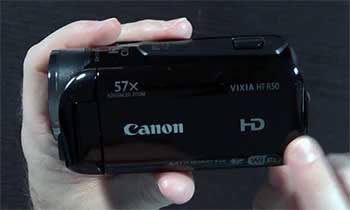
I picked up the Vixia HF R50 primarily because I was tired of my smartphone running out of storage and battery halfway through my nephew’s soccer games.
I wanted a device that had one job: record video, and do it well.
When I first unboxed the R50, the first thing that struck me was how incredibly light it was.
At just under 10 ounces, it felt almost toy-like compared to the heavy DSLR I use for photography. It fits snugly in the palm of your hand, with the strap securing it firmly, making it easy to hold for extended periods without fatigue.
I took it out for a test run at a local park. The headline feature—the 57x Advanced Zoom—is not a gimmick. Standing on the sidelines, I could zoom in all the way to the goal on the opposite side of the field and capture the goalie’s facial expressions clearly. The optical image stabilization (OIS) is the real hero here; at full zoom, handheld footage that should have been a shaky mess was surprisingly smooth. It has a “floating” quality that irons out the micro-jitters of human hands.
However, the user experience showed its age in the menu system. The 3-inch touchscreen is resistive, not capacitive like modern phones, meaning you have to physically press down on the screen rather than just lightly tapping it. It took me a day to retrain my muscle memory.
Audio-wise, I was pleasantly surprised. The internal microphone does a decent job of capturing stereo sound, separating the ambient noise of the crowd from the voices near the camera. But the real game-changer for me was discovering the 3.5mm microphone input jack—a rarity on budget camcorders. Plugging in a cheap shotgun mic instantly elevated the audio quality, making it usable for sit-down interviews.
The low-light performance was the reality check. filming indoors at a birthday party, the footage became noticeably grainy once the lights were dimmed. It captures the moment, sure, but it lacks the crisp, clean look of modern sensors. The “Baby Mode” was a cute addition, automatically tagging videos with timestamps and ages, which saved me hours of organizing files later.
Overall, using the HF R50 felt like driving a reliable older sedan. It doesn’t have the flashy features or speed of the newest models, but it starts every time, gets you where you need to go, and handles the long-haul trips (long recording times) better than many modern sports cars.
Read more: My Thoughts On Nbd Digital Camera
Pros Of Canon Vixia HF R50
- Incredible 57x Advanced Zoom Range: The undisputed selling point of this camcorder is its lens. While most smartphones cap out at 3x or 5x optical zoom before degrading into digital mush, the HF R50 boasts a massive 32x optical zoom that extends to 57x “Advanced Zoom.” This advanced mode uses the extra pixels on the sensor to crop in without losing significant quality. This allows you to film a stage performance from the back of an auditorium or a bird in a tree without disturbing the subject. It gives you a perspective that is physically impossible to get with a standard wide-angle phone lens.
- SuperRange Optical Image Stabilization (OIS): Zooming in 57x would be useless if the footage was shaky. Canon’s optical stabilization system physically moves lens elements to counteract your hand movements. It is far superior to the “electronic” stabilization found in many budget cameras, which just warps the edges of the video. The R50’s stabilization is “intelligent,” meaning it detects if you are walking, panning, or standing still, and adjusts the correction intensity accordingly. This makes handheld footage look polished and watchable, even without a tripod.
- Dedicated Microphone Input: For aspiring YouTubers or interviewers, audio is half the battle. The HF R50 includes a 3.5mm mic jack, a feature that was often stripped out of competitor models in this price range (like the Sony equivalents). This allows you to bypass the mediocre internal mic and use a lavalier or shotgun microphone for professional-grade sound. It also has a headphone jack (via the AV port) for monitoring audio, ensuring you don’t find out later that your sound was clipping.
- Dual Recording & Internal Memory: The R50 comes with 8GB of internal flash memory, which is a lifesaver if you forget your SD card at home. Furthermore, it supports “Dual Recording,” allowing you to record a high-quality AVCHD file for editing and a smaller, lower-resolution MP4 file simultaneously. This was designed for the WiFi sharing features, letting you upload the small file to social media immediately while keeping the master file safe for archiving. It provides a level of redundancy that protects your precious memories.
- Baby Mode and Pre-Record: Canon included features specifically for parents. “Baby Mode” locks the camera into optimal settings for skin tones and allows you to register up to three children’s birthdates. The camera then automatically calculates and stamps their age (e.g., “2 Years, 1 Month”) on the video metadata. Additionally, the “Pre-Record” function buffers 3 seconds of video before you hit the record button. This means if you hit record right after your child scores a goal, the camera actually captured the goal itself. It effectively eliminates the “I missed it!” frustration.
Cons Of Canon Vixia HF R50
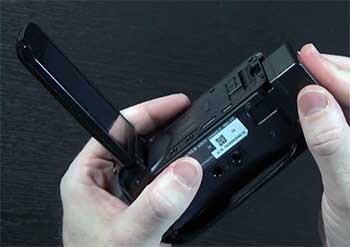
- Mediocre Low-Light Performance: The HF R50 uses a small 1/4.85-inch CMOS sensor. In bright daylight, the colors are vibrant and sharp. However, as soon as the sun goes down or you move into a dimly lit room, the video quality degrades. You will notice “noise” (grain) in the shadows and a loss of detail in darker areas. It struggles to focus in low contrast situations. While it has a “Low Light” mode, it achieves this by lowering the shutter speed, which introduces motion blur. It simply cannot compete with the large sensors of DSLRs or modern high-end phones in the dark.
- Resistive Touchscreen Frustrations: The 3-inch LCD screen uses older resistive touch technology. Unlike the capacitive glass screens on our phones that react to the electrical current in our skin, this screen relies on pressure. You have to press firmly with your finger or fingernail. Navigating menus can feel clunky and unresponsive if you are used to the fluid swiping of an iPhone. It also tends to wash out in direct sunlight, making it difficult to frame shots outdoors on a bright day.
- Outdated WiFi Implementation: While the box proudly proclaims “Built-in WiFi,” the implementation is from 2014. Connecting the camera to a smartphone requires the “CameraAccess Plus” app, which is often buggy or incompatible with newer versions of iOS and Android. The setup process is convoluted, involving connecting your phone to the camera’s ad-hoc network. Many users find the connection unstable, with dropped frames during transfer. It is often faster and less headache-inducing to just pop the SD card into a computer than to wrestle with the wireless transfer.
- No Accessory Shoe: Despite having a microphone jack, the camcorder lacks a physical “cold shoe” or “hot shoe” on top. This means if you attach an external microphone, you have nowhere to mount it. You end up having to hold the mic in your hand or use an ugly bracket/tape solution. It is a baffling design choice that cripples the usability of the mic input for “run and gun” shooters who want a self-contained rig.
- Plastic Build Quality: To achieve its lightweight status, the body is constructed entirely of plastic. While it is durable enough for normal use, it lacks the premium feel of metal-bodied cameras. The lens cover is manual (on some regional variants) or an automatic plastic leaf shutter that feels fragile. The hand strap is basic and can get sweaty. It feels very much like a consumer electronic device rather than a professional tool.
Maintenance Tips For Canon Vixia HF R50
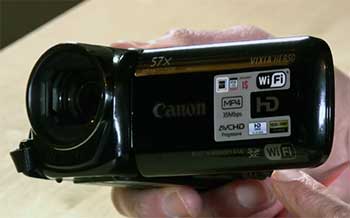
- Battery Care is Critical: The HF R50 uses the Canon BP-718 or BP-727 intelligent lithium-ion batteries. These batteries communicate with the camera to show remaining minutes. To prolong their life, do not store them fully charged for months. If you are putting the camera away for the season, drain the battery to about 50%. Also, clean the metal contacts on both the battery and the camera with a dry microfiber cloth or a pencil eraser periodically. dirty contacts can cause the dreaded “Communication Error” message that shuts the camera down mid-recording.
- Protect the Resistive Screen: Since the screen relies on pressure, the top layer is soft plastic, not glass. It is highly susceptible to scratches from keys or sand. Invest in a cheap generic screen protector cut to size. Avoid using sharp objects like pens as a stylus, as they can permanently dent the touch layer, causing “dead spots” where the touch no longer registers.
- Manage Your File Formats: The camera records in two main formats: AVCHD and MP4. AVCHD offers higher quality and better audio (Dolby Digital) but is a nightmare to play back on Macs or mobile devices without conversion. MP4 is universally compatible but slightly more compressed. For important family archives, shoot in AVCHD. For quick clips you want to share, shoot in MP4. Crucial Tip: When offloading AVCHD files, copy the entire folder structure (BDMV), not just the .MTS files, to ensure your editing software stitches long clips together correctly without audio gaps.
- Lens Barrier Check: The automatic lens cover consists of two thin plastic blades. Dirt and sticky residue can cause these to jam, either staying open (risking lens scratches) or staying closed. Use a can of compressed air to gently blow out any dust from the front of the lens mechanism. Never force the blades open with your fingers, as you can snap the tiny springs inside.
- Reset for WiFi Glitches: If you attempt to use the WiFi features and the camera refuses to connect, perform a “Network Settings Reset” in the menu rather than a full factory reset. This clears out old, conflicted IP addresses without erasing your custom shooting preferences or Baby Mode data.
- Firmware Updates: Check Canon’s support website for the final firmware version released for the R50. While updates are rare for camcorders this old, they sometimes fixed critical bugs related to card compatibility or battery reporting. Ensure you are on the latest version to avoid random freezing.
Also read: My Thoughts On The 8th Street Hidden Camera Detector
Comparison with Other Brands
- Comparison With Sony HDR-CX330: The Sony HDR-CX330 was the direct rival to the R50 in 2014.
- Stabilization: Sony uses “Optical SteadyShot,” which is comparable to Canon’s OIS. However, Sony’s stabilization often feels a bit more “locked on” during walking shots.
- Image Quality: Sony utilizes the BIONZ X processor, which generally produces punchier, higher-contrast images and slightly better low-light performance than the Canon.
- Features: The Canon R50 wins on audio. The Sony CX330 lacks a microphone input jack. If audio matters to you, the Canon is the clear winner. If you just want point-and-shoot simplicity with slightly better video quality in the dark, the Sony is the better bet.
- Zoom: Sony features a 30x optical zoom (60x Clear Image Zoom). Canon has 32x optical (57x Advanced). They are functionally identical in reach.
- Comparison With Panasonic HC-V250/V550: Panasonic camcorders are known for their “Intelligent Zoom” which pushes the range even further, often reaching 90x.
- Zoom: If maximum reach is your only goal (e.g., private investigator work or wildlife), the Panasonic often offers a longer effective zoom range than the Canon.
- Color Science: Canon is famous for its “Canon Color”—warm, pleasing skin tones straight out of the camera. Panasonic footage tends to look a bit cooler and more clinical / digital. For filming people and family events, most users prefer the look of the Canon R50.
- Interface: Panasonic menus are often more cluttered. Canon’s user interface, while resistive, is generally more intuitive for beginners with large, clearly labeled icons.
- Comparison With Modern Smartphones (iPhone/Samsung):
- Resolution: Your phone shoots 4K. The R50 only shoots 1080p. The phone wins on sharpness.
- Zoom: The R50 destroys any smartphone. A phone’s digital zoom is just cropping and enlarging pixels. The R50’s optical zoom uses glass to get closer. The difference is night and day.
- Ergonomics: Holding a phone for 30 minutes hurts your wrists. The R50 is designed to be held for hours.
- Verdict: Use your phone for wide shots, selfies, and low light. Use the R50 for sports, stage performances, and anything further than 10 feet away.
Frequently Asked Questions (FAQ)
No. The Canon Vixia HF R50 records in Full HD (1920×1080) at up to 60 frames per second (60p). It does not have 4K capabilities. However, its 1080p footage is often higher bitrate and cleaner than 1080p footage from budget smartphones.
Technically, yes, but it is limited. The HDMI output is “clean” (can be set to not show icons), meaning you can plug it into a capture card (like an Elgato Cam Link) and use it as a high-quality webcam for Zoom or OBS. The built-in WiFi streaming features are outdated and generally incompatible with modern platforms like YouTube Live or Twitch directly.
With the standard BP-718 battery, you can expect about 60 to 100 minutes of continuous recording. With the larger capacity BP-727 (sold separately), you can get upwards of 3 hours. Real-world usage (zooming, reviewing clips) will lower these numbers.
It does not have “infrared” night vision (the green spooky look). It has a “Low Light” scene mode which lowers the shutter speed to let in more light, but this results in blurry movement. It is not suitable for filming in total darkness like some Sony models with “NightShot.”
Conclusion
The Canon Vixia HF R50 is a survivor. While its WiFi features are a relic of the past and its low-light performance shows its age, it remains a fantastic tool for its core purpose: capturing distant action with stability and clarity.
For parents on the sidelines, it offers a reach that no smartphone can match. For aspiring filmmakers, the microphone jack offers an entry point into professional audio that is hard to find at this price point. If you can accept the resistive screen and 1080p limit, the R50 is a reliable, high-zoom workhorse that deserves a spot in your gear bag.