
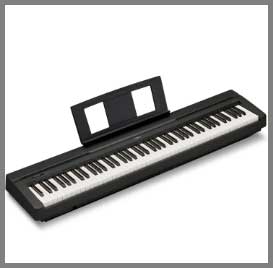
I recall the exact moment I realized I had outgrown my first keyboard. I was trying to play a complex piece with heavy sustain, and the notes just started cutting out. That was when I found myself torn between the reliable, budget-friendly Yamaha P45 and its beefier, louder sibling, the Yamaha P125. If you are standing at this same crossroads, wondering if the extra cash for the P125 actually translates to a better playing experience, I am here to help you decide.
The main intent of this article is to break down exactly what you get for your money with each model. While the P45 is the ultimate starter instrument, the P125 (and its legacy) offers features that bridge the gap to professional performance. By the end of this guide, you will know exactly which portable piano fits your skills and your budget.
A Brief Comparison Table
| Feature | Yamaha P45 | Yamaha P125 |
| Key Action | Graded Hammer Standard (GHS) | Graded Hammer Standard (GHS) |
| Sound Engine | AWM Stereo Sampling | Pure CF Sound Engine |
| Polyphony | 64 Notes | 192 Notes |
| Speakers | 2 x 6W (12W Total) | 2 x 7W + 2 x 4W (4-Speaker System) |
| Audio Outputs | Headphone Jack (1/4″) | 2 x Headphone (1/4″) + L/R Aux Out |
| Recording | No Onboard Recording | 2-Track MIDI Recorder |
| App Compatibility | Limited | Smart Pianist App (Full Control) |
| Dimensions | 52.2″ x 11.6″ x 6.0″ | 52.2″ x 11.6″ x 6.5″ |
My Experience With Yamaha P45
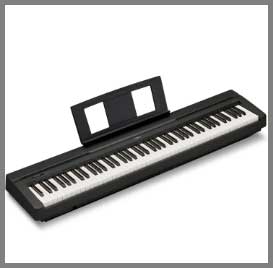
When I first bought the Yamaha P45, I was looking for something that didn’t feel like a toy but also didn’t require me to take out a second mortgage.
I remember setting it up in my small apartment bedroom.
It fit perfectly on a simple X-stand, and because it is so lightweight, I could easily move it to the closet when I needed floor space.
The first time I pressed the keys, I was genuinely impressed by the resistance.
Yamaha’s Graded Hammer Standard (GHS) action is heavier in the low end and lighter in the highs, just like the acoustic upright I grew up playing at my parents’ house.
However, as I spent more time with it, I started to notice its limitations. The interface is extremely minimal—just one button. To change sounds or adjust the metronome, I had to hold that button and press a specific key on the keyboard. I found myself keeping the manual on my music stand for the first two weeks just to remember which key changed the reverb settings. That said, for pure, distraction-free practice, it was a workhorse. It forced me to focus on my technique rather than fiddling with settings. It is the piano I recommend to every student who asks me, “What should I start with?” because it nails the fundamentals without any fluff.
Pros Of Yamaha P45
- Unbeatable Value for Beginners: The strongest selling point of the Yamaha P45 is simply the bang for your buck. You are getting a fully weighted, 88-key instrument from a top-tier brand for a price that undercuts almost all serious competitors. For a student or a hobbyist just starting out, this is crucial. You aren’t paying for bells and whistles you won’t use yet, like multi-track recording or hundreds of instrument voices. You are paying for a solid keybed and a decent piano sample. I often tell parents that the P45 is the safest investment they can make; if their child quits piano in six months, the resale value remains incredibly high, and if they stick with it, it is good enough to get them through the first 3-4 years of lessons.
- Authentic GHS Key Action: Despite being the entry-level model, the P45 shares the exact same key action as the more expensive P125. The Graded Hammer Standard (GHS) action is a staple in the industry. The keys have a matte finish on the black notes, which helps prevent your fingers from slipping during long practice sessions. I found the weight to be substantial enough to build finger strength. If you practice on a P45, you won’t feel lost when you sit down at a real acoustic piano for a recital or an exam. It bridges the gap between digital and acoustic feel better than any semi-weighted keyboard ever could.
- Portability and Compact Design: Weighing in at just 25 lbs, the P45 is incredibly easy to manage. I have personally carried it under one arm up three flights of stairs without breaking a sweat. For college students moving between dorms and home, or for musicians who need a backup board they can throw in the back seat of a sedan, this portability is a massive “pro.” It has a slim depth, meaning it doesn’t dominate a room. You can set it up on a desk or a stand in the corner, and it blends in. It is an instrument that fits into your life, rather than requiring you to rearrange your life around it.
- Simple, Distraction-Free Interface: While I mentioned the single-button interface as a learning curve in my experience, it is also a significant pro for focus. There are no screens to crack, no complex menus to get lost in, and no tempting buttons to distract a young student. You turn it on, and it defaults to a great piano sound. You play. This simplicity is refreshing in a world where every device is trying to be a computer. It operates on a “set it and forget it” mentality, which is perfect for focused practice sessions where the only goal is to learn the notes on the page.
- Dual Mode Capability: Even though it is basic, the P45 allows you to layer two sounds together, such as Piano and Strings. This feature is surprisingly lush. When I teach students about chord voicing, I love using this mode because the sustaining strings help them hear the harmony more clearly. It adds a layer of fun and creativity to the instrument. It is easy to activate and instantly makes simple pieces sound cinematic and professional.
Read More: My Thoughts On JVC True Wireless Earbuds
Cons Of Yamaha P45
- Limited Polyphony: With only 64 notes of polyphony, the P45 shows its age when you try to push it. While beginners playing “Mary Had a Little Lamb” will never notice, intermediate players absolutely will. If you layer a Piano sound with Strings (which uses 2 notes of polyphony for every key press), you effectively only have 32 notes available. If you play a big run with the sustain pedal down, the earliest notes you played will abruptly stop sounding to make room for the new ones. It breaks the immersion and results in a thinner sound for complex, romantic-era classical music or lush ambient playing.
- Rear-Facing Headphone Jack: I cannot overstate how annoying this design choice is. The single headphone jack is located on the back of the instrument. If you have your piano pushed up against a wall, you have to blindly reach over the top or pull the piano out to plug in your headphones. It is a daily friction point. Most modern digital pianos, including the P125, place the headphone jacks on the front for easy access. It seems like a small detail, but when you want to practice quietly at night, fumbling with cables behind the piano is a frustration you shouldn’t have to deal with.
- Weak Speaker System: The two 6-watt speakers on the P45 are adequate for a small bedroom, but they lack presence. The sound can feel somewhat “boxy” and contained. When I tried to play for a group of friends in a living room, I had to max out the volume, and even then, the bass frequencies felt weak and distorted. The speakers face upwards, which is good for the player, but they don’t project well into a room. You will almost certainly want to invest in a good pair of headphones or external monitors if you care about high-fidelity sound.
- No Onboard Recording: The P45 has no internal recording capability. You cannot press a button, play a piece, and then listen back to critique your performance. Recording is one of the most powerful tools for improvement. To record yourself on a P45, you have to hook it up to a computer via USB and use a DAW (Digital Audio Workstation) or an external audio recorder. This adds a barrier to entry. I missed the convenience of a simple “Record/Play” button that lets me quickly check if my rhythm was even or if I rushed a certain passage.
- Basic Sustain Pedal Included: The footswitch that comes in the box is a small, flimsy plastic square that looks more like a sewing machine pedal than a piano damper. It slides all over the floor, and I spent half my practice time chasing it with my foot. It also acts as a simple on/off switch, lacking “half-pedaling” support (the ability to sustain notes partially). To get a realistic experience, you are essentially forced to spend an extra $30-$50 on a better pedal (like the Yamaha FC3A) immediately after buying the piano.
My Experience With Yamaha P125
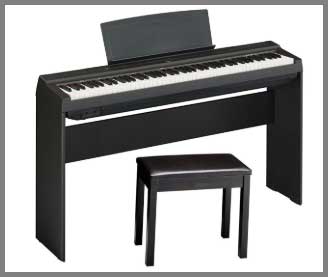
Moving up to the Yamaha P125 felt like upgrading from a reliable sedan to a sports car.
I had the chance to use one for a series of small coffee shop gigs, and the difference was immediate.
The first thing that hit me was the sound projection.
Unlike the P45, which projects sound upwards from two speakers, the P125 has a 4-speaker system that fires both up and down.
When I played a big C-major chord, the sound filled the room in a way the P45 never could. It felt rich, immersive, and remarkably close to a real piano experience, thanks to the “Pure CF” sound engine which samples the Yamaha CFIIIS concert grand.
The other game-changer for me was the connectivity. On the P45, I always struggled with the headphone jack being the only output; I had to use messy adapters to plug into a PA system. The P125 has dedicated stereo Aux outputs on the back. This meant I could plug directly into the venue’s sound system while still using the onboard speakers as my personal monitors. I also fell in love with the Smart Pianist app compatibility. Being able to connect my iPad and control the layers, split points, and save my settings visually was a luxury I didn’t know I needed. It felt like a professional tool rather than just a practice instrument.
Cons Of Yamaha P125
- Same Key Action as the Cheaper Model: The biggest criticism of the P125 is that, despite costing significantly more than the P45, it uses the exact same Graded Hammer Standard (GHS) key action. While GHS is good for beginners, at the P125’s price point, you start seeing competitors (like the Roland FP-30X) offering superior actions with triple sensors and escapement. I found myself wishing the keys felt a bit more premium. They can feel slightly plasticky and noisy (a “thump” sound) when played at low volumes. If you are paying for an intermediate instrument, you might expect an intermediate key feel, but here you are stuck with the entry-level action.
- No Bluetooth Audio: In an era where almost every device is wireless, the lack of Bluetooth Audio on the P125 is a letdown. You cannot stream music from your phone through the P125’s excellent speakers wirelessly to play along. You have to use a wired Aux connection. While some newer versions or regional variants might offer Bluetooth MIDI, the standard P125 lacks the audio streaming capability that makes practicing with backing tracks so convenient. It feels like a feature that was omitted to protect sales of higher-end Clavinova models.
- Discontinued/Confusing Model Availability: This is a major “Con” for current buyers. Yamaha has officially discontinued the P125 and replaced it with the P125a (which removed the USB audio interface functionality—a huge downgrade) and eventually the new P225. Finding a brand-new, original P125 is becoming difficult. This creates confusion in the market. You might think you are buying the P125 with all its recording features, only to end up with a P125a that lacks the ability to record audio directly to your computer via USB. You have to be incredibly careful about which version you are actually buying.
- Glossy Black Keys (Comparison): While I mentioned the matte finish on the black keys for the P45, oddly, some users find the P125’s keys to feel slightly slippery after long periods of use compared to the textured keys found on Roland or Casio competitors. The plastic used is durable, but it doesn’t have the moisture-absorbing properties of synthetic ivory. If you have very dry or very sweaty hands, you might find the grip less than ideal compared to the textured surfaces found on other brands in this price bracket.
- Bulky Optional Stand Unit: While the P125 looks sleek on its own, the optional wooden furniture stand (L-125) and three-pedal unit (LP-1) add significant cost and bulk. If you buy the full setup, the price creeps up into the territory of cabinet-style digital pianos like the Yamaha YDP series. I found that the three-pedal unit feels a bit fragile compared to the pedals on a real upright. It connects via a proprietary plastic connector that feels prone to breaking if you aren’t careful during assembly or moving.
Also Read: My Thoghts on Ailymur V2 Translator Earbuds
Pros Of Yamaha P125
- Superior Sound Engine and Polyphony: The “Pure CF Sound Engine” in the P125 is a noticeable step up from the AWM sampling in the P45. The samples are more detailed, featuring resonance dampers and longer decay times that make the piano sing. But the real star here is the 192-note polyphony. Polyphony is the number of notes that can ring out at once. The P45 has 64, while the P125 has 192. This might sound like technical jargon, but I noticed it immediately when playing fast, arpeggiated classical pieces with the sustain pedal held down. On the P125, the notes never cut off abruptly (“note stealing”). You can layer sounds and play complex chords without hitting a digital ceiling.
- Immersive 2-Way Speaker System: The P125 features a unique 4-speaker system. It has two tweeters firing upwards towards you and two woofers firing downwards. This creates a sound field that wraps around the player. Yamaha calls this “Table EQ,” ensuring that even if you place the piano on a flat table rather than a stand, the sound is optimized. In my testing, this made a huge difference in enjoyment. The bass feels punchy and present, and the highs are crisp without being shrill. You don’t just hear the sound; you feel the vibration in the keys, which adds to the realism.
- Professional Connectivity Options: This is the feature that makes the P125 a legitimate gigging instrument. The inclusion of dedicated L/R Aux outputs allows you to connect to amplifiers, mixers, or recording interfaces without disabling the onboard speakers. On lower-end models, plugging into the headphone jack usually kills the speakers, leaving you unable to hear yourself unless you use monitors. With the P125, I could show up to a venue, plug into the house PA, and still use the piano’s internal speakers to monitor my own playing. It also has dual headphone jacks on the front, making it ideal for teaching or duets where two people need to listen silently.
- Smart Pianist App Integration: The P125 was designed to work seamlessly with Yamaha’s Smart Pianist app (iOS/Android). By connecting your tablet via USB, you can control every function of the piano through a beautiful, touch-friendly interface. You can select voices by looking at pictures of instruments, adjust the reverb environment (e.g., Concert Hall, Club), and even split the keyboard with a drag-and-drop gesture. The app can also analyze songs in your music library and generate a chord chart for you to play along with. This integration modernizes the instrument and makes exploring its features significantly more intuitive than using button combinations.
- Built-in Rhythm and Accompaniment: Unlike the P45, which basically just has a metronome, the P125 comes with a variety of drum rhythms and bass accompaniments. You can play a bass line with your left hand and piano with your right, or just have a drummer backing you up. I found this to be an excellent tool for practicing timing. Playing along with a “cool jazz” beat is infinitely more engaging than playing along to a sterile “click-click-click” of a metronome. It transforms practice from a chore into a jam session.
Maintenance Tips For Yamaha P45 And Yamaha P125
- Invest in a Good Dust Cover: Dust is the enemy of electronics, especially for the sensors under the keys. Since both the P45 and P125 use the GHS action, they are open mechanisms. If dust gets into the contacts, you will start experiencing “loud notes” (where a key plays at max volume regardless of touch) or dead notes. I always recommend keeping the keyboard covered with a stretchy spandex or velvet cover whenever you aren’t playing. A simple cloth sheet works in a pinch, but a fitted cover prevents dust from sneaking in from the sides. This simple habit can double the lifespan of your sensors.
- Clean the Keys Correctly: To keep the keys looking new, avoid using harsh chemicals or alcohol-based wipes, which can damage the plastic surface and dry it out, leading to cracking over time. I use a microfiber cloth slightly dampened with warm water. Wipe the keys towards you, not side-to-side, to prevent pushing dirt into the gaps between keys. If you have stubborn grease marks, a tiny drop of mild dish soap in the water helps, but make sure the cloth is almost dry before touching the keys. Never spray liquid directly onto the keyboard.
- Protect the Power Jack: The power input on these portable keyboards is a common failure point. The jack is soldered directly to the motherboard. If you trip over the cable or yank it, you can crack the solder, causing the piano to lose power intermittently. I recommend looping the power cable through the stand or using a piece of velcro to secure the cable to the leg of your stand. This creates “strain relief,” so if the cable gets pulled, the tension is on the velcro, not the delicate internal port.
- Avoid Direct Sunlight and Heat: Placing your digital piano in front of a window might look aesthetic, but direct sunlight can yellow the plastic keys and warp the casing over time. More importantly, extreme temperature fluctuations (like being next to a radiator or air conditioner) can cause condensation inside the electronics. I suggest placing the instrument against an interior wall where the temperature is stable. This also helps with sound projection, especially for the P125, as the wall can reflect the rear sound back to the room.
- Check the Stand Stability: Whether you use a portable X-stand or the wooden furniture stand, screws loosen over time due to the vibration of playing. Every few months, I grab a screwdriver and tighten all the bolts on my stand. A wobbly stand is not just annoying; it changes your playing technique because you unconsciously hold back to stop the piano from shaking. Ensuring a rock-solid base allows you to play with full dynamic force without fear of the instrument toppling over.
Comparison with other brands
- Roland FP-10/FP-30X vs. Yamaha P45/P125: The biggest rival to the Yamaha P-series is the Roland FP series. The Roland FP-10 competes with the P45, and the FP-30X competes with the P125. The main difference lies in the key action. Roland uses the PHA-4 Standard action, which feels heavier and includes “escapement” (a subtle click sensation) and synthetic ivory textures. I find the Roland action feels more premium and realistic than the Yamaha GHS. However, the Yamaha P-series generally wins on sound brightness. The Yamaha sample is crisp and cuts through a mix, while the Roland “SuperNATURAL” sound is warmer and mellower, which some beginners find “muddy.” If you prioritize key feel, go Roland. If you prioritize a bright, clear sound, go Yamaha.
- Casio CDP-S160/PX-S1100 vs. Yamaha: Casio has revolutionized the market with their “Slim” designs. The CDP-S160 (competitor to P45) and PX-S1100 (competitor to P125) are significantly smaller and sleeker than the Yamahas. They are battery-powered, making them the ultimate busking instruments. However, to achieve this slim size, Casio had to shorten the pivot length of the keys. I found that playing near the back of the keys on the Casio requires much more force than on the Yamaha P45/P125. While the Casios look better in a modern living room, the Yamaha P-series offers a more balanced mechanical action for serious students who need to develop proper technique.
- Kawai ES120 vs. Yamaha P125: The Kawai ES120 is a direct competitor to the P125 and is often lauded by classical pianists. Kawai’s piano sample is sampled from their SK-EX concert grand, which has a very rich, complex, and dark tone compared to the bright Yamaha CFIIIS sample. The key action on the Kawai (Responsive Hammer Compact) is lighter and faster than the Yamaha GHS, making it less fatiguing for long practice sessions. However, the Yamaha P125 has better onboard speakers and a more intuitive app interface. I would recommend the Kawai to classical soloists, while the Yamaha P125 remains the better choice for pop, rock, and gigging musicians who need that punchy sound.
- Alesis Recital Pro vs. Yamaha P45: You will often see the Alesis Recital Pro popping up as a cheaper alternative to the P45. It boasts more sounds and higher polyphony on paper. However, in reality, the “hammer action” on the Alesis feels sluggish and springy compared to the Yamaha. The sound samples on the Alesis lack the dynamic layers of the Yamaha; playing harder just makes it louder, not brighter. I always advise students to save up the extra money for the P45. The gap in quality between a generic brand like Alesis and a legacy brand like Yamaha is massive when it comes to the nuance of the key action and the realism of the piano tone.
Frequently Asked Questions (FAQ)
The Yamaha P125 is objectively the better instrument. It features a superior sound engine (Pure CF), significantly higher polyphony (192 vs. 64), a much better 4-speaker system, and professional audio outputs. However, the P45 is a better value for absolute beginners who just need a weighted keyboard to start learning.
Yes, the original Yamaha P-125 has been discontinued. It was briefly replaced by the P-125a (which removed the USB audio interface features) and has now been succeeded by the Yamaha P-225, which features a new compact design and updated GHC key action. You can still find used P125s, which are highly sought after.
Reddit users often point out that the main difference is the sound quality and speakers. While the key action (feel) is identical (GHS) on both, the P125 sounds much richer due to the 4-speaker system and better samples. Redditors also frequently mention that the P125 supports the Smart Pianist app, which makes controlling the piano much easier than the single-button interface of the P45.
Yes, it feels very close to a real acoustic piano for a digital instrument. It uses weighted keys that are heavier in the low end and lighter in the high end, mimicking the physics of hammers inside an acoustic piano. While it lacks the subtle “escapement” feel of high-end grands, it is sufficient for building proper finger strength and technique.
Conclusion
After spending considerable time with both keyboards, the verdict is clear but nuanced. If you are strictly on a budget or purchasing a first instrument for a child to see if they stick with lessons, I recommend the Yamaha P45. It is the gold standard for beginners. It gives you the weighted keys you need to build strength without confusing you with features you don’t need yet. It is simple, durable, and holds its value incredibly well.
However, if you can stretch your budget, you should choose the Yamaha P125 (or its successor, the P225). The difference in sound immersion provided by the 4-speaker system is massive. It makes playing feel inspiring rather than just functional. The added polyphony, dedicated line outputs, and app integration mean that the P125 is an instrument you won’t outgrow in a year or two. It is a piano that can take you from your bedroom to your first stage performance.
Ultimately, both pianos share the same heart—the GHS action—so your fingers will be happy with either. The choice comes down to whether you want a solid practice tool (P45) or a complete performance experience (P125).