
I know the feeling of staring at a “Check Engine” light that refuses to go away, wondering if a mechanic is about to charge you $150 just to plug in a computer. You are looking for a way to take control of your own repairs, but the market for diagnostic tools is flooded.
You have narrowed it down to the reliable xTool D7 and its upgraded sibling, the xTool D7S, but you aren’t sure if the “S” upgrade is worth the extra cash. My goal is to break this down from a mechanic’s perspective—not just reading spec sheets, but telling you how these tools actually feel when you are under the hood, covered in grease, trying to figure out why a cylinder is misfiring.
A Brief Comparison Table
| Feature | xTool D7 | xTool D7S |
| Operating System | Android 5.1.1 (Older) / Android 10 (Newer batches) | Android 10 |
| Storage Capacity | 32GB | 64GB |
| Battery Capacity | 4,000mAh | 5,000mAh |
| Camera | None | 8MP Rear Camera (Auto-VIN) |
| Protocol Support | Standard OBD2 (Requires adapter for CAN FD) | Built-in CAN FD & DoIP |
| Memory (RAM) | 2GB | 2GB (Optimized) |
| Kickstand | Integrated Plastic Stand | Collapsible Metal/Rigid Stand |
| Update Period | 3 Years Free | 3 Years Free |
My Experience With xTool D7
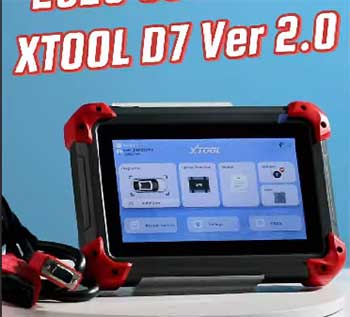
When I first picked up the xTool D7, I was skeptical.
At its price point, getting “bi-directional” control—the ability to not just read the car’s computer but actually talk back to it—seemed too good to be true.
Usually, you pay double for that privilege.
I remember hooking it up to a 2015 Chevy Silverado that had a stuck EVAP vent valve.
With a cheap code reader, I would have just seen a code and guessed.
With the D7, I navigated to the “Actuation Test” menu, pressed a button on the screen, and physically heard the valve click open and closed in the back of the truck. That moment hooked me.
For the first year, the D7 was my go-to “grab and go” scanner. It fits easily in one hand, the rubberized corners saved it from more than one drop onto concrete, and the interface is surprisingly intuitive for something that isn’t a $5,000 Snap-on tool. I used it to bleed ABS brakes on a Honda and reset the oil light on a BMW, tasks that usually require a trip to the dealership.
However, it wasn’t all smooth sailing. I noticed that after downloading updates for about 30 car brands, the 32GB storage started to scream at me. I found myself having to delete European car software just to update the Ford software, which was a hassle. It is a brilliant tool, but you can feel it straining a bit when you try to push it too hard with modern, data-heavy vehicles.
Read more: Comparison of Leatherman Surge And Wave Plus
Pros Of xTool D7
- Incredible Value for Bi-Directional Controls: The biggest selling point of the D7 is that it democratized “active tests.” Before this tool became popular, if you wanted to command a fuel pump to turn on, roll windows up and down electronically to test the motor, or cycle an A/C clutch, you needed a professional-grade scanner costing upwards of $800. The D7 allows you to perform these active tests for a fraction of the price. This changes your diagnostic process from “guessing” to “verifying.” If your window doesn’t roll down, you can use the D7 to bypass the switch and command the motor directly. If it moves, you know the switch is bad. If it doesn’t, the motor is bad. That level of diagnostic power pays for the tool in one repair.
- Extensive Vehicle Coverage: I was genuinely impressed by how many manufacturers are supported right out of the box. It doesn’t just cover the “Big Three” (Ford, GM, Chrysler); it digs deep into Asian and European makes as well. I used it on a Volvo to reset the electronic parking brake (EPB) for a pad change, and on a Nissan to perform an idle relearn after cleaning the throttle body. It supports over 85 vehicle makes, and the software updates are frequent. Unlike some cheaper scanners that claim compatibility but fail to connect to specific modules like the airbag (SRS) or transmission (TCM), the D7 consistently accesses all available modules.1
- Three Years of Free Updates: Most professional scanner companies (like Autel or Launch) typically offer one or two years of updates before hitting you with a steep renewal fee.2 xTool offers three years.3 This is significant because car manufacturers are constantly changing their software. A three-year window means you are covered for new models and bug fixes for a long time without spending a dime. Even after the three years expire, the tool doesn’t turn into a brick—it keeps working with the last installed software, unlike some subscription-based tools that stop functioning entirely.
- Auto-Scan Functionality: While it lacks the camera of the newer model, the software-based Auto-Scan is reasonably fast. When you plug it into the OBDII port, it attempts to pull the VIN automatically and decode it to identify the Year, Make, and Model. On most vehicles post-2008, this works flawlessly. It saves you the tedious effort of scrolling through menus to select “USA > Ford > 2015 > F-150 > 3.5L EcoBoost.” It just finds the car and immediately starts scanning all systems for fault codes, presenting you with a “Health Report” that highlights exactly which modules are unhappy.
- Key Programming Capabilities: For a general diagnostic tool, the D7 has surprisingly robust IMMO (immobilizer) functions.4 While it isn’t a dedicated locksmith tool, I successfully used it to program a new key fob for a 2010 Honda Civic and a 2014 Toyota Camry. Being able to disable a lost key and add a new one without paying a locksmith or dealer is a massive bonus feature that many competitors in this price range strip out to sell separately.
Cons Of xTool D7
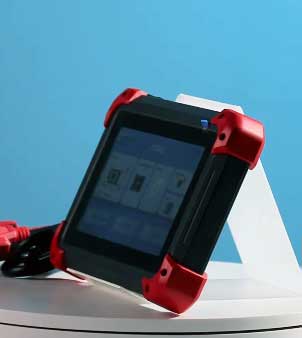
- Limited Internal Storage (32GB): This is the Achilles’ heel of the D7. 32GB sounds like a lot, but diagnostic software is massive. Each car brand (Ford, BMW, Toyota) has a software package that can be several gigabytes. After you update the system OS and download the diagnostic packages for the major brands you work on, you will hit the storage ceiling. I constantly found myself in the “Data Management” screen, deleting brands I don’t see often (like Bugatti or Daewoo) just to make room for a Honda update. It disrupts your workflow when you have a car waiting in the bay and you have to spend 20 minutes shuffling files.
- No Built-in Camera: You might not think a camera is a diagnostic tool, but in the automotive world, it is. The D7 lacks a rear camera, which means you cannot scan a VIN barcode on the door jamb or windshield. You have to rely on the OBD Auto-VIN (which doesn’t always work on older cars) or manually type in the 17-digit VIN. Typo-ing a VIN is frustratingly easy and can lead to incorrect data. Additionally, you cannot take photos of damaged parts or frayed wires to include in the customer’s digital report, which makes documentation harder.
- Older Android Architecture: Depending on when you bought it, some D7 units run on older versions of Android (like 5.1). While the diagnostic app runs fine, the system itself can feel a bit sluggish compared to a modern smartphone. Boot-up times are slower, and navigating between the “Diagnostic” menu and the “Settings” menu can have a noticeable lag. If you are used to the snappy response of an iPhone or a high-end Samsung, the D7 will feel like a tablet from 2016—because, hardware-wise, it essentially is.
- Battery Life is Average: The 4,000mAh battery is adequate for a hobbyist, but if you are using it professionally for a full day, it struggles. With the screen brightness up and the Wi-Fi on (which pulls power constantly), I found the battery draining to 20% by early afternoon. It charges via a proprietary barrel jack or the USB port, but it charges slowly. If you forget to plug it in overnight, you are going to be tethered to the wall (or the car) the next day.
- Lack of Native CAN FD Support: The D7 was designed before the CAN FD protocol became widespread in GM vehicles (roughly 2020 and newer). While it can read these vehicles, it often requires a separate CAN FD adapter dongle that hangs off the OBD port. This is an extra piece of hardware to buy, carry, and potentially lose. Without that adapter, if you plug the D7 into a 2021 Chevy Tahoe, you might not be able to communicate with the vehicle at all, which limits its “future-proof” status.
Maintenance Tips For xTool D7
- Manage Your Storage Aggressively: Since the D7 only has 32GB, treat the storage like prime real estate. Do not just hit “Update All.” Only download the car brands you actually service. If you live in the US, you probably don’t need the software for Holden (Australia) or dense lists of Chinese domestic brands. Periodically go into the settings and “Clear Cache” for the diagnostic app to free up space. If you stop working on European cars for a while, delete those large files to keep the system running smoothly. A full storage drive slows down the entire operating system.
- Protect the OBDII Cable: The main communication cable connects via a DB15 connector on the tablet side. This connector has tiny pins that can bend easily if forced. Never yank the tablet by the cord. When storing it in the case, coil the cable loosely rather than wrapping it tight, which can fray the internal wires. If the cable fails, the tool is useless. I recommend keeping the plastic cap on the DB15 connector when it’s not plugged into the tablet to prevent dust and grease from getting into the pinholes.
- Battery Cycle Health: Lithium batteries in these tools hate being left at 0% for weeks. If you are a DIYer who only uses the tool once a month, check it occasionally. Try to store it at roughly 50% charge. If you leave it dead in a freezing cold garage all winter, you might come back to a battery that refuses to hold a charge. Bring it inside the house if temperatures drop below freezing, as cold kills lithium capacity permanently.
- Screen Protection is Vital: The screen is plastic-covered glass and, while durable, it is not scratch-proof. In a garage environment, you have grit on your fingers. Using the touchscreen with dirty hands effectively sandpapers the display over time. I highly recommend buying a cheap universal 7-inch tempered glass screen protector. It’s much cheaper to replace a cracked screen protector than to replace the digitizer on the unit itself.
- Keep the Connector Pins Clean: The OBDII connector on the cable end goes into dirty car ports all day. Periodically inspect the 16 pins on the male end of the connector. Use a can of electronic contact cleaner and a soft brush to remove any oil or lint buildup. A bad connection can cause “Communication Error” messages that make you think the car’s computer is dead when it’s really just a dirty pin on your tool.
My Experience With xTool D7S
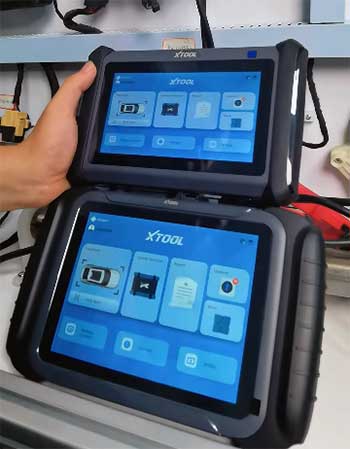
Moving on to the xTool D7S, this is the “S-Class” upgrade to the original workhorse.
The moment I unboxed it, I noticed the hardware improvements immediately.
While the chassis looks similar, the addition of a collapsible kickstand on the back (instead of the molded plastic bump on the old D7) made a huge difference.
I could prop it onto the steering wheel or hang it off a bracket while working, which is a small but vital quality-of-life improvement.
The real difference, however, became apparent when I plugged it into a 2021 Chevy Tahoe.
With the original D7, I would have needed to hunt down a CAN FD adapter and plug it in between the cable and the car. The D7S connected instantly. It has the new protocols built right into the hardware. I also felt the speed difference. Navigating through the menus felt snappier, thanks to the optimized Android 10 OS and the upgraded processor. It didn’t hang when I pulled up the “Live Data” stream for the transmission, even when I graphed 8 different sensors at once. It felt like the tool had grown up from a “hobbyist gadget” to a “junior mechanic’s primary tool.”
Pros Of xTool D7S
- Built-in CAN FD and DoIP Protocols: This is the single biggest reason to buy the D7S over the D7. Modern vehicles (specifically GM 2020+ and newer BMW/Land Rovers) communicate using new, faster languages called CAN FD and DoIP. The D7S speaks these languages natively. You don’t need to buy, carry, or lose those clunky $30-$50 adapters. If you plan to keep this tool for the next 5–10 years, the D7S is future-proofed for the cars coming off the assembly line today.
- Doubled Storage Capacity (64GB): The D7S fixes the biggest complaint of the original D7. With 64GB of onboard storage, I downloaded every single car brand available—including the massive European and Chinese data packages—and still had plenty of room left. I never once had to delete a brand to make room for an update. This allows you to just “update all” and be ready for whatever car rolls into your driveway, rather than managing files like an IT admin.
- Rear Camera with Flash: The inclusion of an 8MP rear camera sounds trivial until you use it. I was able to scan the VIN barcode on a door jamb instantly instead of typing it in. Even more helpful was the ability to take photos of a leak or a broken part directly on the tablet to attach to the diagnostic report. If you are doing side jobs for friends or customers, sending them a professional PDF report with a photo of the broken part builds massive trust. The flash also doubles as a flashlight, which is handy when searching for the OBD port in a dark footwell.
- Improved Battery Life: The D7S bumps the battery capacity to 5,000mAh (up from 4,000mAh in the D7). In real-world terms, this gave me about 2–3 extra hours of continuous usage. I could comfortably get through a heavy Saturday of working on three different cars without needing to run for the charger. The standby time is also significantly better; I left it in the case for two weeks and it still had 85% charge when I turned it on.
- Better Kickstand Design: The metal, collapsible kickstand is surprisingly rigid. It holds the tablet steady even when you are aggressively tapping on the screen. Unlike the D7’s integrated plastic stand, which sometimes caused the tablet to slide flat if you poked it too hard, the D7S stand locks into place securely.
Also read: Comparison of Ryobi And DeWalt Pressure Washer
Cons Of xTool D7S
- Still Wired (No Bluetooth VCI): Despite the “S” upgrade, this is still a wired tool. You are tethered to the car by the OBDII cable. If you want to walk around the vehicle to check a tail light while pressing the button on the scanner, you can’t—unless you have very long arms or a helper. For a tool at this price point (often creeping close to $400-$500), many competitors offer a wireless Bluetooth dongle. To get wireless from xTool, you have to step up to the “D7W” or higher models.
- Screen Size and Resolution Remain the Same: The screen is still a 7-inch LCD with 1024×600 resolution. It is functional, but it isn’t “retina” quality. When looking at complex wiring diagrams or dense data text in bright sunlight, it can be a bit hard to read. I was hoping the “S” model would bump up the brightness or resolution, but it looks identical to the older D7 screen.
- Price Creep: The D7S sits in a tricky price bracket. It is significantly more expensive than the D7. At its price point, it starts competing with higher-end tablets from Topdon and Launch that might include wireless VCI or larger screens. You have to really need the CAN FD and storage to justify the extra cost over the base D7.
- Slow Charging Speed: Despite the larger battery, the charging speed doesn’t feel much faster. It still takes quite a while to go from 0% to 100%. Since it uses a specific barrel connector for optimal charging (though it can charge via USB), if you lose the dedicated wall wart, you might find it charges painfully slowly on a standard phone charger.
Maintenance Tips For xTool D7S
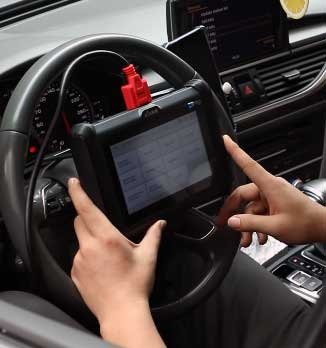
- Lens Care: Since this unit has a camera, keep the lens clean. Grease on the lens means your VIN scans will fail and your inspection photos will be blurry. A quick wipe with a microfiber cloth (not your oily shop rag) before you start working ensures the Auto-VIN feature works instantly.
- Kickstand Hinge Lubrication: The metal kickstand is great, but if you work in a dusty environment, grit can get into the hinge. If it starts squeaking or feeling “gritty” when you open it, a tiny drop of silicone lubricant (applied with a toothpick) on the hinge pin will keep it smooth. Do not spray WD-40 directly on the tablet!
- Cable Strain Relief: Even though the D7S is rugged, the connection point where the cable meets the tablet is a stress point. When you are using the kickstand, make sure the cable has enough slack and isn’t being bent at a sharp 90-degree angle against the table or steering wheel. Over time, this stress can break the internal wires of the main cable.
- Periodic “Deep” Reboots: Because the D7S runs Android 10 and has more background processes (like the camera and flashlight services), it benefits from a full restart once a week. Don’t just put it to sleep; hold the power button and select “Power Off,” then turn it back on. This clears the RAM and keeps the diagnostic software running fast.
Comparison with other brands
- xTool D7S vs. Autel MK808S: The “S” vs “S” battle. The Autel MK808S is the direct rival. Autel wins on screen clarity and a slightly more polished user interface. However, the xTool D7S generally wins on subscription value (3 years free vs Autel’s 1 or 2 years) and key programming features. If you are a locksmith hobbyist, the D7S is the better buy. If you are a European car specialist who wants the absolute best menu translations, Autel has the edge.
- xTool D7S vs. Launch CRP919E BT: The Launch CRP919E often comes with a Bluetooth dongle (Wireless!) for a similar price to the wired D7S. That is a tough competitor. However, Launch tools often have a steeper learning curve and a more cluttered interface. The xTool D7S feels more “user-friendly” for the DIYer, whereas the Launch feels like a stripped-down professional tool that assumes you already know what you’re doing.
- xTool D7S vs. Topdon ArtiDiag800 BT: The Topdon is wireless and often has free lifetime updates (depending on the specific promotion). However, the D7S has significantly faster processing speeds and better bi-directional control support for American cars. The Topdon is a great “code reader plus,” but the D7S feels more like a true “mechanic’s scanner.”
Frequently Asked Questions (FAQ)
No, the standard xTool D7S is a wired scanner. It connects to the vehicle using a DB15 main cable. If you want wireless functionality, you need to look for the xTool D7W or higher-end models like the D8BT.
Yes, the D7S has robust key programming capabilities for a scanner in this price range. It can disable lost keys and program new key fobs for many Asian and American vehicles (Honda, Toyota, Ford, GM). However, it is not a dedicated locksmith tool and may struggle with modern European immobilizer systems (like VW/Audi MQB or BMW CAS4).
No. The tool will continue to function normally with the last software you downloaded. You will not lose any features. You only need to pay if you want access to new car models or new features released after your 3-year period expires.
Yes. The D7S has built-in CAN FD protocol support. You do not need any extra adapters to diagnose 2020+ GM vehicles (Chevrolet, GMC, Cadillac, Buick). It also supports DoIP for newer Land Rover and BMW models.
The D7S is the upgraded version with 64GB storage (vs 32GB), a 5,000mAh battery (vs 4,000mAh), a rear camera, a kickstand, and native CAN FD/DoIP support. The original D7 requires adapters for new protocols and has less memory.
Conclusion
Choosing between the xTool D7 and the xTool D7S comes down to the age of the cars you work on and your tolerance for digital housekeeping.
If you are a budget-focused DIYer working primarily on vehicles from 1996 to 2018 (your personal daily drivers, your kid’s first car), the xTool D7 is still the value king. It does 90% of what the “S” model does for less money. The bi-directional controls are identical, and if you don’t mind deleting a few apps to save space occasionally, it will serve you faithfully.
However, if you are a semi-pro, a flipper, or the “family mechanic” who might see a 2021 Chevy Silverado one day and a 2023 BMW the next, the xTool D7S is the mandatory upgrade. The built-in CAN FD support alone saves you the headache of carrying adapters.
Combined with the double storage and the camera for documentation, it is a tool that respects your time. It costs a little more, but it removes the friction from the diagnostic process. Buy the D7 to save money; buy the D7S to save time.