
I have spent years testing home security systems, and honestly, the choice between Xfinity Home Security and SimpliSafe comes down to one question: Do you want a DIY project with freedom, or a bundled service that just works? My intent with this article is to give you a raw, unfiltered comparison of these two giants. I have used both, and I know where they shine and where they fail. By the end, you will know exactly which system fits your lifestyle, budget, and patience level.
A Brief Comparison Table
| Feature | Xfinity Home Security | SimpliSafe |
| Installation Type | Professional Installation Required (Usually $100+) | 100% DIY (Peel-and-stick) |
| Monitoring Cost | $45 – $55/month (Professional) | $22.99 – $79.99/month (Standard to Pro Plus) |
| Contract Terms | 2-Year Contract (Typical with financing) | No Contract (Month-to-month) |
| Smart Home | Zigbee, Works with X1 TV Box, Third-party devices | Amazon Alexa, Google Assistant (Limited) |
| Video Quality | HD (Good, but reliant on Wi-Fi/Gateway) | HD with Privacy Shutter (Decent, some lag) |
| Equipment Cost | $360 – $600+ (Can be financed) | $250 – $700+ (Frequent 50% off sales) |
| Best For | Existing Comcast customers, Bundlers | Renters, DIYers, Budget-conscious users |
My Experience With Xfinity Home Security
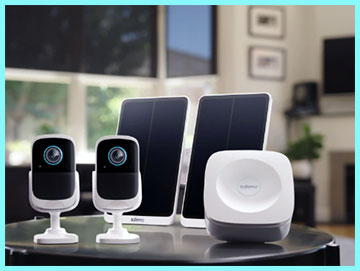
Getting Xfinity Home Security felt less like buying a gadget and more like upgrading a utility.
Since I was already using Xfinity for internet and television, the sales pitch was incredibly smooth.
They offered to bundle the security system onto my existing bill, which I found convenient.
However, the installation process was not something I could do myself.
I had to schedule a technician, which meant blocking out a four-hour window on a Tuesday. The technician was professional, drilled the necessary holes, and set up the touchscreen controller, which is the heart of their system.
Living with Xfinity Home is a mixed bag of convenience and corporate rigidity. The coolest feature, by far, is the integration with my television. When someone rings the doorbell, the video feed pops up right on my TV screen while I am watching a movie. That level of ecosystem integration is something SimpliSafe simply cannot touch. However, I felt “locked in.” The equipment is proprietary, and knowing I was signed up for a two-year contract made me nervous about moving or switching internet providers. The app is polished and responsive, but every time I wanted to add a sensor, I felt like I had to jump through hoops rather than just buying one and sticking it on the wall. It feels like a premium, managed service rather than a piece of tech I own.
Read More: Comparison Of Ring Alarm Pro And Simplisafe
Pros Of Xfinity Home Security
- Seamless Ecosystem Integration: If you are already in the Comcast/Xfinity ecosystem, this system is a no-brainer because it talks to everything else you own. I absolutely loved the ability to control my alarm system using the voice remote on my television. Being able to say “Xfinity, show me the front door” into my remote and having the camera feed appear instantly on the big screen is a futuristic feature that actually works. It turns your home security into an extension of your entertainment center, which ensures you actually check your cameras because it is so easy to do so.
- Professional Installation and Support: For people who are not tech-savvy or simply do not want to climb ladders, the mandatory professional installation is actually a huge benefit. I watched the technician optimize the placement of the motion sensors and test the signal strength of the door sensors, things I might have guessed at if I were doing it myself. Xfinity technicians are trained to find the weak points in your home’s layout. You are paying for the assurance that the system was set up correctly the first time, rather than worrying if you placed the magnet too far from the sensor.
- Robust Home Automation Protocol: Xfinity uses Zigbee, a wireless language that allows it to connect with a massive range of third-party smart home devices. I was able to pair third-party smart bulbs and specific smart locks directly to the Xfinity touchscreen. This makes the Xfinity Home controller a legitimate smart home hub, not just a security keypad. You can set up “scenes” where disarming the system turns on the hallway lights and adjusts the thermostat, and because it uses Zigbee, it is often more reliable and faster than Wi-Fi-based automations.
- One Bill for Everything: There is a significant psychological and administrative ease to having your internet, TV, mobile, and home security all on a single invoice. Managing household finances is a chore, and Xfinity simplifies this by consolidating four services into one payment. This also gives you leverage when your contract is up; I have found that you can often negotiate a better rate on your security monitoring if you threaten to cancel your TV or internet service, giving you a bargaining chip you would not have with a standalone security company.
Cons Of Xfinity Home Security
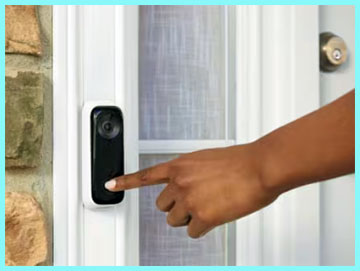
- Expensive Contracts and Early Termination Fees: This is the biggest pain point I experienced with Xfinity. Unlike the modern wave of DIY security companies, Xfinity still relies on the old-school cable model of locking you in. If you sign a two-year agreement to get a deal on the equipment, you are stuck. If you need to move to an area that Xfinity does not service, or if you simply find a better deal elsewhere, you are often hit with hefty early termination fees. This lack of flexibility makes the system feel like a burden rather than an asset, especially for renters or people with unstable living situations.
- High Monthly Monitoring Fees: You are paying a premium for the brand name and the bundle convenience. The standard monitoring fee, which often hovers around $45 to $55 after the promotional period ends, is significantly higher than many competitors. When I looked at the breakdown, I realized I was paying nearly double what some DIY companies charge for essentially the same cellular backup and police dispatch service. Over the course of five years, that price difference adds up to thousands of dollars that could have been spent on better equipment upgrades.
- Customer Service Frustrations: Dealing with Xfinity support is notorious for a reason, and unfortunately, the home security division is part of the same massive call center infrastructure. When I had a false alarm issue, I had to navigate through the same automated phone menus designed for people with internet outages. It can be incredibly frustrating to wait on hold for 20 minutes just to ask a simple question about your motion sensor. You often feel like just another account number in a massive database rather than a valued client protecting their safety.
- Proprietary Equipment Limitations: The equipment you buy from Xfinity is largely designed to work only with Xfinity. If you cancel your service, you are often left with a pile of sensors and cameras that are essentially paperweights. The touchscreen controller is useless without an active subscription. Unlike some systems where you can still use the local alarm or repurpose the sensors, Xfinity’s hardware is locked down tight. This “brick” potential makes the initial investment feel much riskier because you are not building a transferable asset for your home.
My Experience With SimpliSafe
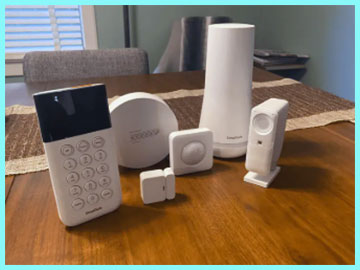
Switching to SimpliSafe was a completely different vibe.
I ordered the “Hearth” package online, and it arrived three days later in a surprisingly small box.
The “unboxing” experience is designed to make you feel capable.
I didn’t need a drill, a screwdriver, or a technician.
I literally spent 45 minutes walking around my house, peeling the backing off adhesive strips, and sticking sensors to doors.
The Base Station, which looks like a sleek white vase, talks to you during the setup, which I found reassuring.
Using SimpliSafe day-to-day feels very modern and low-pressure. I love the “Secret Alert” feature. I put a sensor on my liquor cabinet and set it to notify me privately without triggering the siren—genius. The keypad is not a fancy touchscreen like Xfinity’s; it’s a simple, calculator-like device, but it works every time. The mobile app is clean, and I appreciate that I can cancel my monitoring service right from the dashboard if I go on a budget freeze, without talking to a retention specialist. However, the cameras do feel a bit cheaper than Xfinity’s, and there is a noticeable lag when opening the live stream, but for the price and freedom, it is a trade-off I am willing to accept.
Pros Of SimpliSafe
- Complete Freedom from Contracts: This is the absolute strongest selling point for SimpliSafe and the reason I recommend it to renters. You are never tied down. I was able to activate the monitoring service for a month while I was on vacation and then cancel it when I returned, with zero penalties. This month-to-month flexibility puts the power back in your hands. You are not financing equipment over 24 months, so you own your hardware outright from day one. If you move, you just peel the sensors off the wall and take them with you to your new place.
- Active Guard and Video Verification: SimpliSafe has innovated heavily in their monitoring service. Their “Fast Protect” (formerly interactive monitoring) allows monitoring agents to actually view your camera feed during an alarm event. I tested this, and the peace of mind is incredible. If an intruder breaks in, the agent can speak through the camera and say, “Police have been dispatched, leave immediately!” This turns a passive alarm system into an active security guard. It drastically reduces false alarms because the agent can see if it’s just your dog or an actual bad guy before calling the cops.
- Incredibly Easy DIY Installation: The “peel-and-stick” installation method is not a gimmick; it is a legitimate engineering triumph. I was able to secure a four-bedroom house in under an hour without damaging a single wall. This is crucial for people in apartments or historic homes where drilling holes is forbidden. The command strips are strong but removable. If you make a mistake and place a motion sensor in a bad spot, you just pull it down and move it. You do not have to wait for a technician to come back out and charge you a service fee for moving a device.
- Affordable and Transparent Pricing: SimpliSafe is aggressively priced, and they are almost always running a sale. It is very common to find their equipment packages for 40% to 60% off during holidays.8Even at full price, the hardware is cheaper than Xfinity’s. The monitoring plans are also clear-cut. You know exactly what you are getting for $29.99 or $49.99. There are no hidden “equipment rental fees” or “service activation taxes” that clutter up cable bills. You can build a custom system that fits your exact budget, adding one sensor at a time as you can afford it.
Cons Of SimpliSafe
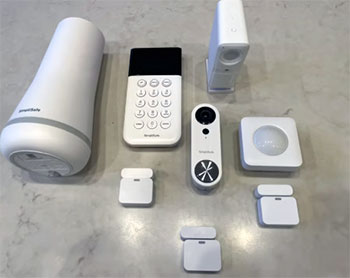
- Hardware Feels Less “Premium”: When you compare the physical build quality of SimpliSafe against Xfinity, you can feel the difference. The SimpliSafe keypad is lightweight plastic with a monochrome LCD screen that feels like technology from the 1990s. It lacks the slick, high-definition glass touchscreens that Xfinity and other competitors offer. While it is durable, it doesn’t look as impressive mounted on your wall. The door sensors are also a bit bulky compared to the slim-profile sensors you get with professional installs, which might bother you if you are a stickler for interior design aesthetics.
- Limited Smart Home Integration: If you are trying to build a fully automated “Iron Man” house, SimpliSafe will disappoint you. It works reasonably well with Amazon Alexa and Google Assistant for basic commands like “arm the system,” but it lacks Z-Wave or Zigbee support. You cannot connect third-party smart lights, locks, or thermostats directly to the SimpliSafe hub. You have to rely on disjointed app-to-app integrations, which are often slower and less reliable. Xfinity acts as a central brain for your home; SimpliSafe is just a security system that stays in its own lane.
- Upfront Equipment Cost: While the monthly fees are low and there are no contracts, you have to buy your equipment upfront. If you want a comprehensive system with cameras, smoke detectors, and glass break sensors, you could be looking at an initial bill of $500 to $700. Xfinity allows you to spread this cost out over two years, making the barrier to entry lower for people who don’t have cash on hand. With SimpliSafe, you need to have the budget ready to buy your hardware before you can secure your home.
- Camera Performance and Features: The cameras on SimpliSafe are decent, but they are not market-leading. I found that the “wake-up” time for the battery-powered outdoor camera can be slow. By the time the camera wakes up and starts recording, a delivery driver might already be walking away. They also rely heavily on your home’s Wi-Fi. If your Wi-Fi is spotty in the corners of your house, your SimpliSafe cameras will struggle. Xfinity cameras often benefit from the proprietary mesh networking of the Xfinity gateway, providing a more stable video stream in larger homes.
Also Read: Comparison Of Blink And Yi Camera
Frequently Asked Questions (FAQ)
For most homeowners, yes. SimpliSafe offers better flexibility, lower long-term costs, and no contracts. However, Xfinity is better if you want deep smart home automation and professional installation.
It is a solid, reliable system, especially for video quality and home automation. The equipment is high-end, but the value is diminished by high monthly fees and poor customer service experiences.
If you want premium automation, systems like Vivint or ADT offer better smart home tech. For pure security value and DIY ease, however, SimpliSafe is currently the market leader.
No, they are incompatible ecosystems. You cannot view SimpliSafe cameras on the Xfinity app or TV interface, and Xfinity sensors will not pair with the SimpliSafe Base Station.
Conclusion
Choosing between these two comes down to your personality type. If you are a renter, a frequent mover, or someone who hates being told what to do by a corporation, you need to go with SimpliSafe. The freedom to cancel anytime and the ease of moving the system yourself is unmatched. I personally prefer SimpliSafe because I want to own my equipment and avoid long-term financial commitments.
However, if you own a large home, plan to stay there for five years, and are already paying for Xfinity cable and internet, the Xfinity Home Security bundle makes sense. You get a slick, professionally installed system that integrates beautifully with your TV and smart lights. Just be prepared to haggle with customer service when your contract expires. Evaluate your need for flexibility versus convenience, and you will make the right choice.