
I’ve been using Bluetooth headsets for years, switching between different models depending on my daily needs like calls during drives, walks, or work-from-home setups. In this article, I share my honest take on Voyager Legend vs 5200: which one stands out as the better choice overall. I focus on real-world use, comparing key aspects like call quality, comfort, battery life, and features to help you decide what fits your routine best.
A Brief Comparison Table Voyager Legend Vs 5200
| Feature | Voyager Legend | Voyager 5200 |
| Bluetooth Version | 3.0 | 4.1 |
| Charging Method | Proprietary magnetic clip | Micro-USB |
| Microphone Setup | Triple-mic with WindSmart technology | Quad-mic with advanced DSP and WindSmart |
| Talk Time | Up to 7 hours | Up to 7 hours (with case up to 14+ hours total) |
| Range | Up to 33 feet | Up to 98 feet |
| Noise Cancellation | Good active DSP | Superior in noisy/windy environments |
| UC Compatibility | Available (with dongle for PC) | UC version with better PC integration |
| Voice Controls | Yes, basic | Advanced with smart sensors |
| Build and Stability | Comfortable, stable fit | Similar design, slightly less comfy long-term |
My Experience With Voyager Legend
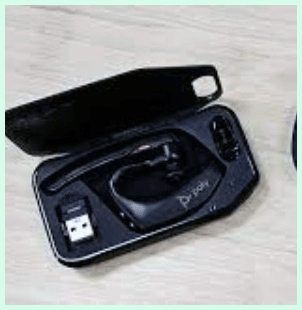
I picked up the Voyager Legend a while back when I needed something reliable for phone calls during commutes and quick home office sessions.
Right away, the magnetic charger became my favorite part—snapping it on feels effortless compared to fumbling with tiny ports late at night.
The fit was snug from day one, with the adjustable boom letting me position the mic perfectly for clear transmission.
Calls sounded good indoors, and even on windy walks, the noise reduction kept things intelligible most of the time. Battery life held up impressively, often lasting beyond what I expected on mixed-use days.
However, in busier areas with lots of wireless signals, I noticed occasional static that disrupted flow. Over months, I appreciated the simplicity—no fancy apps required, just pair and go.
Comfort was solid for an hour or two, but longer stretches made my ear feel a bit tired. Overall, it served me well as a no-fuss option, especially when budget mattered more than the latest bells and whistles.
Pros Of Voyager Legend
- Solid Call Clarity In Everyday Settings: The triple-mic system handles background noise well enough for most office or home calls, making my voice come through clearly without much distortion. People on the other end rarely complain about echo or muffling, even when I’m moving around the house.
- Magnetic Charging Convenience: That little magnetic clip snaps on effortlessly every time I place it near the charger—no fumbling with ports, which saves seconds that add up during busy mornings. It’s a small thing, but it feels premium and reliable after years of use.
- Lightweight And Discreet Design: At just the right weight, it sits comfortably on my ear without causing pressure points during shorter calls. The ergonomic shape lets me forget it’s there most of the time, perfect for quick conversations or multitasking.
- Reliable Battery Performance: Seven hours of talk time consistently gets me through a full day of intermittent calls, and the standby mode keeps it ready without draining power quickly. I charge it overnight and rarely worry about running low mid-day.
- Voice Command Integration: Saying “answer” or “ignore” works smoothly with paired phones, reducing the need to touch buttons while driving or carrying things. It adds a hands-free layer that feels natural in daily routines.
- Proven Durability Over Time: I’ve dropped it a few times without issues, and the build holds up well against daily wear. The ear tips stay secure, and the boom arm adjusts easily for a custom fit.
- Affordable Entry Point: Often priced lower than newer models, it delivers strong value if you don’t need the absolute latest tech. For basic mobile use, it punches above its weight.
- Multipoint Connectivity: Pairing two devices at once lets me switch between phone and tablet seamlessly, which is handy when I’m listening to something on one while expecting calls on the other.
- Wind Reduction Feature: WindSmart tech cuts down gusts effectively during outdoor walks or open-window drives, keeping calls intelligible without constant adjustments.
- Easy Pairing Process: Bluetooth connection happens quickly and stays stable in most environments, with fewer dropouts than some older headsets I’ve tried.
Also read: Comparison of TI-89 Titanium And TI-84 Plus
Cons Of Voyager Legend
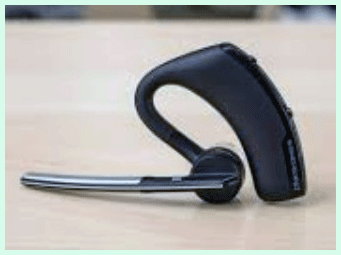
- Older Bluetooth Version Limits Stability: With Bluetooth 3.0, it sometimes picks up interference from Wi-Fi routers or other 2.4GHz devices, leading to occasional clicks or pops during calls in crowded signal areas. Newer tech handles this much better.
- Microphone Not The Strongest In Extreme Noise: While it does a decent job, heavy traffic, strong wind, or crowded streets can let some background sounds bleed through, making my voice less isolated compared to modern alternatives.
- Shorter Effective Range: Limited to about 33 feet, so if I walk too far from my phone—like stepping into another room—the connection drops faster than I’d like, forcing me to stay closer.
- Proprietary Charger Dependency: If I lose the magnetic clip or cable, replacements aren’t as easy to find as standard USB options, which can be frustrating during travel or if something breaks.
- Less Natural Sound On Calls: Some recipients say voices sound a bit tinny or processed, not as warm and full as what newer models deliver, especially in professional settings.
- No Built-In Charging Case: Unlike some competitors, there’s no portable case for extra charges, so I’m stuck relying on wall outlets or car chargers for longer days out.
- Comfort Fades Over Long Sessions: After a few hours straight, the single-ear pressure starts to build, causing mild fatigue that makes me want to switch ears or take breaks.
- Limited PC Integration Without Add-Ons: The UC version needs a separate dongle for reliable laptop use, and even then, it doesn’t feel as seamless as native options in newer headsets.
- Volume Can Feel Restrained: In very noisy places, I sometimes crank it up, but the max output isn’t overpowering, leaving me straining to hear in loud environments.
- Aging Design Aesthetics: It looks dated next to sleeker modern headsets, which might matter if appearance plays a role in professional video calls or client meetings.
Maintenance Tips For Voyager Legend
- Clean The Ear Tips Regularly: Wipe the silicone tips with a soft, damp cloth weekly to remove earwax buildup, which can affect fit and sound quality over time. Avoid harsh chemicals that might degrade the material.
- Store In A Dry Place: Keep it away from humidity or direct sunlight when not in use—moisture can corrode contacts or affect battery performance, so a desk drawer works well.
- Charge Fully Before First Use: Let it reach 100% on the initial charge to calibrate the battery properly, helping maintain long-term capacity and avoiding early degradation.
- Avoid Overcharging: Unplug once full to prevent unnecessary strain on the battery cells, even though it has protection—habits like this extend overall lifespan noticeably.
- Inspect The Magnetic Clip: Check for debris on the charging points monthly and gently clean with a dry brush to ensure solid connection every time you dock it.
- Update Firmware When Available: Connect to the manufacturer’s app or software occasionally for any patches that improve stability or fix minor bugs, keeping performance optimal.
- Rotate Ear Tips For Fit: Experiment with different sizes provided and swap them out if one starts to loosen, maintaining a secure seal that boosts both comfort and mic pickup.
- Wipe The Boom Arm: Use a microfiber cloth on the microphone area to remove dust or oils from handling, preventing muffled audio from accumulated grime.
- Test Connectivity Periodically: Pair it fresh to devices every few months to catch any pairing glitches early, resetting if needed for smoother operation.
- Handle Gently During Travel: Use the original case or a soft pouch to protect against drops or pressure in bags, preserving the adjustable parts and overall structure.
My Experience With Voyager 5200
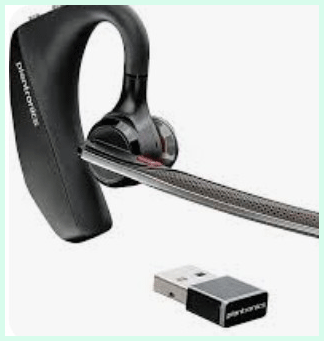
Switching to the Voyager 5200 felt like a noticeable step forward in several ways.
The quad-mic setup really shines in challenging spots—like driving with windows down or walking busy streets—where voices stay crisp and background fades away better than before.
I love the extended range; I can wander farther without drops, which helps during house chores or yard work while on calls.
Micro-USB charging is convenient since cables are everywhere, though I miss the magnetic ease sometimes.
Comfort is similar, but I find it holds up a tad better over full days, with less fatigue.
The smart sensors for auto-answer and mute add practical touches that save time. Battery performance matches well, and the optional case extends usability on the go. In professional calls, recipients comment on clearer audio more often. Drawbacks include a
Pros Of Voyager 5200
- Exceptional Noise Cancellation In Tough Conditions: The four-mic array combined with adaptive DSP and six layers of WindSmart technology blocks out traffic, crowds, wind, and office chatter remarkably well, so my voice stays crystal clear even when I’m outside or in a busy spot. Recipients almost always say they hear me like I’m in a quiet room.
- Impressive Range For Freedom Of Movement: With up to 98 feet of reliable connection, I can walk around the house, step into the yard, or move between rooms without the call dropping or getting staticky, which beats many headsets that cut out much sooner.
- Solid Battery Life With Extra From The Case: Seven hours of talk time on a single charge gets me through most days easily, and the portable charging case adds another 14 hours or so, meaning I rarely run out during long shifts or travel.
- Smart Sensors And Voice Controls Make It Hands-Free: Features like smart sensor for auto-answer when I put it on, plus voice commands to answer, ignore, or check battery, save me from fumbling with buttons while driving or carrying groceries.
- Reversible And Secure Fit: The design flips for either ear, and once adjusted with the right ear tip, it stays put firmly without slipping off during movement or head turns.
- Clear Audio For Calls And Light Listening: While mainly for voice, it handles podcasts or audiobooks surprisingly well with decent clarity and volume, making downtime calls or quick media enjoyable.
- UC Version Boosts Professional Use: The UC model pairs seamlessly with PC via dongle for Teams, Zoom, and more, with better integration and mute controls that feel natural in work calls.
- Lightweight Build For All-Day Wear: At under an ounce, it doesn’t weigh down my ear much, and the ergonomic shape distributes pressure evenly for comfortable extended sessions.
- Moisture Protection Helps Durability: P2i coating guards against sweat or light rain, which has kept it reliable through humid days or accidental splashes without issues.
- Easy Pairing And Multipoint Support: It connects quickly to phones and tablets, switching between two devices smoothly when I get a call on one while using the other.
Read more: Comparison of Schiit Vali 2 And Vali 3
Cons Of Voyager 5200
- Comfort Can Fade During Very Long Wear: The single-ear over-the-ear style starts causing mild pressure or fatigue after 4-5 hours straight for some ears, especially if I’m not swapping sides occasionally.
- Micro-USB Charging Feels Dated: Relying on micro-USB instead of modern USB-C or wireless means hunting for the right cable sometimes, and the port can get finicky if dust builds up.
- Occasional Static Or Drops In Extreme Interference: In areas with heavy Wi-Fi or metal obstacles, the connection might introduce clicks or brief cuts, though it’s rarer than with older models.
- Audio Quality Not Top-Tier For Music: It’s tuned primarily for voice, so music or media sounds okay but lacks the richness and bass that dedicated earbuds provide.
- Case Charging Reliability Varies: Some users report the charging case draining faster than expected or not always topping up the headset fully if not aligned perfectly.
- Higher Price Compared To Basics: It costs more than entry-level options, which can feel steep if you don’t need the advanced noise handling or range every day.
- Earpiece Fit Requires Trial And Error: Finding the perfect ear tip size takes a bit of experimenting, and a wrong fit can make it feel loose or too tight initially.
- No Built-In ANC For The Wearer: It excels at blocking noise from your mic side, but you still hear surroundings fully, which is great for awareness but not for focus in loud places.
- Firmware Updates Can Be Hit-Or-Miss: While Poly Lens app helps, some report glitches after updates or the need to reset for optimal performance.
- Looks A Bit Bulky For Discreet Use: The boom mic and over-ear hook make it noticeable in professional video calls or casual settings compared to tiny earbuds.
Maintenance Tips For Voyager 5200
- Wipe Ear Tips And Boom Regularly: Use a soft, dry microfiber cloth or slightly dampened with isopropyl alcohol (70%) to clean the silicone ear tips and microphone area weekly, removing wax, oils, or dust that could muffle sound or affect fit.
- Clean Charging Contacts Carefully: Gently wipe the metal charging pins on the headset and inside the case with a dry cotton swab or cloth to prevent poor connections from buildup—avoid liquids here to prevent corrosion.
- Charge At Room Temperature Only: Always charge between 0°C and 40°C (32°F to 104°F) to protect battery health; extreme heat or cold can reduce long-term capacity noticeably.
- Fully Deplete And Recharge Occasionally: Let the battery run down completely once every few months, then charge to 100% to recalibrate the battery indicator for more accurate talk time warnings.
- Store In The Case When Not In Use: Keep the headset in its charging case to maintain charge and protect from dust or accidental drops—turn it off if storing for longer periods.
- Avoid Overcharging The Case: Unplug the case once its LEDs show full to minimize unnecessary battery cycles, even though it has smart protection built in.
- Inspect Ear Tips For Wear: Check silicone tips monthly and replace if they crack or lose shape (replacements are available in small, medium, large) to keep a secure, comfortable seal.
- Update Firmware Via Poly Lens App: Connect to the app periodically for updates that fix bugs, improve stability, or enhance noise processing—do this over a stable connection.
- Reset If Connectivity Issues Arise: Hold the power button for 10+ seconds or follow reset steps in the manual if pairing glitches or static occur, which often resolves minor software hiccups.
- Keep Away From Extreme Moisture: While P2i coated, don’t submerge or expose to heavy rain—dry thoroughly if it gets wet to avoid long-term damage to internals.
Comparison With Other Brands
- Jabra Evolve Series: Offers stronger PC-focused features with better dongle integration, but lacks the same wind-handling prowess in outdoor scenarios that the Voyager handles well. Jabra feels bulkier on the ear for all-day wear.
- Sony Bluetooth Headsets: Provide richer audio for music playback alongside calls, yet their noise cancellation doesn’t match the focused voice isolation in windy conditions that Voyager achieves consistently.
- Bose QuietComfort Options: Excel in passive noise blocking for the wearer, but the mic performance in loud environments falls short compared to Voyager’s active processing, making calls less clear outdoors.
- Logitech Zone Series: Delivers excellent unified communications support with easy switching, though comfort during long sessions doesn’t quite reach Voyager’s lightweight stability for single-ear use.
- Apple AirPods Pro (Mono Use): Convenient for iOS users with seamless pairing, but wind noise intrusion is higher without dedicated boom mics, leading to more interruptions in calls than Voyager provides.
- Sennheiser Presence Series: Known for premium build and sound, yet battery life and range often trail Voyager, especially in real-world roaming distance during active movement.
- Microsoft Modern Headsets: Integrate deeply with Teams and Office tools, offering good clarity indoors, but outdoor wind rejection isn’t as robust as Voyager’s specialized tech.
- AfterShokz/Shokz Bone Conduction: Allow ambient awareness, which is great for safety, but call quality suffers in noise compared to Voyager’s enclosed mic design that prioritizes voice pickup.
- BlueParrott B Series: Truck-driver favorites with superior wind and noise blocking, often outperforming Voyager in extreme loud settings, though less discreet for office or casual use.
- General Market TWS Earbuds: Affordable and versatile, but most lack the dedicated boom mic stability and range that make Voyager reliable for professional, extended calls.
Frequently Asked Questions (FAQ)
The Voyager Legend 50 UC features updated AI-enhanced noise cancellation with four mics and a refreshed design, while the 5200 UC uses quad-mic DSP with strong wind handling but older charging and slightly less advanced processing.
Yes, it’s generally comfortable for extended periods thanks to its lightweight build and adjustable fit, though some users note mild ear fatigue after several hours straight.
They are the same core headset; the 5220 is often a retailer-specific variant that includes extras like a vehicle charger, while the 5200 comes with standard accessories.
Conclusion: For Both Products
I’ve weighed both the Voyager Legend and the 5200 carefully through real use, and here’s my final thought for you. If you want a proven, budget-friendly headset that handles everyday calls reliably with easy magnetic charging, go with the Voyager Legend—it still holds up strong for simpler needs. But if clearer calls in noisy or windy spots, better range, and modern tweaks matter more, I recommend the Voyager 5200 as the superior pick overall. Whichever you choose, you’ll get solid performance from this lineup. Pick based on your typical day, and you won’t be disappointed.