
For years, the budget launch monitor market (under $600) has forced golfers to make a choice: do you want a device that requires a smartphone to see any data (like the Garmin R10 or Rapsodo MLM2PRO), or do you want a simple “dumb” screen that only shows distance? The Voice Caddie SC4 Pro (Swing Caddie) attempts to give you the best of both worlds. It is a full-featured simulator that connects to your phone, but it also features a built-in display so you can use it completely untethered.
If you are looking for a launch monitor that is as easy to use as a rangefinder but powerful enough to run a home simulator, the SC4 Pro is currently the most versatile option in its price bracket. You should buy this product from a dedicated golf retailer like PlayBetter, GlobalGolf, or Amazon to ensure you get the “Pro” edition with the upgraded E6 Connect license and firmware.
My Experience With Voice Caddie SC4 Pro
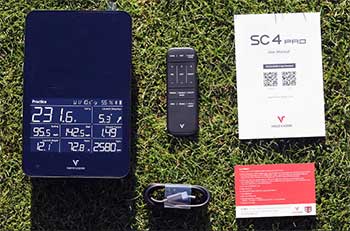
The biggest friction point with most modern launch monitors is the “faff” factor.
Usually, you have to set up a tripod, align it perfectly, connect via Bluetooth, wait for an app to sync, and pray your phone battery doesn’t die.
My experience with the SC4 Pro was refreshingly analog.
I pulled it out of the box, placed it 5 feet behind the ball, and turned it on. That was it.
I hit a shot, and the built-in orange OLED display immediately flashed my carry distance and swing speed. I didn’t need to pair my phone or unlock a screen. For a quick range session where you just want to know “is this driver swing faster than the last one?”, this standalone capability is a godsend.
When I did connect it to the new Voice Caddie S App, the experience shifted from “tool” to “toy” (in a good way). The 3D driving range is smoother than the previous version, and seeing the ball flight trace on my iPad made indoor practice feel much less claustrophobic.
I tested the “Pro” claim regarding spin rates. The original SC4 was known for sometimes guessing spin numbers on driver shots. The SC4 Pro utilizes a new algorithm that seems to have tightened this up. While it’s not going to beat a $20,000 Trackman, the carry distances were consistently within 2-3 yards of the professional-grade units I’ve used. However, like all radar units in this class, it struggles slightly with short chips (under 20 yards) and putting.
One specific highlight: The remote. It magnetically attaches to the back of the unit. Being able to change clubs or modes without bending down to touch the unit or fiddling with a sweaty phone screen is a tiny ergonomic detail that I missed when I switched back to other devices.
Read more: Comparison Of Nexar And Vantrue
Pros Of Voice Caddie SC4 Pro
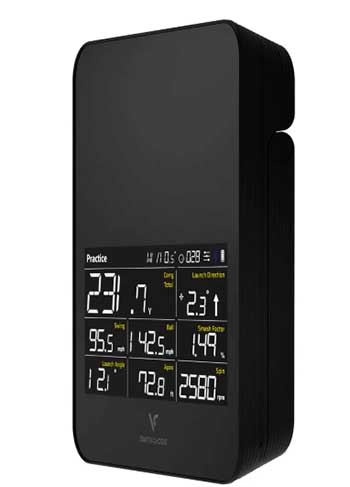
- Built-in Display: This is the USP (Unique Selling Point). You do not need a phone to use it. You can see Carry, Launch Angle, Swing Speed, and Ball Speed directly on the device. This makes it the fastest unit to set up at the driving range.
- No Subscriptions Required: Unlike the Rapsodo MLM2PRO (which locks features behind a $199/year wall) or Garmin (which needs a sub for Home Tee Hero), the SC4 Pro gives you the driving range and data for free. It also comes with a license for 5 courses on E6 Connect (iOS/PC) permanently.
- Doppler Radar Accuracy: The “Pro” update brings improved algorithms for spin rates and launch direction. It tracks Carry, Total Distance, Swing Speed, Ball Speed, Smash Factor, Launch Angle, Apex, and Spin Rate.
- Simplicity: There is no complex calibration board or leveling calibration required. You just set it 5 feet behind the ball. It is far less “fussy” about placement than the Garmin R10.
- Voice Output: As the brand name suggests, the unit speaks to you. Hearing “Carry: 240 yards” without having to look up allows you to stay in your flow state during practice.
- Included Remote: The magnetic remote allows you to change clubs, switch from “Practice” to “Target” mode, and adjust volume from your hitting stance.
Cons Of Voice Caddie SC4 Pro
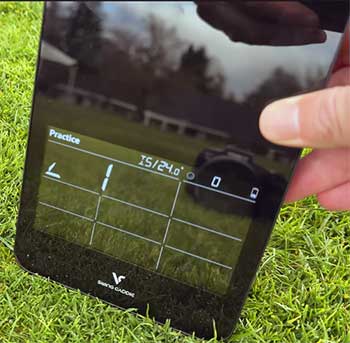
- Spin Calculation Limits: While improved, this is still a small Doppler radar unit. It measures ball speed and launch angle perfectly, but it often “calculates” spin rather than directly measuring it (unlike photometric camera units). If you are trying to fix a wicked slice, a camera-based unit (like the MLM2PRO) might show the spin axis better.
- Short Game struggles: Radar units hate slow-moving objects. Pitching and chipping under 20-30 yards can be inconsistent. It sometimes fails to pick up the shot entirely if the ball speed is too low.
- Putting is “Meh”: While it supports putting in simulation mode, it is not its strength. It feels floaty and approximate. If you are building a sim specifically to practice putting, this isn’t the device for you.
- Size: It is larger than the Garmin R10. It fits in a golf bag easily, but it’s not “pocketable” like the R10.
- App Polish: The Voice Caddie app has improved significantly, but it still feels slightly less polished and “gamified” than the software from Garmin or Rapsodo.
Maintenance & Setup Tips
- The “5-Foot” Rule: The SC4 Pro needs to be placed 5 feet behind the ball. This is closer than the Garmin R10 (which needs 6-8 feet). However, ensure you also have about 8-10 feet of ball flight in front of you if hitting into a net. Radar needs to “see” the ball fly for a split second to calculate the data.
- Update Firmware Immediately: Out of the box, the unit might be on older firmware. Connect it to the “Voice Caddie Manager” on PC or the app to update it. The “Pro” accuracy improvements are largely software-based, so this is critical.
- Level Surface is Key: Even though it doesn’t have a strict leveling calibration, placing the unit on a tilt will skew your launch angle data. If you are at a driving range with uneven mats, use the carrying case (if you bought the bundle) or a book to level the unit.
- Metallic Stickers (Optional): If you are using it indoors and finding the spin numbers are weird, try using the metallic stickers (often included or cheap to buy) on the golf ball. This helps the radar track the rotation of the ball more accurately in short indoor environments.
Comparison with Other Brands
- Garmin Approach R10:
- The Difference: The R10 is smaller and has better “gamification” (Home Tee Hero is fun). However, the R10 requires a phone to see any data. The SC4 Pro has a screen.
- Space: The SC4 Pro requires less space behind the ball (5ft vs 8ft), making it better for smaller garages.
- Value: Garmin hides features behind a subscription; SC4 Pro is largely a one-time purchase.
- Rapsodo MLM2PRO:
- Technology: The MLM2PRO uses cameras and radar. It is significantly better at reading spin and spin axis (shot shape). If accuracy is your #1 priority, Rapsodo wins.
- The Catch: Rapsodo is practically useless without the $199/year subscription. It also takes longer to set up and connect. The SC4 Pro is faster and cheaper to own long-term.
- Bushnell Launch Pro (BLP):
- Tier: The BLP is in a different league ($2,000+). Do not expect the SC4 Pro ($500) to match the BLP in data fidelity. The SC4 Pro is a “check your distances” tool; the BLP is a “fix your swing mechanics” tool.
Also read: My Thoughts On Enesy Dash Cam
Frequently Asked Questions (FAQ)
No. The basic driving range app, data analysis, and on-device features are free forever. It also comes with a free license for E6 Connect that includes 5 courses and practice ranges. You only pay if you want more courses on E6 Connect.
Yes. There is a specific mode for this. However, you need at least 8-10 feet of distance from the tee to the net. If the ball hits the net too quickly, the radar cannot read the flight parameters accurately.
Physically, they are nearly identical. The “Pro” distinction largely refers to the updated firmware algorithm (better spin/accuracy), the integration with the newer “Voice Caddie S” app, and the included software bundle (more E6 courses). If you have an old SC4, updating the firmware gets you 90% of the way there, but the Pro package offers better out-of-the-box value.
It measures “Spin Rate” and “Launch Direction.” It uses these to calculate the shot shape (draw/fade). It is fairly accurate for general shot shapes, but if you need precise “Spin Axis” data to diagnose a subtle swing flaw, a camera-based unit is superior.
You can expect about 10 hours of continuous use. This is excellent and will last you weeks of range sessions. It charges via USB-C.
Conclusion
The Voice Caddie SC4 Pro is the champion of convenience. It solves the biggest headache of modern golf tech: connectivity. By including a high-quality screen directly on the device, it ensures that you will actually use it during your range sessions rather than leaving it in the bag because you can’t be bothered to pair your phone. While it lacks the granular spin-axis precision of the Rapsodo MLM2PRO, it makes up for it with zero subscription fees and an incredibly user-friendly experience. If you want a simulator that is “grab and go,” the SC4 Pro is the best choice on the market.