
I’ve spent years using graphing calculators for everything from high school algebra to college-level engineering courses and even some professional work. TI-89 Titanium vs TI-84 Plus: Which One Is Better? is the question I get asked most often when people see my collection. In this article, I share my honest take based on real daily use. I cover key features like symbolic solving, graphing capabilities, battery life, exam rules, and overall performance. My goal is to help you decide which fits your needs without wasting money on the wrong one.
A Brief Comparison Table
| Feature | TI-89 Titanium | TI-84 Plus |
| Processor | Motorola 68000 @ 16 MHz | Zilog Z80 @ 15 MHz |
| RAM (User Accessible) | 188 KB | 24 KB |
| Flash ROM | 2.7 MB | 480 KB |
| Display | 160 x 100 pixels, monochrome | 96 x 64 pixels, monochrome |
| CAS (Symbolic Algebra) | Yes | No |
| 3D Graphing | Yes | No |
| Battery Type | 4 AAA + backup | 4 AAA + backup |
| USB Connectivity | Yes | Yes |
| Exam Approval | Limited (banned on ACT, some others due to CAS) | Widely approved (SAT, ACT, AP, etc.) |
| Best For | Advanced calculus, engineering, symbolic work | Standard high school math, statistics, basic graphing |
My Experience With TI-89 Titanium
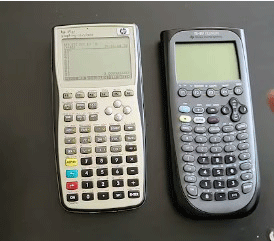
I first picked up the TI-89 Titanium during my sophomore year in college for multivariable calculus.
At first, the menu system confused me compared to the TI-84 I used in high school.
After a few weeks of practice, symbolic solving changed everything.
I could factor expressions or integrate functions exactly, which helped me understand concepts instead of just approximating.
In engineering classes, 3D graphing proved invaluable. Rotating plots to visualize surfaces made vector fields and multiple integrals clearer. I wrote small programs to automate repetitive matrix operations, saving hours on homework.
Battery life annoyed me during long sessions, so I learned to dim the screen and avoid constant heavy CAS use. The lack of color never bothered me much since the resolution showed details fine.
For exams, I stuck with TI-84 because of restrictions. The TI-89 stayed my go-to for deep study and projects. Even now, I pull it out for advanced problems where exact symbolic answers matter.
It feels like a reliable tool that grows with you. Once mastered, it handles tasks no basic graphing calculator touches.
Read more: Comparison of Eufy S340 And E30
Pros Of TI-89 Titanium
- Symbolic manipulation stands out as the biggest strength: The built-in Computer Algebra System lets me solve equations exactly, like factoring polynomials or finding integrals symbolically without numerical approximations. This saves huge time in calculus and differential equations classes where exact answers matter.
- Advanced graphing features make complex problems easier: I can plot 3D surfaces, rotate them in real time, and handle contour plots or implicit functions. For engineering courses involving multivariable calculus, this capability turns abstract concepts into visuals I can rotate and analyze directly on the screen.
- More memory supports larger programs and data: With 188 KB of usable RAM and 2.7 MB flash, I store extensive apps, custom programs, and big datasets without running out of space. Preloaded software like EE*Pro for electrical engineering or CellSheet for spreadsheet work expands what I accomplish beyond basic calculations.
- Symbolic differentiation and integration handle tough derivatives: When I need to find derivatives or integrals of complicated expressions, the CAS delivers exact results. This proves invaluable during homework or when verifying manual work in advanced math.
- Units and constants built-in simplify physics and engineering tasks: The calculator manages measurement units automatically, converting between systems or keeping track of them in calculations. This reduces errors in problems involving forces, energies, or circuits.
- Numeric solver tackles equations I cannot solve by hand: For transcendental equations or systems, the solver finds roots efficiently. I use this feature regularly in optimization problems or when modeling real-world scenarios.
- Text editor and note-taking keep everything organized: I jot down formulas, derivations, or reminders right on the device. This acts like a portable notebook for quick reference during study sessions.
- Upgradable OS keeps it current: Even years after release, firmware updates add minor improvements or fix issues. The hardware holds up well for long-term use.
- Programming in TI-BASIC plus assembly offers flexibility: I write custom routines for repetitive tasks or simulations. The power lets me automate complex sequences that would take forever manually.
- Overall power suits serious STEM users: In my experience, once I mastered the interface, the TI-89 Titanium accelerated my workflow in higher-level courses far more than simpler models.
Cons Of TI-89 Titanium
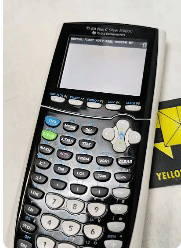
- CAS gets it banned from many standardized tests: The symbolic capabilities make it prohibited on the ACT and some other exams where only non-CAS calculators are allowed. I always double-check rules before tests to avoid surprises.
- Interface feels less intuitive at first: Menus and key combinations require practice compared to simpler layouts. I spent weeks getting comfortable switching between modes or accessing functions quickly.
- AAA batteries drain faster during heavy use: Four AAA cells power it, but intensive graphing or CAS operations shorten life. I carry spares because recharging is not built-in like newer models.
- No color display limits visual appeal: The monochrome screen works fine but lacks the vibrancy of backlit color options on updated versions of other calculators. Graphs look basic in comparison.
- Heavier and bulkier design: It weighs more and feels chunkier in my hand or pocket. For daily carry to classes, this adds noticeable bulk over slimmer alternatives.
- Limited teacher and peer support in some settings: Many instructors stick to TI-84 series, so finding quick help or shared programs proves harder. I often end up troubleshooting alone.
- Higher price for features I might not always need: If my work stays in basic algebra or statistics, the extra cost does not justify itself. I paid more for power that sat unused in lower-level classes.
- Smaller community for custom apps: Fewer people develop for it now, so new add-ons are rare. I rely on older libraries that still work but lack modern updates.
- No rechargeable battery option natively: Unlike some competitors or newer TI models, I replace batteries manually. This becomes inconvenient during long study marathons.
- Overkill for high school basics: In standard courses without symbolic needs, it complicates simple tasks. I switch to a TI-84 for those to keep things straightforward.
Maintenance Tips For TI-89 Titanium
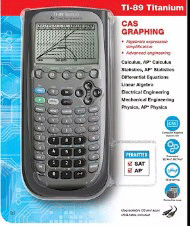
- Replace batteries promptly when low: I check the indicator regularly and swap all four AAA cells at once to avoid data loss. Keeping a spare set in my bag prevents mid-exam failures.
- Clean the screen gently with a microfiber cloth: Dust or fingerprints build up over time. I wipe lightly without liquids to prevent scratches on the LCD.
- Update firmware when possible: I connect via USB to check for official updates from Texas Instruments. This keeps apps stable and fixes occasional bugs.
- Protect with a hard case: The slide cover helps, but I use a padded pouch for backpack transport. This guards against drops or pressure damage.
- Backup programs and data regularly: Using linking software, I transfer everything to my computer. This safeguards custom work if the device fails.
- Avoid extreme temperatures: I never leave it in a hot car or freezing conditions. Heat warps components, and cold slows response.
- Remove backup battery if storing long-term: For months without use, I take out the SR44 to prevent leakage. I reinstall fresh when resuming.
- Calibrate contrast if display fades: Press and hold specific keys to adjust. This keeps text readable as the device ages.
- Organize apps in folders: I group them logically to navigate faster. This reduces menu clutter during timed work.
- Test after any drop: I run diagnostic self-tests and verify calculations to catch hidden damage early.
Also read: Comparison of Select Eufy S230 And S331
Comparison With Other Brands
HP calculators offer RPN entry for faster experienced users: Models like the HP 50g use reverse Polish notation, which speeds up input once learned. I find it more efficient for chain calculations than TI’s algebraic style.
Casio options provide affordability and simplicity: The fx-CG50 gives color graphing at a lower price. It handles statistics and graphing well without the complexity of CAS.
NumWorks brings modern open-source appeal: Its Python support attracts programmers. The touchscreen interface feels fresh compared to traditional keypads.
HP Prime stands out with touchscreen and CAS: It combines symbolic power with a sleek design and rechargeable battery. I appreciate the app-like feel for multitasking.
Casio fx-991EX excels in non-graphing advanced functions: For exams banning graphing, it offers extensive features cheaply. I use it as a backup for quick symbolic work.
TI-Nspire series adds document management: From the same brand, it organizes notes and graphs like a mini-computer. This suits project-based learning better.
HP focuses on engineering precision: Units handling and matrix operations feel more robust in some models. Professionals in fields like surveying prefer them.
Casio prioritizes speed in basic operations: Their processors handle numerical crunching quickly. For timed tests without CAS, they perform reliably.
Other brands lack TI’s exam dominance: TI holds strong approval across SAT, AP, and many college boards. Switching risks compatibility issues.
Overall, TI ecosystem wins for education support: Apps, teacher resources, and community favor TI heavily. Other brands shine in niches but trail in widespread adoption.
Frequently Asked Questions (FAQ)
It depends on needs. The TI-89 Titanium excels with symbolic algebra and advanced features, but the TI-84 wins for simplicity and broader exam approval.
Its Computer Algebra System solves equations symbolically, which many exams ban to test manual skills. Check specific test rules.
No, both released around 2004. The TI-89 Titanium came slightly later than the original TI-84 Plus.
Conclusion: For Both Products
I have used both extensively, and each has its place in my toolkit. If you tackle advanced math, engineering, or need symbolic power, go for the TI-89 Titanium—it delivers unmatched depth once you invest time learning it. For most high school students, standardized tests, or straightforward graphing and statistics, the TI-84 Plus remains the safer, more practical choice with its wide compatibility and ease. Pick based on your courses and exam requirements—you cannot go wrong with either if it matches what you actually use daily.