
I remember standing in the aisle of an office supply store, staring blankly at the wall of plastic blister packs, wondering why on earth a calculator costs as much as a budget smartphone. If you are stuck in that same spot, debating between the classic TI-83 and the updated TI-84, I am here to walk you through exactly which one belongs in your backpack. My goal is to break down the processing speeds, memory limits, and usability differences so you can make the smartest investment for your math classes without overspending.
A Brief Comparison Table
| Feature | TI-83 Plus | TI-84 Plus |
| Processor Speed | 6 MHz | 15 MHz |
| RAM (User Available) | 24 KB | 24 KB |
| Flash ROM (Archive) | 160 KB | 480 KB |
| Screen Resolution | 96 x 64 pixels | 96 x 64 pixels |
| Connectivity | I/O Port (Link Cable) | Mini USB & I/O Port |
| Built-in Apps | Limited | Pre-loaded (Cabri Jr, etc.) |
| Battery Type | 4 AAA + Backup | 4 AAA + Backup |
| SAT/ACT Allowed | Yes | Yes |
| MathPrint™ Mode | No | Yes (Latest OS) |
My Experience With TI-83 And TI-84
I have spent countless hours punching buttons on Texas Instruments calculators, starting way back when the TI-83 was the absolute gold standard for high school algebra. When I first transitioned to the TI-84 Plus, the physical layout felt incredibly familiar, which is a massive plus if you are upgrading. The keys are in the exact same spots, meaning muscle memory from the 83 carries over instantly. However, the moment I started graphing complex functions, the difference was night and day.
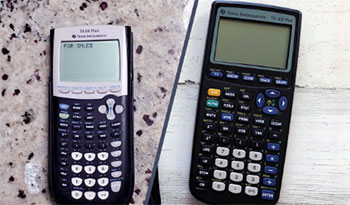
The TI-83 always felt reliable, like an old sedan that gets you from A to B, but the TI-84 feels like that same sedan with a turbo engine.
The speed difference when rendering graphs is noticeable; where the 83 would pause and think, drawing the line pixel by pixel, the 84 snaps the graph onto the screen much faster.
I also found the USB connectivity on the 84 to be a lifesaver. Back with the 83, I needed a specific, often hard-to-find serial cable to update the OS or transfer games. With the 84, I just grab a standard mini-USB cable, plug it into my laptop, and I am good to go.
Despite the upgrades, I still have a soft spot for the TI-83. It forces you to be very precise with your syntax. You don’t get the fancy MathPrint templates that look like textbook equations; you have to understand how to use parentheses correctly. In a way, using the older model made me better at understanding the logic of the math I was inputting. But if I am sitting in a timed AP Calculus exam today, I am taking the TI-84 every single time purely for the speed and the easier-to-read display options.
Read More: Comparison Of NumWorks And TI-84
Pros Of TI-83
- Legacy Reliability: The TI-83 is essentially the tank of the graphing calculator world. I have seen units that are over fifteen years old still functioning perfectly after being dropped in hallways, stuffed into overfilled backpacks, and generally abused by teenagers. There is a sense of security knowing that the hardware is incredibly simple and robust. It does not suffer from the software glitches that can sometimes plague newer, more complex color models. Because it has been the standard for so long, almost every math teacher knows exactly how to troubleshoot it without looking at a manual. If you raise your hand in class because you are getting a syntax error, your teacher can likely fix it from across the room because they have seen that exact error on that exact screen for two decades.
- Battery Efficiency: One thing I absolutely love about the older hardware is that it sips power. Because the processor is slower (running at a modest 6 MHz) and the screen is a low-power monochrome LCD without backlighting, a fresh set of four AAA batteries lasts an eternity. I have gone entire semesters without needing to swap them out. This is a huge advantage during long standardized tests where you definitely do not want your device dying on you. The backup lithium battery also ensures that even if your main AAAs die, your programs and stored formulas aren’t wiped from the memory instantly. It gives you that peace of mind that low-tech solutions often provide.
- Availability and Price: If you are strictly looking at the second-hand market, the TI-83 is significantly cheaper. Since millions of these were produced and sold over the last twenty-plus years, you can walk into almost any pawn shop or look on eBay and find one for a fraction of the retail price of a new TI-84. For students on a strict budget who just need a device that meets the syllabus requirements for Algebra I or II, this accessibility is a major winning point. You aren’t paying for bells and whistles you might not use; you are paying for a raw functional tool.
- Distraction-Free Interface: The lack of advanced features can actually be a pro for students who get easily distracted. The TI-83 doesn’t support the high-resolution games or complex applications that the newer color models do. When you turn it on, you are there to do math. The screen is stark and utilitarian. There is no backlight to keep you up at night, and no rechargeable battery to worry about managing. It is a singular tool for a singular purpose. I found that when I used the 83, I spent less time fiddling with settings and more time actually working through the problem sets because there simply wasn’t much else to do on the device.
- Massive Library of BASIC Programs: Because the TI-83 has been around for so long, the community support for it is legendary. There are thousands of programs written in TI-BASIC available online that are specifically optimized for this processor. Whether you need a program to help automate the quadratic formula or a simple text-based game to play after you finish your test, the code exists. I have spent hours typing in code from internet forums, and the TI-83 handles these simple BASIC scripts beautifully. It is a great introduction to programming logic without needing a computer.
Cons Of TI-83
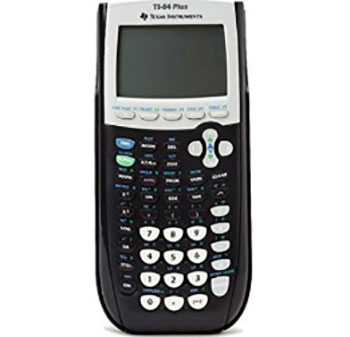
- Outdated Processor Speed: The most glaring issue I face when using the TI-83 today is the sluggishness. Running at only 6 MHz, it really shows its age when you ask it to do anything beyond basic arithmetic or simple linear graphing. If you are in a calculus class and need to graph the derivative of a complex trigonometric function, you will watch the calculator draw the line slowly across the screen. In a high-pressure exam environment like the SAT or ACT, those seconds add up. It feels like browsing the modern internet on a dial-up connection; it works, but it tests your patience constantly.
- Lack of MathPrint Technology: This is a dealbreaker for many modern students. The TI-83 uses “Classic” mode input, meaning everything is linear. If you want to enter a fraction, you can’t make it look like a vertical fraction ($\frac{a}{b}$). You have to type
a/b. If you want to enter a square root, it doesn’t extend the bar over the numbers; it opens a parenthesis likesqrt(. This requires you to be extremely vigilant about closing your parentheses. I cannot tell you how many times I got the wrong answer on a complex calculation simply because I missed a closing parenthesis at the end of a long string of operations. It forces you to think in “calculator syntax” rather than standard mathematical notation. - Limited Memory: The memory capacity on the TI-83 is severely restricted by modern standards. With only 24 KB of user-available RAM and, more critically, a much smaller Flash ROM archive compared to the 84, you hit the ceiling pretty quickly. I remember trying to load a few helper applications for chemistry and physics, only to get an “ERR: MEMORY” message. You constantly have to manage your space, deleting old programs or variables to make room for new ones. It feels very claustrophobic if you are a power user who likes to have a suite of tools ready at your fingertips.
- Antiquated Connectivity: Connecting a TI-83 to a computer in 2025 is a headache. It relies on a specific 2.5mm I/O jack. To connect this to a modern PC, you need a special “SilverLink” cable (USB to 2.5mm), which is not something people just have lying around. Unlike the TI-84 which uses standard mini-USB, the 83 requires you to hunt down proprietary accessories. This makes updating the operating system (if updates are even available anymore) or transferring data a significant chore. Most of the time, I just didn’t bother backing up my data because the barrier to entry was too high.
- Low Contrast Screen: The display on the TI-83 is a non-backlit layout with fairly low contrast. In dimly lit classrooms, I often found myself squinting or tilting the device to catch the light just right. The pixels are large and blocky, which makes reading fine details on a dense graph difficult. Unlike newer models where the axes and the curves are sharp and distinct, the 83 can sometimes look like a smudge of black dots. Prolonged use actually strained my eyes more than I expected, simply because the clarity just isn’t there compared to modern displays.
Pros Of TI-84 Plus
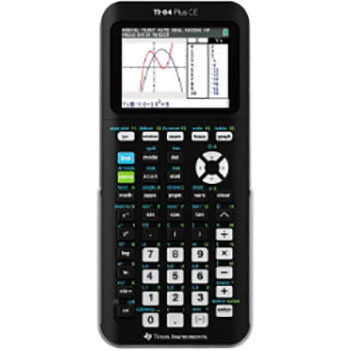
- MathPrint Functionality: The absolute biggest game-changer on the TI-84 Plus is the inclusion of MathPrint. This feature allows the calculator to display math exactly as it appears in a textbook. When you type a fraction, it looks like a fraction. When you type an exponent, the cursor actually moves up into the superscript position. I cannot overstate how helpful this is for visual learners. It significantly reduces syntax errors because you can visually verify that the equation you entered matches the one on your test paper. You don’t have to count parentheses or worry about order of operations ambiguities nearly as often. It bridges the gap between written math and computed math perfectly.
- Faster Processing Speed: The bump to a 15 MHz processor might not sound like much in the world of gigahertz computers, but on a calculator, it is substantial. When I hit “Graph” on the TI-84, the curves appear almost immediately. Tracing along a function, finding intersections, or calculating integrals happens with a snappiness that the 83 lacks. This speed gives you confidence. You aren’t waiting and wondering if you pressed the button; the feedback is instant. For students taking the ACT, where speed is critical, this responsiveness can be the difference between finishing a section and leaving questions blank.
- Enhanced Memory and Storage: With 480 KB of Flash ROM, the TI-84 Plus allows you to store a significantly higher number of applications (Apps). Texas Instruments pre-loads these with useful tools like Cabri Jr. for geometry, a periodic table for chemistry, and inequality graphing tools.1 I found this extra space incredibly useful for storing notes and formulas (where allowed) or keeping a wide variety of subject-specific apps installed simultaneously. I didn’t have to choose between my Physics solver and my Calculus tools; I could keep them all archived and ready to access.
- USB Connectivity: The addition of a mini-USB port fundamentally changed how I interacted with the device. It makes the calculator feel like a part of a modern ecosystem rather than an isolated island. You can easily plug it into a computer to update the operating system, which TI releases periodically to fix bugs or add features. It also allows for calculator-to-calculator communication using a standard cable if you need to transfer a list of data to a lab partner. The ease of interface with the TI Connect software is a major convenience that saves time and frustration.
- Hardware Durability with Modern Touches: While it retains the classic rugged shape, the TI-84 Plus often comes in various colors and has a slightly more refined build quality. The keys have a nice tactile response—not too mushy, not too stiff. I have found that the faceplates are often customizable, which lets you add a bit of personality to a boring tool. Despite the tech upgrades, it keeps the durability rating high. I have dropped my 84 on concrete floors, and while the battery cover might fly off, the device boots right back up. It balances modern utility with the tank-like resilience of its predecessor.
Cons Of TI-84 Plus
- High Price Point: The elephant in the room is the cost. Even years after its release, a new TI-84 Plus still commands a retail price that shocks most parents and students. You are paying over a hundred dollars for technology that, on paper, is vastly inferior to a cheap Android phone. This monopoly-like pricing structure is a huge barrier. I often feel frustrated recommending it because I know it is a significant financial burden for many families, especially when the technology inside hasn’t evolved proportionally to the price. You are paying for the brand and the standardized testing approval, not necessarily cutting-edge hardware.
- Battery Consumption: While still efficient, I have noticed that the faster processor and slightly more complex OS drain the batteries faster than the older TI-83. If you are a heavy user utilizing the graphing features and Apps constantly, you will burn through those AAAs more frequently. It is not terrible, but it is noticeable. I learned the hard way to always keep a spare set of batteries in my pencil case, whereas with the 83, I could be a bit more cavalier about it. The lack of a rechargeable battery in the standard “Plus” model (unlike the CE version) feels like a missed opportunity for the price.
- Bulky Design: Compared to modern electronics, the TI-84 Plus is a brick. It is thick, heavy, and takes up a decent amount of space in a bag. When I carry it around, I definitely know it is there. The design hasn’t slimmed down much from the 90s era aesthetic. In an age where laptops are razor-thin, pulling out this chunky device feels a bit archaic. The cover slides on and off, but it adds even more bulk. If you prefer sleek, lightweight tech, the physical footprint of the 84 Plus is undeniably clunky.
- Screen Resolution Limitations: Despite the software upgrades like MathPrint, the screen resolution remains stuck at 96 x 64 pixels on the standard Plus model.2 This is fairly pixelated. When graphing multiple intersecting lines, they can sometimes blur together or look jagged. It is not a high-definition experience. I sometimes find it hard to distinguish between two curves that are very close together because the pixels just aren’t small enough to show the separation. You have to use the Zoom features aggressively to see what is really going on, which adds extra steps to your workflow.
- Learning Curve for Advanced Features: While the basic math is easier to input, the sheer number of menus and sub-menus on the TI-84 can be overwhelming. Because it has so many more features and Apps pre-installed, navigating to find a specific function can feel like digging through a maze. I remember getting lost in the “Catalog” menu trying to find a specific probability function. The “friendlier” interface sometimes buries the power-user tools deeper than they were on the 83, requiring you to memorize more key sequences to get to the functions you need quickly.
Also Read: Comparison Of Nerdwallet And Ynab
Frequently Asked Questions (FAQ)
The TI-84 is objectively better due to its faster processor, more memory, and MathPrint technology that displays fractions naturally. However, the TI-83 is a capable, cheaper alternative for basic algebra.
They remain expensive because demand is high for standardized testing, and Texas Instruments maintains a dominant market position with little competition in the education sector.
Yes, the TI-83 Plus is fully approved for use on the SAT, ACT, and AP exams, making it a safe choice for testing.3
The original TI-83 was released in 1996, and the TI-83 Plus followed in 1999, making the core technology over two decades old.4
Conclusion
Choosing between these two calculators ultimately comes down to your budget and your tolerance for older tech. If you are taking high-level math classes like Calculus or Physics and you can afford the extra cost, I highly recommend you go with the TI-84 Plus. The speed increase and MathPrint capabilities will save you significant frustration and time during exams. However, if you are strictly on a budget or just need a device to get you through a required Algebra course, the TI-83 Plus is still a reliable workhorse that will get the job done. It won’t be pretty, and it won’t be fast, but it will calculate every bit as accurately as the newer models.