
I’ve been using continuous glucose monitors for a while now, and lately I’ve spent a lot of time comparing the Dexcom Stelo and the Dexcom G7. This article shares my honest take on which one stands out as better, based on real-world use. I cover key features like accuracy, cost, alerts, ease of setup, and who each suits best—whether you’re managing diabetes without insulin or need full monitoring tools. My goal is to help you decide which fits your life without the usual hype.
A Brief Comparison Table
| Feature | Dexcom Stelo | Dexcom G7 |
| Prescription Required | No | Yes |
| Intended Users | Adults 18+ not using insulin (type 2 diabetes or general wellness) | People with diabetes (including insulin users, ages 2+) |
| Sensor Wear Time | Up to 15 days (+12-hour grace period) | Up to 10 days (+12-hour grace period) |
| Accuracy (MARD) | 8.3% | 8.2% |
| Glucose Range Displayed | 70-250 mg/dL | 40-400 mg/dL |
| Low/High Alerts | No urgent alerts; trend notifications only | Customizable urgent low, low, high alerts |
| Cost (approx. per month) | $89-$99 for 2 sensors (30 days) | Higher (often $200-300+ depending on insurance) |
| App Focus | Trends, insights for lifestyle | Real-time management, sharing, integrations |
| Over-the-Counter | Yes | No |
My Experience With Dexcom Stelo
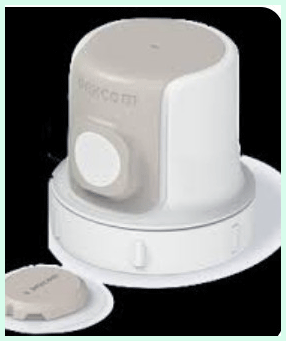
I started with the Stelo because I wanted to understand my glucose responses without jumping into a prescription device.
The first application felt straightforward—I pressed it on my arm, paired it to the app, and within minutes I had my first reading.
Over the weeks, I noticed how a late-night snack pushed my levels up more than expected, or how a morning walk leveled them out nicely.
The trends helped me tweak my coffee habit and add more protein to meals. Comfort-wise, it stayed put during runs and showers, with only minor itching once that faded quickly.
The lack of alerts didn’t bother me since my levels stay stable, but I appreciated the gentle phone notifications for spikes. Cost-wise, paying under $100 monthly felt reasonable for the insights gained. Compared to fingersticks, this gave me constant data without pain.
I switched sensors every 15 days or so, and the process became routine. Overall, it’s boosted my awareness of how daily choices affect energy and mood. If you’re not on insulin and just want better health tracking, it’s been a game-changer for me.
Pros Of Dexcom Stelo
- No prescription needed: I love that I can just order it online without doctor visits or paperwork; it makes trying CGM tech so much simpler for anyone curious about their glucose patterns.
- Lower cost barrier: At around $89 for a monthly subscription or $99 one-time for two sensors (covering 30 days), it’s way more affordable than prescription options, especially if insurance doesn’t cover CGM for non-insulin users.
- Longer sensor life per wear: Each sensor lasts up to 15 days with that handy 12-hour grace period, so I change it less often and get more consistent data stretches without interruptions.
- Super easy access for non-insulin folks: Designed specifically for adults not on insulin, it fits perfectly if I have type 2 diabetes managed by diet or oral meds, or even if I’m just tracking for health optimization.
- Painless and discreet application: The all-in-one sensor/transmitter is small, applies quickly to the back of my upper arm, and stays comfortable during daily activities like workouts or sleeping.
- Solid accuracy for its purpose: With a MARD around 8.3%, the readings feel reliable for spotting trends in how food, exercise, or stress affect my levels within the 70-250 mg/dL range it displays.
- Focus on actionable insights: The app gives me personalized tips on patterns, like how certain meals spike my glucose or how activity brings it down, without overwhelming me with medical jargon.
- HSA/FSA eligible: I can use pre-tax dollars, which stretches the value even further and makes ongoing use feel less like an expense.
- No calibration required: It starts up fast after a short warm-up, and I never have to prick my finger to calibrate, keeping things hassle-free.
- Bluetooth connectivity works well: It pairs smoothly with my phone for real-time updates every few minutes, and the data syncs reliably even if I step away briefly.
Cons Of Dexcom Stelo

- No urgent low or high alerts: Without alarms for dangerous lows or highs, it’s not safe if my levels could drop sharply or spike extremely, so I wouldn’t rely on it alone for insulin management.
- Limited glucose range visibility: It only shows readings from 70-250 mg/dL, so if my numbers go below 70 or above 250, it just says “low” or “high” without specifics, which frustrates me during unusual days.
- Not for insulin users: Officially intended for non-insulin folks, so if I ever start insulin therapy, I’d have to switch devices right away to get proper safety features.
- Fewer integrations: It doesn’t connect to insulin pumps, smartwatches for advanced sharing, or third-party apps as robustly as full CGMs, limiting customization.
- App is simpler but less comprehensive: While the insights are helpful, it lacks detailed reporting tools or Clarity software depth that I get with other Dexcom options for long-term analysis.
- Potential for fewer trend notifications: The focus on gentle nudges rather than constant alerts means I might miss subtle shifts if I’m not checking the app regularly.
- Availability can vary: As an over-the-counter product, stock sometimes runs low online, and not every retailer carries it yet.
- No pediatric use: Strictly for adults 18+, so families managing kids’ diabetes can’t consider it.
- Subscription commitment for best price: To get the $89 rate, I need to subscribe monthly, which locks me in unless I cancel.
- Less proven in extreme conditions: While accurate, it’s optimized for stable ranges, so in high-stress or illness scenarios, the capped display feels restrictive.
Also read: Comparison of Smart Mouth And Therabreath
Maintenance Tips For Dexcom Stelo
- Apply to clean, dry skin: I always wash my upper arm with soap and water, then dry it completely and avoid lotions before insertion to ensure the adhesive sticks all 15 days.
- Choose the right spot: The back of the upper arm gives the best comfort and accuracy for me; I avoid areas with scars, tattoos, or lots of movement like near the elbow.
- Warm up properly: After applying, I wait the full warm-up time (usually under an hour) before relying on readings, and I keep my phone nearby for initial pairing.
- Check adhesion daily: I gently press around the edges each morning and use overpatches if needed during sweaty activities to prevent early detachment.
- Store spares correctly: I keep extra sensors in a cool, dry place away from direct sunlight or extreme heat to maintain their performance.
- Update the app regularly: I make sure the Stelo app stays current on my phone for the latest features and bug fixes that improve connectivity.
- Remove gently: When it’s time to change, I peel the adhesive slowly while supporting the skin to avoid irritation, then clean the area with alcohol.
- Monitor for skin reactions: If redness appears, I rotate arms or use barrier films next time to prevent irritation from repeated use.
- Backup data if needed: The app stores trends, but I screenshot key patterns occasionally in case I switch phones.
- Pair only one sensor at a time: I deactivate the old one fully before starting a new sensor to avoid confusion in the app.
My Experience With Dexcom G7

I tried the G7 during a period when I needed more robust monitoring.
Setup required a prescription, but once approved, applying the smaller sensor was quick and less noticeable than older models.
The real-time readings covered a wide range, and the customizable alerts saved me during a low episode—I got warned early and treated it fast.
Sharing data with my doctor via Clarity reports made appointments more productive. Accuracy felt spot-on, even during exercise or illness.
The 10-day wear meant more frequent changes, but the grace period helped. Integrations with watches and pumps (if needed) added convenience.
Downsides included higher cost without full insurance and occasional connectivity hiccups. For serious diabetes management, the alerts and full visibility gave me confidence. It’s powerful, but overkill if I don’t need those safety nets.
Pros Of Dexcom G7
- Outstanding accuracy you can trust: With a MARD of around 8.2%, the G7 delivers readings that match my fingerstick results closely, giving me confidence even during rapid changes like after meals or exercise.
- Urgent low and high alerts save stress: I set customizable alarms for lows below 55 mg/dL or highs above 250 mg/dL, and those loud warnings have caught dangerous drops early, letting me treat them before feeling shaky.
- Wide glucose range visibility: It shows real numbers from 40 to 400 mg/dL without capping out or saying “low/high,” so I always know exactly where I stand, especially useful during illness or intense activity.
- Smaller and more discreet sensor: The all-in-one design is noticeably tinier and flatter than previous models, making it barely visible under clothing and comfortable for all-day wear, including sleep.
- Fast warm-up time: It starts providing data in about 30 minutes after application, which feels quick compared to older CGMs that took hours, so I get back to monitoring sooner.
- No fingerstick calibration needed: Once applied, it runs independently without any manual calibrations, saving me pokes and keeping the process simple.
- Strong app ecosystem and integrations: The Dexcom Follow feature lets family or friends see my numbers in real time, and it pairs smoothly with smartwatches, insulin pumps, and third-party apps for automated insulin delivery when I use compatible systems.
- 10-day wear with grace period: Each sensor reliably lasts the full 10 days plus an extra 12-hour window, reducing how often I need to change it and keeping data consistent.
- Advanced trend arrows and predictive insights: The arrows show direction and speed of change clearly, and the app offers pattern recognition that helps me spot recurring issues like dawn phenomenon or post-workout drops.
- Robust data sharing with healthcare providers: I export detailed Clarity reports straight from the app, which makes doctor visits more productive since they see weeks of precise trends instead of just A1C numbers.
- Improved adhesive performance: The patch sticks well through showers, swimming, and sweaty workouts for most people, with fewer reports of early lift-off compared to older versions.
- Works across age groups: Approved for ages 2 and up, it suits kids, teens, and adults, making it a family-friendly option if multiple people need monitoring.
Read more: Comparison of 2 Mucinex Fast Max And Mucinex DM
Cons Of Dexcom G7
- Higher ongoing cost: Without good insurance coverage, a month’s supply often runs $200–$400, which adds up quickly compared to over-the-counter alternatives that cost under $100.
- Prescription required: I need a doctor’s script to get it, involving appointments, prior authorizations, or pharmacy hassles that slow down the process of starting or restarting.
- Shorter sensor duration: At 10 days per sensor (plus grace), I change it more frequently than some competitors that last 14–15 days, meaning more applications and more chances for skin irritation over time.
- Occasional connectivity drops: Bluetooth can lag or disconnect briefly if my phone is too far or in a poor signal area, causing missed readings until it reconnects.
- Adhesive issues for some skin types: While better than before, the patch still irritates sensitive skin on certain people, leading to redness or itching that requires overpatches or rotation strategies.
- No over-the-counter availability: Unlike newer wellness-focused Dexcom products, I can’t just buy it online without paperwork, which limits quick access if I run out unexpectedly.
- App can feel overwhelming at first: The sheer number of customizable alerts, graphs, and settings sometimes makes it tricky to configure exactly right without spending time experimenting.
- Compression lows during sleep: Lying on the sensor arm can cause falsely low readings from pressure, a common CGM issue that still happens with the G7 and requires position adjustments.
- Limited grace period flexibility: The 12-hour extension helps, but if I forget to change it on time, I lose data until the new sensor warms up.
- Not ideal for very active or contact sports: The sensor can get knocked off more easily during rough play or heavy contact, even with extra tape.
Maintenance Tips For Dexcom G7
- Prep skin thoroughly before application: I wash the back of my upper arm with plain soap (no lotion or oil), dry it well, and wipe with an alcohol pad to remove residue for maximum adhesion.
- Apply in a low-movement area: I stick to the back or outer side of the upper arm, avoiding bony spots, scars, stretch marks, or areas near elbows that bend a lot.
- Wait the full warm-up: I resist checking readings until the 30-minute warm-up finishes, and I keep my phone close during that time to ensure smooth pairing.
- Use overpatches proactively: For workouts, swimming, or humid days, I add a breathable overpatch right after application to reinforce the edges and extend wear time.
- Rotate insertion sites: I switch arms each time and leave at least a few inches between old and new spots to give skin a break and reduce irritation buildup.
- Remove carefully: When changing sensors, I peel the adhesive back slowly while supporting the skin underneath, then clean the area with mild soap and water or adhesive remover.
- Store sensors properly: I keep unopened boxes at room temperature, away from direct sunlight, freezing, or hot cars to preserve sensor function.
- Keep the app updated: Regular updates fix bugs, improve connectivity, and add new features, so I check for them monthly.
- Monitor for skin reactions: If redness or rash appears, I pause use, apply a barrier film next time, or consult my doctor if irritation persists.
- Backup important data: I screenshot key patterns or export Clarity reports periodically in case of phone issues or app glitches.
- Test connectivity daily: I glance at the app first thing in the morning to confirm readings are flowing and alerts are active.
Comparison With Other Brands
- Vs FreeStyle Libre 3: The Libre 3 requires scanning sometimes in older versions, but the current one is continuous like Stelo; however, Stelo edges out with no scanning ever and better app insights, though Libre might have slightly lower cost in some markets.
- Vs Abbott Lingo: Lingo targets wellness users like Stelo, but Stelo uses Dexcom’s proven tech for higher accuracy (around 8.3% MARD vs Lingo’s reported higher variance), and I prefer Stelo’s interface for clearer trends.
- Vs Dexcom G6: The older G6 needs calibration occasionally and has a bulkier profile; Stelo feels more modern and compact, plus no prescription beats G6’s requirements.
- Vs Medtronic Guardian: Medtronic systems often need more setup and calibration; Stelo wins on simplicity and over-the-counter access, though Medtronic offers pump integration that Stelo lacks.
- Vs Eversense: Eversense is implantable for longer wear, but it’s prescription-only and involves a procedure; Stelo is far easier to start and remove myself without medical help.
- Vs other OTC options: Emerging wellness CGMs sometimes have shorter wear or less accurate sensors; Stelo stands out with Dexcom’s established reliability and 15-day duration.
- Vs prescription Dexcoms overall: Full systems like G7 provide alerts and broader ranges essential for insulin users, while Stelo prioritizes affordability and ease for non-critical monitoring.
Frequently Asked Questions (FAQ)
Stelo is over-the-counter for non-insulin users with no alerts and a 70-250 mg/dL range, while G7 is prescription-based for all diabetes types with full alerts and a 40-400 mg/dL range.
Stelo costs about $89 per month on subscription or $99 one-time for two sensors (30-day supply).
Stelo readings are highly accurate with a MARD of 8.3% and proven reliable for trend tracking in its intended range.
Conclusion: For Both Products
I’ve weighed the options carefully, and here’s my take: if you’re not on insulin and want an easy, affordable way to track glucose for better habits, go with the Stelo—it’s accessible and insightful. But if you manage diabetes with insulin or need urgent alerts and broader data, the G7 is the stronger choice for safety and control. You know your needs best—what matters most to you in daily monitoring? Pick the one that matches your routine, and you’ll get real value from either.