
I have spent countless hours with headsets clamped to my ears, ranging from budget bins to audiophile-grade gear, but few rivalries are as interesting as the internal battle between the SteelSeries Arctis Pro and its successor, the Nova Pro. My goal here is straightforward: I want to break down exactly how these two titans compare in the real world so you can decide if the shiny new model is worth the premium or if the classic still holds the crown. Whether you are a competitive gamer or a media enthusiast, this comparison is for you.
A Brief Comparison Table
| Feature | Arctis Pro Wireless | Arctis Nova Pro Wireless |
| Audio Drivers | 40mm Neodymium High-Res | 40mm High-Fidelity Gen 2 |
| Active Noise Cancellation | No | Yes (4-mic Hybrid ANC) |
| Battery System | Swappable Dual Battery | Swappable Dual Battery (Infinity Power) |
| Connectivity | 2.4GHz + Bluetooth 4.1 | 2.4GHz (Multi-System) + Bluetooth 5.0 |
| Microphone | ClearCast Bidirectional | ClearCast Gen 2 Retractable |
| Software | SteelSeries Engine | SteelSeries GG + Sonar |
| Charging Port | Micro-USB | USB-C |
| Build Material | Aluminum & Steel Alloy | Premium PVD-Coated Steel |
My Experience With Arctis Pro
When I first picked up the Arctis Pro years ago, it felt like a revelation in a market saturated with plastic, bass-heavy toys. The immediate thing that struck me was the ski-goggle headband. It was not just a design quirk; it was a functional masterpiece that distributed weight so perfectly I often forgot I was wearing it during marathon sessions.
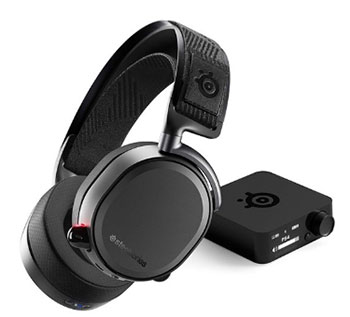
Using the GameDAC (in the wired version) or the transmitter box (wireless) gave me a sense of control that few other peripherals offered.
I loved being able to tweak my chat mix on the fly without Alt-Tabbing out of a tense match.
The audio profile was incredibly crisp, leaning towards treble and high-mids, which is exactly what I needed to hear footsteps in tactical shooters.
However, living with it revealed some cracks in the armor.
The micro-USB charging felt dated even when it was new, and I always had a lingering fear about the hinge durability, which felt a bit fragile when taking the headset off quickly.
Despite these minor gripes, it remained my daily driver for a very long time simply because the convenience of the swappable battery system in the wireless model was a total game-changer. I never plugged a headset in to charge for two years straight, and that kind of freedom is hard to give up.
Read More: Comparison Of Turtle Beach Stealth 700 Gen 2 And Gen 2 Max
Pros Of Arctis Pro
- Signature Ski-Goggle Suspension Band: This is arguably the most defining feature of the classic Arctis line. Unlike traditional headbands that use padding to cushion the crown of your head, this headset uses a woven elastic fabric that stretches across the frame. In my usage, this eliminated hot spots entirely. The weight distribution is unmatched, making the headset feel significantly lighter than it actually is. You can adjust the tension via velcro straps, allowing for a custom fit that accommodates different head shapes without the clamping force headache associated with other brands.
- Swappable Dual-Battery System: If you opt for the wireless version, this feature alone justifies the purchase price for many users. The base station charges a spare battery while you use the other one in the headset. When you hear the low battery beep, you simply swap them out in less than 20 seconds and get back to the action. I found this effectively gave me “infinite” battery life. There is no downtime, no tethering yourself to a cable mid-game, and no worrying about whether you remembered to dock it overnight. It solves the biggest pain point of wireless gaming audio.
- Hi-Res Audio Certification: The Arctis Pro was the first gaming headset to receive the coveted Hi-Res Audio certification. This means it is capable of reproducing frequencies up to 40,000 Hz, which is double the range of standard headsets (20,000 Hz). While human hearing caps out lower than that, this headroom ensures that the audio within the audible range is produced with zero distortion and incredible clarity. When listening to lossless music or playing games with high-fidelity sound design, the soundstage feels expansive and airy, allowing for precise imaging of where sounds are coming from.
- Dedicated GameDAC Or Transmitter Base: Whether you go wired or wireless, having a physical interface on your desk is incredibly useful. The OLED screen on the transmitter allows you to adjust equalization settings, surround sound toggles, and ChatMix (balancing game and voice audio) without installing software on every PC you use. I found this particularly helpful when switching between a console and a PC. You can see your volume levels, battery status, and input source at a glance, which keeps you immersed in your setup rather than fumbling through Windows menus.
- ClearCast Bidirectional Microphone: The microphone design on the Arctis Pro mimics the bidirectional pattern used by aircraft carrier deck crews. This provides excellent noise cancellation by rejecting background noise from the sides and back of the mic. In my testing, it did a fantastic job of isolating my voice from the click-clack of my mechanical keyboard. While it might not replace a dedicated XLR microphone for professional streaming, it is widely considered one of the best integrated microphones in the gaming headset market for clear, natural-sounding voice comms.
Cons Of Arctis Pro
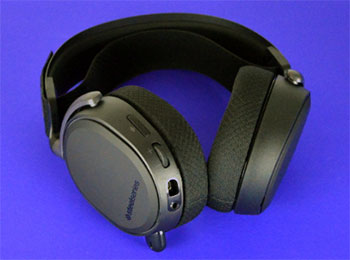
- Fragile Hinge Points: One of the most significant drawbacks I encountered, and one that is well-documented in the community, is the potential for failure at the ear cup hinges. The connection point between the metal arm and the plastic ear cup housing can develop stress cracks over time. I had to be very careful not to pull the headset too wide when putting it on or taking it off. For a premium product with a high price tag, having to baby the hardware to prevent structural failure is a major downside that detracts from the otherwise premium build quality.
- Dated Micro-USB Connectivity: In a world where almost every device has moved to USB-C, the Arctis Pro sticks out like a sore thumb with its Micro-USB charging and connection ports. This means you have to keep a specific legacy cable on your desk just for this headset. It feels clunky and inconvenient, especially if you are traveling and want to minimize the number of cables you carry. The connection is also directional and less durable than USB-C, making it feel like a relic of the past compared to modern peripherals.
- Lack of Active Noise Cancellation (ANC): While the passive noise isolation provided by the ear cushions is decent, the Arctis Pro lacks Active Noise Cancellation. If you are gaming in a noisy environment—perhaps with a fan running, a loud PC tower, or roommates talking nearby—you will hear it. The Airweave fabric ear cushions, while breathable and cool, are porous and let more sound in than leatherette options. This limits the immersion factor if you cannot control the ambient noise in your room.
- Proprietary Cables and Connections: The wired connections on the Arctis Pro often rely on SteelSeries’ proprietary 8-pin connector rather than a standard 3.5mm jack at the headset end (though an adapter is included). This makes replacing a damaged cable much more annoying than it should be. You cannot just grab a generic aux cable from a drawer; you have to order a specific replacement part from the manufacturer. This proprietary nature extends to the mobile audio cable as well, adding a layer of frustration to long-term ownership.
- Bass Response Can Feel Lacking: Out of the box, the Arctis Pro has a very “flat” and neutral sound signature. While audiophiles might appreciate this accuracy, casual gamers who love the rumble of explosions or the deep thrum of an engine might find it underwhelming. I often had to tinker with the EQ settings significantly to get the bass to a level that felt impactful for cinematic single-player games. It does not have the visceral “thump” that some competitors offer, which can make action sequences feel slightly less intense without software modification.
My Experience With Arctis Nova Pro
Transitioning to the Arctis Nova Pro felt like stepping into the future. The design language has shifted completely; it looks less like a piece of gamer gear and more like a high-end pair of lifestyle headphones you could wear in public without getting strange looks. The build quality feels denser and more refined.
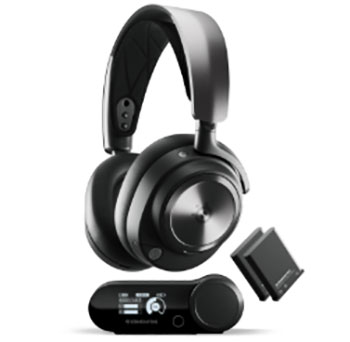
The biggest shock to my system was the Active Noise Cancellation (ANC).
Activating it for the first time while my air conditioner was blasting was magical—the hum just vanished.
It allows me to keep the volume lower, which is better for my hearing in the long run.
I also appreciated the update to the base station; having two USB-C inputs meant I could finally have my PC and PlayStation 5 connected simultaneously and switch between them with a button press.
However, it was not all smooth sailing.
The new “Sonar” software is powerful but intimidatingly complex. I spent the first two hours just messing with parametric EQs trying to get the sound “just right,” whereas the older model felt simpler to plug and play. Also, the leatherette ear cups, while great for isolation, definitely made my ears warmer than the breathable fabric of the original Pro. Despite that, the Nova Pro feels like a definitive evolution, addressing almost every gripe I had with the predecessor.
Pros Of Arctis Nova Pro
- Active Noise Cancellation (ANC): This is the headline feature that separates the Nova Pro from its predecessor. The inclusion of a 4-mic hybrid ANC system allows the headset to actively counter external noise. In my experience, this is transformative for immersion. It cuts out the low-frequency hum of computer fans and distant traffic, creating a “bubble” of silence. It also features a Transparency Mode, which uses the mics to pipe outside sound in, letting you hear a conversation or a doorbell without removing the headset. This versatility makes it functional for both intense gaming and casual office work.
- Dual USB-C Multi-System Connect: SteelSeries redesigned the base station to include two dedicated USB-C ports on the back. This allows you to connect two different platforms—like a PC and a PS5, or a PC and a Nintendo Switch—at the same time. You can toggle between them instantly using the knob on the base station. I found this incredibly convenient as it eliminated the need to constantly swap cables behind my desk. It serves as a central audio hub for your entire entertainment setup, streamlining the workflow for multi-platform gamers.
- Infinity Power System (Updated): The Nova Pro retains the beloved swappable battery system but refines it. The battery is hidden behind a magnetic plate on the ear cup, making it easy to access. Just like the original, this feature ensures you are never tethered to a charging cable. The peace of mind this offers cannot be overstated. Knowing you have a fully charged battery waiting in the base station at all times changes how you use the device; you stop worrying about battery life percentages entirely and just focus on the game.
- Sonar Audio Software Suite: With the Nova Pro, SteelSeries introduced Sonar, a parametric EQ software that offers an absurd level of control. You can adjust specific frequencies with surgical precision to highlight footsteps, reloads, or bomb plants. It also separates audio streams into Game, Chat, and Microphone channels, giving you a digital mixer right on your PC. I found the spatial audio presets particularly impressive, offering a 360-degree soundscape that felt more accurate than standard 7.1 surround sound implementations.
- Fully Retractable, Flush Microphone: The design of the microphone has been completely overhauled. On the Nova Pro, the mic retracts fully into the ear cup so that it sits flush with the chassis. When retracted, the headset looks like a sleek pair of audiophile headphones. This is a massive aesthetic upgrade over the older model where the mic always protruded slightly. The quality of the mic has also seen a bump, with better background noise rejection and clearer vocal capture, aided by AI noise cancellation features in the software.
Cons Of Arctis Nova Pro
- ANC Nub Inside The Ear Cup: This is a surprisingly common complaint that I also experienced. Inside the ear cup, there is a small protruding component related to the Active Noise Cancellation hardware. For users with larger ears or ears that sit flush against the driver, this nub can press against the cartilage, causing discomfort or pain after an hour or so. It is a baffling design oversight in an otherwise comfortable headset. I had to adjust the headset positioning frequently to avoid this pressure point, which is not ideal for long sessions.
- Steep Price Point: The Nova Pro is undeniably expensive. It sits at the very top of the gaming headset price bracket. While you get a lot of features for the money, the cost of entry is prohibitive for many gamers. When you consider that you can buy a decent gaming console for the price of this headset, it becomes a serious investment. You really have to need the specific combination of ANC, wireless freedom, and dual-battery swapping to justify the cost over mid-range competitors that offer 90% of the performance for half the price.
- Leatherette Ear Cups Retain Heat: To make the ANC work effectively, SteelSeries switched from the breathable Airweave fabric to a leatherette material to create a better seal. While this is great for sound isolation and bass response, it is terrible for heat management. During intense summer gaming sessions, I found my ears getting sweaty much faster than they did with the Arctis Pro. If you live in a hot climate or run warm, this material change might feel like a downgrade in terms of physical comfort.
- Software Complexity: While Sonar is powerful, it can be overwhelming. Upon installing the software, you are greeted with multiple virtual audio devices in Windows (Game, Chat, Media, Aux, Mic), which can confuse your system settings. I had moments where Discord would default to the wrong input, or my game audio would cut out because the output device switched automatically. It requires a bit of technical know-how to configure correctly, and for someone who just wants to “plug and play,” the setup process can be frustratingly intricate.
- Base Station Screen Burn-In Risk: The OLED screen on the base station is functional and looks great, but it is prone to burn-in if left on high brightness with static text for years. While there are settings to dim the screen or turn it off, out of the box, it stays on. I found myself obsessively checking the dimming settings to ensure I was not damaging the display. It is a small anxiety to have with a piece of hardware, but for a premium product, you would hope for a screen technology that is more resilient to constant use.
Also Read: Comparison Of Turtle Beach And HyperX Headsets
Frequently Asked Questions (FAQ)
The Nova Pro is objectively better in terms of features, offering ANC, USB-C, and updated drivers, but the Arctis Pro remains a viable, cheaper option if you prefer the ski-goggle comfort and do not need noise cancellation.
SteelSeries does not manufacture a headset called the “Arctis Elite.” You are likely comparing it to the older Arctis Pro or perhaps a competitor’s “Elite” model. Against the Arctis Pro, the Nova Pro Wireless is the superior, more modern headset.
The Arctis Nova Pro Wireless currently holds the title for the best sound quality in their lineup, thanks to the Premium High Fidelity Drivers and the extensive customization available through the Sonar audio suite.
FaZe Clan has had partnerships with SteelSeries, and many of their members have been seen using the Arctis Nova Pro Wireless for its competitive features like the specific footstep-enhancing EQ settings.
Conclusion
After spending substantial time with both headsets, the verdict depends on what you value most in your setup. If you are currently using the Arctis Pro, I do not think you need to rush out and upgrade immediately unless you are desperate for Active Noise Cancellation or need to connect a PS5 and PC simultaneously. Your current headset is still a beast with excellent audio and that unbeatable battery system.
However, if you are buying new today, or if your old headset is falling apart, the Arctis Nova Pro is the clear winner. The addition of ANC, the modernization to USB-C, and the sheer power of the Sonar software make it the most complete gaming audio package on the market. It is expensive, yes, but it is an investment that pays off every time you swap that battery and keep playing while your friends are looking for charging cables.