
If you spend eight to twelve hours a day glued to a desk, you know that back pain isn’t just a minor annoyance; it is a productivity killer that slowly drains your energy and focus. We have all been there, shifting uncomfortably in a cheap “ergonomic” chair bought from a big-box store, trying to find a position that doesn’t make our lower back scream by 2:00 PM. In the quest for the ultimate office throne, one name consistently rises to the top of every Reddit thread and expert review: the Steelcase Leap V2. It is often hailed as the gold standard of modern seating, promising to adapt to your body like a second skin.
In this review, I am going to strip away the marketing jargon and give you an honest, detailed breakdown of what it is actually like to live with this chair. I will cover everything from the “LiveBack” technology to the controversial seat cushion thickness, helping you decide if this investment is the cure for your office woes. If you are looking to buy, my best advice is to look for a reputable refurbished dealer like Crandall Office or BTOD if you are on a budget, as you can get a like-new chair for half the price; otherwise, buying new directly from Steelcase ensures you get their legendary 12-year warranty without hassle.
My Experience With Steelcase Leap V2
I came to the Steelcase Leap V2 after years of destroying my posture in a racing-style gaming chair. Like many people, I fell for the flashy aesthetics of the bucket seat design, not realizing that what keeps you secure in a drift car is terrible for typing a report. My lower back was constantly tight, my shoulders were rolled forward, and I found myself needing to stand up every hour just to reset my spine. I knew I needed a change, but the price tag of a new Leap V2 made me hesitate for months. Finally, after a particularly grueling week of deadlines and back spasms, I pulled the trigger on a fully loaded model.
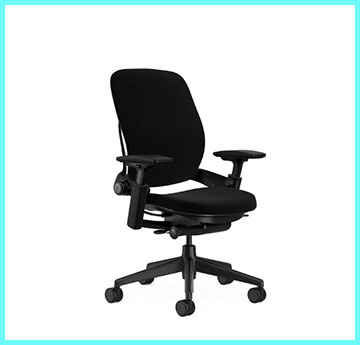
When the chair arrived, the first thing that struck me was the weight.
This is not a flimsy piece of plastic furniture; it feels like a tank. It arrived fully assembled, which was a massive relief.
I wheeled it into my office, and my first sit was… underwhelming.
This is something people don’t talk about enough.
The seat didn’t feel like a plush cloud; it felt firm, almost surprisingly thin.
I remember thinking, “Did I just spend a fortune on a brick?” But I had read enough reviews to know that “cushy” often equals “bad posture,” so I committed to giving it a fair shake.
The magic started happening once I began dialing in the adjustments. This isn’t a chair you just sit in; it is a machine you calibrate. I spent the first two days tweaking the “Lower Back Firmness” knob and the seat depth. The moment of clarity came around day three. I realized that for the first time in years, I hadn’t thought about my back for four straight hours. The “LiveBack” technology, which sounds like a gimmick, actually works. As I leaned back to take a phone call, the spine of the chair shifted with me, maintaining support exactly where I needed it without me slipping out of the sweet spot.
One feature I became obsessed with was the 4D armrests. In my old chair, my elbows were always hovering or resting at weird angles. With the Leap V2, I could slide the arms in, back, and pivot them inward. This meant I could bring the armrests close to my body while typing, supporting my forearms completely and taking the strain off my trapezius muscles. It changed the way I interacted with my keyboard. I wasn’t reaching anymore; I was resting.
However, it wasn’t all sunshine and rainbows. The seat cushion, while supportive, is definitely on the firmer side. On days where I sat for 10+ hours, I noticed a bit of “bottoming out” feeling near my tailbone. It wasn’t painful, but it wasn’t luxurious either. I also found the aesthetics to be extremely boring. It looks like standard office furniture—functional, safe, and completely devoid of personality. It disappears into a room rather than making a statement.
After six months of daily use, I can confidently say this chair ruined other chairs for me. When I have to sit in a generic conference room chair now, I feel the lack of lumbar support instantly. The Leap V2 didn’t “cure” my back problems magically, but it stopped the chair from being the cause of them. It became a tool that allowed me to work longer and harder without paying the physical price the next morning.
Read More: My Thoughts on Blacklyte Chair
Pros Of Steelcase Leap V2
When you analyze why the Leap V2 has held the title of “best office chair” for over a decade, it comes down to engineering that prioritizes function over form. Here are the specific benefits that make this chair a powerhouse.
- Unrivaled Adjustability For All Body Types: The strongest selling point of the Leap V2 is that it fits almost everyone. Most chairs have a “sweet spot” for people of a certain height or weight, but the Leap is a shapeshifter. The seat depth adjustment allows you to slide the seat pan forward or backward, ensuring that whether you are 5’2″ or 6’4″, you can get the edge of the seat to hit the back of your knees perfectly (leaving that crucial 2-3 inch gap). The flexible seat edge also relieves pressure on your thighs, preventing that “dead leg” feeling during long sessions. You aren’t forcing your body to fit the chair; you are forcing the chair to fit your body.
- The Legendary 4D Armrests: I cannot overstate how good the armrests are on this chair; they are widely considered the best in the industry. They move in four directions: up/down, forward/back, side-to-side (width), and they pivot diagonally. The pivot function is the game changer for anyone who types on a keyboard or uses a smartphone. You can angle the armrests inward to support your forearms while your hands are close together on a keyboard, keeping your shoulders in a neutral, relaxed position. The mechanism is sturdy yet fluid, holding its position without locking, allowing you to micro-adjust effortlessly throughout the day.
- LiveBack Technology and Lumbar Support: The backrest is designed to mimic the natural shape and movement of the human spine. Instead of a rigid board, the back of the Leap V2 is composed of slats and a flexible frame that changes shape as you recline. If you lean back, the lower spine of the chair pushes forward to fill the gap in your lumbar curve, ensuring you never lose support. Additionally, the “Lower Back Firmness” knob allows you to control exactly how much resistance the lower lumbar region gives you. This active support system means you are supported dynamically, whether you are sitting upright in focus mode or reclining in deep thought.
- Built Like A Tank With A Warranty To Match: The build quality of the Steelcase Leap V2 is industrial-grade. It is heavy, utilizing metal and high-quality plastics that don’t creak or wobble even after years of use. This durability is backed by one of the best warranties in the business: 12 years on parts and labor, and a lifetime warranty on the frame for the original owner. This includes the gas cylinder, casters, and mechanisms, which are usually the first things to break on cheaper chairs. When you buy this chair, you are effectively buying a piece of furniture that is guaranteed to last you over a decade, making the high upfront cost much more palatable over time.
Cons Of Steelcase Leap V2
Despite its legendary status, the Leap V2 is not perfect. There are specific design choices that might be deal-breakers for certain users, especially those expecting a specific type of comfort.
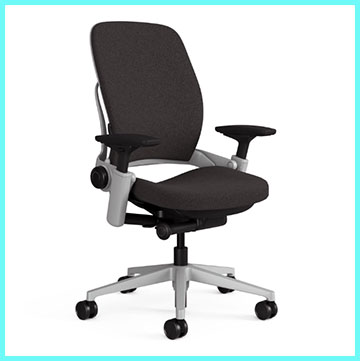
- The Seat Cushion Is Divisive: If you are looking for a plush, sink-in, La-Z-Boy style experience, you will hate this seat. The cushion on the Leap V2 is intentionally thin and firm, designed for ergonomics rather than immediate comfort. Steelcase engineers believe that too much foam creates pressure points and heat buildup, but some users find the padding insufficient for all-day sitting. For heavier users or those with less natural padding on their backside, this can lead to a sensation of “bottoming out” where it feels like you are sitting on the hard plastic pan beneath the foam. It requires an adjustment period that some people simply never get past.
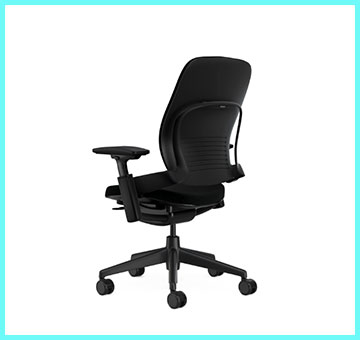
- Boring, Corporate Aesthetics: Let’s be honest: the Leap V2 looks like it belongs in a cubicle farm in 2005. It lacks the futuristic, sci-fi appeal of the Herman Miller Embody or the sleek, modern lines of the Steelcase Gesture. The plastic back shell creates a visual “bulk” that can dominate a small home office. While you can spice it up with different fabric colors, the silhouette is undeniably utilitarian. If you care about the interior design of your workspace and want a chair that looks like a piece of art, the Leap V2 is likely to disappoint you aesthetically.
- The Headrest Is An Afterthought: Unlike the chair itself, the optional headrest for the Leap V2 feels poorly designed and clunky. It is often described as flimsy and lacking the range of adjustment needed to be truly useful. Many users complain that it pushes their head too far forward, ruining their neck posture rather than supporting it. Because it is not integrated into the frame design like on the Gesture, it looks and feels like a cheap add-on. Most ergonomic experts recommend buying the chair without the headrest, which is a shame for those who like to recline fully and nap.
- The Recline Mechanism Isn’t Smooth For Everyone: The Leap V2 uses a “sticky” recline mechanism, meaning it doesn’t rock back and forth freely like a rocking chair. When you recline, the seat pan slides forward while the back tilts back (a mechanism called synchro-tilt). While this is ergonomically superior for keeping your eyes on the screen, some users miss the effortless “rocking” sensation found in mesh chairs like the Aeron. The tension knob can be hard to dial in perfectly; sometimes it feels too loose, and you fall back, or too tight, and you have to push hard to recline. It forces you into a specific way of moving that might feel unnatural if you are used to standard office chairs.
Maintenance Tips For Steelcase Leap V2
Because this is a high-performance machine with moving parts, you cannot just ignore it for five years and expect it to work perfectly. A little maintenance goes a long way in preserving your investment.
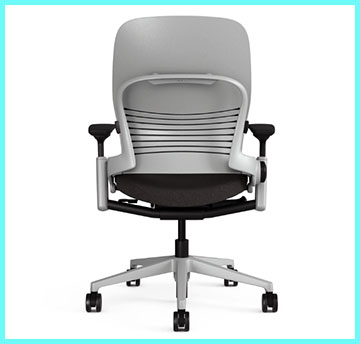
- Cleaning The Fabric Upholstery: The fabric on the Leap V2 is durable, but it acts like a sponge for dust, skin cells, and crumbs. You should vacuum the seat and backrest at least once a month using an upholstery attachment. For stains, use a water-based cleaner or a mild soap solution (like a drop of dish soap in warm water). Dab the stain gently; do not scrub aggressively, as this can pill the fabric. If you bought a refurbished chair, consider renting a steam cleaner once a year to deep clean the foam and fabric, which revives the cushion’s loft and kills bacteria.
- Lubricating The Gas Cylinder: Over time, the gas cylinder that controls the height adjustment might start to squeak or become stiff. If you hear a groaning noise when you sit down, it is time to lubricate. Extend the chair to its maximum height to expose the piston. Wipe off any old grease and dust with a paper towel. Apply a small amount of silicone-based lubricant (like WD-40 Specialist Silicone, not regular WD-40) to the metal piston. Run the chair up and down a few times to distribute the lubricant evenly, which should silence any noise and make the action smooth again.
- Tightening The Armrest Screws: The armrests are the most manipulated part of the chair and can loosen over time. If your armrests start to feel wobbly or rattle excessively, check the screws underneath the arm caps. You may need a Torx screwdriver or a standard Phillips head, depending on the manufacturing year. Tighten these screws gently; do not overtighten, as you can crack the plastic housing. Checking these every six months ensures the arms stay rigid and supportive.
- Caster Care And Replacement: The wheels (casters) are the primary contact point with your floor and pick up a lot of hair and debris. Flip the chair over and inspect the axles of the wheels. Use a pair of tweezers or a seam ripper to pull out any hair or carpet fibers wrapped around the axle, as this buildup prevents the wheels from rolling smoothly. If you are using the chair on a hardwood floor, I highly recommend replacing the standard plastic casters with “rollerblade style” rubber wheels. These protect your floor from scratches and make the chair roll silently and effortlessly.
Comparison with Other Brands
The Steelcase Leap V2 sits at the top of the food chain, but it has fierce rivals. Understanding how it differs from the competition is crucial for making the right choice.
- Herman Miller Aeron: This is the other “king” of office chairs, famous for its mesh design. Comparison: The Aeron is a mesh chair, meaning you sit “in” it, suspended by the material, whereas the Leap is a foam chair you sit “on.” The Aeron is much more polarizing; the hard plastic frame of the seat can dig into your thighs if you are too wide or like to sit cross-legged. The Leap allows for any sitting position, including cross-legged, because of its flat foam seat. The Aeron keeps you cooler because of the airflow, making it better for hot climates. However, the Aeron forces you into “perfect” posture and punishes you for slouching, while the Leap moves with you and supports you even if your posture isn’t perfect. Choose Aeron for breathability and strict posture; choose Leap for flexibility and all-day comfort in various positions.
- Steelcase Gesture: The Gesture is the newer, more modern sibling of the Leap. Comparison: The Gesture was designed specifically for modern technology use (tablets, phones). Its armrests are superior to the Leap’s, offering a massive 360-degree range of motion that mimics the human arm. However, the Gesture’s lumbar support is less aggressive and less adjustable than the Leap’s. The back of the Gesture is more rigid and doesn’t have the same independent upper/lower back controls as the Leap. Many users find the Leap V2 more comfortable for strict computer work due to the better back support, while the Gesture looks better and has better arms. The Gesture is also typically more expensive.
- Herman Miller Embody: The Embody is the “spare no expense” option with a futuristic, alien-spine design. Comparison: The Embody uses a pixelated support system that distributes weight incredibly well, feeling entirely different from the Leap’s foam. The Embody has a taller back, which some tall users prefer, but it lacks the depth-adjustable lumbar support of the Leap. The arms on the Embody are its weak point; they only go up/down and in/out, lacking the pivot and depth of the Leap’s 4D arms. The Embody encourages movement even more than the Leap but comes with a squeaky frame that can be annoying. If you have an unlimited budget and want the “best” back feel, Embody is a contender, but the Leap V2 offers a more complete ergonomic package (better arms, better lumbar control) for a lower price.
Read More: My Thoughts on Edward Creation Lift Chair
Frequently Asked Questions (FAQ)
The adjustment process is the same regardless of gender, but focusing on the seat depth is key. Sit with your hips pushed all the way back into the chair. Adjust the seat depth lever (under the left side of the seat) so there is a 2-3 inch gap between the edge of the seat and the back of your knees. Adjust the “Lower Back Firmness” knob (right side, back) until you feel firm pressure in your lumbar curve without it digging in. Set the armrest height so your shoulders are relaxed and not hunched up toward your ears.
Absolutely, and for most people, it is the smarter financial choice. New Leap V2s cost upwards of $1,200, while reputable refurbishers like Crandall Office or BTOD sell them for $500-$600. These companies strip the chairs down, replace the fabric, the gas cylinder, and the arm pads, and offer their own warranties (often 12 years). You are essentially getting a brand-new chair functionality-wise for half the price, with the only downside being potential minor scuffs on the plastic frame.
The V1 is the older model (produced until roughly 2006) and the V2 is the current model. The V2 has a more streamlined, thinner backrest and a more flexible seat edge. The armrests on the V2 were upgraded to have more range of motion (4D). The V1 feels “puffier” and has thicker padding, which some people actually prefer, but the V2 offers better ergonomic support and updated technology. Parts for the V1 are becoming harder to find, making the V2 the safer long-term buy.
While no chair can medically “cure” back pain, the Leap V2 is specifically designed to reduce the strain that causes it. The “LiveBack” system ensures your lumbar spine is supported throughout your entire range of motion, preventing the slouching that compresses discs. The ability to control the firmness of the lower back support allows you to customize the pressure to your specific pain points. Many users report a significant reduction in sciatica and lumbar fatigue after switching to this chair.
Conclusion
The Steelcase Leap V2 is not just a chair; it is a piece of essential equipment for the modern knowledge worker. It lacks the visual flair of a gaming chair or the status symbol appeal of the Aeron, but it makes up for it with relentless, uncompromising performance. It is a chair that understands how the human body moves and supports it through every shift, lean, and recline of a long workday.
If you are tired of finishing your day with a stiff back and aching shoulders, the Leap V2 is arguably the safest and most effective investment you can make. Whether you buy it new or save money with a refurbished unit, your spine will thank you. It is the kind of product that you stop noticing after a while because it just works, allowing you to focus on your work rather than your discomfort.