
If your home theater setup needs a serious audio upgrade that delivers immersive cinema sound without cluttering your room or requiring complex wiring, you should absolutely get the Sony Bravia Theatre Bar 8 today. This Dolby Atmos soundbar with 11 built-in speakers, 360 Spatial Sound Mapping, and seamless integration with Sony TVs creates a wide, theater-like experience that’s clear, dynamic, and room-filling. It’s elegant, easy to set up, and transforms movies, shows, and music into something you feel as much as hear—once you experience it, you’ll never go back to TV speakers or basic bars.
My Experience With Sony Bravia Theatre Bar 8
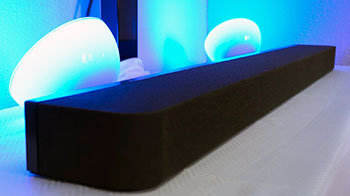
I upgraded to the Sony Bravia Theatre Bar 8 after years of settling for my TV’s built-in audio, which sounded tinny and flat no matter how many “enhancement” settings I tweaked.
My living room has a 65-inch Sony Bravia OLED, so pairing it with a Sony soundbar felt like a natural fit for Acoustic Center Sync and other ecosystem perks.
The bar arrived well-packaged, sleek black design that blends under the TV without dominating the space. Setup took minutes: HDMI eARC connection, power on, and the Bravia TV auto-detected it—boom, ready to go with no app wrestling or firmware headaches.
The first movie test was a Dolby Atmos title. I hit play on a favorite action scene, and the difference hit immediately.
Sound wrapped around the room thanks to the 360 Spatial Sound Mapping—the bar creates phantom speakers virtually, so effects panned from side to side and overhead without actual surrounds.
Explosions had weight, dialogue stayed crisp in the center channel, and ambient details like rain or footsteps felt placed precisely. No muddiness; everything stayed separated and clear. I sat in different spots on the couch, and the sweet spot was impressively wide—my partner on the far end still got the full immersion.
Music playback surprised me positively. Streaming tracks via Bluetooth or the TV’s apps, the bar handled genres well—bass had punch without boominess (though adding the optional sub would deepen it more), mids were natural for vocals, and highs didn’t fatigue.
I streamed playlists during dinner parties, and guests commented on how “alive” the room sounded. For gaming, the low-latency mode worked great; no noticeable lag in fast-paced titles.
Over months of daily use, reliability shone. No dropouts via eARC, consistent performance across streaming services, Netflix Atmos content, and even casual YouTube. The bar stays cool during long sessions, no distortion at high volumes in my medium-sized room. Voice enhancement mode clarified dialogue in mumbling movies without sounding artificial.
The remote is simple—dedicated buttons for sound modes, volume, and input switching. Analytically, it’s not the absolute widest soundstage I’ve heard (adding rears elevates it hugely), but standalone it’s among the best single-bar Atmos experiences. Minor quirks: occasional need to recalibrate room mapping if furniture moves, and the bar’s height might require a slight TV lift for perfect alignment.
But overall, it’s elevated my viewing routine—movie nights feel special again, music fills the space better, and I rarely crank the TV volume anymore. If you’re pairing with a Bravia TV, the synergy is unbeatable; even without, the performance stands strong.
Read More: My Experience with Boox Note Max
Pros Of Sony Bravia Theatre Bar 8
- Immersive 360 Spatial Sound Mapping: The technology creates virtual phantom speakers around the room using 11 built-in drivers, delivering wide, convincing surround and height effects for Dolby Atmos content without needing physical rears—great for cinematic immersion in movies and shows.
- Clear And Balanced Sound Quality: Dialogue stays crisp and centered thanks to dedicated center channel and voice enhancement, while the overall tuning avoids harshness—bass has good impact, mids natural, highs detailed for a well-rounded listen across content types.
- Seamless Integration With Sony TVs: Acoustic Center Sync aligns sound from the TV and bar perfectly, plus features like auto-calibration and eARC make setup effortless and enhance performance when paired with Bravia models.
- Elegant And Compact Design: Slim profile with premium build fits neatly under most TVs, looks modern and unobtrusive in any living room without taking up extra space or clashing with decor.
- Strong Dolby Atmos And DTS:X Support: Handles object-based audio formats excellently, with height channels adding overhead effects that make rain, helicopters, or flyovers feel genuinely above you for more engaging viewing.
- Easy Setup And Connectivity: HDMI eARC, Bluetooth, Wi-Fi streaming, and simple remote control get you up and running quickly—supports multiple inputs and works with voice assistants for hands-free operation.
- Room-Filling Volume Without Distortion: Pushes impressive levels in medium rooms while staying clean, so you can enjoy dynamic action scenes or loud music without compression or strain.
- Useful Sound Modes And Adjustments: Modes like cinema, music, night (compressed for late viewing), and voice zoom tailor the experience to content or time of day without complicated menus.
- Reliable Long-Term Performance: Users report consistent operation over extended use, with no frequent dropouts or overheating issues when properly ventilated.
- Expandable System: Add optional subwoofer and rear speakers for even fuller surround, giving upgrade path while performing strongly as a standalone bar.
These strengths make it a standout for anyone wanting premium home theater sound without a full multi-speaker setup.
Cons Of Sony Bravia Theatre Bar 8
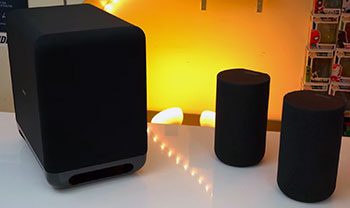
- Bass Could Be Deeper Standalone: Without the optional subwoofer, low-end lacks the rumble some expect for explosive movies or bass-heavy music—it’s punchy but not room-shaking on its own.
- High Price Point: At premium pricing, it costs more than many comparable bars, so if you’re on a budget or don’t need the spatial mapping tech, alternatives might offer better value.
- Soundstage Width Varies By Room: In smaller or oddly shaped spaces, the virtual surround can feel less expansive, and optimal placement is key for best results.
- No Built-In Chromecast Or AirPlay In Some Regions: Connectivity relies on TV passthrough or Bluetooth for some streaming, which can limit direct wireless options compared to competitors.
- Occasional Calibration Tweaks Needed: Room mapping might require re-running if furniture shifts significantly, and some users adjust EQ manually for perfect balance.
- Dialogue Can Feel Slightly Forward: In some content, voices emphasize clarity over warmth, which might sound analytical rather than natural to some ears.
- Limited Physical Inputs: Mainly HDMI eARC focused, so multiple wired sources need switching via TV.
- Expansion Adds Cost: Full potential with rears and sub pushes total spend higher, making standalone feel incomplete for surround enthusiasts.
These issues are typical for high-end single bars but worth considering based on your setup and priorities.
Maintenance Tips For Sony Bravia Theatre Bar 8

- Keep It Dust-Free Regularly: Wipe the top grille and sides weekly with a soft, dry microfiber cloth to prevent dust buildup that can muffle sound—avoid liquids or abrasive cleaners that could damage the finish.
- Ensure Proper Ventilation: Position with at least a few inches clearance around sides and back—avoid enclosing in tight cabinets to prevent overheating during long sessions.
- Clean Connections Periodically: Gently wipe HDMI and power ports with a dry cloth to remove lint or oxidation—check cables for wear and reseat them monthly for reliable eARC performance.
- Run Calibration When Needed: Re-run 360 Spatial Sound Mapping in the app or TV menu after moving furniture or speakers to optimize virtual placement and sound accuracy.
- Update Firmware Frequently: Check for software updates through the TV or Sony app every few months—new versions often improve sound tuning, fix bugs, and add features.
- Control Volume Levels: Avoid max volume for extended periods to prevent driver strain—use night mode for late viewing to reduce overall output while preserving dynamics.
- Store Remotes And Accessories Safely: Keep the remote in a consistent spot and protect the bar from direct sunlight to avoid fading or heat damage over time.
- Monitor For Firmware Compatibility: If adding optional sub or rears later, ensure all components are on latest firmware for seamless wireless pairing and performance.
- Clean Grille Carefully: Use compressed air or a soft brush for deeper grille cleaning every few months to maintain airflow and prevent muffled highs.
- Power Cycle Occasionally: Unplug for a minute every month or so to reset internal electronics and resolve any minor glitches.
These simple steps keep the bar sounding its best and lasting longer with little ongoing effort.
Comparison With Other Brands
Versus Bose Smart Ultra Soundbar: Bose emphasizes a wide, immersive soundstage with strong voice clarity and smart features like Alexa integration in a stylish, compact bar. The Sony Bravia Theatre Bar 8 counters with more built-in speakers (11 vs Bose’s setup), superior 360 Spatial Sound Mapping for precise phantom surrounds, and better Dolby Atmos height effects—making it feel more cinematic in larger rooms, though Bose might edge out for simpler music playback and easier multi-room use.
Versus Sonos Arc Or Beam Series: Sonos excels in ecosystem integration, true multi-room audio, and app-based EQ customization with clean, balanced sound. Sony’s Bar 8 delivers more powerful, room-filling output with dedicated height channels and native 360 mapping that creates a wider virtual surround standalone—ideal for movie-focused users—while Sonos wins for seamless streaming and voice assistant support.
Versus Samsung HW-Q Series Soundbars: Samsung bars often include wireless subwoofers standard and Q-Symphony for TV-speaker synergy. The Sony stands out with its spatial mapping tech for more accurate placement of effects without sub dependency, plus cleaner dialogue handling—though Samsung might offer punchier bass out of box and better gaming low-latency modes.
Versus LG Soundbars With Dolby Atmos: LG models focus on Meridian tuning for musicality and AI room calibration. Sony’s Bar 8 provides stronger virtual height and surround immersion through its speaker array and mapping, creating a more theater-like bubble—better for Atmos movies—while LG appeals more for balanced music reproduction and TV matching aesthetics.
Versus Yamaha Or Denon Single Bars: These prioritize natural timbre and hi-fi accuracy with good expansion options. The Sony edges with its advanced spatial processing and Atmos performance that feels more enveloping, especially in non-ideal room setups, though Yamaha might sound warmer for music purists.
The Bar 8 shines as a cinematic powerhouse with strong standalone capabilities in the premium segment.
Also Read: My thoughts on Klipsch The One Plus
Frequently Asked Questions (FAQ)
The Sony Bravia Theatre Bar 8 often feels better for immersive movie experiences with its 360 Spatial Sound Mapping and more convincing surround/height effects, while the Bose Smart Ultra excels in wider soundstage for music and easier smart features—choose Sony for cinema focus, Bose for versatility and style.
Yes, the Sony Bravia 8 OLED is highly regarded for excellent picture quality, accurate colors, great contrast, and smooth motion handling—it’s a strong mid-to-high-end option, especially when paired with Sony audio like the Theatre Bar 8 for full ecosystem benefits.
The Rear 8 speakers add true wireless rear channels for more accurate surround placement, enhancing the 360 Spatial Sound Mapping with genuine multi-speaker immersion—benefits include deeper envelopment in movies, better off-axis listening, and expanded soundstage without cables cluttering the room.
The Bar 8 is a compact single-bar design with 11 speakers and strong spatial mapping, while the Bar 9 adds a separate subwoofer and potentially more power/drivers for deeper bass and larger-room performance—the 9 suits bigger spaces or bass lovers, but the 8 delivers excellent results standalone or with optional add-ons.
Conclusion
Bottom line, the Sony Bravia Theatre Bar 8 is a worthwhile investment if you want cinematic sound that elevates every viewing session without hassle. It’s transformed my home entertainment—clearer, more immersive, and genuinely enjoyable. If you’re ready for audio that matches great visuals, pick one up; your movies and shows will never sound the same again.