
I have been using electric toothbrushes for years, and recently I decided to compare two popular models from Philips Sonicare: the ProtectiveClean 6100 and the ProtectiveClean 6500. My main goal is to help you understand their differences, strengths, and weaknesses so you can pick the right one for your needs. Both brushes deliver that signature sonic cleaning with up to 62,000 movements per minute, but small variations in features and accessories make one stand out depending on your lifestyle. In this article, I share my honest experience, break down the key aspects, and give you a clear verdict.
A Brief Comparison Table
| Feature | Sonicare ProtectiveClean 6100 | Sonicare ProtectiveClean 6500 |
| Cleaning Modes | Clean, White, Gum Care | Clean, White, Gum Care |
| Intensity Levels | 3 (Low, Medium, High) | 3 (Low, Medium, High) |
| Pressure Sensor | Yes (pulses and reduces power) | Yes (pulses and reduces power) |
| BrushSync Technology | Yes (replacement reminder + mode pairing) | Yes (replacement reminder + mode pairing) |
| Battery Life | Up to 14 days | Up to 14 days |
| Travel Case | Standard protective case | Charging travel case (USB rechargeable) |
| Included Brush Heads | Typically 1-2 (varies by bundle) | Typically 2-3 (often more in bundles) |
| Bluetooth/App Connectivity | No | No |
| Best For | Everyday use on a budget | Frequent travelers or those wanting extra convenience |
My Experience With Sonicare ProtectiveClean 6100
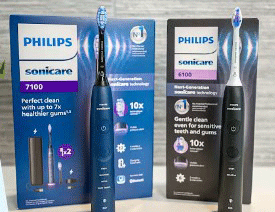
I started my journey with the 6100 about six months ago. Right out of the box, I noticed how comfortable the handle feels in my hand.
The grip is textured just enough to prevent slipping, even when my hands are wet.
I usually brush twice a day, and the 14-day battery life means I only charge it once every two weeks.
That is a huge relief compared to older models I owned that died after a few days.
The three modes are straightforward. I begin most mornings with Clean mode on medium intensity for a thorough feel.
When I want to brighten my smile, I switch to White mode. Gum Care mode is gentle enough for days when my gums feel a bit sensitive after flossing.
The pressure sensor has saved me from over-brushing several times. It gives a soft pulse and dials back the vibrations if I press too hard. I appreciate that feature because I used to brush aggressively with manual brushes.
BrushSync is another favorite part. When I attach a new head, the brush automatically pairs the right mode. The handle also reminds me after three months that it is time for a replacement.
I travel occasionally for work, and the standard case keeps everything protected in my bag. Overall, the 6100 has become my reliable daily driver.
It delivers consistent results without overwhelming me with extra gadgets. My teeth feel noticeably cleaner, and my dentist commented on reduced plaque at my last checkup.
Pros Of Sonicare ProtectiveClean 6100
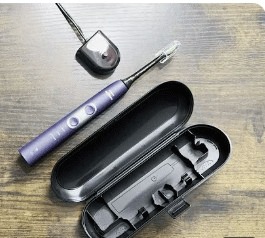
- Excellent cleaning performance: Delivers up to 62,000 movements per minute for superior plaque removal compared to manual brushing.
- Customizable intensity: Three levels let me start gentle and build up as my gums adjust.
- Pressure sensor protection: Prevents gum damage by pulsing and reducing power when I press too hard.
- Long battery life: Up to 14 days on a single charge makes it perfect for busy weeks.
- BrushSync convenience: Automatically pairs modes with brush heads and reminds me when to replace them.
- Comfortable design: Ergonomic handle feels natural and stays secure even with wet hands.
- Quiet operation: Runs smoothly without disturbing others in the house.
- Affordable premium features: Offers advanced sonic tech without the highest price tag.
- Versatile modes: Clean, White, and Gum Care cover daily needs, stain removal, and gum health.
- Easy to maintain: Simple charging stand and compatible with a wide range of Sonicare heads.
Cons Of Sonicare ProtectiveClean 6100
- Standard travel case only: No charging capability means I still need a separate charger on trips.
- Fewer bundled heads: Some packages include just one head, so I buy extras sooner.
- No app connectivity: Lacks Bluetooth tracking for brushing habits.
- Slightly higher cost than basic models: More expensive than entry-level Sonicare brushes.
- Light ring can be bright: The visual pressure alert is helpful but noticeable at night.
- Brush heads pricey over time: Replacement costs add up, though compatible third-party options exist.
- No advanced gum tracking: Does not provide detailed feedback beyond the basic sensor.
- Basic accessories: Lacks premium extras like a USB-charging case.
- Mode switching takes practice: Cycling through modes and intensities requires a second button.
- Not the lightest handle: Feels solid but slightly heavier than some budget competitors.
Also read: Comparison of Philips Sonicare 6500 And 7500
Maintenance Tips For Sonicare ProtectiveClean 6100
- Rinse thoroughly after each use: Run the brush head under water to remove toothpaste residue and prevent buildup.
- Remove the head weekly: Detach the head and clean the metal stem with a damp cloth to avoid bacteria.
- Charge fully every two weeks: Even if the battery lasts longer, top it up regularly for best performance.
- Store in an open area: Keep the brush upright and uncovered to allow air circulation and drying.
- Replace heads every three months: Follow the BrushSync reminder or change sooner if bristles fray.
- Clean the charger base monthly: Wipe the charging stand with a soft cloth to remove dust.
- Avoid submerging the handle: Never immerse the handle in water to protect the electronics.
- Use compatible heads only: Stick to official Sonicare heads for optimal BrushSync functionality.
- Check the light ring: If the pressure light activates often, adjust your technique to brush lighter.
- Travel smart: Pack the standard case and a small USB adapter for charging away from home.
My Experience With Sonicare ProtectiveClean 6500
A few months after getting the 6100, I upgraded to the 6500 to test the differences. The handle feels almost identical in weight and grip, so switching was seamless. The real upgrade comes with the charging travel case. I plug it into any USB port, and the brush charges inside. On a recent weekend trip, I did not worry about outlets or carrying an extra charger. That convenience alone made a big difference.
The cleaning modes and intensities match the 6100 exactly. I use the same routine: Clean for everyday, White for occasional polishing, and Gum Care when needed. The pressure sensor works the same way, and BrushSync pairs modes automatically. Battery life stays around 14 days, even with travel use. The extra brush heads included gave me a longer supply before buying replacements. Overall, the 6500 feels like a slightly more polished version of the 6100. It suits my lifestyle better because I travel more often than I expected.
Pros Of Sonicare ProtectiveClean 6500
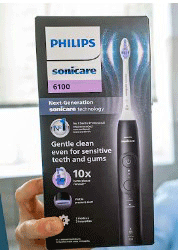
- Charging travel case: Recharge the brush on the go via USB for ultimate travel convenience.
- More bundled heads: Often includes extra heads for longer use before repurchasing.
- Same excellent cleaning: Matches the 6100 with 62,000 movements per minute and three modes.
- Pressure sensor reliability: Pulses and reduces power to protect gums consistently.
- BrushSync features: Auto mode pairing and replacement reminders work flawlessly.
- Long battery life: Up to 14 days, even when using the travel case frequently.
- Versatile intensities: Three levels allow customization for comfort and effectiveness.
- Premium feel: The charging case adds a luxury touch without extra bulk.
- Quiet and gentle: Sonic action removes plaque while staying easy on sensitive areas.
- Durable build: Handles daily use and travel without showing wear quickly.
Cons Of Sonicare ProtectiveClean 6500
- Higher price point: Costs more than the 6100 for similar core cleaning performance.
- No Bluetooth features: Still lacks app connectivity for brushing data.
- Bulkier travel case: The charging case takes up slightly more space in luggage.
- Replacement heads expensive: Ongoing costs remain the same as other Sonicare models.
- Extra features underused: If you rarely travel, the charging case adds unnecessary expense.
- Similar modes to 6100: No additional cleaning options beyond the standard three.
- Charging case needs USB: Requires a power source, though any USB port works.
- Light ring visibility: The pressure alert can be noticeable in low light.
- Not the lightest option: Handle weight feels substantial for some users.
- Bundle variations: Number of included heads can differ by retailer.
Maintenance Tips For Sonicare ProtectiveClean 6500
- Clean the charging case interior: Wipe the inside with a dry cloth weekly to remove dust.
- Charge via USB regularly: Use any USB port to keep the case and brush powered.
- Rinse heads after brushing: Remove debris to maintain optimal performance.
- Detach head for deep clean: Clean the metal connector monthly with a soft brush.
- Replace heads on schedule: Follow BrushSync alerts for best results.
- Store case openly: Let the case dry completely between trips.
- Avoid water on handle: Keep the main unit dry to protect internal components.
- Check USB cable: Inspect for wear and replace if damaged.
- Pack carefully: Place the case in a protective pouch during travel.
- Test charge level: Plug in the case monthly even if not traveling.
Read more: Comparison of Select Sonicare 9500 And 9700
Comparison With Other Brands
- Vs Oral-B Pro series: Sonicare’s sonic action feels gentler on gums than Oral-B’s rotating motion.
- Vs Oral-B iO series: iO offers app tracking, but Sonicare provides longer battery life.
- Vs Quip electric: Quip is simpler and cheaper, but lacks Sonicare’s powerful sonic cleaning.
- Vs Colgate Hum: Hum has app features, but Sonicare delivers stronger plaque removal.
- Vs Burst toothbrush: Burst is affordable, but Sonicare’s pressure sensor is more reliable.
- Vs Foreo ISSA: Foreo combines sonic and silicone, but Sonicare excels in traditional brushing.
- Vs basic manual brushes: Sonicare removes significantly more plaque than manual options.
- Vs other Sonicare lines: ProtectiveClean balances price and features better than entry-level or premium DiamondClean.
- Vs ExpertClean series: ExpertClean adds minor extras, but ProtectiveClean offers similar daily performance.
- Vs DiamondClean Prestige: Prestige has more modes, but 6100/6500 provide better value for most users.
Frequently Asked Questions (FAQ)
The best model depends on your needs. The ProtectiveClean 6100 or 6500 offers great value with strong features for most people. For premium options, the 9900 Prestige tops the line.
The 6500 includes a charging travel case and often more brush heads, while the 5300 has fewer intensities and a standard case. Core cleaning is similar.
The 6100 adds three intensity levels and full BrushSync mode pairing. The 5300 has fewer customization options but similar basic performance.
The 6100 offers three modes and intensities plus advanced BrushSync. The 4500 has fewer modes, basic features, and lower power delivery.
Conclusion: For Both Products
I have used both the Sonicare ProtectiveClean 6100 and 6500 extensively, and I can say they both transform your brushing routine. If you want solid performance without extra cost, go for the 6100. You will get excellent cleaning, smart features, and great battery life. But if you travel often or appreciate the convenience of charging on the go, choose the 6500. The upgraded case makes a real difference. Either way, you will enjoy cleaner teeth and healthier gums. Pick the one that matches your daily life, and you will not regret it.