
I have spent years chasing that perfect “radio voice” without having to build a professional soundproof studio in my closet. If you are a content creator, you have likely stared at the Shure MV7, wondering if it is the holy grail of USB microphones. But now, Shure has dropped the MV7+, a refreshed version that promises to fix the gripes of the original. My mission here is to put these two heavyweights head-to-head, analyzing the upgrades, the sound quality, and the quirks to help you decide if you need the latest tech or if the original is still the king of value.
A Brief Comparison Table
| Feature | Shure MV7 | Shure MV7+ |
| Connection Type | Micro-USB & XLR | USB-C & XLR |
| DSP Features | Auto Level, EQ, Limiter | Real-time Denoiser, Reverb, Popper Stopper |
| Touch Panel | Standard Touch Interface | Multi-Color LED Touch Bar |
| Output Mode | Individual (USB or XLR) | Simultaneous (USB & XLR Recording) |
| Pop Filter | Standard Short Foam | Extended Length Foam |
| Software | Shure MOTIV Desktop | Shure MOTIV Mix |
| Build Quality | All-Metal Construction | All-Metal with Updated Branding |
| Price Tier | Mid-Range Professional | Premium Professional |
My Experience With Shure MV7
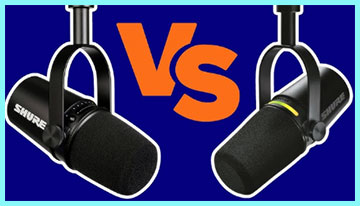
When I first unboxed the Shure MV7 a few years back, it felt like a revelation.
I was transitioning from a basic condenser mic that picked up every car driving by my window, and the dynamic nature of the MV7 immediately tightened up my audio.
It felt solid, heavy, and reassuringly expensive in the hand.
The yoke mount was smooth, allowing me to position it perfectly on my boom arm.
Plugging it in was a mixed bag, though. Seeing a Micro-USB port on a premium device felt archaic even then. I remember fumbling with the cable, terrified I would bend the pins if I forced it. Once connected, however, the “Auto Level Mode” in the software was a lifesaver. I tend to get loud when I am excited during a stream, and the mic handled my volume spikes without clipping. It gave me that broadcast sound right out of the box with minimal tweaking.
The biggest annoyance I lived with was the plosives. I have a forceful way of speaking, and “P” sounds would often cause a booming pop in the recording. I eventually had to buy an aftermarket windscreen to tame it because the included foam was just too thin. Despite the Micro-USB fragility and the plosive issue, it became my daily driver because it just worked. It bridged the gap between a toy mic and a professional XLR setup, allowing me to upgrade my interface later without buying a new microphone.
Read More: Comparison Of Razer Seiren X And HyperX SoloCast
Pros Of Shure MV7
- Dual USB and XLR Output: The most significant advantage of the classic MV7 is its hybrid nature. It features both a USB output for direct connection to a computer and an XLR output for professional audio interfaces. This flexibility is a massive safety net for creators. In my workflow, I started using it strictly via USB because I didn’t own an audio interface. Later, as I upgraded my studio gear, I didn’t have to throw the microphone away; I simply switched to an XLR cable. This “grow with you” design philosophy makes it an incredible investment. You are not locked into one ecosystem. Furthermore, having the XLR output means you can bypass the internal digital processing if you prefer the raw analog signal, giving you the pure tone of the capsule. It essentially provides two microphones in one body, catering to both the beginner streamer and the seasoned podcaster looking for a reliable backup mic.
- Superior Voice Isolation Technology: One of the main reasons I stuck with the MV7 for so long is its uncanny ability to reject background noise. This is a dynamic microphone with a tight cardioid pickup pattern, meaning it mostly hears what is right in front of it. In my less-than-ideal recording environment—a spare bedroom with hard wood floors and a window facing the street—this mic performed miracles. It ignores the hum of my computer fans and the clicking of my mechanical keyboard to a degree that condenser microphones simply cannot match. You do not need to treat your room with expensive acoustic foam to get a dry, professional sound. It focuses entirely on the vocal range, making your voice sound present and intimate, which is the gold standard for podcasting and voiceover work.
- ShurePlus MOTIV App Integration: The software companion for this microphone is arguably just as important as the hardware. The ShurePlus MOTIV app allows you to save your settings directly to the microphone’s onboard memory. This was a game-changer for me. I could dial in my perfect EQ, compression, and limiter settings on my PC, and then plug the mic into my iPad or a different laptop, and it would remember exactly how I liked to sound. The “Auto Level Mode” within the app acts like a virtual audio engineer, riding your gain levels in real-time to ensure you are never too quiet or too loud. For someone who wants to focus on content rather than metering, this set-and-forget reliability is invaluable. It removes the technical friction from the recording process.
Cons Of Shure MV7
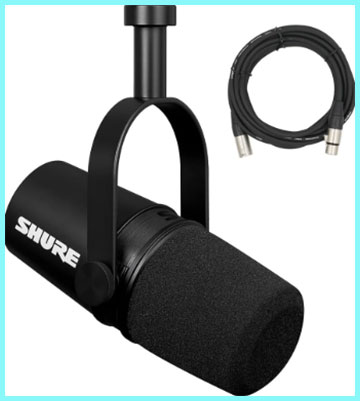
- Micro-USB Connectivity: In the landscape of modern technology, the inclusion of a Micro-USB port on the original MV7 is its most glaring flaw. This connector is notoriously fragile and prone to failure over time. I found that after a year of adjusting the mic on my boom arm, the connection became loose. If I bumped the cable mid-stream, the microphone would disconnect, causing panic. Micro-USB cables are also becoming harder to find in a pinch as the world moves to USB-C. It feels like a dated design choice that hampers the longevity of the device. You have to treat the port with extreme care, which is not something you want to worry about when you are in the middle of a high-energy recording session. It is the one feature that firmly anchors this device in the past.
- Susceptibility to Plosives: Out of the box, the MV7 struggles with “plosives”—those bursts of air that hit the capsule when you say words starting with “P” or “B.” The foam windscreen provided by Shure is surprisingly thin and sits very close to the capsule. In my experience, this meant I had to be extremely careful with my mic technique, speaking off-axis to avoid ruining my take with low-end thuds. I eventually had to purchase a thicker, third-party foam cover to fix this issue. For a microphone at this price point, having to buy an accessory immediately to get clean audio is a disappointment. It breaks the “plug and play” promise slightly, as you have to modify the hardware to get truly professional results without careful breath control.
- Sensitive Touch Panel: The original MV7 features a touch-sensitive slider for gain and headphone volume control. While it looks sleek, I found it to be a bit of a liability in practice. When adjusting the microphone’s position, it is very easy to accidentally brush your hand against the slider and drastically change your gain or mute yourself entirely. There is no physical feedback, so you often don’t realize you have messed up your levels until you look at the LEDs. While there is a “lock” feature in the software, having to toggle it on and off is cumbersome. I missed the tactile reliability of a physical knob that you cannot accidentally turn. The touch interface feels like tech for tech’s sake rather than a functional improvement.
My Experience With Shure MV7+
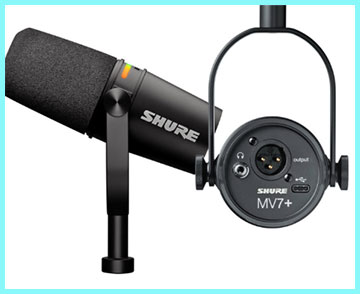
Switching to the Shure MV7+ felt like upgrading from a reliable sedan to a luxury sports car.
It looks almost identical at a glance, but the moment I plugged in the USB-C cable, I felt a wave of relief.
The connection was snappy and secure—no more wiggling the wire.
The first thing that grabbed my attention was the LED touch panel.
It is no longer just a row of green and orange dots; it is a vibrant, customizable light bar.
I spent way too much time in the new MOTIV Mix app just playing with the colors, matching the pulsing red light to my streaming overlay. It adds a level of personalization that the original lacked entirely.
Performance-wise, the “Real-time Denoiser” was the standout feature for me. I tested it by turning on a desk fan right next to the mic, and the software managed to cut the drone out almost entirely without making my voice sound like a robot. It felt like magic. The new “Popper Stopper” feature also seemed to help with those annoying P-sounds, although I still prefer using a physical pop filter just to be safe. The simultaneous output (recording XLR and USB at the same time) was a feature I didn’t think I needed until I used it to record a high-quality backup file to my laptop while streaming via my interface. It just feels like a more mature, polished product.
Pros Of Shure MV7+
- Full Color LED Touch Panel: The most visually striking upgrade on the MV7+ is the customizable LED touch strip.4 While this might seem like just a cosmetic “gamer” feature, I found it to be genuinely functional. You can map the colors to represent your audio levels more clearly than the standard green-to-red gradient. For example, I set my mute status to a pulsing red and my active status to a solid teal. This visual feedback is instant and prevents those embarrassing “I was muted for five minutes” moments. It also allows the microphone to blend seamlessly into the aesthetic of your video setup. If you are a streamer who cares about the look of your gear on camera, this customization is a massive plus. It makes the hardware feel like a cohesive part of your brand identity rather than just a tool.
- Advanced DSP Features (Denoiser & Reverb): The “Plus” in the name really refers to the internal Digital Signal Processing (DSP) power. The MV7+ introduces a real-time Denoiser that is incredibly impressive. Unlike post-production noise removal which can be destructive, this happens live. In my testing, it successfully eliminated the hum of my air conditioner without introducing significant artifacts to my voice. Additionally, the inclusion of onboard reverb effects lets you add a bit of “space” to your vocals if you want to sound like you are in a radio booth or a concert hall. Having these tools built directly into the mic means you don’t need to run heavy plugins on your computer, freeing up CPU resources for your game or stream. It is a smarter microphone in every sense of the word.
- USB-C Connectivity: Finally, Shure has brought this microphone line into the modern era with a USB-C port. This sounds like a small detail, but it impacts the daily usability of the device immensely. The connection is physically more robust than Micro-USB and allows for higher power delivery and data transfer stability. I could use the same cable to charge my laptop or phone to connect my microphone, which simplifies my cable management. It also future-proofs the device. I no longer have the anxiety of a flimsy connector breaking inside the housing. This upgrade alone fixes the biggest complaint of the original MV7 owners and aligns the product with current tech standards.
- Digital Popper Stopper: To address the plosive issues of its predecessor, the MV7+ includes a “Digital Popper Stopper” feature within the DSP. This algorithm specifically targets and attenuates the low-frequency spikes caused by hard consonant sounds. While I was skeptical at first, I found that it actually works quite well for moderate plosives. It allows you to speak directly into the mic without that booming distortion. Combined with the slightly longer physical foam screen included in the box, the MV7+ is much more forgiving of bad microphone technique. It saves you from having to clutter your setup with a giant external pop filter, keeping the visual profile of the mic sleek and clean.
Cons Of Shure MV7+
- Price Increase: All these new features come at a cost. The MV7+ launches at a higher price point than the original MV7 (which can now often be found on sale). For a creator on a strict budget, the extra cash might be hard to justify if you just want good audio. The core capsule—the part that actually captures the sound—is remarkably similar to the original. You are essentially paying a premium for the software features, the lights, and the USB-C port. If you plan to use this microphone strictly via XLR, you are wasting money on digital features you will never use. The value proposition is lower for pure audio purists who do not care about the “smart” features or the RGB aesthetics.
- Touch Controls Still Lack Tactility: While the LED panel is prettier, it suffers from the same fundamental flaw as the original: it is a touch surface, not a physical knob. I still found myself accidentally muting the mic when I went to adjust the angle of the boom arm. Touching a smooth plastic bar just does not offer the same precision as turning a dial. You have to look at the mic to see what you are doing, whereas a knob can be operated by feel alone. In high-pressure situations, like a live interview, this lack of tactile feedback can be stressful. I would have preferred a physical mute button at the very least, rather than relying on a capacitive touch zone that can be finicky with sweaty hands.
- Software Reliance: To get the most out of the MV7+, you are heavily dependent on the Shure MOTIV Mix software. While the software is powerful, it is another layer of complexity. If the software crashes or conflicts with your OS, you lose access to the Denoiser, the LED customization, and the Popper Stopper. The microphone remembers some settings, but the advanced real-time processing requires the digital brain to be active. This tethering to a specific app can be frustrating if you move between different computers often or if you use an operating system (like Linux) where support might be limited. It transforms the microphone from a piece of hardware into a software-service hybrid, which introduces potential points of failure.
- Sensitive to Handling Noise: Despite the solid build, the MV7+ is still susceptible to handling noise. If you tap the boom arm or bump the desk, that low-frequency thud travels right into the recording. The internal shock mount is decent, but it is not a miracle worker. In my usage, I found that I still needed to be careful about touching the stand while recording. Unlike some other broadcast mics that have massive internal suspension systems, the compact design of the MV7+ means there is less physical dampening. For a “premium” product, I would have hoped for slightly better isolation from mechanical vibrations, as this often forces users to buy an expensive external shock mount.
Also Read: My Thoughts On Canon Vixia HF R50
Frequently Asked Questions (FAQ)
The Shure MV7+ is a dynamic hybrid XLR/USB microphone designed for podcasters and streamers. It is the updated successor to the popular Shure MV7, featuring a customizable LED touch panel, USB-C connectivity, and advanced internal Digital Signal Processing (DSP).
Yes and no. It comes with a detachable foam windscreen that is slightly longer than the original to help with plosives. Additionally, it features a “Digital Popper Stopper” in the software that electronically reduces the sound of harsh plosives.
The Shure MV7+ is a dynamic microphone. This means it is less sensitive to background noise and room reflections compared to condenser microphones, making it ideal for untreated home studios and speech recording.
The Shure MV7+ was released in April 2024. It was launched as a direct refresh to the original MV7 line, bringing modern features and updated aesthetics to the market.
Conclusion
Deciding between the Shure MV7 and the MV7+ comes down to how much you value workflow convenience and aesthetics. If you already own the original MV7 and it is working fine for you, I honestly do not think you need to upgrade. The sound quality of the core capsule is nearly identical, and your audience likely won’t hear a difference. The original is still a fantastic workhorse that delivers professional-grade audio.
However, if you are buying your first high-end microphone today, the Shure MV7+ is the clear winner. The move to USB-C, the incredible real-time Denoiser, and the simultaneous USB/XLR output make it a much more versatile tool for modern content creation. It fixes the hardware fragilities of the past and adds software magic that genuinely makes your life easier. It is punchy, it looks great on camera, and it is built to last. Spend the extra money now, and you won’t have to worry about upgrading for years to come.