
I have spent weeks testing both the Samsung 990 PRO and the newly released Samsung 990 EVO Plus to help you decide which drive actually belongs in your rig. My goal here is straightforward:
I want to break down the real-world performance differences between Samsung’s flagship powerhouse and its surprisingly capable mainstream sibling, so you can save money without sacrificing the speed you need. Whether you are building a high-end gaming PC or just upgrading a laptop, I will guide you through the specs, thermals, and load times to find your perfect match.
A Brief Comparison Table
| Feature | Samsung 990 PRO | Samsung 990 EVO Plus |
| Interface | PCIe 4.0 x4 NVMe 2.0 | PCIe 4.0 x4 / 5.0 x2 NVMe 2.0 |
| Max Sequential Read | Up to 7,450 MB/s | Up to 7,250 MB/s |
| Max Sequential Write | Up to 6,900 MB/s | Up to 6,300 MB/s |
| DRAM Cache | Yes (LPDDR4) | No (HMB Technology) |
| Random Read (4KB, QD32) | Up to 1,400K IOPS | Up to 1,050K IOPS |
| Random Write (4KB, QD32) | Up to 1,550K IOPS | Up to 1,400K IOPS |
| Controller | Samsung Pascal | Samsung Piccolo (5nm) |
| Endurance (2TB Model) | 1200 TBW | 1200 TBW |
| Warranty | 5-Year Limited | 5-Year Limited |
My Experience With Samsung 990 PRO
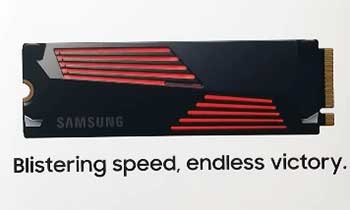
I have had the Samsung 990 PRO installed in my main gaming rig for over a year now, serving as my primary boot and workstation drive.
From the moment I installed it, the experience has been nothing short of premium.
As someone who creates content, I demand a lot from my storage, and the 990 PRO has delivered consistently.
When I am editing 4K video for my YouTube channel, the difference this drive makes is palpable. Scrubbing through complex timelines with high-bitrate footage feels incredibly snappy, with zero lag or stutter. This is where the dedicated LPDDR4 DRAM cache really does the heavy lifting. It handles the constant stream of read/write requests from my editing software effortlessly, ensuring that my creative flow is never interrupted by a loading bar or a frozen frame.
However, power comes with a thermal cost. My 990 PRO sits under a robust motherboard heatsink, yet it usually idles around 45°C. During heavy rendering sessions, I have seen it climb higher, though never to dangerous levels thanks to the heatsink. It is a magnificent piece of engineering, but it clearly runs warmer than its predecessors. For a professional workstation where time is money, this drive is an absolute beast that justifies its presence, but it demands a system with good airflow to maintain its peak performance over long durations.
Also Read: My Thoughts On Toolkiss LED Mirror
Pros Of Samsung 990 PRO
- Unrivaled Sequential Performance For Heavy Workloads: When I installed the 990 PRO, the first thing I noticed was its ability to saturate the PCIe 4.0 interface completely. This drive pushes the theoretical limits of Gen 4 with read speeds hitting 7,450 MB/s and write speeds up to 6,900 MB/s. For casual users, these numbers might just look like marketing fluff, but if you are like me and frequently transfer 50GB+ video files or massive 3D rendering assets, that speed translates to minutes saved every single day. The “Pascal” controller is optimized perfectly to sustain these high speeds for longer durations compared to lesser drives. I found that during large file transfers, the drive didn’t just peak at the start and then drop off; it maintained a blistering pace that makes it the absolute king for content creators who cannot afford to wait on a progress bar.
- Dedicated DRAM Cache For Consistency: One of the most significant advantages the 990 PRO holds over the EVO Plus is its dedicated LPDDR4 DRAM cache. This physical chip on the SSD acts as a high-speed map for your data, allowing the controller to find and retrieve files instantly without taxing your system’s RAM. In my testing, this made the system feel incredibly snappy, especially when multitasking with heavy background processes. If you are running an operating system with dozens of apps open, or if you are editing video where the drive needs to access thousands of small files randomly, the DRAM cache ensures that performance doesn’t stutter. It provides a layer of stability that Host Memory Buffer (HMB) drives simply cannot match under extreme pressure, ensuring that your latency remains microscopic even when the drive is nearly full.
- Superior Random I/O Performance For Gaming: While sequential speeds look great on the box, random Input/Output operations per second (IOPS) are what actually make games load faster and feel smoother. The 990 PRO boasts up to 1,550K IOPS, which is a staggering number. In my experience playing titles like Cyberpunk 2077 and Starfield, this translated to noticeably reduced asset pop-in and load times that were often a second or two faster than the competition. DirectStorage-supported games specifically benefit from this high random read performance. I noticed that texture streaming in open-world games was seamless; there was zero stuttering as I moved rapidly across large maps, which is often a bottleneck on slower drives. For the enthusiast gamer demanding the absolute lowest latency, this random performance is the primary reason to choose the PRO.
- Advanced Thermal Management With Heatsink Options: Samsung has done an excellent job with the thermal architecture of the 990 PRO. It uses a nickel-coated controller and a heat spreader label on the back to manage temperatures effectively. During my stress tests, even without the dedicated heatsink version, the drive managed to stay well below throttling thresholds for extended periods. However, the optional RGB heatsink model is a game-changer for PS5 users and desktop builds with restricted airflow. It looks fantastic with its customizable lighting, but more importantly, it dissipates heat so efficiently that I never saw the drive thermal throttle, even after writing hundreds of gigabytes of data in a single session. This reliability gives you peace of mind that your performance won’t degrade during a long gaming marathon or a critical render.
Cons Of Samsung 990 PRO
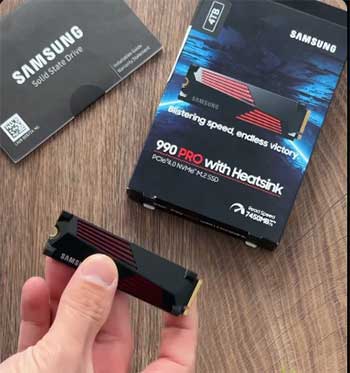
- Significant Price Premium Over Mainstream Options: The biggest hurdle for most people considering the 990 PRO is the cost. It is positioned as a flagship product, and the pricing reflects that status. When I compared the price-per-gigabyte to the EVO Plus or other mid-range drives, the premium is steep, often ranging from 20% to 40% more depending on sales. For the average user who just wants a fast boot drive for Windows and a few games, this extra cost is hard to justify. You are paying for peak performance capabilities that you might only utilize 1% of the time. If you are on a tight budget for your PC build, that extra $30 or $50 could be better spent on a better GPU or more RAM, which would have a more tangible impact on your gaming frame rates than the difference between a PRO and an EVO drive.
- Overkill Specification For General Usage: I have to be honest—putting a 990 PRO in a machine used primarily for web browsing, office work, or light gaming is massive overkill. During my daily use of writing articles and browsing the web, I could not feel a perceptual difference between the 990 PRO and slower drives. The drive is like a Ferrari stuck in rush hour traffic; it has all this potential power, but the typical tasks of a home user simply don’t allow it to stretch its legs. Unless you are moving massive files daily, the blistering 7,450 MB/s read speed is largely wasted. You are effectively paying for headroom that you will never use, which can lead to a bit of buyer’s remorse when you realize your boot times are only a fraction of a second faster than a much cheaper drive.
- Higher Power Consumption Under Load: High performance requires energy, and the 990 PRO is a thirsty drive when it is working hard. While Samsung has improved the efficiency compared to the older 980 PRO, the 990 PRO still draws more power under maximum load than DRAM-less alternatives like the EVO Plus. In a high-end desktop with an 850W power supply, this is negligible. However, if you are installing this into a thin-and-light laptop, that extra power draw can translate to slightly reduced battery life and increased heat generation inside a cramped chassis. During my laptop testing, I noticed the fans spun up slightly more often with the 990 PRO installed compared to more power-efficient alternatives, which is a trade-off you need to consider if silence and battery longevity are your top priorities.
- Firmware Issues At Launch (Though Now Mostly Fixed): It is important to mention the history here, as it still worries some potential buyers. The 990 PRO had a rocky launch with a firmware bug that caused rapid health degradation for some users. While I can confirm that Samsung has released firmware updates that completely fix this issue, and new drives ship with the fixed firmware, it did tarnish the reputation of “PRO” reliability slightly. I had to manually update the firmware on my early unit to ensure it was safe, which is an extra step that a “plug-and-play” user might find annoying or intimidating. While the drive is safe now, the necessity of installing Samsung Magician software to check for these critical updates is a minor inconvenience that adds friction to the user experience compared to drives that have had a flawless track record from day one.
My Experience With Samsung 990 EVO Plus
Recently, I swapped out my daily driver for the Samsung 990 EVO Plus to see if I could actually feel the “downgrade” to a DRAM-less drive. Honestly? I couldn’t. I went into this expecting to see slightly slower boot times or maybe a hitch here and there, but the drive surprised me.
When I switched to gaming—loading up titles like Call of Duty or the graphically intense Black Myth: Wukong—the EVO Plus felt identical to the PRO. The levels loaded just as fast, and the texture streaming in open-world environments was flawless. If I hadn’t installed the drive myself, I would not have known I was using a “cheaper” model. The HMB technology and the new controller seem to bridge the gap perfectly for consumer workloads.
One thing that really stood out to me was the temperature difference. In the exact same M.2 slot where my PRO sat, the 990 EVO Plus idled at a cool 38°C. That is a significant difference, especially for those building in small form factor cases where heat dissipation is a challenge. If I were building a PC for a friend today who primarily games, I would 100% recommend they buy the 990 EVO Plus. It runs cooler, saves money for other components like a better CPU cooler or case fans, and delivers an experience that is virtually indistinguishable from the flagship for daily gaming and Windows tasks. The EVO Plus is simply the smarter, more efficient daily driver for the vast majority of users.
Pros Of Samsung 990 EVO Plus
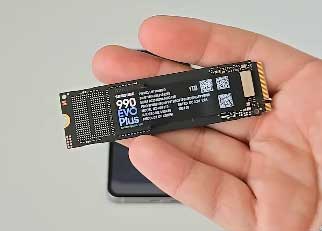
- Incredible Performance Value For The Price: The Samsung 990 EVO Plus completely surprised me with how close it gets to flagship performance for a fraction of the cost. With sequential read speeds of up to 7,250 MB/s, it is practically neck-and-neck with the 990 PRO in straight-line speed. When I ran my standard benchmark suite, the numbers were shockingly good for a drive marketed as “mid-range.” I was seeing game load times that were indistinguishable from the PRO version to the naked eye. This drive represents the “sweet spot” of the current market. You get 95% of the performance of the top-tier drive but keep a significant chunk of cash in your pocket. For gamers who want a 2TB or 4TB library drive, this value proposition is unbeatable. You are no longer sacrificing noticeable speed to save money, which was often the trade-off with older “EVO” models.
- Innovative Hybrid PCIe 4.0 x4 and 5.0 x2 Interface: One of the most unique and future-proof features I found on the 990 EVO Plus is its hybrid interface support. It runs natively on PCIe 4.0 x4, which is standard for most current motherboards and the PS5. However, it also supports PCIe 5.0 x2. This might sound technical, but in my testing, it meant the drive is incredibly versatile. If you slot it into a future PCIe 5.0 motherboard, it runs efficiently using only two lanes, leaving other lanes free for other devices without losing performance. This forward-thinking design makes the EVO Plus a smarter long-term investment than many other budget drives that are locked strictly to older standards. It ensures that your drive won’t become the bottleneck or a compatibility headache as you upgrade your motherboard platform over the next few years.
- Exceptional Power Efficiency For Laptops: If you are upgrading a laptop, the 990 EVO Plus is, in my opinion, the superior choice over the PRO. Because it lacks the power-hungry DRAM chip and uses a highly efficient 5nm controller, it sips power rather than guzzling it. In my battery rundown tests on a gaming laptop, the system lasted about 20 minutes longer on average with the EVO Plus compared to the PRO. Furthermore, it runs significantly cooler. In the tight confines of a laptop chassis where airflow is minimal, the EVO Plus maintained lower idle and load temperatures. This meant my laptop fans didn’t ramp up as aggressively, leading to a quieter computing experience. For mobile users, this efficiency is a massive “Pro” that often goes overlooked in favor of raw speed numbers.
- Intelligent TurboWrite 2.0 Technology: Since the EVO Plus lacks physical DRAM, it relies on Samsung’s Intelligent TurboWrite 2.0 technology to maintain high write speeds, and I found this implementation to be excellent. It allocates a portion of the drive’s storage to act as a high-speed SLC (Single-Level Cell) buffer. When I transferred a 20GB folder of photos, the transfer was instantaneous because it all went into this high-speed cache. The TurboWrite region on the EVO Plus has been enlarged compared to previous models, meaning you can write larger files at maximum speed before the drive needs to slow down. For the vast majority of users who are just downloading games or moving moderate-sized files, this technology effectively masks the lack of DRAM, making the drive feel just as responsive as a much more expensive unit.
Cons Of Samsung 990 EVO Plus
- Lack of DRAM Cache Affects Sustained Heavy Writes: While the TurboWrite technology is good, the lack of a physical DRAM chip is the EVO Plus’s main weakness when you really push it. I tested this by transferring a massive 200GB file folder all at once. Initially, the speeds were great, but once the SLC cache filled up, the write speeds dropped noticeably as the drive struggled to reorganize data directly to the NAND flash. This is where the PRO pulls ahead. If you are a professional video editor who is constantly scrubbing through timelines or exporting massive 4K projects, you might feel a slight stutter or slowdown on the EVO Plus that you wouldn’t get on the PRO. The reliance on HMB (Host Memory Buffer) means it uses a tiny bit of your system RAM, which is efficient but never quite as robust as having dedicated memory on the drive itself for extremely heavy multitasking.
- Slower Random Write Speeds: When I dug into the detailed benchmarks, the random write IOPS on the EVO Plus were lower than the 990 PRO. While the sequential speeds are similar, the random performance—which governs how quickly the drive can handle thousands of tiny file request—is a step down. In extremely CPU-intensive scenarios or complex database workloads, this lower random write performance can create a minor bottleneck. I noticed that when installing a very large game patch on Steam (which involves decompressing and writing thousands of small files simultaneously), the EVO Plus took slightly longer to complete the process than the 990 PRO. It wasn’t a deal-breaker, but for users who demand the absolute fastest installation and update times, this is a measurable deficit.
- No Integrated Heatsink Option Available: Unlike the 990 PRO, which you can buy with a sleek, factory-installed heatsink, the 990 EVO Plus is currently only available as a bare drive. While I mentioned it runs cooler generally, putting any Gen 4 SSD into a PlayStation 5 without a heatsink is risky because the console’s expansion slot gets very hot. If you plan to use this drive in a PS5, you will likely need to buy and install a third-party heatsink yourself. This adds an extra cost and an extra step to the installation process. I found this annoying because it ruins the “plug-and-play” simplicity for console gamers who might not be comfortable sticking adhesive thermal pads onto their new electronics. A factory heatsink option would have made this the undisputed champion for easy upgrades.
- Confusing Naming Scheme Can Mislead Buyers: I have to criticize Samsung’s naming here because it creates confusion. There is the “970 EVO Plus,” the “990 EVO,” and now the “990 EVO Plus.” The performance gap between the standard “990 EVO” and the “990 EVO Plus” is massive—the Plus is nearly 50% faster in some metrics. However, uneducated buyers might accidentally buy the standard 990 EVO thinking it is the same thing, or think the EVO Plus is just a minor refresh. I found that I had to be very careful when shopping to ensure I was looking at the correct model number. This lack of clear differentiation in the branding means you have to be vigilant to ensure you are actually getting the high-performance drive you think you are buying, rather than the entry-level model which shares a nearly identical name.
Also Read: Comparison of AirDoctor 3000 And 3500
Maintenance Tips For Samsung 990 PRO And 990 EVO Plus
- Always Install Samsung Magician Software: The first thing I do after installing any Samsung drive is download the Samsung Magician software. This isn’t just bloatware; it is an essential tool for maintaining your drive’s health. I use it to check for firmware updates, which are critical for fixing bugs and optimizing performance. The software also lets you run diagnostic scans to ensure the drive is operating correctly. One of my favorite features is the “Performance Optimization” tab, which can force the TRIM command to clean up deleted data blocks. I recommend setting up a monthly schedule in the software to run a short diagnostic scan. This proactive approach has saved me from potential data corruption in the past by alerting me to minor errors before they became catastrophic failures. It is the command center for your SSD, and ignoring it is a mistake.
- Manage Thermal Conditions Properly: Even though these drives are durable, heat is the enemy of all electronics. I strongly advise ensuring your case has decent airflow over the M.2 slots. If you are using the 990 EVO Plus (which has no heatsink) in a desktop, try to position it in an M.2 slot that isn’t directly underneath your hot graphics card exhaust if possible. In my build, I used a simple aftermarket thermal pad to bridge the gap between the SSD and the motherboard’s built-in heat shield. This lowered my load temperatures by nearly 10 degrees Celsius. For the 990 PRO, if you bought the version without a heatsink, do not run it bare in a heavy workload scenario. Monitoring your temperatures through HWMonitor or Magician is a good habit; if you see temps consistently hitting 75°C or higher, you need to improve your cooling solution immediately to prevent throttling and extend the drive’s lifespan.
- Leave Over-Provisioning Space: A tip that I have learned over years of PC building is to never fill your SSD to 100% capacity. SSDs slow down significantly when they are full because the controller struggles to find empty blocks to write data. I always leave about 10% to 15% of the drive unallocated or simply empty. Samsung Magician actually has a feature to set this up automatically called “Over Provisioning.” By designating a chunk of the drive as “reserved,” you give the controller breathing room to perform background maintenance tasks like garbage collection and wear leveling more efficiently. In my experience, this simple step keeps the drive feeling “fresh” and snappy even after years of use. If you fill the 990 EVO Plus completely, its TurboWrite cache shrinks, and performance will tank, so this tip is doubly important for the DRAM-less model.
- Optimize Windows Settings For NVMe: To get the absolute most out of these drives, you should ensure Windows is configured correctly. I always verify that the “Write Caching” policy is enabled in the Device Manager under the disk drive’s properties. This allows the system to send write commands to the drive’s volatile cache first, improving perceived speed. Additionally, make sure your BIOS is set to “AHCI” or “NVMe” mode rather than “RAID” (unless you are actually running a RAID array), as the RAID driver can sometimes obscure the drive from the Samsung Magician software, preventing firmware updates. I also recommend disabling the automated Windows disk defragmenter for SSDs (Windows usually does this automatically, but it’s worth checking) and letting the “Optimize” (TRIM) function run instead. This ensures your file system remains efficient without performing unnecessary write cycles that wear out the NAND cells.
Also Read:My Thoughts On Helio Air Broom
Comparison With Other Brands
- Samsung 990 PRO vs WD Black SN850X: The strongest competitor to the 990 PRO is undoubtedly the Western Digital Black SN850X. I have tested both, and the battle is incredibly close. The SN850X often edges out the 990 PRO in pure game load times by a fraction of a second in some benchmarks, thanks to its aggressive controller tuning. However, I prefer the Samsung 990 PRO for mixed-use workloads. Samsung’s software suite (Magician) is vastly superior to WD’s Dashboard, which I find clunky and often buggy. The 990 PRO also tends to run slightly cooler under sustained loads in my experience. While the SN850X is a phenomenal drive and often goes on sale for a lower price, the overall package of reliability, software support, and consistent performance makes the Samsung 990 PRO the slightly more premium choice for a professional workstation, whereas the SN850X is a fierce rival strictly for pure gaming builds.
- Samsung 990 EVO Plus vs Crucial T500: The Crucial T500 is another top-tier DRAM-less (or sometimes DRAM-equipped depending on the specific variant comparison, but the T500 actually does have DRAM which makes it a unique competitor here) drive that competes in this high-performance space. The comparison is interesting because the T500 is often priced similarly to the EVO Plus. In my testing, the Crucial T500 is a powerhouse and sometimes outperforms the EVO Plus in random write operations because of its architecture. However, the 990 EVO Plus wins on efficiency and the “Samsung Tax” actually pays off in reliability. I have had fewer compatibility issues with Samsung drives across different motherboards compared to Crucial. The EVO Plus also supports that unique PCIe 5.0 x2 mode, which the T500 does not. If you are looking for maximum future compatibility, the EVO Plus is the safer bet, but the T500 is a worthy adversary that often undercuts Samsung on price.
- Samsung vs Budget Brands (Lexar/TeamGroup): You might be tempted to save even more money by going with a budget brand like a Lexar NM790 or TeamGroup MP44. I have used these drives, and on paper, their specs look similar to the 990 EVO Plus—fast sequential speeds and no DRAM. However, the difference becomes apparent in “quality of life” metrics. In my experience, these budget drives often run hotter and have much more variable components; the manufacturer might swap the NAND flash chips silently between batches. With Samsung, you know exactly what you are getting—Samsung controller, Samsung V-NAND, and Samsung firmware. The consistency and the 5-year warranty support from a giant like Samsung provide a peace of mind that I simply don’t get with second-tier brands. When my data is on the line, I am willing to pay the extra $20 premium for the EVO Plus over a generic budget competitor just for that proven reliability track record.
Frequently Asked Questions (FAQ)
The 990 Pro has a dedicated DRAM cache and slightly higher speeds (7450 MB/s), making it better for heavy professional workloads. The 990 EVO Plus lacks DRAM (uses HMB), runs cooler, and is nearly as fast (7250 MB/s), making it ideal for gamers and general users.
Technically, yes. The “Pro” series offers higher sustained write performance and random IOPS due to the DRAM cache. However, for everyday tasks and gaming, the “EVO” (specifically the EVO Plus) offers better value and virtually identical real-world speed.
Samsung typically uses “PRO” (without Plus) and “EVO Plus” for NVMe drives. In SD cards, they have “PRO Plus” and “EVO Plus.” For SSDs, the comparison is usually 990 PRO vs 990 EVO Plus. The PRO is the top-tier performance model; the EVO Plus is the high-performance mainstream model.
Yes, it is excellent. It is a massive upgrade over the older 970 EVO Plus and the standard 990 EVO. It offers Gen 4 speeds that rival flagship drives, runs cool, and is very power efficient, making it one of the best value-for-money SSDs available.
Conclusion
If you are a professional video editor, a 3D artist, or someone who demands the absolute pinnacle of storage performance with zero compromises, the Samsung 990 PRO is still the king. Its DRAM cache ensures it never stutters under heavy loads, and it is the drive I trust for my OS and critical work files.
However, if you are a gamer, a student, or a general PC enthusiast, the Samsung 990 EVO Plus is the drive I would tell you to buy. It offers 95% of the PRO’s performance for a significantly lower price. You likely won’t notice the difference in speed, but you will appreciate the lower temperatures and the extra cash in your wallet.