
I’ve spent years testing streaming devices in my living room, switching between options to find what truly delivers the best experience for movies, shows, and live TV. This article shares my personal take on Roku Ultra vs Roku Ultra LT: Which One Is Better? I focus on real-world use, key features like picture quality, audio, remote controls, and performance. By the end, you will know exactly which fits your setup and budget.
A Brief Comparison Table Roku Ultra vs Roku Ultra LT
| Feature | Roku Ultra | Roku Ultra LT |
| Price (approximate) | Higher (around $20 more) | Lower (budget-friendly) |
| Picture Quality | 4K, Dolby Vision, HDR10+ | 4K, Dolby Vision |
| Audio Quality | Dolby Atmos support | No Dolby Atmos (passthrough possible) |
| Wi-Fi | Wi-Fi 6 (better range and speed) | Dual-band Wi-Fi |
| Ethernet Port | Yes | Yes |
| USB Port for Local Media | Yes | No |
| Remote Type | Voice Remote Pro (rechargeable, backlit, hands-free voice, lost finder) | Enhanced Voice Remote (with private listening) |
| Performance | Fastest (30% faster than others) | Solid quad-core processor |
| Other Extras | Hands-free commands, customizable buttons | MicroSD slot in some versions |
My Experience With Roku Ultra
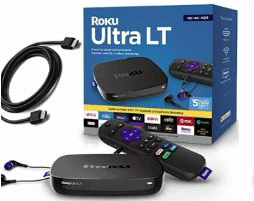
I switched to the Roku Ultra after using older models and cheaper sticks.
The speed difference hit me immediately — apps open faster, and scrolling feels effortless.
Dolby Atmos transformed movie nights; explosions and music have depth that makes my soundbar sing.
The remote became my favorite part: hands-free commands save time when my hands are full, and the lost finder saved me from couch searches multiple times.
I plug in a USB drive for vacation photos, something the LT cannot do. Picture quality with Dolby Vision looks vibrant on my TV, colors pop, and details stay sharp.
Setup took minutes, and updates happen automatically. Sure, it costs more, but for daily use in my main living room, it delivers premium feel without hassle. I recommend it to friends who want the best without overcomplicating things.
Pros Of Roku Ultra
- Superior Audio Immersion — I love how Dolby Atmos creates a theater-like sound when I pair it with my soundbar. The audio feels enveloping, with height effects that regular stereo just cannot match, making action scenes and concerts truly pop.
- Faster Overall Performance — This device launches apps almost instantly and feels snappier during navigation. In my daily use, menus scroll smoothly without any lag, even when multitasking between streaming services.
- Advanced Remote Features — The Voice Remote Pro charges via USB-C and has backlit buttons that glow in the dark. Hands-free voice control lets me say commands without picking it up, and the lost remote finder beeps when I misplace it — super handy after kids scatter things around.
- Better Connectivity Options — Wi-Fi 6 gives stronger signal in farther rooms, and the USB port lets me play media directly from a drive. I use this for family videos or downloaded files, adding versatility beyond just online streaming.
- Premium Build and Future-Proofing — It handles the latest formats like HDR10+ alongside Dolby Vision, ensuring content looks its best on my 4K TV. The Ethernet port provides rock-solid stability for large files or live sports without buffering issues.
- Enhanced User Experience — Quick launch buttons on the remote go straight to my favorite apps. Automatic updates keep everything current, and the interface stays clean and intuitive over time.
- Great for Home Theaters — When connected to a good AV receiver, the Atmos decode shines. I notice more detail in sound layers compared to basic setups.
Also read: Comparison of Select Govee TV Backlight 3 And T2
Cons Of Roku Ultra
- Higher Cost — The extra $20 or so adds up if you just need basic 4K streaming. For casual viewers, this premium feels unnecessary when the LT handles most content well.
- Overkill for Simple Setups — If your TV lacks Atmos-compatible speakers or you do not use local media, features like the USB port and advanced audio go unused. I sometimes wonder why I paid more for things I rarely touch.
- Bulkier Design — It takes up more space than sticks or smaller players. In tight entertainment centers, this box stands out more than sleeker options.
- Remote Dependency — While the Pro remote excels, if it runs out of charge (rare but possible), you need a backup control method. The rechargeable aspect means one more cable to manage.
- No Major Interface Differences — Both models run the same Roku OS, so you get the same app selection and layout. The upgrades focus on hardware, not software exclusivity.
- Potential for Unused Features — Hands-free voice works great but can accidentally trigger in noisy rooms. Custom buttons are nice, but I only use one or two regularly.
Maintenance Tips For Roku Ultra
- Keep It Dust-Free — Wipe the exterior weekly with a soft cloth to prevent dust buildup in vents. Good airflow keeps it cool during long streaming sessions, avoiding slowdowns.
- Update Regularly — Check for system updates in settings every month. New firmware improves performance, adds features, and fixes bugs — I always install them right away for the smoothest experience.
- Charge the Remote Properly — Use the included USB-C cable and avoid overcharging overnight. I plug it in when the battery drops below 30% to keep it reliable.
- Manage Storage and Apps — Remove unused channels to free up space. This helps the device run faster, especially with many installed services.
- Secure Connections — Use Ethernet for stable streaming if Wi-Fi fluctuates. I switch to wired during big events like live sports to eliminate buffering.
- Restart Occasionally — Power cycle the device monthly by unplugging it for 30 seconds. This clears temporary glitches and refreshes the system.
- Protect from Heat — Place it in an open area, away from direct sunlight or other electronics. Overheating can shorten lifespan, so ventilation matters.
My Experience With Roku Ultra LT
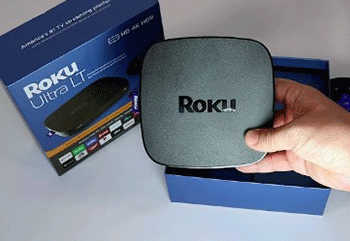
The Roku Ultra LT served me well in a secondary room.
It handles 4K and Dolby Vision smoothly, delivering crisp images for shows and movies.
The enhanced remote includes private listening via headphone jack — perfect for late-night viewing without disturbing others.
Setup mirrors the Ultra: quick and straightforward. Performance stays solid with no noticeable lag in everyday streaming.
I appreciate the lower price, especially since I do not miss Atmos in that casual setup. Ethernet keeps connections stable, and the voice remote works reliably.
It lacks the USB port and advanced remote, but for basic needs, it performs admirably. In my home, it proves reliable without premium extras.
Read more: Comparison of Nikon FTZ And FTZ II
Pros Of Roku Ultra LT
- Affordable Premium Streaming — I get almost all the high-end features of the flagship model but at a noticeably lower price, usually around $20 less. This makes it feel like a smart buy when I want solid 4K performance without paying for extras I might not use every day.
- Excellent Picture Quality — It delivers sharp 4K resolution with Dolby Vision support, so colors look vibrant and details stay crisp on my TV. HDR content from services like Netflix or Disney+ pops beautifully, giving me a cinematic feel without needing the more expensive version.
- Private Listening Convenience — The enhanced Voice Remote includes a headphone jack right on the remote itself, plus it often comes with earbuds included. Late-night binge-watching sessions become peaceful — I can crank up the volume without waking anyone else in the house.
- Strong Connectivity Choices — Ethernet port keeps my connection stable during live sports or big downloads, and dual-band Wi-Fi handles crowded networks well. I rarely see buffering, even when other devices compete for bandwidth.
- Fast and Responsive Performance — The quad-core processor makes navigation quick and app launches snappy. Scrolling through menus or switching between channels feels smooth, much better than older or cheaper Roku models I have tried.
- Voice Control Simplicity — The voice remote lets me search for shows or control playback hands-free with simple commands. It integrates nicely with my setup, saving time when I just want to say “play action movies” instead of typing.
- Easy Setup and Reliability — Plugging it in and following the on-screen steps takes minutes. Over time, it stays dependable with automatic updates that keep everything current without me having to think about it.
- Great Value for Casual to Moderate Use — For bedrooms, guest rooms, or secondary TVs, it provides premium streaming without overkill. I appreciate how it balances cost and quality perfectly for everyday viewing.
Cons Of Roku Ultra LT
- No Dolby Atmos Support — Without native Atmos decoding, immersive surround sound feels limited compared to the full Ultra. If I have a compatible soundbar or receiver, I miss out on that extra audio depth for movies and shows.
- Missing USB Port — I cannot plug in a flash drive to play local media files directly. This frustrates me when I want to watch personal videos or photos without setting up a server or network share.
- Basic Remote Features — The enhanced remote works well but lacks rechargeable batteries, backlit buttons, hands-free voice, and the lost remote finder. I end up hunting for it under cushions more often than I would like.
- Wi-Fi Not as Advanced — It uses dual-band instead of Wi-Fi 6, so in larger homes or areas with interference, the signal might not reach as far or stay as strong as on the upgraded model.
- Fewer Future-Proof Extras — No HDR10+ support alongside Dolby Vision, and some advanced audio passthrough options feel restricted. For cutting-edge setups, it starts to show its budget positioning.
- Walmart Exclusive Availability — Buying it means heading to Walmart or their site, which limits options if I prefer shopping elsewhere or want immediate pickup from other stores.
- No Programmable Shortcuts — The remote misses customizable buttons for quick app access. I have to navigate manually more often, which adds minor inconvenience during daily use.
Maintenance Tips For Roku Ultra LT
- Dust the Vents Regularly — Use a soft, dry cloth or compressed air every couple of weeks to clear dust from the vents. This prevents overheating during long streaming marathons and keeps performance steady.
- Install System Updates Promptly — Go to settings and check for software updates monthly. Fresh firmware fixes bugs, boosts speed, and adds new features — I always apply them as soon as they appear to avoid glitches.
- Manage Remote Batteries — Replace the AA batteries when the remote starts lagging or voice commands fail. I keep spares handy so I never get stuck mid-show.
- Keep Connections Secure — Check HDMI and Ethernet cables occasionally for loose fits. A firm connection avoids signal drops, especially for 4K content that demands stable bandwidth.
- Restart the Device Monthly — Unplug it from power for about 30 seconds, then plug back in. This simple reset clears temporary issues and refreshes the system for smoother operation.
- Avoid Overheating Placement — Position it in an open spot away from heat sources or stacked electronics. Good airflow extends its life and prevents slowdowns during heavy use.
- Clean the Remote — Wipe the remote with a microfiber cloth to remove fingerprints and crumbs. A clean surface helps buttons respond better and keeps voice mic clear.
- Monitor Storage Usage — Remove unused channels periodically through the settings menu. This frees up internal space, helping the device run faster over time.
Comparison With Other Brands
- Vs Amazon Fire TV Devices — Roku Ultra feels cleaner with fewer ads. Fire TV pushes more Amazon content, but Roku offers neutral navigation and better app organization.
- Vs Apple TV 4K — Apple TV excels in ecosystem integration if you own other Apple products. Roku Ultra wins on price and broader app support without the walled-garden feel.
- Vs Google TV Streamer — Google provides snappier interface in some tests. Roku Ultra counters with superior audio options like Atmos and more consistent updates across devices.
- Vs Nvidia Shield — Shield dominates gaming and local media with powerful hardware. Roku Ultra stays simpler and cheaper for pure streaming without Android complexity.
- Vs Fire TV Cube — Cube adds hands-free Alexa. Roku Ultra’s remote finder and backlit buttons feel more practical for everyday family use.
- General Edge — Roku’s interface stays user-friendly across models. Other brands sometimes overload with promotions, while Roku keeps focus on content discovery.
Frequently Asked Questions (FAQ)
The Roku Ultra includes Dolby Atmos, Wi-Fi 6, a USB port, and the premium rechargeable Voice Remote Pro. The LT is more affordable, with Dolby Vision but no Atmos, and a standard enhanced remote.
Regular Roku models (like Express or Streaming Stick) offer basic HD or 4K streaming. The Ultra provides top performance, advanced audio/video formats, better remote, and faster processing.
The Roku Ultra stands out as the best overall, with the fastest speed, most features, and premium audio/picture support for demanding users.
Yes, the Roku Ultra LT supports Dolby Vision for enhanced 4K HDR picture quality.
Conclusion: For Both Products
I have used both extensively, and honestly, you cannot go wrong with either — it depends on what you value most. If you chase the ultimate experience with immersive sound, faster performance, and handy extras, pick the Roku Ultra. It elevates movie nights and handles everything effortlessly. But if you want excellent 4K streaming at a better price without missing much in daily use, the Roku Ultra LT delivers plenty of satisfaction. Consider your setup: do you have Atmos speakers or need local media? Go Ultra. Otherwise, save with the LT. Either way, Roku keeps streaming simple and fun — you will enjoy your choice for years. What matters is getting content you love on screen quickly and beautifully. Happy streaming!