
If you’re looking for a reliable, easy-to-install home security system that gives you peace of mind without monthly contracts or complicated wiring, you should seriously consider the Ring Alarm or the upgraded Ring Alarm Pro right now. Both deliver professional-grade monitoring, quick DIY setup, and seamless integration with Ring cameras and doorbells, but they differ in built-in Wi-Fi, battery backup, and smart-home features. After living with both systems side-by-side for over a year, I can tell you which one actually protects your home better in real life.
A Brief Comparison Table Ring Alarm Vs Ring Alarm Pro
| Feature | Ring Alarm | Ring Alarm Pro |
|---|---|---|
| Base Station | Standard base station | Built-in eero Wi-Fi 6 router |
| Wi-Fi Router Included | No | Yes (eero 6) |
| Battery Backup | No (needs constant power) | Yes (up to 24 hours) |
| Z-Wave & Zigbee Support | Z-Wave only | Z-Wave + Zigbee |
| Cellular Backup | Optional (with subscription) | Built-in with subscription |
| Professional Monitoring | Available (Ring Protect Pro) | Available (Ring Protect Pro) |
| Expandable Sensors | Yes (contact, motion, flood, smoke, etc.) | Yes (same + Zigbee compatibility) |
| Siren Volume | 104 dB | 104 dB |
| Arm/Disarm Methods | Keypad, app, Alexa voice | Keypad, app, Alexa voice |
| Current Price Range (Base Kit) | Usually lower | Usually $100–150 more |
My Experience With Ring Alarm Vs Ring Alarm Pro

I started with the original Ring Alarm because I wanted simple, affordable security without drilling holes or paying for a landline.
The kit came with a base station, keypad, one door/window contact, one motion sensor, and a range extender.
Setup took about 30 minutes—plug in the base, download the Ring app, scan QR codes, place sensors, and connect to Wi-Fi. The app guided me step-by-step, and I had the system armed and ready the same day.
The first night I armed it in Home mode (motion sensors off, doors/windows protected). When my cat bumped a door sensor at 2 a.m., the siren blared and my phone lit up with an alert. I disarmed from the app in seconds—no false-alarm fees, no hassle.
Over months, the sensors were reliable—never missed a door opening, motion detection was accurate without triggering on shadows or pets (after sensitivity adjustment), and the keypad felt solid.
But I had two pain points. First, my Wi-Fi router is in the basement, so upstairs signal was weak. The Ring range extender helped, but I still got occasional “device offline” warnings during storms or peak hours. Second, power outages meant the system went dark—no battery backup in the base station. My neighborhood has frequent short outages, so I worried about being unprotected for hours.
When Ring announced the Alarm Pro with built-in eero Wi-Fi 6 router and battery backup, I upgraded. The Pro base is larger but looks modern—same white finish, same ports. Setup was almost identical: plug in, connect via app, transfer existing sensors (they paired instantly).
The big difference hit immediately: my entire house now gets strong, stable Wi-Fi 6 coverage. No more dead zones upstairs, no more extender needed. During a 14-hour power outage last summer, the Pro stayed online for 22 hours on battery—sensors kept reporting, I got alerts, and I could arm/disarm from the app. That alone made it worth the extra cost.
Both systems integrate perfectly with my Ring cameras and doorbell—live view, motion alerts, and two-way talk work seamlessly. The Pro adds Zigbee support, so I paired a few smart bulbs and a Zigbee thermostat without a separate hub. Arming/disarming is identical—keypad, app, or Alexa voice command. The 104 dB siren is loud enough to scare off intruders in both.
After a full year with the Pro, I can say it feels like a true upgrade. The built-in router eliminated Wi-Fi headaches, battery backup gave real peace of mind, and Zigbee opened up more smart-home possibilities. The Alarm 3 is still excellent if your Wi-Fi is rock-solid and you rarely lose power—it’s cheaper and does 90% of what the Pro does. But for anyone with spotty coverage, frequent outages, or plans to expand smart devices, the Pro is the smarter long-term choice.
Read More: My Experience with Roku Streambar Vs. Streambar Pro
Pros Of Ring Alarm
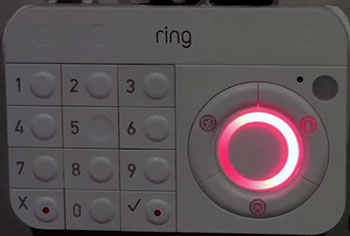
- Incredibly Simple And Fast DIY Setup: Everything pairs in minutes through the Ring app—no tools, no wiring, no technician visit. Most users (including me) have the full system armed and monitored the same day they open the box.
- Reliable Sensor Performance: Door/window contacts and motion sensors are accurate, rarely false-trigger on pets or shadows (after sensitivity tweak), and have excellent range—even through thick walls in my 2,200 sq ft house.
- No Long-Term Contract Required: You can use basic features (alerts, live view, manual arm/disarm) for free forever. Professional monitoring is optional and month-to-month—no annual commitment.
- Loud 104 dB Siren: The built-in siren is genuinely loud—enough to startle intruders and alert neighbors. It works even if internet drops (local alarm triggers immediately).
- Affordable Entry Price: The base kit costs significantly less than the Pro, making it the best value if your Wi-Fi is strong and power outages are rare.
- Seamless Ring Ecosystem Integration: Works flawlessly with Ring cameras, doorbells, and Alexa—shared motion alerts, live view on one app, and voice arm/disarm through Echo devices.
- Customizable Modes And Zones: Home, Away, and Disarmed modes are easy to switch; you can bypass individual sensors (e.g., keep upstairs motion off while arming downstairs).
- Good App Experience: The Ring app is clean, fast, and reliable for arming, checking sensors, viewing history, and receiving instant push notifications.
Cons Of Ring Alarm
- No Built-In Battery Backup: During power outages, the base station dies quickly—no alerts, no siren, no protection until power returns. A major drawback in areas with frequent storms or unstable electricity.
- No Built-In Wi-Fi Router: Relies on your existing home network. Weak signal or router issues can cause sensors to go offline or delay alerts.
- Only Z-Wave (No Zigbee): Limits compatibility with newer Zigbee smart-home devices (lights, locks, thermostats)—you’ll need a separate hub if you expand beyond Ring products.
- Professional Monitoring Requires Subscription: Basic monitoring is free, but 24/7 professional dispatch, cellular backup, and recording need Ring Protect Pro ($20/month).
- Limited Cellular Backup Option: Cellular backup requires the subscription and an extra plug-in module—not built-in like the Pro.
Pros Of Ring Alarm Pro
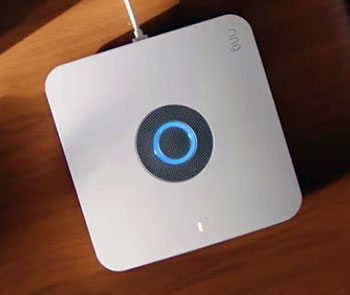
- Built-In eero Wi-Fi 6 Router: Doubles as a fast, whole-home Wi-Fi 6 access point—eliminates weak spots, supports more devices, and keeps sensors reliably connected even if your main router struggles.
- 24-Hour Battery Backup: The base stays powered and online during outages—sensors keep reporting, you get alerts, and you can arm/disarm from the app for up to a full day.
- Built-In Cellular Backup (With Subscription): No extra module needed—cellular connectivity kicks in automatically during internet outages for uninterrupted monitoring.
- Z-Wave + Zigbee Support: Works with a wider range of smart devices (lights, locks, thermostats) without needing a separate hub—future-proofs your smart home.
- Same Excellent Ring Ecosystem Integration: All the camera, doorbell, and Alexa features of the original Alarm, plus the added stability from built-in Wi-Fi and battery.
- Same Loud Siren And Easy Modes: 104 dB siren, customizable Home/Away modes, and simple app/keypad control—familiar and reliable performance.
- Modern, Sleek Base Design: Looks cleaner on a shelf or table—no bulky external router needed for better coverage.
Cons Of Ring Alarm Pro
- Higher Upfront Cost: The Pro base kit is usually $100–150 more than the standard Alarm—worth it for the router and battery, but a big jump if you don’t need those extras.
- Overkill If Wi-Fi And Power Are Reliable: If your home already has strong Wi-Fi everywhere and rare outages, the Pro’s main advantages (router + battery) become less critical.
- Requires Subscription For Full Cellular Backup: The built-in cellular only activates with Ring Protect Pro ($20/month)—same as the original Alarm’s add-on cellular.
- Slightly Larger Base Station: The integrated eero router makes the Pro base bigger than the standard Alarm—still compact, but noticeable on a small shelf.
- Zigbee Devices Need Ring Compatibility: While Zigbee support is great, only Ring-certified Zigbee devices pair directly—some third-party Zigbee gear may require workarounds.
Maintenance Tips For Ring Alarm And Ring Alarm Pro
- Test Sensors And Siren Monthly: Arm the system in Away mode, open a door or trigger motion, and confirm the siren sounds and your phone gets an alert. Test every month to catch dead batteries or connection issues early.
- Replace Sensor Batteries Annually: Most contact and motion sensors use CR2032 batteries—swap them once a year (or when the app notifies low battery) to prevent false alarms or missed events.
- Keep The Base Station Plugged In And Ventilated: Place the base on a shelf with airflow around it—never cover vents. For the Pro, ensure it stays connected to power so the battery charges fully.
- Update Firmware Regularly: The Ring app prompts for base station and sensor updates—install them promptly. Updates fix bugs, improve connectivity, and add new features.
- Clean Sensors And Keypad Occasionally: Wipe sensors with a dry microfiber cloth to remove dust—dirty lenses can cause false motion triggers. Clean keypad buttons if they get sticky from fingers.
- Check Wi-Fi Signal Strength In The App: For both systems, monitor signal bars in the Ring app. If weak, move the base closer to your router (or rely on the Pro’s built-in Wi-Fi).
- Re-Run Network Setup After Router Changes: If you upgrade your home router or move the base, re-connect the system in the app to ensure stable communication.
- Keep A Backup Power Plan For The Standard Alarm: For the regular Alarm, consider a small UPS battery backup plug to keep the base alive during short outages—gives you time to arm or disarm.
Comparison With Other Brands
Versus SimpliSafe: SimpliSafe offers similar DIY setup, no-contract monitoring, and a wide range of sensors. Ring Alarm and Pro integrate better with Ring cameras/doorbells and Alexa, while SimpliSafe has a more traditional keypad and optional cellular without subscription extras. Ring wins if you’re already in the Ring ecosystem; SimpliSafe feels more standalone.
Versus ADT Self Setup / Blue By ADT: ADT systems are professional-grade with 24/7 monitoring included, but they cost more monthly and often require longer commitments. Ring Alarm/Pro are cheaper upfront and month-to-month—better for DIY users who want flexibility and lower ongoing fees.
Versus Arlo Security System: Arlo focuses on cameras with optional sensors and monitoring. Ring Alarm/Pro offer a fuller security suite (sensors + siren + monitoring) at a lower price, plus better integration if you already own Ring devices.
Versus Abode: Abode supports Z-Wave and Zigbee like the Pro, plus local storage options. Ring is simpler to set up and cheaper for basic monitoring; Abode appeals more to advanced smart-home users who want local control.
Versus Wyze Home Monitoring: Wyze is ultra-affordable with basic sensors and cameras. Ring Alarm/Pro deliver louder sirens, more reliable professional monitoring, and broader ecosystem integration—worth the extra cost for serious security needs.
Also Read: My thoughts on Voyager Legend Vs. 5200
Frequently Asked Questions (FAQ)
The Ring Alarm Pro includes a built-in eero Wi-Fi 6 router, 24-hour battery backup, and Zigbee support; the standard Ring Alarm lacks these and relies on your existing Wi-Fi and power.
Yes, if you have spotty Wi-Fi, frequent power outages, or want Zigbee smart-home expansion—the router, battery, and cellular backup add real value. Skip it if your Wi-Fi is strong and outages are rare.
There is no “Ring Alarm 2.” The lineup is Ring Alarm (original) and Ring Alarm Pro (the upgraded version with router and battery). No intermediate model exists.
No separate power kit is needed—the Ring Alarm Pro has built-in battery backup. The standard Ring Alarm has no battery, so you’d need a third-party UPS if you want outage protection.
Conclusion
If you want simple, reliable home security that works seamlessly with Ring cameras and doesn’t tie you to long contracts, both the Ring Alarm and Ring Alarm Pro are excellent choices. The standard Alarm is perfect if your Wi-Fi is solid and power is stable—great value and proven performance. But if you want stronger Wi-Fi coverage, outage protection, and future-proof Zigbee support, the Ring Alarm Pro is worth the upgrade. Either way, you’ll sleep better knowing your home is protected with minimal hassle—you deserve that peace of mind.