

In the world of “affordable industrial” 3D printing, Qidi Tech has carved out a massive niche. They are the go-to brand if you want to print warp-prone engineering materials (ABS, ASA, Nylon) without spending $5,000 on a Stratasys. But their lineup is currently in a confusing transition period.
You have the X-Max 3, the reigning flagship with a massive build volume and a reputation for being a tank. Then you have the Plus 4, the newcomer that—despite being a “Plus” model—actually outperforms the Max 3 in several key specs and introduces a long-awaited multi-color ecosystem.
If you are looking to buy a large-format heated printer today, you are likely staring at these two and wondering: “Do I need the extra 20mm of build volume on the Max 3, or should I go for the modern features of the Plus 4?” I have spent extensive time with Qidi’s Series 3 machines and have recently tested the Plus 4’s capabilities. Here is the breakdown of whether bigger is actually better, or if newer is the smarter buy.
A Brief Comparison Table
| Feature | Qidi Tech X-Max 3 | Qidi Tech Plus 4 |
| Build Volume | 325 x 325 x 315 mm | 305 x 305 x 280 mm |
| Multi-Color | No (Requires 3rd party mods) | Yes (Supports Qidi Box) |
| Chamber Temp | Active Heating (65°C) | Active Heating (65°C, 2nd Gen) |
| Max Nozzle Temp | 350°C | 370°C (Bimetal) |
| Motion System | CoreXY (10mm Belts, Hollow Steel) | CoreXY (Updated Motors/Rails) |
| Screen/UI | 5-inch Touch (Older UI) | Updated Touch (Newer UI) |
| Release Era | Series 3 Flagship (2023) | Series 4 Mid-Range (2024/25) |
| Best For | Maximum Build Volume Needs | Multi-Material & Modern Features |
My Experience With Qidi Max 3
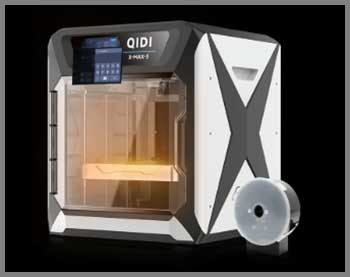
When I first unboxed the X-Max 3, my immediate thought was, “This thing is a beast.”
It is physically imposing.
It doesn’t try to look like a home appliance; it looks like a CNC machine that belongs in a garage.
I bought it primarily for one reason: printing full-sized cosplay helmets in one piece using ABS.
And in that regard, it is a monster.
I threw a Mandalorian helmet file at it, set the chamber to 60°C, and walked away. The 325mm build plate is luxurious. You don’t have to play “Tetris” with your model placement. The active heater works exactly as advertised—my large ABS prints came out with zero warping and perfect layer adhesion.
However, living with the Max 3 requires tolerance. It is loud. When the chamber fan, part cooling fan, and motherboard fan are all blazing, it sounds like a server room. The software experience also feels a bit “last generation.” While it runs Klipper, the stock Fluidd interface on the screen felt a bit clunky compared to modern standards. But for pure reliability on big, scary engineering prints, it never let me down. It’s a sledgehammer: heavy, blunt, and effective.
Pros Of Qidi Max 3
- The King of Volume: The 325 x 325 x 315 mm build volume is the main reason to buy this machine. Those extra centimeters matter. If you are printing large architectural models, automotive intake manifolds, or XL-sized cosplay armor, the Max 3 accommodates prints that would be cut off on the Plus 4 or Bambu X1C.
- Proven “Tank” Durability: The Max 3 uses massive 10mm belts and hardened hollow steel linear rods. It is overbuilt. Users have logged thousands of hours on these machines with minimal mechanical failures. It is a known quantity in the industry now.
- Simple, Brutal Heating: The active chamber heating on the Max 3 is powerful. It doesn’t just “take the chill off”; it bakes the part. For large ABS parts that like to pull up from the corners, the Max 3’s chamber is arguably the best in its price class.
- Mature Community: Because the Max 3 has been out longer, there are established profiles, mods, and troubleshooting guides available. If something breaks, someone on Reddit has likely already designed a fix for it.
Also read: My Thoughts On Quantum X Vacuum
Cons Of Qidi Max 3
- No Multi-Color Ecosystem: You are stuck with single-color printing unless you hack together a solution like the CoPrint or Palette, which are fiddly and expensive. If you ever think you might want multi-color, the Max 3 is a dead end.
- Noise Levels: The Max 3 is loud. The fans are industrial grade and they let you know it. It is difficult to be in the same room with this machine while it is running a high-temp print.
- Bulky Footprint: It is a massive cube. It takes up significantly more desk depth than the Plus 4. You need a dedicated heavy-duty table for it; putting it on a standard office desk will likely cause the desk to wobble during fast infill moves.
My Experience With Qidi Plus 4
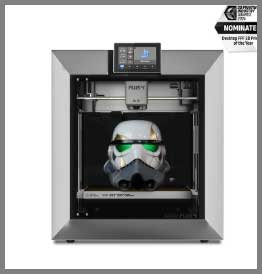
The Qidi Plus 4 feels like an apology for the rough edges of the Series 3.
The industrial aesthetic has been refined into something slightly sleeker.
While the build volume is technically smaller (305mm vs 325mm), I found that for 95% of my projects—including most helmets—it was still plenty big enough.
The 280mm Z-height is the only place where I felt the squeeze compared to the Max 3’s 315mm.
The biggest shift, however, was the ecosystem.
The Plus 4 is designed to work with the Qidi Box, a multi-filament changer similar to Bambu’s AMS. I tested it with a 4-color PLA print involving soluble supports. The ability to mix standard PLA with a dedicated support interface material is a game-changer for complex geometries. The machine swapped filaments relatively smoothly, though not as fast as a Bambu.
What struck me most was the heat management. The “2nd Gen” chamber heater seemed to reach 65°C faster than the Max 3, and the thermal insulation on the print head felt superior. I printed a Carbon Fiber Nylon gear on the Plus 4, and the surface finish was impeccable.
The updated nozzle design (rated for 370°C) gave me extra confidence that I wasn’t cooking the PTFE liner. It feels like a machine that bridges the gap between the “raw power” of the Max 3 and the “smart features” of modern consumer printers.
Pros Of Qidi Plus 4
- Native Multi-Color Support: This is the decisive factor. The Plus 4 supports the Qidi Box out of the box. You can print multi-color models or, more importantly for engineers, use multi-material supports (e.g., PETG as a support interface for PLA). The Max 3 does not natively support this system.
- Higher Temperature Ceiling: The Plus 4 comes with a bimetal hotend rated for 370°C (vs 350°C on the Max 3). While 20 degrees seems minor, it pushes the machine further into the realm of ultra-performance polymers like PPS and coated PEEK without needing aftermarket upgrades.
- Refined User Experience: The Plus 4 fixes many of the “jankiness” of the Series 3. The auto-leveling is more consistent (using improved sensors), the filament runout sensors are better placed, and the touchscreen interface is more responsive and intuitive.
- Better Value Proposition: Often launching at a price point similar to or lower than the Max 3, the Plus 4 offers newer tech (better motors, better electronics, camera included) for the money. You are getting 2024 technology rather than 2023 technology.
Cons Of Qidi Plus 4
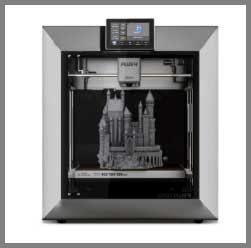
- Smaller Z-Axis: The drop from 315mm (Max 3) to 280mm (Plus 4) is noticeable. If you print tall vases or statues, you are losing over an inch of vertical build space. It makes the machine feel slightly more “squat.”
- New Product Teething Issues: As with any new Qidi release, early adopters have reported minor bugs, such as filament sensor false positives or firmware glitches with the new Qidi Box integration. The Max 3 has had time to have these ironed out.
- Proprietary Nozzle ecosystem: While Qidi is generally good about spares, the Plus 4 uses a specific hotend assembly. You cannot simply thread in a standard V6 nozzle easily without ensuring it matches the new thermal break length and thread pitch specific to the Plus 4.
Maintenance Tips For Qidi Max 3 and Plus 4
- Fan Intake Cleaning (Crucial): Both machines use active chamber heaters that suck air from inside the chamber, heat it, and recirculate it. This loop collects dust, hair, and plastic wisps. Clean the heater fan intake monthly. If it clogs, the heater element can overheat and trigger a safety shutdown or melt its housing.
- Rod Maintenance:
- Max 3: Uses hollow steel optical shafts. Clean with alcohol and apply a light machine oil (sewing machine oil) or thin grease. Do not let them run dry or they will score.
- Plus 4: Check the specific manual, but generally, linear rails need Lithium grease (white) injected into the carriage blocks every 300-500 hours.
- Belt Tension: The CoreXY belts on both machines are long. Over time, they will stretch. If you see circles becoming ovals, check the belt tensioners (usually located at the back of the gantry). They should twang like a bass string, not a loose rubber band.
- Nozzle Clogs (High Temp): If you print CF Nylon or ABS, do not just let the machine cool down immediately after a print. Let the fan run for a few minutes to prevent “heat creep” where the plastic melts higher up in the throat, causing a nasty clog for the next print.
Also read: My Thoughts On LJUREN Cordless Vacuum Cleaner
Comparison with other brands
- Bambu Lab X1C vs. Qidi Plus 4: The X1C is the king of multi-color and ease of use. However, the Qidi Plus 4 beats it on build volume (305mm vs 256mm) and active chamber heating (65°C vs Passive). If you print PLA/PETG/Multi-color, get the Bambu. If you print Nylon/PC/ABS, get the Qidi Plus 4.
- Creality K1 Max vs. Qidi Max 3: The K1 Max has a similar build volume (300x300x300) but lacks the active chamber heater (it relies on the bed). The Qidi Max 3 is a superior machine for engineering materials because of that active heater. The K1 Max is better for general PLA/speed printing and is usually cheaper.
- Flashforge Adventurer 5M Pro vs. Qidi Plus 4: No contest. The Qidi Plus 4 is a much larger, more capable machine. The 5M Pro is a budget entry-level enclosed printer.
Frequently Asked Questions (FAQ)
Yes. The X-Max 3 has a build volume of 325 x 325 x 315 mm, whereas the Plus 4 is 305 x 305 x 280 mm. You get roughly 20mm more in X/Y and 35mm more in Z with the Max 3.
Not officially. The Qidi Box is listed as compatible with the Plus 4, Q2, and the upcoming Max 4. While the Max 3 runs Klipper and could theoretically be modded, it does not support the seamless plug-and-play experience that the Plus 4 does.
Yes. The Qidi Plus 4 features a 2nd Generation Active Chamber Heater capable of maintaining 65°C, making it excellent for warp-free ABS and Nylon printing.
The Qidi Plus 4 is generally quieter than the Max 3 due to updated motor drivers and slightly better fan curves, but both are loud machines compared to a bed-slinger because of the air filtration and chamber heating fans.
Conclusion
This comparison comes down to a choice between Volume and Versatility.
Choose the Qidi Tech X-Max 3 if:
- You absolutely need the maximum build volume possible for the price (325mm).
- You are printing large single-material parts (like helmets or industrial ducts) and have zero interest in multi-color printing.
- You want a machine that has been “battle-tested” by the community for over a year.
Choose the Qidi Tech Plus 4 if:
- You want a modern, refined experience with better software and sensors.
- You plan to use the Qidi Box for multi-color prints or soluble supports.
- You are okay with a slightly smaller (but still generous) 305mm build plate.
- You want the latest hotend technology capable of 370°C for exotic materials.