
For a long time, if you wanted to 3D print “difficult” materials like ABS, Nylon, or Polycarbonate reliably, you had two choices: spend thousands on an industrial machine or build a fire-hazard enclosure for your cheap desktop printer. The Qidi Tech Q1 Pro disrupts this dynamic entirely. It brings a feature previously reserved for the elite—an active heated chamber—down to a price point that undercuts popular competitors like the Bambu Lab P1S.
If your goal is to print strong, heat-resistant functional parts without warping, the Q1 Pro is arguably the best value printer on the market right now. You should buy this product directly from the Qidi Tech official store or Amazon to ensure you get the latest version with the updated nozzle design and firmware.
My Experience With Qidi Q1 Pro
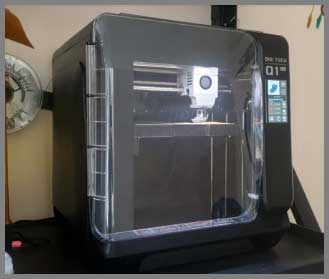
Unboxing the Qidi Q1 Pro, the first thing that struck me was its utilitarian aesthetic.
It doesn’t have the sleek, futuristic curves of a Bambu Lab printer; it looks like a piece of industrial equipment, boxy and functional.
It feels incredibly solid, with a rigid metal frame encased in sturdy plastic.
Setup was refreshing. The printer comes virtually fully assembled.
I just had to remove the shipping screws, attach the screen, and run the automatic calibration. The “dual-sensor” auto-leveling system (which uses sensors behind the bed) worked perfectly. I didn’t have to fiddle with paper or manual knobs.
I decided to test its primary selling point immediately: ABS printing. I loaded a spool of red ABS, set the chamber temperature to 60°C, and sliced a large gears model. On most printers in this price range, a print like this would peel off the bed or crack in the middle due to cooling. On the Q1 Pro, it printed flawlessly. The active heater kept the internal environment toasty, allowing the plastic to anneal as it printed.
However, “toasty” also applies to the noise. When the chamber heater fan and the auxiliary cooling fan kick in, this machine is loud. It definitely lives up to its “Pro” moniker in that it belongs in a workshop, not a living room.
The Klipper firmware interface (Fluidd) is a dream for power users. It gives you raw access to configuration files and performance graphs. While the onboard screen is a bit small and resistive (pressure-sensitive rather than touch-sensitive like a phone), the web interface is where you will spend most of your time.
One minor frustration was the spool holder. It is mounted on the back of the machine. If you place the printer against a wall, changing filament becomes a blind reaching exercise. I quickly printed a side-mounted spool holder (a popular community mod) to fix this.
Also read: My Thoughts On Quantum X Vacuum
Pros Of Qidi Q1 Pro
- Active Heated Chamber (60°C): This is the killer feature. Unlike “passive” enclosures that just trap heat from the bed (like the Creality K1 or Bambu P1S), the Q1 Pro has a dedicated heater fan that actively maintains the air at 60°C. This practically eliminates warping and delamination for materials like ABS, ASA, and PC. It makes engineering-grade printing “easy mode.”
- 350°C Bimetal Nozzle: Out of the box, the Q1 Pro comes with a high-temperature, hardened steel nozzle. You do not need to upgrade the hotend to print abrasive materials like Carbon Fiber Nylon or Glow-in-the-dark PLA. It handles them natively without wearing out.
- Tank-Like CoreXY Stability: The motion system uses 10mm hollow linear steel rods (Class bearing steel) which are incredibly rigid. Even when printing at the advertised 600mm/s speeds, the printer feels grounded. This rigidity results in minimal “ringing” (ripples) on the surface of your prints.
- Independent Dual Z-Axis: Unlike many budget CoreXY printers that use a single motor to lift the bed (which can lead to bed tilt), the Q1 Pro uses two independent motors. This allows the printer to automatically “tram” (level) the bed physically before every print, ensuring a perfect first layer every time.
- Fully Open Source Klipper: Qidi has embraced the open-source community. You get full root access to the Klipper firmware. This means you can install your own webcams, add custom macros, or tune the input shaping algorithms without voiding your warranty or hacking the system.
- Included 1080p Camera: While some competitors make you pay extra for a camera, the Q1 Pro includes one pre-installed. It allows you to monitor your prints remotely and creates nice timelapse videos of your builds.
Cons Of Qidi Q1 Pro
- Industrial Noise Level: This printer is not designed to be quiet; it is designed to be effective. The combination of the power supply fan, the chamber heater, and the part cooling fans creates a loud drone. You will likely want to place this in a garage, basement, or separate room.
- Rear-Mounted Spool Holder: The default location for the filament spool is on the back of the machine. This is ergonomically poor, especially if you have limited desk depth or want to push the printer against a wall. Accessing it to change colors is a hassle without printing a community modification.
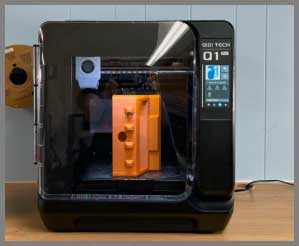
- Utilitarian Aesthetics: If you care about how your tech looks on a desk, the Q1 Pro might disappoint. It looks like a plastic microwave or a lab tool. It lacks the premium fit and finish of the Bambu Lab X1 series.
- Small Touchscreen: The 4.3-inch screen is functional but feels a bit dated. It is resistive, meaning you have to press slightly harder than you would on a modern smartphone. However, since the web interface is so good, you rarely need to use the physical screen.
- App Polish: The Qidi mobile app and slicer are functional forks of popular software (PrusaSlicer/Orca), but they lack the seamless, polished “cloud” experience of the Bambu Handy app. It feels more like a tool for makers than a consumer gadget.
Maintenance Tips For Qidi Q1 Pro
- Lubricate the Linear Rods: The print head moves on steel rods that need to be kept wet with oil or light grease. If they run dry, the printer will get louder and print quality will drop. Wipe them clean and re-apply the included lubricant every few weeks or after 50 hours of printing.
- Clean the Chamber Heater Vent: The heater fan is located at the bottom of the chamber. It is easy for scraps of filament or “poop” (purged plastic) to fall near the intake. Check this area regularly to ensure the heater can breathe and won’t overheat.
- Check Belt Tension: Being a high-speed CoreXY machine, the belts take a beating. If you notice your circles becoming ovals, use the automatic tensioning procedure or manually adjust the belts according to the Klipper input shaping graphs.
- PEI Sheet Care: The textured PEI sheet is excellent, but it hates oil. Do not touch the print area with your fingers. If prints stop sticking, wash the plate with warm water and plain dish soap (Dawn) to remove finger oils. Isopropyl alcohol works for quick cleans, but soap and water is the deep clean reset.
- Backup Config Files: Since you have full access to Klipper, it is possible to accidentally break a configuration file. Once you have the printer running perfectly, download a backup of your
printer.cfgfile from the web interface so you can restore it if you mess something up later.
Also read: My Thoughts On LJUREN Cordless Vacuum Cleaner
Comparison with Other Brands

- Bambu Lab P1S:
- The Main Difference: The P1S is a polished consumer product with a passive enclosure. The Q1 Pro is a workhorse with an active heated chamber.
- Use Case: If you primarily print PLA and want multi-color (AMS) prints, buy the P1S. If you want to print ABS, ASA, or Nylon for engineering parts, the Q1 Pro is superior due to the active heater.
- Ecosystem: Bambu’s software is easier for beginners; Qidi’s is more flexible for tinkerers.
- Creality K1 / K1C:
- Reliability: The original K1 had a rocky launch with extruder issues. The Q1 Pro has generally proven to be more reliable out of the box with better customer support from Qidi.
- Heating: Like the Bambu, the K1 relies on passive heat. The Q1 Pro’s active heater gives it a distinct advantage for warp-prone materials.
- Nozzle: The Q1 Pro comes with a bimetal nozzle standard; the base K1 often requires upgrades for abrasive filaments (though K1C fixed this).
- Flashforge Adventurer 5M Pro:
- Size: The Q1 Pro has a larger build volume (245mm vs 220mm).
- Filament: The 5M Pro is great for quick PLA/PETG prints, but again, lacks the active chamber heater for serious engineering grade materials.
Frequently Asked Questions (FAQ)
The Qidi Q1 Pro can actively heat its chamber up to 60°C. This is the “magic number” for printing ABS and ASA, as it keeps the ambient air just below the glass transition temperature of the plastic, preventing warping and layer splitting.
Out of the box, the Q1 Pro is a single-filament machine. However, Qidi has recently released the “Qidi Box” (similar to an AMS), which brings multi-color capability to their Klipper printers. You should check if this accessory is compatible or available in your region if multi-color is a dealbreaker for you.
It is not recommended. Because the Q1 Pro is so well insulated, printing PLA with the door and lid closed can cause “heat creep,” where the filament melts too early in the extruder and clogs. For PLA, you should remove the top lid and open the front door to let heat escape.
Yes. The Q1 Pro uses a specific nozzle design that is integrated but replaceable. It is a “Revo-style” quick change but screwed in. You don’t need to disassemble the entire print head, but you should do it while hot (carefully!) to ensure a tight seal.
Yes, the Q1 Pro has built-in WiFi (2.4GHz) and an Ethernet port. You can send files wirelessly from your computer using the Qidi Slicer or Orca Slicer and monitor the print via the web interface.
Conclusion
The Qidi Q1 Pro is a specific tool for a specific job. It doesn’t try to be the prettiest printer or the most “fun” multi-color toy. Instead, it focuses entirely on performance. It democratizes engineering-grade 3D printing by offering an active heated chamber at a price that was previously impossible.
If you are an engineer, a cosplayer needing durable props, or a hobbyist tired of warped ABS parts, this is the machine to get. It is a loud, boxy, industrial beast that simply gets the job done. You should buy this product to finally conquer advanced materials without breaking the bank.