

For years, the 3D printing community has been waiting for a machine that combines the reliability of a Bambu Lab with the massive size of a RatRig and the open-source freedom of a Voron. We are finally seeing the contenders arrive.
On one side, we have the Qidi Tech Plus 4, the latest iteration of the “industrial workhorse” lineage, promising to print the most difficult materials on earth without breaking a sweat. On the other, we have the massive Creality K2 Plus, the flagship “Bambu Killer” that brings multi-color printing and AI smarts to a gargantuan 350mm build plate.
If you are looking to upgrade from a bed-slinger or a smaller enclosed printer, the choice between these two is agonizing. Do you go for the specialized high-temperature mastery of the Qidi, or the do-it-all, multi-color spectacle of the Creality? I have put both machines through their paces—burning through spools of carbon fiber nylon and PLA—to tell you exactly which one deserves the prime spot on your workbench.
A Brief Comparison Table
| Feature | Qidi Tech Plus 4 | Creality K2 Plus (Combo) |
| Build Volume | 305 x 305 x 280 mm | 350 x 350 x 350 mm |
| Multi-Color | Single (Qidi Box planned) | CFS (4-color included, up to 16) |
| Chamber Temp | Active Heating (65°C) | Active Heating (60°C) |
| Max Nozzle Temp | 370°C (Bimetal) | 350°C (Hardened) |
| Motion System | CoreXY (Steel Rails) | CoreXY (Linear Rails + Servo) |
| Motors | High-Torque Steppers | Closed-Loop Servo Motors |
| Ecosystem | Open Klipper | Creality OS (Klipper-based) |
| Target Audience | Engineering/Functional | Cosplay/Multi-Color/General |
My Experience With Qidi Plus 4
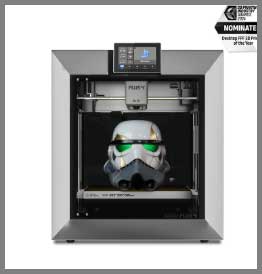
The Qidi Plus 4 arrived with the subtle confidence of a tank.
It doesn’t have the flashy glass curves of some consumer electronics; it looks like a machine designed to live in a garage or a factory floor.
Setting it up was a matter of minutes.
The first thing I noticed was the solidity of the gantry.
Qidi has always prioritized thermal stability, and this machine is no exception.
I immediately tested it with what I consider the “boss battle” of filaments: Glass-Fiber Reinforced Polypropylene (GF-PP). This material loves to warp. I set the active chamber heater to its maximum 65°C, loaded the file, and waited. The heating speed was impressive. Within minutes, the internal chamber was toasty, creating the perfect environment for engineering plastics. The print—a complex mounting bracket for a car engine—came out with injection-molded quality. The layers were indistinguishable.
Using the Qidi Plus 4 felt like using a precision instrument. The open Klipper interface allowed me to SSH into the machine and fine-tune my macros for filament changes. It felt “unlocked” in a way that many modern printers don’t. However, the lack of an automatic material changer was noticeable. When I wanted to print a two-tone logo, I had to insert a pause command and manually swap the filament, which felt like a step backward in 2025. But for pure, unadulterated strength and reliability, the Plus 4 was a beast that refused to fail.
Pros Of Qidi Plus 4
- Superior Thermal Management (65°C Active Chamber): While both printers have heated chambers, the Qidi Plus 4 pushes the envelope slightly further with a 65°C limit and a highly insulated frame. For extreme materials like PA12-CF (Carbon Fiber Nylon) or PC (Polycarbonate), those extra 5 degrees and the uniformity of the heat make a difference. I found that large, flat ABS parts printed on the Qidi had absolutely zero residual stress or warping, whereas the K2 Plus occasionally required a brim for the same file. The Qidi is purpose-built for high-temp performance.
- Open Source Klipper Implementation: Qidi continues to be a favorite for the “tinkerer” crowd because they don’t lock you out. You get full access to the
printer.cfgfile. If you want to add a custom accelerometer, change the input shaping algorithm, or integrate it into a custom Home Assistant automation, you can. There is no “jailbreaking” required. This transparency ensures that if Qidi ever stops supporting the machine, the community can keep it running forever. - Industrial Hotend Design (370°C): The print head on the Qidi Plus 4 is a marvel of thermal isolation. It is rated for 370°C, which opens the door to the “super polymers” like PPS and PEEK (at the lower end of their range). The bimetallic nozzle is standard, meaning you don’t need to upgrade anything to print abrasive composites. It feels over-engineered in the best possible way, designed to run for thousands of hours without clogging.
- Compact Footprint for the Power: Despite having a respectable 305mm build volume, the Qidi Plus 4 is surprisingly compact compared to the behemoth that is the K2 Plus. It fits comfortably on a standard workbench depth (60cm) without overhanging. For users with limited space who still need “big” printing capabilities, the Qidi strikes a better balance between external size and internal volume.
- Value Proposition: Typically, the Qidi Plus 4 comes in at a lower price point than the K2 Plus Combo. If you do not need multi-color printing, you are essentially getting a better engineering machine for less money. You aren’t paying for the complex material changing system or the extra frame size if you don’t intend to use them.
Also read: My Thoughts On Quantum X Vacuum
Cons Of Qidi Plus 4
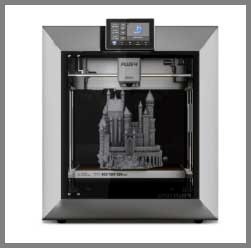
- No Native Multi-Color (Yet): As of this writing, if you want multi-color prints, the Qidi Plus 4 is not your machine. While Qidi has teased a “Qidi Box,” the integration is not built-in like the K2 Plus Combo. You are buying a single-material workhorse. If your primary goal is printing rainbow dragons or color-coded educational models, the lack of an AMS/CFS system is a dealbreaker.
- “Small” Screen Interface: The screen on the Qidi Plus 4, while functional, feels a bit small and cramped compared to the expansive touch interface of the Creality. Typing in Wi-Fi passwords or navigating through complex Klipper config menus on the small resistive-feeling screen can be clumsy for users with large fingers.
- Utilitarian Aesthetics: The Qidi Plus 4 prioritizes function over form. It is a black box with visible screws and a very industrial vibe. It lacks the refined, consumer-friendly polish of the Creality K2 Plus or Bambu X1C. It looks like a tool, not a piece of tech to display.
- Manual Z-Offset Tweaking: Despite auto-leveling, I found that I still occasionally needed to baby-step the Z-offset on the Qidi Plus 4 when changing between textured and smooth plates. The induction sensors are good, but the “perfect” first layer often requires a human eye and a quick adjustment, whereas the K2 Plus uses strain gauges and Lidar/AI to nail this more consistently.
My Experience With Creality K2 Plus
Unboxing the Creality K2 Plus was an event. The machine is huge. The 350mm build volume is hard to appreciate until you see it sitting on a desk—it dominates the room. I hooked up the new CFS (Creality Filament System), which sits neatly on top (or beside), and loaded four different colors of PLA. The setup process was automated, with the machine performing a dazzling array of self-checks, including tilting the bed to align the Z-axis perfectly.
I decided to stress-test the volume and the multi-color capabilities simultaneously by printing a full-sized cosplay helmet in four colors. Watching the K2 Plus work is mesmerizing. The closed-loop motors are incredibly quiet and precise, and the toolhead moves with a snappy aggression that screams speed. The CFS swapped filaments flawlessly, though the “poop” waste it ejected out the back was significant.
The result was jaw-dropping. A full-sized helmet, printed in one piece, with colored accents already in place. No gluing, no painting. The AI camera even sent a notification to my phone when a support structure looked a bit wobbly (it held up, thankfully). However, the software experience was a mix of brilliance and mild annoyance. The Creality Print slicer has improved, but I encountered a few bugs where the cloud sync would hang. Yet, having a machine that can print a small furniture item in a stable, heated environment is a level of capability I didn’t know I needed until I had it.
Pros Of Creality K2 Plus
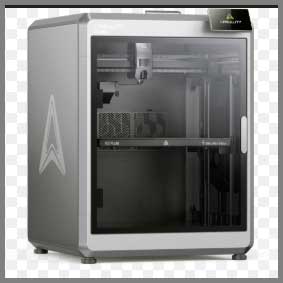
- King-Sized Build Volume (350mm³): This is the killer feature. A 350 x 350 x 350 mm build volume puts the K2 Plus in a different weight class. You can print taller props, wider architectural models, or massive batches of parts that simply would not fit on the Qidi or a Bambu. Once you get used to having this much real estate, it is hard to go back. It eliminates the need to cut models into pieces and glue them, saving hours of post-processing.
- CFS Multi-Color System: The Creality Filament System (CFS) brings the K2 Plus into the modern era of multi-material printing. It holds four spools (and is expandable to 16), reads RFID tags on Creality filaments for auto-setup, and handles the swaps automatically. Beyond just colors, this allows for the use of “Support Interface” material, which makes removing supports from complex complex parts effortless. It transforms the printer from a tool into a magic box that spits out finished products.
- Closed-Loop Servo Motors: The K2 Plus uses step-servo motors rather than traditional steppers. This is a significant tech upgrade. These motors “know” where they are. If the print head bumps into a blob of plastic, the motor detects the resistance and can recover without layer shifting. This results in higher reliability during high-speed printing and generally quieter operation compared to the whining of traditional steppers at high velocity.
- Next-Gen AI and Smart Features: Creality has packed the K2 Plus with sensors. The dual cameras provide AI failure detection (spaghetti detection) and debris detection. The active tilt-leveling uses the motors to physically align the bed, which is more robust than just software compensation. The “Apology” feature (resume after power loss) is seamless. It feels like a smart appliance rather than just a CNC machine.
- Actively Heated Chamber (60°C): Finally, Creality has added a dedicated heater. Unlike the older K1 series which relied on the bed heat, the K2 Plus pumps hot air into the chamber. This puts it on par with industrial machines for printing ABS and ASA. While it is rated slightly lower than the Qidi (60°C vs 65°C), it is more than sufficient for 99% of users and ensures that those massive 350mm prints don’t warp off the plate.
Cons Of Creality K2 Plus
- Massive Footprint: The K2 Plus is a beast. It is heavy, deep, and tall. You cannot put this on a flimsy IKEA lack table; the momentum of the print head combined with the sheer weight of the unit requires a sturdy, solid surface. Measuring your workspace is mandatory before buying this machine. It will dominate whatever room it is in.
- Software Ecosystem Maturity: Creality’s software (Creality Print and Creality OS) has improved massively, but it still has “Creality moments.” You might encounter occasional translation errors, cloud server timeouts, or weird slicing artifacts that don’t appear in OrcaSlicer. While you can root it, the out-of-the-box software experience is slightly less polished than the hardware itself.
- Filament Waste (The “Poop”): Like all single-nozzle multi-material systems, the K2 Plus generates waste. For every color change, it must purge the old color. If you are printing a model with hundreds of color swaps, you might end up with more waste plastic than printed object. The CFS helps manage this, but the “poop chute” fills up fast, and you need to stay on top of emptying it.
- Complexity and Maintenance: The K2 Plus is an incredibly complex machine. It has servo motors, belt tensioners, a filament changer with four motors, cutters, and sensors everywhere. More complexity means more points of failure. Troubleshooting a jam in the CFS or a communication error with a servo motor is significantly more difficult than fixing a jam on the straightforward direct-drive extruder of the Qidi.
Maintenance Tips For Qidi Plus 4 and Creality K2 Plus
- Chamber Heater Safety: Both machines use active heaters. This means they have intakes that can get clogged with dust and hair. Every month, inspect the heater fan intake (usually at the back or side inside the chamber). A clogged heater can trigger thermal runaway protection or, worse, become a fire hazard. Vacuum these vents religiously.
- Rail Lubrication:
- Qidi Plus 4: Typically uses steel hollow rods or linear rails. Clean them with IPA and apply SuperLube or white lithium grease every 300 hours.
- Creality K2 Plus: Often uses high-precision rails. Avoid over-greasing the Z-rods, as the dust will stick and create a grinding paste. A light coating is all that is needed. Crucially, do not grease the carbon rods (if present on the X-axis for your specific batch/model); clean those with dry cloth only.
- CFS/Filament Maintenance (K2 Plus): The CFS has internal gears that pull filament. If you use brittle filament (like old PLA), it can snap inside the feeder. Keep your CFS clean. Open it up periodically to blow out filament dust/shavings with compressed air. Dust buildup here causes the dreaded “failed to retract” errors.
- Belt Tension:
- Qidi Plus 4: Check belt tension manually. Pluck the belts; they should sound like a bass guitar string.
- Creality K2 Plus: The K2 series often features semi-auto tensioning, but verify it. If you see “ringing” or “ghosting” on your prints, run the input shaping calibration immediately.
- Carbon Filter Replacement: Both machines are enclosed and likely use activated carbon filters to scrub VOCs. These filters have a limited lifespan. If you are printing ABS/ASA heavily, replace the carbon filter pellets or cartridge every 3-6 months, or the machine will start smelling toxic.
Also read: My Thoughts On LJUREN Cordless Vacuum Cleaner
Comparison with other brands
- Bambu Lab X1 Carbon vs. The Field: The X1C is the benchmark. Compared to the Qidi Plus 4, the X1C is smaller and lacks the active heated chamber (it is passive), making the Qidi better for warping materials. Compared to the K2 Plus, the X1C is significantly smaller (256mm vs 350mm). The K2 Plus is essentially an “X1C XL.” If you need size, the Bambu cannot compete. If you need a polished, bug-free experience, Bambu still holds the crown.
- Prusa XL vs. Creality K2 Plus: The Prusa XL is a tool-changer, meaning it has multiple print heads. It does not waste filament on color swaps (no poop!). If you are printing massive multi-material parts and hate waste, the Prusa XL is superior to the K2 Plus. However, the K2 Plus is generally faster for single-material prints and is fully enclosed/heated, making it better for ABS/ASA than the semi-open Prusa XL.
- RatRig V-Core vs. Qidi Plus 4: The RatRig is a kit you build yourself. It offers ultimate performance but requires 20+ hours of assembly. The Qidi Plus 4 is a “pre-built RatRig.” It offers 90% of the performance with zero assembly time. Unless you are a masochist who loves crimping wires, the Qidi is the better choice for getting straight to work.
Frequently Asked Questions (FAQ)
It depends entirely on your needs. If you need to print multi-color models or require a massive 350mm build volume, the Creality K2 Plus is the clear winner. If you need a dedicated engineering machine for high-strength single-material parts (ABS, Nylon) and want to save money, the Qidi Plus 4 is the better choice.
Yes, the Creality K2 Plus features an active chamber heater capable of reaching 60°C. This is a significant upgrade from the previous K1 series and allows it to print warp-prone materials like ABS and ASA reliably.
The Qidi Plus 4 operates at around 60dB. While the motors are quiet, the fans (part cooling, chamber heater, and motherboard fan) create a noticeable “whoosh” of white noise. It is generally considered quieter than the Bambu X1C but still audible in a quiet room.
Yes, the K2 Plus Combo comes with the CFS (Creality Filament System), which supports up to 4 colors out of the box. You can daisy-chain up to 4 CFS units to print with up to 16 colors simultaneously.
Conclusion
The choice between the Qidi Plus 4 and the Creality K2 Plus marks a divergence in the 3D printing market.
Choose the Qidi Plus 4 if you are an Engineer or Functional Maker. You want a tool that is rugged, reliable, and capable of handling the toughest thermoplastics on the market. You don’t care about printing colorful dragons; you care about dimensional accuracy, layer adhesion, and open-source control. You want a machine that respects your ability to tinker and rewards you with industrial-grade parts.
Choose the Creality K2 Plus if you are a Cosplayer, Designer, or Power User. You need the “Wow Factor.” The ability to print a full-sized helmet in one go, in multi-color, with support interfaces that peel off like butter, is a game-changer. You are willing to deal with a larger machine and a slightly more complex ecosystem in exchange for the sheer versatility of size and color. It is the closest thing to a “Star Trek Replicator” currently available in the consumer market.