

For a long time, the advice for anyone wanting a reliable 3D printer was simple: “Just buy a Bambu P1S.” It became the default recommendation—the Toyota Corolla of 3D printing. It just works. But the market has shifted.
Qidi Tech, a brand known for making industrial-grade features accessible to hobbyists, has released the Plus 4. This isn’t just another clone; it’s a direct challenge to the status quo, offering features that the P1S simply cannot match on paper.
If you are reading this, you are likely torn between the safety of the popular choice and the allure of “more for your money.” Do you need the active heated chamber and massive build volume of the Qidi, or is the polished, multi-color ecosystem of the Bambu P1S too good to pass up? I have run both machines side-by-side to give you the honest truth about which one belongs on your desk.
A Brief Comparison Table
| Feature | Qidi Tech Plus 4 | Bambu Lab P1S |
| Build Volume | 305 x 305 x 280 mm | 256 x 256 x 256 mm |
| Chamber Heating | Active Heating (up to 65°C) | Passive Enclosure (Heat Creep Risk) |
| Max Nozzle Temp | 370°C (Bimetal) | 300°C (Stainless Steel*) |
| Multi-Color | Qidi Box (New, supports drying) | AMS (Mature, reliable standard) |
| Firmware | Klipper (Open) | Proprietary (Closed) |
| Display | Touchscreen (Responsiveness varies) | Low-Res Text Screen (D-Pad) |
| Connectivity | Wi-Fi, Ethernet, USB | Wi-Fi, MicroSD |
| Target Audience | Engineering / High-Performance | General Purpose / PLA / PETG |
*Note: P1S stock nozzle is stainless steel; hardened gear/nozzle upgrades are needed for abrasive filaments, whereas Qidi comes hardened out of the box.
My Experience With Qidi Plus 4
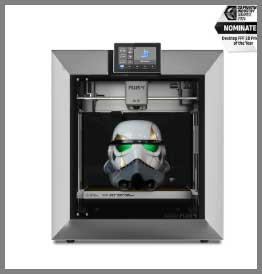
The Qidi Plus 4 feels like a piece of industrial equipment that someone shrunk down (but not too much) for home use.
It is physically larger than the P1S, and that extra size translates directly to the build plate.
I loaded up a full-sized helmet file that I previously had to slice into pieces for smaller printers.
On the Plus 4, I just hit “slice” and it fit with room to spare.
The standout experience for me was printing ASA. On most printers, this is a stressful ordeal involving glue sticks and prayers against warping. On the Plus 4, I set the active chamber heater to 60°C. I could hear the heater fan spin up—a reassuring hum. The print finished with razor-sharp corners and zero lift. It felt like “cheating.”
However, the experience wasn’t entirely frictionless. The touchscreen, while functional, isn’t as snappy as a modern smartphone. I also found myself tinkering with the Z-offset after changing nozzles, something I rarely think about on other modern machines. The Qidi Box (their answer to multi-color) is a fascinating addition. It actively dries filament while printing, which is a huge advantage over the Bambu AMS, but the filament swap times felt slightly slower and clunkier than the refined dance of the Bambu.
Pros Of Qidi Plus 4
- Active Heated Chamber: This is the “killer app” of the Qidi Plus 4. Unlike the P1S, which relies on the bed to passively warm the air (often unevenly), the Qidi pumps hot air into the chamber. This guarantees successful prints with warp-prone materials like ABS, ASA, Nylon, and PC. If you want to print functional engineering parts, this feature alone makes the Qidi the winner.
- Build Volume: The 305 x 305 mm build plate offers significantly more surface area than the Bambu’s 256 mm standard. This isn’t just about printing “big” things; it’s about printing more things. You can fit more parts in a single batch, or print long objects diagonally that simply wouldn’t fit on the P1S.
- Engineering-Ready Out of the Box: The Qidi comes with a hardened bimetal nozzle capable of 370°C. You can print carbon-fiber nylon immediately. On the P1S, the stock stainless steel nozzle will wear out quickly with abrasive materials, requiring you to buy and install a hardened upgrade kit.
- Qidi Box Drying Capability: If you opt for the multi-color combo, the Qidi Box has a massive advantage over the Bambu AMS: it heats and dries your filament while you print. The Bambu AMS is airtight but cannot actively dry filament (unless you mod it or buy the expensive AMS Hub/Dryer setups). For moisture-sensitive nylon, the Qidi Box is superior.
- Open Ecosystem: Running Klipper means you own the machine. You can use any slicer you want, modify the firmware, add custom macros, and repair it with generic parts if needed. You are not locked into a proprietary “walled garden.”
Also read: My Thoughts On LJUREN Cordless Vacuum Cleaner
Cons Of Qidi Plus 4
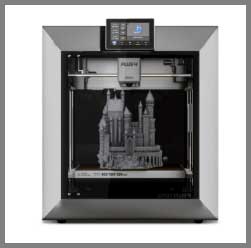
- Quirky User Experience: While powerful, the Qidi lacks the polish of Bambu. You might encounter menu typos, the occasional “MCU shutdown” error that requires a restart, or a Z-offset that needs manual tweaking. It requires a user who is willing to engage with the machine mechanically.
- Noise: The active chamber heater adds another fan to the mix. When the Qidi is printing ABS with the heater on and the filter fan running, it is loud—a constant whoosh of air. It is not a machine you want running next to you while you take a Zoom call.
- Newer Ecosystem: The Qidi Box is a relatively new product compared to the battle-tested AMS. You may face early-adopter bugs or firmware glitches as they refine the multi-color purging logic.
- Plastic Build Quality: While the frame is rigid steel, the outer casing and doors of the Qidi can feel a bit “plasticky” and utilitarian compared to the glass-and-metal feel of the Bambu enclosure.
My Experience With Bambu P1S
Using the Bambu P1S is less about “operating a machine” and more about “requesting a print.” The unboxing was absurdly simple. I peeled off the tape, calibrated it, and within 20 minutes I was printing a four-color model. The AMS system is the gold standard for a reason. It handles filament swaps with a reliability that borders on magic.
I printed a complex PLA multicolor dragon. The waste (poop) was substantial, but the result was flawless. The P1S is incredibly fast, and the input shaping is tuned to perfection right out of the factory. I didn’t have to touch a PID tune or a pressure advance setting.
But the limitations became apparent when I tried to print a large polycarbonate gear. The passive chamber struggled to get above 45°C. The part warped slightly at the edges. Also, the interface on the printer itself is a throwback—a small, low-resolution screen controlled by a D-pad. It feels like navigating an old MP3 player. You are forced to rely on the mobile app or PC slicer for almost all control, which is fine, but sometimes you just want to tap a button on the machine to load filament.
Pros Of Bambu P1S
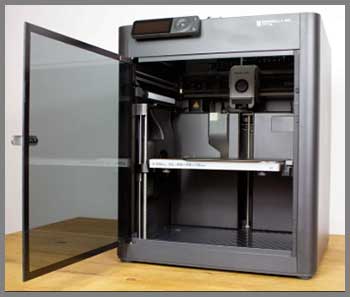
- The “Just Works” Factor: The P1S is the most reliable printer in its class. The hardware and software are tightly integrated. You don’t need to know what “G-code” is to get a perfect print. The failure rate is incredibly low, making it ideal for people who view 3D printing as a tool, not a hobby.
- Polished Multi-Color System (AMS): The Bambu AMS is currently the most mature multi-material system on the market. It jams less often, loads faster, and integrates seamlessly with the slicer. The software automatically calculates flushing volumes and purge towers perfectly. It creates a user experience that is hard to beat.
- Massive Community and Profiles: Because the P1S is so popular, there are millions of users. If you have an issue, someone else has solved it. “MakerWorld” allows you to download print profiles that are pre-tuned for your exact printer. You can print a complex model from your phone with one click, trusting that the settings are correct.
- Compact and Sleek: The P1S fits easily on a desk. It looks refined and modern. The footprint is smaller than the Qidi, making it friendlier for home offices or apartments where space is at a premium.
- Resale Value: Bambu printers hold their value incredibly well. If you decide to upgrade or sell it later, you will likely get a good chunk of your investment back.
Cons Of Bambu P1S
- The Screen: The onboard screen on the P1S is objectively bad. It is a tiny, monochrome, low-frame-rate display operated by physical buttons. Entering a Wi-Fi password on it is painful. Bambu expects you to use your phone or PC, but for a machine in this price range, the screen is a clear cost-cutting measure.
- Proprietary Parts: If a fan dies or a cable snaps, you generally have to buy the replacement from Bambu. You can’t just grab a generic part from Amazon and swap it in easily. This lock-in worries some users regarding long-term repairability.
- Passive Chamber Limitations: For high-temp materials, the P1S relies on the bed to heat the chamber. This takes a long time (30+ minutes of “heat soaking”) and rarely exceeds 45-50°C. This is often not enough to prevent warping on large ABS parts.
- Closed Source: You cannot easily modify the firmware. If Bambu Lab decides to change a feature or if their cloud servers go down, you are at their mercy. While LAN-only mode exists, it cripples some of the “smart” functionality.
Maintenance Tips For Qidi Plus 4 And Bambu P1S
- Carbon Rods (P1S): The X-axis carbon rods on the P1S are self-lubricating. Never grease them. If you do, you will ruin the bushings. Clean them with isopropyl alcohol (IPA) every few weeks to remove carbon dust buildup.
- Linear Rails (Qidi Plus 4): The Qidi uses steel linear rails. These do need lubrication. Wipe them down and apply a light coat of white lithium grease or sewing machine oil every 1-2 months to keep the movement smooth.
- Chamber Heater Filter (Qidi Plus 4): Since the Qidi sucks air in to heat it, the heater intake can get clogged with dust and hair. Check the intake vent inside the chamber regularly. A clogged heater can overheat and fail.
- Poop Chute (Both): Both machines eject waste filament out the back. If you are doing multi-color prints, this pile grows fast. If it backs up, it can jam the print head. Print a large bucket or “poop chute” extension immediately for either machine.
- AMS/Qidi Box PTFE Tubes: The Teflon tubes that guide the filament wear out over time. If you start getting “failed to load” errors, check the ends of the PTFE tubes. If they are chewed up or deformed, trim a few millimeters off or replace the tube entirely.
Also read: My Thoughts On Quantum X Vacuum
Comparison with other brands
- Creality K1C vs. Bambu P1S: The K1C is Creality’s answer to the P1S. It is cheaper and offers an open ecosystem (Klipper) like the Qidi. However, the K1C’s build volume is smaller (220mm), and its reliability history is spotty compared to the rock-solid Bambu. The P1S is the safer buy; the K1C is the budget buy.
- Flashforge Adventurer 5M Pro vs. Qidi Plus 4: The 5M Pro is a great budget CoreXY, but it is significantly smaller and lacks the active heated chamber. The Qidi Plus 4 is in a different league regarding capabilities. The 5M Pro competes more with the Bambu A1 or P1P.
- Prusa MK4S vs. Bambu P1S: The Prusa is a bedslinger, not a CoreXY. It is slower and has a smaller print volume. However, it is whisper-quiet and built to last forever. If you value silence and open-source repairability over speed and enclosure, the Prusa is the alternative. But for most, the P1S offers better value and performance.
Frequently Asked Questions (FAQ)
If you print engineering materials (ABS, ASA, Nylon) or need large parts, yes, the Qidi Plus 4 is better due to its active heated chamber and larger volume. If you print primarily PLA/PETG and want a hassle-free, “plug-and-play” experience with great multi-color support, the Bambu P1S is better.
Yes, but you need to upgrade the extruder gear and nozzle to hardened steel first. The Qidi Plus 4 comes with these hardened parts installed out of the box.
Yes, via the “Qidi Box” accessory. Unlike the Bambu AMS, the Qidi Box can actively heat and dry filament while printing, which is a major advantage for moisture-sensitive materials, though the system is newer and less proven than Bambu’s AMS.
Bambu Lab cut costs on the P1S interface to keep the price competitive, assuming most users would use the mobile app or PC software. The X1 Carbon (the more expensive model) has the nice touchscreen.
Conclusion
The decision between these two printers is a classic trade-off between Capability and Convenience.
Buy the Bambu Lab P1S if:
- You want an appliance that “just works” with minimal setup.
- You primarily print PLA, PETG, or standard decorative models.
- You want the best, most hassle-free multi-color experience currently available.
- You value a polished software ecosystem and community support.
Buy the Qidi Tech Plus 4 if:
- You want to print functional, engineering-grade parts (ABS, ASA, PC, Nylon) without warping.
- You need the extra build volume (305mm vs 256mm).
- You prefer an open platform (Klipper) that you can tweak and modify.
- You want the ability to dry filament actively during long multi-material prints via the Qidi Box.