
For years, the 3D printing market has been divided into two camps: affordable “bed slingers” for printing PLA toys, and expensive industrial machines for printing functional engineering parts. The Qidi Tech Plus 4 attempts to bridge this gap aggressively. It promises features usually reserved for $5,000+ Stratasys machines—specifically an actively heated chamber—at a price point that competes directly with Bambu Lab and Creality.
If you are looking to move beyond printing colorful dragons and start manufacturing functional car parts, drone frames, or heat-resistant enclosures, the Qidi Plus 4 might be the most important printer released this year. You should buy this product directly from the Qidi Tech official store or a specialized 3D printing retailer to ensure you receive the latest batch with the updated heating control board.
My Experience With Qidi Plus 4
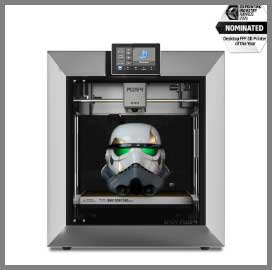
When the delivery truck arrived, the first thing I noticed was the sheer mass of the box.
The Qidi Plus 4 is not a delicate desktop gadget; it is a 60-pound industrial cube.
Getting it out of the box was a two-person job, and placing it on my desk made me question the structural integrity of my IKEA furniture.
It feels built like a tank, with a rigid metal frame and heavy-duty plastic paneling.
Setup was surprisingly minimal. Unlike the tinkering required for older Ender 3s, this machine comes fully assembled. I removed the foam restraints, tightened a few screws for the spool holder, and ran the automatic leveling. The “hands-free” leveling was genuinely hands-free; it uses sensors to mesh-map the bed without me needing to slide a piece of paper under the nozzle.
I went straight for the torture test: ABS. On most printers, printing a large ABS part without an enclosure results in warping, cracking, and tears. I set the Qidi’s chamber heater to 60°C. After about 15 minutes of pre-heating (the “heat soak”), the internal temperature hit the target. I printed a large electronic enclosure box. The result was flawless. No warping at the corners, no layer separation. The active heater essentially eliminates the physics problems that plague ABS and ASA printing.
However, this performance comes with volume—audible volume. When the chamber heater, the auxiliary fan, and the hotend fan are all spinning at 100%, this machine sounds like a server room. It is not something you want running in your bedroom while you sleep.
The software experience, powered by Klipper, is a joy for nerds but a slight hurdle for beginners. The web interface (Fluidd) gives you incredible control over every motor and sensor. While Qidi provides their own slicer (Qidi Studio, based on PrusaSlicer/Orca), I found myself quickly switching to Orca Slicer, which has excellent profiles for this machine.
One quirk that annoyed me was the filament loading. The path is at the back, and feeding the filament through the runout sensor into the drive gears requires a bit of blind fumbling. It’s not a dealbreaker, but it is less elegant than the front-loading systems on other modern printers.
Also read: My Thoughts On Quantum X Vacuum
Pros Of Qidi Plus 4
- Active Heated Chamber (65°C): This is the headline feature. Most “enclosed” printers (like the Bambu P1S or Creality K1) are passive; they only trap the heat generated by the bed. The Qidi Plus 4 has a dedicated 400W heater that pumps hot air into the chamber. This ensures the ambient air stays at a stable 65°C, which is critical for preventing internal stresses in materials like ABS, ASA, Polycarbonate (PC), and Nylon (PA). It turns difficult materials into “easy” mode.
- Massive Build Volume: With a build area of 305 x 305 x 280 mm, it offers significantly more real estate than the standard 256mm³ found in its competitors. This extra space allows you to print full-sized helmets in one piece or large batches of parts without needing to split models and glue them later.
- High-Temperature Nozzle (370°C): The stock hotend is a bimetallic design capable of reaching 370°C. This opens the door to high-performance polymers like Carbon Fiber reinforced PPA or PPS, which require extreme heat to extrude. You don’t need to buy an aftermarket “all-metal” upgrade; it’s ready out of the box.
- Open Source Klipper Firmware: Unlike some competitors that lock their firmware down (making it hard to customize), Qidi embraces open-source Klipper. You have full root access. If you want to install a custom webcam, add macros, or tweak the input shaping algorithms, you can. It respects your ownership of the device.
- Tank-Like Stability: The CoreXY motion system uses 10mm linear rods (thicker than the usual 8mm) and independent Z-axis motors. This rigidity translates to print quality. Even at high speeds (up to 600mm/s), the printer exhibits very little “ringing” or ghosting artifacts because the frame simply does not vibrate.
- Value Proposition: At a price point around $799, getting an active heated chamber and this build volume is unheard of. To get similar specs previously, you would have to look at enterprise machines costing three times as much.
Cons Of Qidi Plus 4
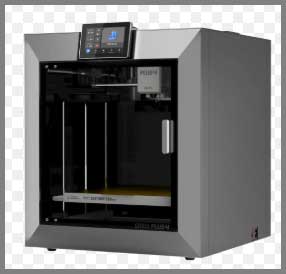
- Industrial Noise Levels: This is not a quiet machine. The chamber heater fan, the exhaust fan, and the part cooling fans combine to create a significant drone. While you can turn the fans down for PLA printing, if you are using the machine for its intended purpose (engineering materials), you will need a dedicated workspace, garage, or sound-dampened closet.
- Large Footprint & Weight: Weighing in at nearly 60 lbs (approx 27kg) with a footprint of roughly 20×20 inches, this is not a desktop companion. It dominates a standard desk. You need a sturdy table or a dedicated workbench. Moving it is difficult for one person due to the bulk and weight.
- Filament Handling Ergonomics: The spool holder is mounted on the back (though it can be modified), and the filament runout sensor is tucked away in a spot that is hard to reach if the printer is against a wall. Changing filaments is less convenient than on machines with front-facing loading systems or AMS units.
- Aesthetics and Fit/Finish: While functional, the Qidi Plus 4 looks like an industrial tool. The plastic panels, while thick, don’t have the sleek, Apple-esque polish of a Bambu Lab X1C. The touchscreen interface is functional but can feel slightly laggy compared to a modern smartphone.
- Warming Up Time: Because the bed is a thick 6mm aluminum plate (for thermal stability) and you often need to heat the chamber air, the “time to first layer” is longer than average. You might wait 10-15 minutes for the chamber to heat soak before the print actually starts.
Maintenance Tips For Qidi Plus 4
- Clean and Lube the Rods: The CoreXY system runs on steel linear rods. Over time, dust and carbon fiber particles can stick to the lubrication. Every 100 print hours, wipe the rods down with a microfiber cloth and apply a fresh coat of lithium grease or sewing machine oil (check the manual for specific grease types). Dry rods will cause layer shifting and noise.
- Carbon Filter Replacement: The printer has an exhaust fan with an activated carbon/HEPA filter to scrub fumes from melting plastic. If you print ABS or Nylon frequently, this filter will become saturated. Replace the carbon filter cartridge every 3-6 months to ensure you aren’t breathing in styrene fumes.
- Nozzle Care: Even though the nozzle is hardened steel, abrasive filaments (like Glow-in-the-dark or Carbon Fiber) will eventually wear it out. Keep a spare nozzle on hand. If you notice your extrusion becoming inconsistent or the diameter of the plastic line getting wider, it’s time to swap the nozzle.
- Belt Tension Check: The high accelerations of this printer can stretch the timing belts over the first few weeks of use. If you see “ghosting” (ripples) on your prints, run the input shaping calibration again. If that doesn’t fix it, manually check the belt tension and tighten them evenly using the adjustment screws on the gantry.
- Chamber Heater Vent: Ensure the vents for the active chamber heater (inside the box) are never blocked by failed prints or debris. A blockage here could cause the heating element to overheat or the thermal fuse to trip.
Also read: My Thoughts On LJUREN Cordless Vacuum Cleaner
Comparison with Other Brands
- Bambu Lab X1 Carbon:
- Heated Chamber: Active vs. Passive: The Qidi Plus 4 has a 65°C active heater. The X1 Carbon relies on passive heat from the bed (getting maybe 45-50°C). For large ABS/Nylon parts, the Qidi is superior physically.
- Polish: Apple vs. Linux: The Bambu X1C is polished, user-friendly, and “just works” with a slick app. The Qidi is a workhorse that gives you more control but requires a bit more technical know-how.
- Price: The Qidi is roughly $400-$600 cheaper than the X1C combo.
- Creality K1 Max:
- Build Volume: Similar Size: Both have roughly a 300mm³ build volume.
- Heating: Active wins: The K1 Max is a passive enclosure. Again, for engineering materials, the Qidi’s active heater is a distinct advantage.
- Reliability: Qidi Support: Qidi Tech is legendary in the community for their customer support (often sending free replacement parts quickly). Creality’s support is notoriously hit-or-miss.
- Flashforge Adventurer 5M Pro:
- Market Segment: Toy vs. Tool: The Flashforge is a great enclosed printer for schools and beginners, but it lacks the active chamber heater and the massive build volume of the Plus 4. The Flashforge is for safe, easy printing; the Qidi is for heavy-duty manufacturing.
Frequently Asked Questions (FAQ)
Yes, but with an add-on. The Plus 4 is compatible with the “Qidi Box,” a multi-material system (similar to Bambu’s AMS) that allows for up to 4 colors (expandable to 16). However, check if the Qidi Box is included in your bundle or needs to be purchased separately, as it was released slightly after the printer itself.
If you print PLA or PETG, you don’t. However, if you want to print ABS, ASA, or Nylon, these materials shrink rapidly as they cool. This shrinking causes the corners of the print to lift off the bed (warping) or the layers to split apart (delamination). An active heated chamber keeps the part hot (65°C) during the entire printing process, allowing the plastic to settle without stress, resulting in factory-strength parts.
Generally, no. PLA needs to cool down quickly to stay solid. If you run the heated chamber or keep the door/top closed while printing PLA, the heat can creep up the nozzle (“heat creep”), causing the filament to swell and clog the extruder. For PLA, you should remove the top lid and open the front door.
Yes, but be mindful of ventilation. The Qidi Plus 4 has a carbon filter, which helps reduce odors, but printing ABS/ASA still releases VOCs (Volatile Organic Compounds). It is best to place the printer in a well-ventilated room, near a window, or use an external duct to vent the fumes outside if you are printing heavy engineering materials.
Conclusion
The Qidi Plus 4 is not just another 3D printer; it is a statement. It declares that you don’t need to spend thousands of dollars to get a machine capable of manufacturing real-world, heat-resistant engineering parts. While it lacks the refined aesthetic of the Bambu Lab series and brings quite a bit of noise to your workshop, it compensates with raw capability.
The combination of a massive build volume, a 65°C active heated chamber, and open-source Klipper firmware makes it the undisputed king of value for prosumers and engineers. If you are ready to stop printing toys and start printing tools, you should buy this product at the Qidi Tech official website or a trusted 3D printing vendor.