
If you have spent any time scrolling through TikTok or Instagram lately, you have likely seen the explosion of small embroidery businesses making custom sweatshirts and hats. The allure of turning a digital design into a tangible, stitched product is undeniable, but the barrier to entry has always been the price tag. For years, if you wanted a machine with a decent hoop size, you had to shell out thousands for a Brother or Baby Lock. Then came Poolin, a brand that seemingly appeared out of nowhere, flooding the market with machines that offer massive screens and huge embroidery areas for a fraction of the cost.
In this review, I am going to give you a completely unfiltered look at the Poolin embroidery machine (specifically the popular EOC series), breaking down whether this budget beast is a hidden gem or a technical nightmare. We will cover everything from the setup process to the inevitable troubleshooting that comes with cheaper machines. My goal is to help you decide if saving money upfront is worth the potential learning curve, or if you should stick to the legacy brands. If you are looking to start a side hustle on a budget, this might be your ticket, but you need to know exactly what you are signing up for.
My Experience With Poolin Embroidery Machine
I bought the Poolin EOC06 because I was frustrated with the 4×4 inch hoop limit on my starter machine. I wanted to stitch large floral designs on the back of denim jackets, and the price of the Poolin was simply too good to ignore compared to a $2,000 upgrade from other brands. The machine arrived in a massive box, well-packed, and the first thing that struck me was the screen size. Coming from a tiny, pixelated display, the 7-inch color touchscreen felt like upgrading from a flip phone to an iPad.
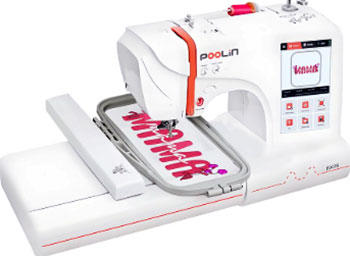
Setup was surprisingly straightforward, although the manual is clearly translated and can be a bit clunky in its phrasing.
Threading the machine is similar to any standard single-needle machine, but the automatic needle threader took a bit of finesse to master.
The first design I ran was a built-in font, and I was genuinely impressed by the speed.
It stitches fast, and the noise level is comparable to other domestic machines—loud, but not “industrial factory” loud.
However, the honeymoon phase hit a speed bump when I tried my first complex, dense design. I immediately ran into tension issues where the bobbin thread was pulling up to the top. Unlike my previous machine which was “plug and play,” the Poolin required me to actually learn how to balance tension manually. I spent a good afternoon tweaking the bobbin case screw (a tiny, terrifying adjustment for beginners) until I got the perfect stitch. Once I dialed it in, the quality was fantastic, but it definitely required more hands-on mechanical adjustments than I was used to.
The WiFi feature is a game-changer for workflow. Being able to send a file from my laptop directly to the machine without hunting for a USB stick saved me so much time. The interface is intuitive enough, allowing you to resize, rotate, and combine designs right on the screen. I did experience one software glitch where the screen froze, but a quick restart fixed it.
After six months of use, I have accepted the Poolin for what it is: a powerful machine that needs a little babying. It is not as refined as a Brother, and it can be picky about thread brands, but it allows me to create projects that would be impossible on any other machine in this price range. It is a workhorse for my small Etsy shop, provided I keep it clean and oiled.
Read More: Comparison Of Brother CS7000X And Singer 4452
Pros Of Poolin Embroidery Machine
When looking at the value proposition, Poolin offers features that are almost unheard of at this price point. Here are the specific advantages that make it a compelling choice for budget-conscious creators.
- Massive Embroidery Area For The Price: The absolute biggest selling point of the Poolin EOC series is the hoop size. Most entry-level machines restrict you to a tiny 4×4 inch square, which limits you to small logos or pocket designs. The Poolin typically comes with a 4×9.25 inch or even a 7×11 inch hoop depending on the model, allowing for full-front sweatshirt designs or large tote bag patterns. Getting this kind of real estate usually costs double or triple with major brands like Janome or Bernina. This feature alone allows you to say “yes” to more customer requests without having to split designs and re-hoop multiple times. For a small business owner, time is money, and single-hooping a large design is a massive efficiency boost.
- Modern 7-Inch Color Touchscreen: The interface on this machine is leaps and bounds ahead of the grainy, button-navigated screens of older budget models. You can see your design in full color, which is crucial for verifying thread colors before you hit start. The touch responsiveness is good, allowing you to drag and drop designs, rotate them by single degrees, and resize them with a pinch or a tap. It feels like using a modern tablet rather than a piece of industrial machinery. This visual feedback reduces mistakes because you can clearly see exactly where the needle will drop and how the design fits within the hoop boundaries.
- Wireless Design Transfer: Gone are the days of losing flash drives or dealing with corrupted files on old USB sticks. The Poolin connects to your home WiFi, allowing you to transfer designs wirelessly from your computer. This streamlines the creative process significantly, especially if you buy designs from Etsy and want to stitch them immediately. While it still has a USB port for backup, the wireless capability feels very premium and convenient. It also allows the machine to receive over-the-air firmware updates, potentially fixing bugs or adding features down the road without complex manual installations.
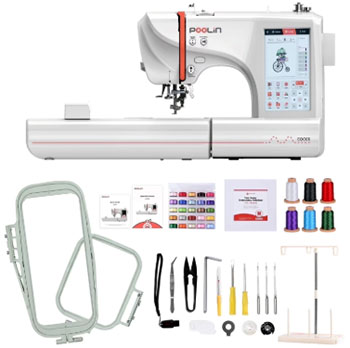
- Comprehensive Starter Package: Poolin understands that their target market is beginners, so they tend to throw the kitchen sink into the box. The machine often arrives with a huge bundle of thread, stabilizers, bobbins, and multiple hoop sizes. This means you can unbox it and start stitching within the hour without needing to run to the craft store for supplies. For someone just starting out, not having to spend an extra $200 on basic consumables is a huge financial relief. The inclusion of software (often a basic digitizing or editing program) further adds value, giving you the tools to create simple text designs right away.
Cons Of Poolin Embroidery Machine
While the specs are impressive on paper, the reality of using a budget machine involves some compromises. You need to be aware of these potential headaches before you commit.
- Finicky Tension Adjustments Required: Unlike premium machines that have advanced “auto-tension” systems that work perfectly out of the box, the Poolin often requires manual intervention. Many users, myself included, report needing to adjust the bobbin case tension screw to get the stitch quality right. This can be intimidating for a complete beginner who is afraid of breaking the machine. If you use cheap thread or change brands, you might find yourself constantly tweaking the tension dials to prevent looping or bird-nesting. It requires you to develop a “feel” for the machine rather than just pressing a button and walking away.
- Learning Curve And Documentation: The user manual provided is often a translation that lacks the depth of a Brother or Singer manual. Phrasing can be awkward, and some advanced features aren’t explained clearly in the text. You will likely find yourself relying heavily on YouTube tutorials and Facebook user groups to figure out how to do specific tasks. While the community is helpful, the official documentation does not hold your hand. If you are not tech-savvy or patient with trial-and-error, the initial setup can be frustrating and lead to wasted materials.
- Single-Needle Limitations: Despite its “pro” look, the EOC series are still single-needle machines. This means that for a multi-color design, the machine will stop after every color, and you have to manually re-thread it. If you are doing a design with 15 colors, that is 14 stops where you are tied to the machine. It is not a “set it and forget it” commercial machine like a multi-needle Ricoma or Bai. You cannot queue up a complex design and leave the house; you are the automatic color changer. This limits your production speed if you are trying to make bulk orders of complex logos.
- Customer Support Is Unconventional: Poolin does not have a massive network of local dealers or repair shops like the legacy brands. Support is primarily handled through online channels like WhatsApp, email, or Facebook Messenger. While they are generally responsive, the time difference (as they are based overseas) can mean waiting overnight for a reply. If your machine breaks physically, you cannot just drive it to the local vacuum and sew shop, as many technicians refuse to work on “internet brands.” You are effectively your own mechanic, guided by video calls with their support team.
Maintenance Tips For Poolin Embroidery Machine
Because you don’t have a local dealer to service this machine, staying on top of maintenance is your responsibility. Proper care will prevent the majority of the “glitches” people complain about online.
- Aggressive Lint Management: Embroidery generates a massive amount of lint, especially when using cotton stabilizers or cheap thread. You must remove the needle plate and clean the bobbin area after every major project or every 8 hours of stitching. Use the included brush to sweep out the fluff from the feed dogs and the bobbin case. Do not use canned air to blow the lint into the machine; this can jam the sensors and gears deep inside. A clogged machine is the number one cause of “bird nesting” and thread breaks, so keeping it pristine is non-negotiable. Invest in a small handheld vacuum attachment to suck the debris out safely.
- Regular Oiling Routine: Unlike some modern machines that claim to be “oil-free,” the Poolin benefits from regular lubrication. You should place a drop of high-quality sewing machine oil on the hook race (the metal part that spins around the bobbin) every week if you are using it daily. Check the manual for other specific oiling points on the needle bar. Never use WD-40 or cooking oil; these will gum up the works and ruin the machine. Running the machine dry creates friction, which leads to overheating and premature wear on the metal components. A well-oiled machine runs quieter and stitches smoother.
- Needle Hygiene: A dull needle is the enemy of good embroidery. You should change your needle every 8 to 10 hours of stitching time, or immediately if you hear a “popping” sound as it penetrates the fabric. Using a dull needle pushes the fabric down into the bobbin plate, causing jams and puckering. Make sure you are using the correct needle type (Ballpoint for knits, Sharp for wovens) and the correct system (usually HAx1 or 15×1 for home machines). A fresh needle is the cheapest insurance policy against ruined garments.
- Firmware Updates: Since the Poolin is a computerized machine with WiFi, you need to keep the software current. Check the settings menu periodically for “System Updates.” These updates often fix bugs related to screen freezing, design loading errors, or connectivity issues. Do not turn the machine off during an update, as this can brick the motherboard. Keeping the software up to date ensures compatibility with newer USB formats and design files.
Comparison with Other Brands
The embroidery market is competitive, and the Poolin is often cross-shopped against established giants. Here is how it stacks up against the most common alternatives.
- Brother PE800 / SE1900: These are the gold standards for home embroidery enthusiasts. Comparison: The Brother machines are incredibly user-friendly, with polish and reliability that Poolin lacks. Threading a Brother is easier, the tension is almost always perfect automatically, and the interface is foolproof. However, the Brother PE800 usually tops out at a 5×7 inch hoop, whereas the Poolin offers significantly larger areas (up to 7×11) for a similar or lower price. Poolin gives you size; Brother gives you refinement and ease of use. If you are terrified of mechanics, buy the Brother. If you need to stitch big designs on a budget and are willing to tinker, buy the Poolin.
- Janome Memory Craft 500e: This is a dedicated embroidery-only machine known for its robustness. Comparison: The Janome is a tank; it is built better than the Poolin and has a very large hoop area as well (7.9×11). However, the Janome 500e is typically twice the price of the Poolin EOC06. Janome has a massive dealer network, meaning you can get it serviced locally anywhere. The stitch quality on the Janome is slightly more consistent on fine fabrics. Poolin is essentially the “generic” version of this machine; you get 90% of the capability for 50% of the price, but you lose the dealer support and build quality.
- Ricoma / Bai Multi-Needle Machines: Many people look at Poolin as a stepping stone to these commercial machines. Comparison: It is important to remember that the Poolin EOC series are single-needle machines, whereas Ricoma and Bai are often multi-needle (15 needles). A multi-needle machine changes colors automatically, saving you hours of labor. Poolin does make a multi-needle machine now, but at the EOC price point, you are comparing a flatbed home machine to a commercial tubular machine. You cannot embroider hats easily on the Poolin EOC (you need a flat hoop), whereas a Ricoma can spin a hat 270 degrees. If your goal is a hat business, the Poolin EOC is the wrong choice; save up for a used multi-needle.
Also Read: Comparison Of Brother XR9550 And CS7000X
Frequently Asked Questions (FAQ)
Poolin is considered a “value” brand that offers excellent specs for the money, making it a great choice for beginners on a budget. While it lacks the polish and dealer support of brands like Brother, the community feedback is generally positive regarding its stitch quality and durability. It is a legitimate option for those who want large hoop capabilities without spending thousands.
The Poolin machines typically use the .DST or .DSB file formats. DST is the universal industry standard for embroidery files, meaning you can find compatible designs on almost any website like Etsy or Urban Threads. Unlike Brother (which uses PES) or Janome (JEF), DST files do not hold color information, so you will need to manually select your thread colors on the screen.
Poolin support is primarily digital. You can reach them via their official email, their active Facebook group (“Poolin Embroidery Machine Group”), or via WhatsApp. They are known for doing video calls to help troubleshoot issues, which is a unique and helpful service method, even if they don’t have a phone number you can call for instant support.
The EOC05 is a flatbed machine, meaning it is not designed for structured caps. You can embroider on beanies or unstructured hats if you float them on the hoop carefully. However, for structured baseball caps, it is very difficult to get a professional result without a specialized hat hoop or a multi-needle machine.
Conclusion
The Poolin embroidery machine represents a shift in the industry, proving that you don’t need to mortgage your house to get into large-scale embroidery. It is a feature-rich, capable machine that democratizes the craft, putting professional-sized hoops into the hands of home hobbyists. The large touchscreen, wireless connectivity, and generous starter kit make it an incredible value that is hard to beat on paper.
However, that value comes with the caveat of “sweat equity.” You are trading dollars for patience. You will need to learn how to tension your bobbin, you will need to clean it diligently, and you will need to be your own tech support. If you are a DIY-minded person who loves a bargain and isn’t afraid of a learning curve, the Poolin is absolutely worth it. It is a stepping stone that can launch a business, provided you respect the machine and take the time to master it.