
In the world of networking, few devices have achieved the iconic status of the NETGEAR Nighthawk AC1900 (Model R7000). With its stealth-bomber aesthetics and massive antennas, it defined what a “performance router” looked like for nearly a decade.
But we are in 2025 now. WiFi 6, 6E, and even WiFi 7 are the new standards, promising speeds that make the AC1900’s “Gigabit” claims look modest. So, why are people still buying this router?
For many, it remains the ultimate reliable workhorse—a budget-friendly option that covers the basics of streaming and gaming without the premium price tag of next-gen tech. For enthusiasts, it is one of the best platforms for custom firmware like DD-WRT. I dusted off this classic black wedge to see if it can still handle a modern smart home or if it belongs in a museum.
My Experience With The Nighthawk AC1900
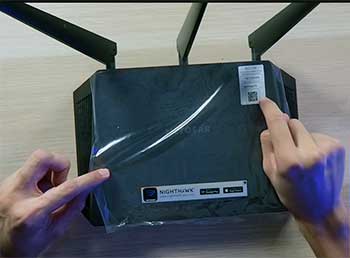
I have a bit of a nostalgic soft spot for the R7000. Years ago, this was the router that finally fixed the dead zone in my upstairs bedroom.
Plugging it back in for this review felt familiar.
The setup process via the Nighthawk app is smoother than it used to be, though it still pushes you aggressively to sign up for NETGEAR Armor (their paid security subscription), which I promptly skipped.
Once up and running, the coverage was just as impressive as I remembered. My home is about 1,800 square feet with a fair amount of drywall, and the Nighthawk punched through it effectively. On the 5GHz band, I was pulling reliable speeds of around 400-500 Mbps near the router. It’s not the 1Gbps+ you get from WiFi 6E, but let’s be real: for streaming 4K Netflix and scrolling TikTok, it is more than enough.
However, the “age” of the device started to show when I loaded it up with traffic. I connected a PS5, two laptops on Zoom calls, and a 4K TV streaming a movie simultaneously. The router handled it, but I noticed a slight buffer on the TV when the PS5 started downloading a massive game update. It lacks the MU-MIMO efficiency and channel width of newer routers, meaning it struggles a bit more when 20+ devices are screaming for data at once.
The most critical part of my experience involved the firmware. I initially updated to the latest stock firmware provided by NETGEAR. Unfortunately, I experienced the dreaded “random disconnects” that many forums complain about—specifically on the 2.4GHz band. My smart bulbs would go unresponsive. I decided to flash it with DD-WRT (open-source firmware), and the difference was night and day.
The stability returned, and I unlocked features like advanced VPN routing and ad-blocking that the stock firmware keeps hidden or simplified. If you are tech-savvy, this router is a playground. If you aren’t, the stock firmware quirks might frustrate you.
Also Read: My Thought on FleGobey Translator Earbuds
Pros Of NETGEAR Nighthawk AC1900
- Exceptional Range for the Price: Even by today’s standards, the R7000 has excellent radio amplifiers. The Beamforming+ technology focuses the WiFi signal toward your devices rather than blasting it in a perfect circle, which helps maintain speed at the edges of your home. If you have a long ranch-style house or thick walls, this router often outperforms cheap modern mesh nodes that lack dedicated backhaul.
- The King of Custom Firmware: This is arguably the main reason to buy an R7000 in 2025. It has massive community support. You can install DD-WRT, Tomato, or FreshTomato firmware. These open-source operating systems turn this $100 consumer router into a professional-grade device, allowing you to tweak transmit power, set up granular bandwidth monitoring, and run a secure OpenVPN server directly at the router level. It is a hobbyist’s dream.
- Robust Port Selection: Unlike many modern mesh systems that give you one or two LAN ports, the Nighthawk keeps it classic with four Gigabit Ethernet LAN ports and one WAN port. It also includes a USB 3.0 port on the front and a USB 2.0 port on the back. This allows you to plug in an external hard drive to create a simple NAS (Network Attached Storage) for sharing files across your network, or even a printer to make it wireless.
- Sturdy, Heat-Dissipating Design: The “stealth fighter” shape isn’t just for looks; it allows for significant airflow. The router feels solid and heavy, unlike the flimsy plastic feel of many budget TP-Link or Tenda routers. The wide footprint means it stays cool even under load, provided you don’t stack books on top of it.
Cons Of NETGEAR Nighthawk AC1900

- Outdated Wi-Fi 5 (AC) Standard: The elephant in the room is that this is an 802.11ac router (Wi-Fi 5). It does not support Wi-Fi 6 (AX) or the 6GHz band (Wi-Fi 6E). This means it cannot handle multiple devices as efficiently as newer routers. If you have a household with 30+ smart devices, newer phones, and gaming consoles, you are missing out on the latency benefits and battery savings (Target Wake Time) that newer standards provide.
- Stock Firmware Instability: NETGEAR’s recent firmware updates for this model have been hit-or-miss. A significant number of users report that updates released post-2021 can cause the 5GHz radio to drop out or the router to reboot randomly. While this is solvable by rolling back to an older version (like version .42 or .64) or installing custom firmware, the “out of the box” experience can be rocky for a casual user who just hits “Update All.”
- Bulky and Ugly: In an era where Google Nest and Eero try to blend into your home decor like ceramic vases, the Nighthawk screams “I AM TECH.” It is wide, has three large pointy antennas, and a row of incredibly bright white LEDs that can light up a dark room (though there is a switch to turn them off). It requires a significant amount of shelf space.
- Aggressive Upselling: The Nighthawk app is useful, but it is cluttered with ads for NETGEAR Armor (security) and Circle (parental controls). It can feel like the router is holding features ransom behind a subscription paywall, which is frustrating when you have already paid for the hardware.
Also Read: My Thought on FleGobey Translator Earbuds
Maintenance Tips For Nighthawk AC1900
- Manage the Heat: The R7000 runs warm. The processor is powerful for its age, and the passive cooling relies on air moving through the vents. Do not place this router inside a closed cabinet or stack your modem on top of it. I recommend elevating it slightly by placing bottle caps or small rubber feet under the corners to increase airflow underneath the unit.
- The “30-30-30” Reset: If you encounter stability issues or plan to flash custom firmware, learn the “30-30-30” reset rule. Hold the reset button for 30 seconds while powered on, keep holding it while unplugging power for 30 seconds, and keep holding it while plugging power back in for 30 seconds. This fully clears the NVRAM (non-volatile memory) and clears out any corrupted settings that a standard reboot won’t fix.
- Disable “Smart Connect”: In the router settings, there is a feature called Smart Connect that merges the 2.4GHz and 5GHz bands into one SSID name. On older routers like this, the logic isn’t perfect. It often dumps high-speed devices onto the slower 2.4GHz band. For the best performance, split your networks (e.g., “HomeWiFi” and “HomeWiFi-5G”) and manually connect your TV and consoles to the 5G one.
- Stick to “Safe” Firmware: If you stick with stock firmware, check forums like SNBForums or the NETGEAR community to see which version is currently considered the most stable. Many users swear by firmware version 1.0.9.42 as the “golden” stable release, avoiding newer updates that introduce telemetry or bugs.
Comparison with Other Brands
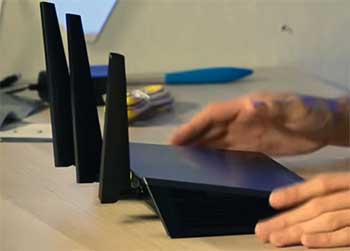
- Nighthawk AC1900 (R7000) vs. TP-Link Archer A7/C7:The TP-Link Archer A7 is the direct budget competitor. The Archer is usually cheaper, slimmer, and easier to hide. However, the Nighthawk R7000 has a significantly more powerful processor (Dual Core 1GHz vs Single Core on the A7) and better range. If you just need basic WiFi for a small apartment, get the Archer. If you want to run a VPN or connect a hard drive, the Nighthawk crushes the Archer in performance.
- Nighthawk AC1900 (R7000) vs. ASUS RT-AC68U (AC1900):These two are the “Cola Wars” of the router world; they are fierce rivals. The ASUS RT-AC68U (or AC86U) has a better stock interface (ASUSWRT) which is feature-rich and stable without needing custom firmware. ASUS also supports “AiMesh,” allowing you to buy a second ASUS router later and create a mesh network. NETGEAR does not support this easily on the R7000. If you want a “set it and forget it” experience, the ASUS is slightly better. If you want to hack your router with DD-WRT, the NETGEAR R7000 is often preferred for its hardware durability.
- Nighthawk AC1900 vs. Wi-Fi 6 Routers (e.g., NETGEAR RAX10 or TP-Link AX1800):A low-end WiFi 6 router will be faster for a single device near the router, but often has worse range and a weaker CPU than the older high-end R7000. The R7000 was a flagship in its day; the AX1800 is an entry-level budget model today. You are often trading build quality and range for the newer WiFi standard. Unless you have a specific need for WiFi 6 speeds (e.g., transferring huge files wirelessly), the R7000 might actually give you better whole-home coverage.
Frequently Asked Questions (FAQ)
It is decent for casual gaming, but it is not a “pro” gaming router by modern standards. It lacks the dedicated gaming ports or “Geo-Filter” features of the Nighthawk Pro Gaming (XR) series. However, if you use an Ethernet cable plugged into the LAN ports, it provides a rock-solid, low-latency connection. Over WiFi, it’s acceptable for 1080p gaming but may struggle with cloud gaming services (like Xbox Cloud Gaming) if other people are streaming 4K video simultaneously.
Yes, but with caveats. You can plug the Nighthawk into the ONT (Optical Network Terminal) or the ISP-provided gateway. However, since this router is limited to Gigabit ports (1000 Mbps), you will not get the full benefit if you pay for a 2 Gig or 5 Gig fiber plan. It will bottleneck your speed to roughly 940 Mbps. It is best suited for internet plans of 500 Mbps or below.
The R7000 has a row of very bright activity LEDs. Fortunately, NETGEAR included a physical switch on the back of the router (near the antennas) to turn them off. Alternatively, you can log into the router interface (routerlogin.net), go to Advanced > Advanced Setup > LED Control Settings, and disable them there. The Power LED will usually remain on to show the device is working.
Officially, no. The R7000 is a standalone router. Unlike ASUS routers with AiMesh, you cannot simply buy another R7000 and wirelessly link them to create a seamless mesh system using stock software. However, NETGEAR does sell “Mesh Extenders” (like the EX7700) that can work with the R7000 to extend the network using the same SSID, mimicking a mesh experience.
Conclusion
The NETGEAR Nighthawk AC1900 (R7000) is a survivor. In 2025, it is no longer the speed demon it once was, but it remains a remarkably capable device for the average household or the budget-conscious tech enthusiast. Its build quality, range, and custom firmware potential make it a smarter buy than many cheap, flimsy WiFi 6 routers found in bargain bins. If you are willing to tinker with it—or if you just need a reliable router for a sub-gigabit internet plan—the Nighthawk still soars. Just be ready to manage the firmware yourself to get the best experience.