
In the rapidly evolving world of smart home cleaning, the line between “budget-friendly” and “premium flagship” is becoming increasingly blurred. You used to have to spend over a thousand dollars to get a robot that could empty its own bin, wash its own mops with hot water, and navigate with lasers. But now, new contenders are entering the arena, promising top-tier specs for a fraction of the price. If you have been researching robot vacuums recently, you have likely come across the Mova P10 Pro Ultra. With its eye-watering 13,000 Pa suction and advanced mopping features, it claims to rival the industry giants like Roborock and Dreame.
In this review, I am going to walk you through a detailed analysis of the Mova P10 Pro Ultra, breaking down its real-world performance, its intelligent features, and whether those impressive numbers on the spec sheet actually translate to a cleaner home. I will compare it against the heavyweights in the market to see if it is a hidden gem or too good to be true. Whether you are a pet owner drowning in fur or just someone who hates mopping, this guide will help you decide if this robot deserves a spot in your living room.
My Experience With Mova P10 Pro Ultra
I have tested a lot of robot vacuums over the years, ranging from the dumb “bump-and-go” pucks of the early 2010s to the sophisticated AI-driven machines of today. My home is a torture test for these devices: I have hardwood floors that show every speck of dust, medium-pile carpets that love to trap dog hair, and a clutter-prone living room thanks to my kids. When I ordered the Mova P10 Pro Ultra, I was admittedly skeptical. The specs seemed almost inflated—13,000 Pa of suction is nearly double what some flagship models offered just a year ago. I wanted to see if this was just marketing fluff or if the motor really had that kind of power.
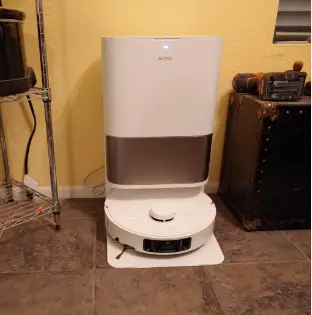
Unboxing the unit, the first thing that struck me was the sheer size of the base station. It is a beast, but in a good way.
It houses two massive water tanks (clean and dirty) and a dust bag, which immediately signaled that this machine was designed for autonomy.
Setting it up was surprisingly straightforward.
I downloaded the app, connected the robot to my Wi-Fi, and let it loose for its first mapping run.
The LiDAR navigation was incredibly fast; it mapped my entire downstairs floor plan in about ten minutes without bumping into a single wall.
The first cleaning run was where things got interesting. I set it to “Turbo” mode to test that 13,000 Pa suction. The noise level was noticeable but not deafening, a high-pitched whine that indicated the motor was working hard. Watching it tackle the rug in my hallway was impressive. usually, robots leave a fine layer of dog hair embedded deep in the fibers, but the Mova P10 Pro Ultra pulled up hair I didn’t even know was there. The dust bin was packed after just one room, which was a testament to its raw power.
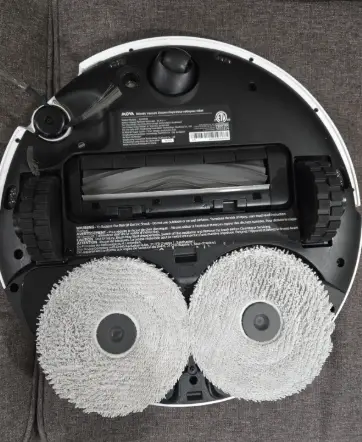
However, the real star of the show was the mopping system. I have always been critical of robot mops that just drag a damp cloth around. The Mova P10 Pro Ultra uses dual spinning mops that apply pressure, and it has an extendable arm that kicks out the right mop to reach the baseboards. Watching it in action was oddly satisfying. It would approach a wall, extend its little mechanical leg, and scrub right up to the edge, leaving no gap. This is a feature I had only seen on robots costing twice as much.
I also tested the hot water mop washing feature. After cleaning the kitchen—where I had “accidentally” spilled some dried coffee and juice—the robot returned to the dock. I could hear the water heating up and the mops spinning against the washboard. When it came back out for round two, the pads were steaming slightly and looked brand new. There was no cross-contamination of sticky residue back onto my hardwood floors.
That said, the experience wasn’t entirely flawless. While the navigation is generally great, the obstacle avoidance is a bit aggressive. It sometimes identified a thick rug fringe as an obstacle and refused to vacuum over it until I adjusted the settings in the app. Also, the app itself, while functional, feels a bit cluttered with menus buried inside menus. It took me a while to figure out how to schedule specific room cleaning sequences.
Overall, living with the Mova P10 Pro Ultra has been a net positive. It has reduced my manual vacuuming to almost zero, and my floors have never felt cleaner barefoot. It feels like a premium device that accidentally got priced like a mid-range one. It handles the heavy lifting of daily chores with a level of competence that makes the minor app annoyances easy to forgive.
Read More: Comparison Of Wyze And Roomba
Pros Of Mova P10 Pro Ultra
When you look at what this robot offers for the price, the value proposition is undeniable. It packs features that are typically reserved for the absolute top-tier models of other brands. Here are the specific advantages that make the Mova P10 Pro Ultra stand out.
- Industry-Leading Suction Power: The most headline-grabbing feature is the 13,000 Pa suction, and it is not just a number on a page. In practical terms, this means the vacuum can pull heavy debris like cat litter, pebbles, and deep-seated dust out of carpets that weaker robots would leave behind. Most standard robot vacuums hover around the 6,000 to 8,000 Pa range, so having this level of power ensures that even dense carpets get a deep clean. If you are a pet owner, this is a massive benefit because it removes dander and allergens from deep within the pile, improving the air quality in your home. You rarely have to run it twice over the same spot to get a clean result.
- Innovative Extendable Mop Arm: One of the biggest frustrations with robot mops is the “dead zone” along walls and furniture where the round body of the robot can’t reach. The Mova P10 Pro Ultra solves this with its dynamic extendable mop technology (often called FlexiArm or similar). When the robot detects an edge or a corner, it physically extends the right mop pad outwards to scrub right up against the baseboard. This eliminates the need for you to manually touch up the edges of your room with a Swiffer or rag. It creates a truly edge-to-edge clean that covers 99% of your floor surface area, something very few competitors can claim.
- Hot Water Mop Washing and Drying: Hygiene is a critical factor in automated cleaning, and washing mops with cold water often just smears bacteria around. This base station washes the dirty mop pads with hot water (often around 140°F or 60°C) to dissolve grease, oil, and sticky residues effectively. After washing, it uses hot air to dry the pads completely, which prevents that awful mildew smell that can develop in damp environments. You don’t have to worry about taking the pads off and throwing them in the washing machine every week; the dock handles the sanitation for you. This ensures that every time the robot goes out, it is cleaning with fresh, sterile pads.
- Intelligent Dirt Detection: The robot is equipped with sensors that can detect how dirty the water is when it returns to wash its mops. If the sensors determine that the mops are exceptionally filthy, the robot will automatically decide to go back and re-mop the area it just cleaned. This “re-wash and re-mop” strategy ensures that heavily soiled areas, like a muddy entryway or a kitchen after dinner, get the extra attention they need without you having to intervene. It adds a layer of autonomy that mimics how a human would clean; if you see a spot is still dirty, you scrub it again, and now your robot does too.
Cons Of Mova P10 Pro Ultra
No piece of technology is perfect, and to hit this aggressive price point with such high specs, some compromises had to be made. It is important to be aware of these potential frustrations before you buy.
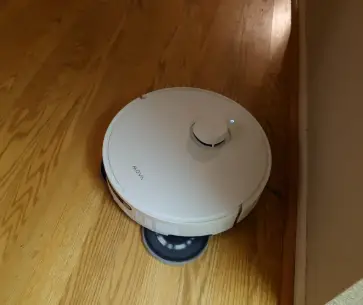
- Obstacle Avoidance Can Be Inconsistent: While the robot uses cameras and lasers to see the world, its AI object recognition is sometimes hit-or-miss compared to the top-tier Roborock S8 or Dreame X40. It generally avoids big objects like shoes and toys, but it can struggle with smaller, low-contrast items like phone charging cables or dark socks on a dark rug. I found myself having to “robot-proof” the house a bit more thoroughly than I expected, ensuring no loose wires were on the floor. Sometimes it is too cautious and gives a wide berth to objects that aren’t actually obstacles, like a curtain touching the floor, leaving a small uncleaned patch. It is good, but it doesn’t have the “human-level” perception that the absolute best AI models have.
- Battery Drain on Max Settings: The massive 13,000 Pa motor is a power-hungry beast. If you run the vacuum on the highest “Turbo” or “Max” suction setting while simultaneously mopping, the battery drains significantly faster than advertised. For a large home (over 2,000 sq ft), the robot might need to return to the dock to recharge in the middle of a cleaning job. This interrupts the cleaning flow and extends the total time it takes to clean your house. While it has a “smart resume” feature, waiting for it to charge can be annoying if you are expecting a quick clean before guests arrive. You often have to balance power vs. runtime by using lower suction settings for daily maintenance.
- App User Interface Complexity: The companion app is packed with features, but the user interface (UI) can be overwhelming for non-tech-savvy users. Essential functions like setting up “No-Go Zones,” scheduling specific room sequences, or adjusting the mop wash frequency are sometimes buried under multiple sub-menus. The translation in the app can occasionally be a bit clunky, with error messages or descriptions that aren’t perfectly clear native English. Compared to the highly polished and intuitive apps from brands like iRobot, the Mova app has a steeper learning curve. You will need to spend some time clicking around to fully understand how to customize the robot’s behavior.
- Large Footprint of the Base Station: The all-in-one dock is incredibly convenient, but it is also physically massive. It requires a significant amount of dedicated floor space and vertical clearance to open the tank lids. If you live in a small apartment or have a crowded home layout, finding a spot to place this tower where it isn’t an eyesore can be a challenge. It dominates the visual space of whatever room it is in. Unlike smaller docks that just charge the robot, this is a piece of furniture in its own right, and the aesthetic design is utilitarian white plastic that might not blend with all decor.
Maintenance Tips For Mova P10 Pro Ultra
Even though this robot is marketed as “fully automated,” if you neglect it, it will eventually fail. A little bit of regular maintenance keeps the machine running at peak performance and prevents foul odors.
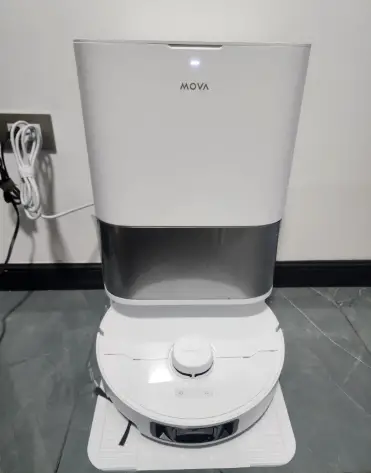
- Clean the Base Station Wash Tray Regularly: The area where the robot washes its mops is the dirtiest part of the entire system. Over time, mud, hair, and gunk accumulate in the filtration tray at the bottom of the dock. You should pull this tray out (it is usually removable) and rinse it under a tap every two weeks. If you don’t clean it, the standing water and debris can start to smell like a swamp and can even clog the drainage pump. Use an old toothbrush to scrub the plastic washboard grooves to ensure the mops are actually getting cleaned properly.
- Manage Hair Tangles on the Roller Brush: Despite claims of “anti-tangle” designs, long hair will eventually wrap around the main brush and the side brush axles. Check the main roller brush once a week, especially if you have long-haired family members or pets. Most brushes have detachable end caps—pop these off, as hair loves to tightly wind itself around the metal bearings inside. If hair builds up here, it creates friction that can overheat the motor or melt the plastic housing. Use the little cutting tool that comes with the robot to slice through any hair wrapped around the bristles.
- Wipe Down Sensors and Charging Contacts: The robot relies on its “eyes” (cameras and laser sensors) to navigate your home safely. Dust and fingerprints can obscure these sensors, causing the robot to bump into walls or fall down stairs. Once a month, take a microfiber cloth and gently wipe the black sensor strips on the bumper, the cliff sensors underneath, and the metal charging contacts on the bottom. Also, wipe the infrared lens on the dock so the robot can find its way home easily. A blind robot is a clumsy robot, and keeping the glass clear ensures precise navigation.
- Refresh the Water Tanks and Filter: Do not just keep refilling the clean water tank; empty it out completely and rinse it periodically to prevent algae growth. More importantly, dump the dirty water tank immediately after the robot finishes cleaning. Leaving dirty water sitting in the tank for days is a recipe for a smell that will permeate your entire house when you finally open it. Check the dust bag in the base station regularly, and don’t wait for the app to tell you it’s full. A completely packed bag reduces the suction power of the auto-empty dock, meaning the robot’s internal bin won’t get emptied properly.
Comparison with Other Brands
The Mova P10 Pro Ultra exists in a competitive bracket. To see if it is the right choice for you, we need to compare it to the direct alternatives that you might be considering.
- Roborock Q Revo Master: This is the most direct competitor, offering a similar dual-spinning mop design and extending arm. Comparison: The Roborock Q Revo Master generally has a more polished app experience and slightly superior obstacle avoidance AI. However, the Mova P10 Pro Ultra often undercuts the Roborock on price while offering higher raw suction specs (13,000 Pa vs. 10,000 Pa on the Roborock). The Mova’s hot water washing temperature is comparable, but Mova often pushes aggressive sales that make it a better value buy. Roborock wins on software reliability and long-term brand trust; Mova wins on raw performance-per-dollar. If you want a “set it and forget it” experience with fewer bugs, go Roborock. If you want maximum power for less money, go Mova.
- Dreame L10s Pro Ultra Heat: Mova is a sub-brand of Dreame, so these robots share a lot of DNA. Comparison: The Dreame L10s Pro Ultra Heat is essentially the “big brother” to the Mova P10 Pro Ultra. They share the same extendable mop technology and hot water washing. The main difference is often in the aesthetic finish and minor software features; the Dreame branded models sometimes get firmware updates slightly faster. The Mova is positioned as the younger, more budget-aggressive option. If you find the Dreame L10s Pro Ultra on sale, it is a great buy, but usually, the Mova P10 Pro Ultra offers 95% of the same experience for a lower price. Physically, they are very similar, so you are essentially choosing based on the current discount and warranty support in your region.
- Eufy X10 Pro Omni: Eufy has made waves with this model, which also features dual mops and AI detection. Comparison: The Eufy X10 Pro Omni is fantastic at obstacle avoidance; its camera AI is arguably better at spotting pet waste and cables than the Mova. However, the Eufy X10 lacks the extendable mop arm for corner cleaning and usually has lower suction power (8,000 Pa). The Eufy also doesn’t wash mops with hot water (depending on the specific sub-model), whereas Mova includes this as a standard premium feature. If your house is always messy with toys and cables, Eufy’s camera might save you from tangles. If your priority is deep cleaning carpets and sanitizing mops, the Mova P10 Pro Ultra is the superior hardware package.
Also Read: My Thoughts On Narwal Freo And Roborock
Frequently Asked Questions (FAQ)
Yes, it is one of the best robots for corners due to its specific “FlexiArm” or extendable mop technology. When the robot detects it is cleaning along a wall or in a corner, it mechanically extends the mop pad outwards to reach areas that standard round robots miss. This significantly reduces the need for manual touch-ups along baseboards.
Absolutely, it is designed with high-pile carpets in mind thanks to its massive 13,000 Pa suction power. It also features automatic mop lifting, meaning when it detects carpet, it raises the wet mop pads (usually by 10.5mm) to stop them from touching the fibers. This allows it to vacuum carpets and mop hard floors in a single run without getting your rugs wet.
To connect it to Alexa, you first need to set up the robot in the Dreamehome or Mova app (depending on your region). Then, open your Alexa app, go to “Skills & Games,” and search for the specific skill (usually “Dreame” or “Dreamehome”). Enable the skill and log in with your Mova account credentials to link the devices. Once linked, you can use voice commands like “Alexa, tell the robot to clean the kitchen.”
Conclusion
The Mova P10 Pro Ultra is a disruptive force in the robot vacuum market, proving that you don’t need to spend a mortgage payment to get flagship-level cleaning performance. It successfully bridges the gap between budget and premium, offering high-end features like 13,000 Pa suction, hot water mop washing, and extendable edge cleaning at a price that undercuts the competition. While the app interface and obstacle avoidance have minor quirks compared to the absolute best in the industry, the raw cleaning power and autonomy it provides are unmatched in its class.
If you are looking for a robot that can handle a busy, messy home with pets and varying floor types, the Mova P10 Pro Ultra is a fantastic investment. It removes the daily drudgery of vacuuming and mopping, leaving you with spotless floors and more free time. It is a workhorse that punches well above its weight, making it highly recommended for value-conscious buyers who refuse to compromise on performance.