
If you are standing ankle-deep in a soggy basement or watching mold creep up your drywall, you don’t have time for marketing fluff—you need a machine that sucks water out of the air, fast. I have been in that exact position, staring at Amazon listings at 2 AM, trying to decide between the innovative, shapeshifting Midea Cube and the reliable, boxy workhorse from hOmeLabs. The intent of this article is to guide you through a brutally honest, hands-on comparison of these two market leaders. I will break down why Midea’s smart features might change your life and why hOmeLabs might still be the better “set it and forget it” option. By the end, you will know exactly which compressor belongs in your home.
A Brief Comparison Table
| Feature | Midea Cube (50 Pint) | hOmeLabs (50 Pint) |
| Design Type | Expandable “Cube” (Nesting) | Traditional Upright Tower |
| Bucket Capacity | Massive (up to 4.22 Gallons / 16L) | Standard (1.6 Gallons / 6L) |
| Smart Features | Wi-Fi, App, Alexa/Google Support | None (Basic Digital Controls) |
| Drainage Options | Pump (select models) / Hose / Bucket | Pump (select models) / Hose / Bucket |
| Portability | Handles (No wheels when expanded) | Caster Wheels & Side Handles |
| Noise Level | ~40-50 dB (Quiet Mode available) | ~50-53 dB (Standard fan noise) |
| Air Filter | Washable (Side access) | Washable (Rear access) |
| Best For | Tech-savvy users & Large Reservoirs | Traditionalists & simple setups |
My Experience With Midea Cube
When the Midea Cube first arrived at my doorstep, I honestly thought they had sent me the wrong item. The box was tiny. It didn’t look like a 50-pint dehumidifier; it looked like a small footstool. That is the “magic” of the Cube design—it ships nested inside itself. When I pulled it out, I had to lift the top half (the engine) and lock it onto the bottom half (the bucket). It’s a Transformer for humidity.
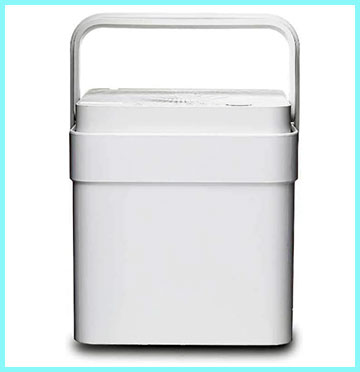
Setting it up in my basement was a unique experience.
Unlike every other dehumidifier I have used, this one doesn’t have wheels when it is in “operating mode.”
You have to pick it up and place it. Once I situated it near my sump pump, I connected it to the Midea Air app.
This is where Midea flexes its muscles. Being able to check the humidity level from my phone while I was upstairs making dinner was genuinely useful.
I didn’t have to trudge down to the dungeon just to see if it was working.
The sheer volume of water the bucket holds is staggering.
In my previous experience with standard units, I was emptying the bucket twice a day during humid Virginia summers. With the Midea Cube, I could go nearly three days before the “Full” notification popped up on my phone. However, emptying it was a bit of a workout. A 4-gallon bucket of water is heavy—over 30 pounds. You have to unlatch the top unit, set it aside (which drips a little), and then lug this massive square bucket to the sink. It is not for the frail. But the trade-off of emptying it less frequently was worth it for me.
Read More: Comparison Of Air Doctor And Dyson
Pros Of Midea
- Massive Water Bucket Capacity: The absolute standout feature of the Midea Cube is its bucket size. By allowing the unit to expand, Midea created a reservoir that holds up to three times more water than a standard dehumidifier of the same class. Most competitors, including the hOmeLabs, top out at around 1.6 to 1.8 gallons. The Cube can hold over 4 gallons. If you are relying on manual draining because you don’t have a floor drain or a sink nearby, this is a game-changer. It essentially triples the time you can leave the unit unattended. For someone with a vacation home or a busy schedule, the difference between emptying a bucket every 12 hours versus every 36 hours is the difference between the machine actually working or sitting idle and full while mold grows.
- Smart Connectivity and App Integration: In an era where even our toasters have Wi-Fi, it might seem gimmicky, but the Midea Air app is surprisingly robust. You can set specific humidity targets, adjust fan speeds, and most importantly, receive alerts when the bucket is full. This “bucket full” notification saved me several times from forgetting about the unit entirely. Furthermore, it integrates with Amazon Alexa and Google Assistant. You can literally yell, “Alexa, what is the humidity in the basement?” and get an answer. For data nerds, the app also graphs humidity levels over time, so you can see if your insulation improvements are actually making a difference or if the unit is struggling to keep up during rainstorms.
- Compact Storage and Shipping Design: The nesting design isn’t just cool; it’s practical for off-seasons. In the winter, when the air is naturally dry and you don’t need the dehumidifier running, you can clean it out, nest the top half back into the bucket, and store it on a shelf. It takes up half the vertical space of a traditional tower unit. This is fantastic for people living in apartments or smaller homes where closet space is at a premium. Additionally, because it ships in a smaller box, there is less packaging waste and a lower carbon footprint associated with shipping it to your door. It feels like a modern, thoughtful approach to appliance design rather than the stagnant “big white box” design we have seen for thirty years.
Cons Of Midea
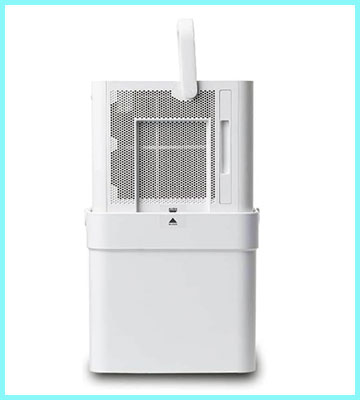
- Lack of Wheels When Expanded: This is the single biggest design flaw for users with mobility issues. Traditional dehumidifiers sit on caster wheels. If you need to move them five feet to the left, you just nudge them. The Midea Cube, when expanded and operating, has no wheels. It sits flat on the floor. If you want to move it, you have to disassemble it or pick up the entire unit. And if that bucket is full of 30 pounds of water, moving it is a recipe for a hernia or a massive spill. You basically have to pick the spot where it will live and leave it there. If you have a large basement and like to move the dehumidifier around to target different damp spots, the Midea Cube will be frustratingly stationary.
- Cumbersome Emptying Process: While the large bucket is a pro, the mechanics of emptying it are a con.3 On a standard unit, the bucket slides out like a drawer—easy, one-handed operation. On the Midea Cube, the “engine” of the dehumidifier sits on top of the bucket. To empty the water, you have to unlock the latches, lift the heavy top section off (which contains the compressor, fan, and coils), place that heavy top section on the floor, and then pick up the bucket. It is a multi-step process that requires two hands and a bit of physical strength. There is also the “drip factor”—when you lift the top off, condensate on the coils can drip onto your floor. It is definitely less refined than the slide-out drawer method.
- Complexity for Non-Tech Users: If you are buying this for an elderly relative or someone who just wants to turn a knob, the Midea might be overkill. The interface on the device itself is sleek and digital, but it relies on you understanding the “Max” and “Min” fill lines and the nesting procedure. If you don’t set the bucket up correctly, the unit won’t turn on. If you lose the Wi-Fi connection, you lose half the functionality that justifies the price. Sometimes, technology adds friction. I found that if I just wanted to quickly adjust the fan speed, I had to bend all the way down to the floor (since the controls are on top of the short unit) or pull out my phone, whereas a tall tower unit has controls at hip height.
My Experience With hOmeLabs
Switching to the hOmeLabs 50-pint dehumidifier felt like driving a vintage pickup truck after driving a Tesla. It wasn’t flashy, it didn’t talk to my phone, and it certainly didn’t look like a piece of modern art. But man, did it work. I unboxed it, attached the wheels (which took about 30 seconds), plugged it in, and pressed the “Power” button. That was it.
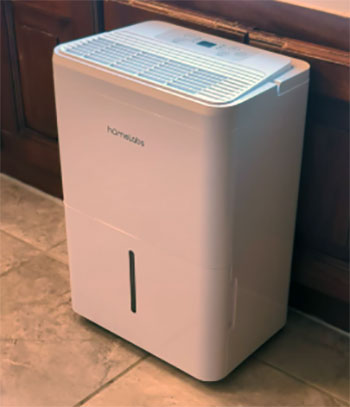
The hOmeLabs unit is a beast when it comes to moisture removal.
I placed it in the same damp corner of the basement, and within 24 hours, the air felt noticeably crisper.
The fan is louder than the Midea—it has a consistent white noise “whoosh” that reminds you it is doing its job.
I actually didn’t mind the noise; it felt reassuring.
The best part of the hOmeLabs experience for me was the mobility.
I realized I needed to dry out a carpet spill in the living room upstairs.
I simply rolled the unit to the stairs, carried it up (it has great handles), and rolled it to the wet spot.
No disassembly required. The bucket is smaller, yes. I found myself emptying it morning and night during a particularly rainy week. However, the slide-out bucket is incredibly easy to handle. It has a nice handle, a splash guard, and it slides right back in with a satisfying click. I also tested the continuous drain option with a garden hose, and it worked perfectly, bypassing the bucket entirely. It felt like a tool designed for a job, prioritizing function over form.
Pros Of hOmeLabs
- Simplicity and Ease of Use: The hOmeLabs dehumidifier is the champion of “user-friendly.” There is practically no learning curve. The control panel is clearly labeled with intuitive buttons: Power, Turbo, Timer, and Comfort. You don’t need to download an app, create an account, or pair it with your router. You just plug it in and set your desired humidity level. For many homeowners, this simplicity is exactly what they want. It is an appliance, not a gadget. If the power goes out and comes back on, the unit remembers your settings and restarts automatically. This reliability makes it perfect for landlords who need to put a unit in a rental property and don’t want tenants calling them about Wi-Fi connectivity issues.
- Superior Mobility: Unlike the stationary Midea Cube, the hOmeLabs unit is designed to move. It comes with smooth-gliding caster wheels and recessed handles on the sides. You can roll it from the laundry room to the bedroom to the basement with minimal effort. This is particularly useful if you only own one dehumidifier but have moisture issues in different parts of the house depending on the season. During the winter, you might need it in the bathroom; in the summer, the basement. The ability to just push it down the hall without lifting 40 pounds of machinery is a significant advantage for daily usability.
- Proven Durability and Customer Support: hOmeLabs has built a cult following not because they are flashy, but because they support their products. While all dehumidifiers eventually fail (compressors are finicky), hOmeLabs is known for having responsive US-based support that actually honors the warranty. The build quality feels dense and sturdy. The plastic doesn’t creak, and the bucket handle feels solid enough to carry a full load of water without snapping. It feels like a machine built to run 24/7 for years. The turbo mode effectively dries out rooms quickly after a flood or leak, proving that the internal components are sized correctly for the 50-pint rating.
Cons Of hOmeLabs
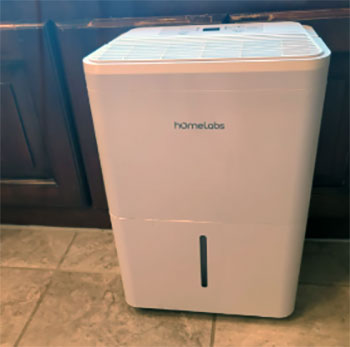
- Small Bucket Capacity: The Achilles’ heel of the standard hOmeLabs design is the bucket size. At roughly 1.6 gallons (6 liters), it is significantly smaller than the unit’s daily collection potential. If the machine is running at full tilt, extracting 50 pints (6.25 gallons) a day, you would theoretically need to empty the bucket four times in 24 hours. That is a lot of maintenance. If you work an 8-hour day, you might come home to find the unit has been off for hours because the bucket filled up by noon. Unless you can use the continuous gravity drain (hose) or the pump option, you are tethered to the machine, acting as its manual water carrier.
- Lack of Smart Features: In 2025, the lack of an app feels like a missing limb to some users. You cannot check if the bucket is full without walking into the room. You cannot turn the unit off remotely if you realize you left it on while on vacation. There is no scheduling feature to have it run only during off-peak electricity hours (unless you use the basic timer, which is not recurring). If you are building a smart home ecosystem where your thermostat triggers your dehumidifier, the hOmeLabs unit will not fit into that puzzle. It is an analog island in a digital stream.
- Heat Generation: All compressor dehumidifiers generate heat—it is simple thermodynamics. However, the hOmeLabs unit seems to exhaust slightly warmer air than the Midea. In a cool basement, this is actually a bonus (free heat!), but if you are using it in a living space or a bedroom during the summer, it can raise the room temperature by a few degrees. It acts almost like a low-power space heater. This can force your air conditioner to work harder, fighting against the dehumidifier to keep the room cool. It is not a dealbreaker, but it is something to be aware of if you are sensitive to room temperature fluctuations.
Also Read: My Thoughts On Puraclenz Air Purifier
Frequently Asked Questions (FAQ)
Yes. Midea is one of the world’s largest manufacturers of appliances and HVAC systems. They actually manufacture the internal components for many other “premium” brands. Their dehumidifiers are generally regarded as highly efficient, innovative (especially the Cube), and reliable compared to generic options.
While reliability varies by batch, Midea and Frigidaire often top reliability rankings due to their manufacturing scale and quality control. However, hOmeLabs is frequently cited by users as highly reliable specifically because of their excellent customer service and warranty policies, which buffer against the occasional hardware failure.
hOmeLabs is a brand owned by Aterian (formerly Mohawk Group). They do not manufacture the units in the USA. Like almost all consumer dehumidifiers, they are manufactured in China, likely by major OEMs (Original Equipment Manufacturers) who build them to hOmeLabs’ specifications. hOmeLabs handles the branding, support, and distribution from the US.
There is no single “best,” but the top tier includes Midea (for innovation), Frigidaire (for longevity), hOmeLabs (for customer support and value), and Honeywell (for brand legacy). Your choice should depend on whether you prioritize smart features (Midea) or simple durability (hOmeLabs).
Conclusion
The decision between the Midea Cube and the hOmeLabs dehumidifier is a choice between innovation and tradition.
If you are comfortable with technology and hate emptying buckets, the Midea Cube is the superior choice. Its massive expandable reservoir means you do half the work of a normal unit, and the app integration lets you monitor your home’s humidity from anywhere. It is a modern solution for modern problems, designed for efficiency and storage.
However, if you want a machine that you can unbox, plug in, and roll around your house without reading a manual, the hOmeLabs is the one for you. It is a tank—reliable, simple, and effective. You won’t get firmware update notifications; you will just get dry air.