
If you have been doom-scrolling through TikTok or Instagram lately, you have almost certainly seen the viral “cozy cardio” setups: a standing desk, a dimmed room, a candle, and a sleek walking pad humming away beneath a laptop. It is the ultimate work-from-home fantasy—getting your 10,000 steps in without ever leaving your email inbox.
Among the flood of brands vying for your attention is Lichico, a contender that promises not just a walking pad, but a proper 2-in-1 treadmill experience with incline options for a fraction of the cost of big-name gym equipment. I believe you should buy this product if you are a remote worker looking for a versatile, quiet machine that can handle both slow walking and a light jog. However, if you are expecting automatic incline adjustments or a high-tech app experience, you might find this budget-friendly option slightly wanting.
My Experience With The Lichico Walking Pad
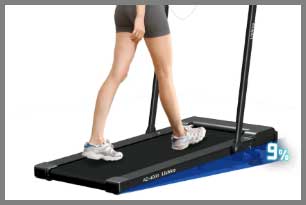
I decided to pull the trigger on the Lichico 2-in-1 Under Desk Treadmill (specifically the AD-4000 model) after my third month of realizing my “sedentary lifestyle” notification on my watch was basically mocking me.
I needed something that could slide under my standing desk but also serve as a real workout tool when I clocked out.
The promise of a 3.0 HP motor and an 8.7 mph top speed—significantly faster than the standard 4 mph walking pads—was the main selling point for me.
Unboxing it was surprisingly painless. It came fully assembled, which is a massive win. I just had to slide it out of the box, plug it in, and flip the switch. It is definitely heavier than it looks—around 60 pounds—so while it has wheels, moving it on a thick carpet requires a bit of muscle. The design is sleek and modern, with a matte black finish that doesn’t scream “gym equipment” in the middle of my office.
The first time I stepped on it, I was nervous about the noise. I share a wall with a neighbor who hears everything. To my relief, at walking speeds (1.5 – 2.0 mph), it is whisper-quiet. The brushless motor hums gently, easily drowned out by my typing or a podcast. I walked for 90 minutes during a Zoom call (camera up, so no one saw my bobbing head), and no one mentioned a background whir.
However, the “2-in-1” feature requires a bit of manual labor. To switch to running mode, you have to raise the riser bar. It feels sturdy enough, but it’s not something you can do in two seconds mid-meeting. The real reality check came with the incline. The marketing mentions incline, but be warned: it is manual. You have to physically get off the machine, flip it up, and adjust the feet or pads at the base. It’s effective for getting a sweat on, but don’t expect to simulate rolling hills with the push of a button like you would at Planet Fitness.
Over the last three months, it has become a staple of my routine. I did encounter the dreaded “belt drift” in week two, where the belt started rubbing against the left edge. A quick YouTube tutorial and a few turns of the included Allen wrench fixed it, but it was a reminder that this is a machine that needs maintenance. It’s not perfect—the app is clunky and I almost never use it—but for the price, it has completely changed my daily activity levels without forcing me to drive to a gym.
Read More: My Thoughts on Hugterra Neck Massager.
Pros Of Lichico Walking Pad
- Versatile Speed Range (Up to 8.7 MPH): Most under-desk treadmills cap out at 3.8 or 4.0 mph, strictly limiting them to walking. The Lichico stands out because it is a true hybrid. With the riser bar up, you can crank it up to 8.7 mph, which is a solid jogging or light running pace for most people. This means you don’t need to buy two separate machines; one device can handle your gentle morning “coffee walk” and your sweat-drenched evening cardio session. It saves both money and floor space.
- Quiet Brushless Motor: The noise level is a critical factor for home office equipment, and Lichico delivers here. It uses a brushless motor, which is generally quieter and more durable than traditional brushed motors found in cheaper knock-offs. At walking speeds (under 3 mph), the noise is roughly 45 decibels—comparable to a library whisper or a refrigerator humming. You can comfortably take conference calls or watch TV without needing to blast the volume.
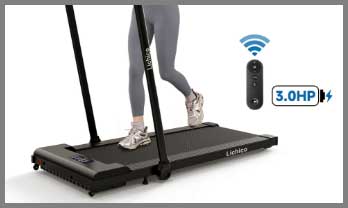
- Compact and Storable Design: Despite its power, the profile is slim. The unit is about 5 inches tall when folded flat, allowing it to slide under a sofa or a bed relatively easily. The inclusion of transport wheels on the front makes it mobile enough to roll out of the way when you need to sit down. For apartment dwellers or those with multi-purpose rooms, this “hideaway” capability is essential to keeping your living space from looking like a cluttered home gym.
- Generous Weight Capacity: Rated for 265 lbs, the Lichico feels surprisingly stable underfoot. Many budget walking pads feel flimsy or shaky, especially near their weight limit. The alloy steel frame provides a solid base that doesn’t shudder or creak with every step. This durability gives you confidence that the motor won’t burn out after a few months of daily use, a common issue with cheaper plastic models.
- Dual Control Options: You aren’t stuck with just one way to control the machine. It comes with a handheld remote (with a wrist strap) that allows you to start, stop, and adjust speed instantly. Additionally, the riser bar has a dedicated phone holder and controls, and there is Bluetooth app connectivity. While the app is basic, having the remote means you don’t have to fiddle with your phone just to pause the machine when the doorbell rings.
Cons Of Lichico Walking Pad
- Manual Incline Inconvenience: This is the most common point of confusion and frustration. While “incline” is listed as a feature, it is not automatic. You cannot adjust the slope while walking. You must stop the machine, get off, lift the heavy base, and manually adjust the feet or add the provided incline pads. If you are looking to do interval training with varying slopes, this machine will not work for you. It is a “set it and forget it” incline, which discourages frequent changes.
- Belt Maintenance Required: Like many compact treadmills, the running belt is prone to drifting to one side if your floor isn’t perfectly level or if you favor one leg while walking. You will need to get comfortable using an Allen wrench to center the belt periodically. If you ignore this, the belt can fray against the side rails, ruining the machine. It is not a “maintenance-free” appliance; it requires weekly attention to keep running smoothly.
- Underwhelming App Experience: The companion app (often Besyfit or a similar white-label fitness app) is frequently cited as the weak link. Users report connectivity issues, a clunky interface, and difficulty syncing data with major health platforms like Apple Health or Google Fit. Most users eventually abandon the app entirely and just rely on the remote and the LED display on the unit itself. Do not buy this machine for its “smart” features.
- Short Power Cord: A minor but annoying detail is the length of the power cord, which is often barely 5 feet long. Unless your desk is right next to an outlet, you will almost certainly need a heavy-duty extension cord. Using a standard, cheap extension cord can be a fire hazard with high-wattage appliances like treadmills, so you’ll need to invest in a proper surge protector or high-gauge cable.
- Narrow Running Deck for Some: While the 16-inch belt width is standard for the category, it can feel narrow if you are used to commercial gym treadmills (which are usually 20-22 inches wide). If you have a wide stance or drift while you run, you might find yourself stepping on the side rails. For walking, it’s fine, but for running at higher speeds, it requires a bit more focus to stay centered, which can be mentally draining.
Also read: My Thought on Vitality Joints Massager.
Maintenance Tips For Lichico Walking Pad
- Lubricate the Belt Monthly: The number one killer of treadmill motors is friction. The Lichico comes with a bottle of silicone oil. You need to lift the belt and apply a squiggly line of oil to the deck underneath every 3-4 weeks (or every 30 hours of use). This keeps the belt gliding smoothly and prevents the motor from overworking. If the belt starts to feel “sticky” or jerky, you are already overdue for lubrication.
- Master the “Quarter Turn” Rule: When the belt drifts to the left or right, do not go crazy tightening the screws. Use the Allen wrench to turn the rear roller bolt on the side the belt is drifting towards. Turn it clockwise only a quarter turn at a time. Run the machine at 3 mph for a minute to let it adjust. Over-tightening can stretch the belt or damage the rollers, so patience is key.
- Vacuum the Motor Compartment: Dust and pet hair are the enemies of electronics. Once a month, unplug the machine and use a vacuum hose to suck up dust from around the motor housing vents and under the belt. If you have pets, do this more frequently. Accumulated dust can cause the motor to overheat and trigger the E08 error code.
- Use a Surge Protector: Treadmills draw a lot of power, especially when starting up. To protect the control board from power spikes and to protect your home’s circuit breaker, plug the Lichico into a dedicated surge protector rated for appliances. Avoid plugging other high-draw devices (like space heaters) into the same outlet while walking.
- Check the Remote Battery: If the machine suddenly stops responding, it is almost always the remote battery (usually a CR2032 coin cell). Keep a spare battery in your desk drawer. There is nothing worse than being ready for a workout and having a dead remote, effectively bricking the machine until you can replace it.
- Proper Storage Orientation: If you plan to store it vertically (leaning against a wall), ensure it is stable and preferably strapped or wedged so it cannot tip over. Not all models are designed to stand upright unsupported. Check the manual for your specific model; if it doesn’t have a kickstand, sliding it flat under a bed is safer to prevent damage to the plastic housing.
Comparison with Other Brands
- Comparison With UREVO 2-in-1: The UREVO is the Lichico’s biggest rival. They share very similar specs (2.5HP motor, ~265lb capacity).
- Incline: UREVO has recently released models with auto-incline, a massive advantage over Lichico’s manual adjustment if you want varied workouts.
- Speed: Lichico generally wins on top speed (8.7 mph vs UREVO’s typical 7.6 mph), making Lichico better for faster runners.
- Price: UREVO is often slightly cheaper, but Lichico feels a bit more premium in build materials. If you need auto-incline, go UREVO. If you need faster running speeds, go Lichico.
- Comparison With WalkingPad (Kingsmith): WalkingPad is famous for its unique ability to fold the deck itself in half, making it much smaller to store than the Lichico (which only folds the handle down).
- Portability: WalkingPad wins hands down. It fits in tiny spaces Lichico cannot.
- Durability: The folding hinge on the WalkingPad is a weak point that can be felt underfoot. Lichico’s solid deck feels more stable and durable for running.
- Usage: WalkingPad is strictly for walking (usually maxing at 3.7 mph). Lichico is a true hybrid that allows running. If you ever plan to jog, Lichico is the clear winner.
- Comparison With DeerRun: DeerRun is the budget-budget option.
- Integration: DeerRun often integrates better with apps like Zwift or PitPat for gamified running. Lichico’s app integration is weaker.
- Build Quality: Lichico generally has a stronger motor and higher weight capacity. DeerRun feels a bit more “entry-level” and plastic.
- Verdict: Buy DeerRun if you want the cheapest possible way to get steps and care about gaming apps. Buy Lichico if you want a machine that will last longer and handle heavier daily use.
Frequently Asked Questions (FAQ)
No. Most Lichico models, including the popular 2-in-1 versions, feature manual incline. This means you have to get off the machine and adjust the feet or flip out a kickstand to change the angle. It cannot be adjusted via the remote or app while you are walking.
Yes, but only if you have the riser bar (handle) lifted up. In “walking mode” (handle down), the speed is typically limited to around 3.8 mph for safety. When you raise and lock the handle, the machine unlocks “running mode,” allowing speeds up to 8.7 mph.
It is considered very quiet for a treadmill. At walking speeds (1-3 mph), it registers around 45-50 decibels, which is quiet enough for office work and TV watching. At running speeds (6+ mph), the footfall noise (your feet hitting the deck) will be louder than the motor itself, which is unavoidable with any treadmill.
If your remote unpairs, unplug the machine, then plug it back in and turn it on. Immediately press and hold the “Start/Stop” button (or sometimes the “Mode” button, depending on the specific remote version) for about 5-10 seconds until you hear a “beep.” This signals that the remote has re-synced with the treadmill.
Conclusion
The Lichico Walking Pad is a standout performer in the crowded market of under-desk treadmills, largely due to its versatility. It successfully bridges the gap between a slow office walker and a capable home gym runner. While the lack of auto-incline and a mediocre app prevent it from being a “luxury” experience, the strong motor, quiet operation, and solid build quality make it an excellent value for the price. If you are serious about breaking up your sedentary workday and want a machine that can grow with you from walking to jogging, the Lichico is a reliable, worthy investment for your home office.