
If you are tired of looking at price tags for smartwatches that cost as much as a car payment, you are not alone. The market is flooded with high-end devices that offer a million features you will likely never use. Enter the Letsfit E26 Smartwatch. It claims to strip away the fluff and deliver exactly what you need—fitness tracking, notifications, and sleep monitoring—for the price of a few fancy coffees.
I decided to strap this budget-friendly contender to my wrist to see if it is a hidden gem or just cheap plastic junk. If you are looking for a low-risk entry into the world of wearables, you should buy this product at the official Letsfit store or a major retailer like Amazon to ensure you get the latest firmware version.
My Experience With Letsfit E26 Smartwatch

I have worn everything from the high-end Apple Watch Ultra to simple pedometers clipped to my belt.
I walked into this test with managed expectations.
The Letsfit E26 is undeniably a budget device, and when I first opened the box, the lightweight feel confirmed that.
It doesn’t have the cold, heavy heft of stainless steel; it is unapologetically plastic.
However, once I put it on, that lack of weight became its biggest asset.
I often find bulky smartwatches annoying when typing on a laptop or trying to sleep, but the E26 virtually disappeared on my wrist.
Setting it up was a test of patience, but not a difficult one. You have to download the companion app (typically “VeryFitPro” or the branded Letsfit app depending on the manual instructions) to pair it. My phone found the watch immediately, but the initial firmware update took about ten minutes. Once that was cleared, I was ready to go.
I took the E26 out for my standard 5-mile loop. Since the watch lacks built-in GPS, it relies on “Connected GPS,” meaning it piggybacks off your phone’s location. As long as I had my phone in my pocket, the tracking was surprisingly accurate, matching my usual mile markers within a tenth of a mile. The heart rate monitor was consistent during steady jogging, though it struggled to keep up during high-intensity sprint intervals—a common flaw even in mid-range trackers.
The real surprise came at night. I usually hate wearing watches to bed, but the E26 is so slim and comfortable that I slept through the night without taking it off. The next morning, the sleep data was fascinating. It broke down my deep sleep, light sleep, and awake time. While I can’t verify the medical accuracy without a sleep lab, the data correlated perfectly with how groggy or rested I felt.
Battery life is where this device absolutely embarrasses the competition. With my Apple Watch, I am tethered to a charger every single night. With the Letsfit E26, I went a full eight days before the battery indicator turned red. That level of freedom changes how you use a device; you stop worrying about it dying mid-workout.
However, it is not all sunshine. The screen is a standard LCD, not the vibrant OLED you see on expensive watches. In direct, bright sunlight, I had to squint and shade the screen with my hand to read my text notifications. Speaking of notifications, being able to read WhatsApp messages and emails on my wrist is great, but the inability to reply (even with canned responses) was a reminder of the price point. But for the money? It performed far better than I anticipated.
Read more: Comparison Of Autophix 3210 And Autophix 3210 Pro
Pros Of Letsfit E26 Smartwatch
- Exceptional Battery Life: The standout feature of the Letsfit E26 is undoubtedly its endurance. In a world where premium watches struggle to last 24 hours, the E26 comfortably lasts 7 to 10 days on a single charge, depending on your screen brightness settings and usage. This makes it an ideal companion for camping trips or long vacations where you don’t want to bring extra cables. It eliminates the “range anxiety” of daily charging, ensuring that the watch is actually on your wrist tracking your sleep, rather than sitting on a nightstand charger.
- Incredible Value for Money: It is rare to find a functional piece of technology for this price point. The E26 offers about 80% of the functionality of a flagship smartwatch for about 10% of the cost. You get heart rate monitoring, blood oxygen (SpO2) estimation, sleep tracking, step counting, and notification mirroring. For a teenager, a senior citizen, or someone just starting their fitness journey who isn’t ready to commit hundreds of dollars, this value proposition is unbeatable. It lowers the barrier to entry for health tracking significantly.
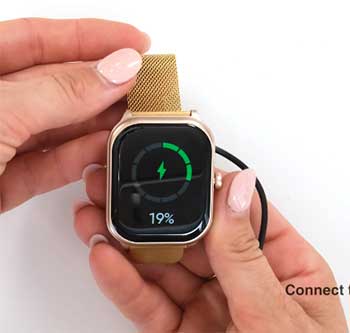
- Lightweight and Comfortable Design: Because the chassis is made of durable polycarbonate rather than heavy metal, the watch is extremely light. This is crucial for a device meant to be worn 24/7. The silicone strap is soft, flexible, and surprisingly breathable, preventing that gross, sweaty wrist feeling you get with cheaper rubber bands. Whether you are typing at a desk, doing pushups, or sleeping, the low profile ensures the watch never digs into your skin or feels cumbersome.
- IP68 Water Resistance: You do not need to baby this watch. The IP68 rating means it is dust-tight and can withstand immersion in water. You can keep it on while washing your dishes, sweating through a heavy HIIT workout, or running in the pouring rain. While it is not designed for deep-sea diving, it handles the hazards of daily life and swimming in shallow pools perfectly fine. This durability adds to the value, as you don’t have to panic if you accidentally jump in the shower while wearing it.
- Comprehensive Sleep Tracking: Sleep is just as important as exercise, and the E26 excels here. It automatically detects when you fall asleep and wake up, providing a graphical analysis of your sleep stages (Deep, Light, and Awake). The silent vibration alarm is a gentle way to wake up without disturbing your partner. Many users find that simply seeing this data motivates them to go to bed earlier, making the watch a genuine tool for lifestyle improvement.
- Music Controls on Wrist: A small but highly convenient feature is the ability to control your phone’s music player from the watch face. If you are on a run or doing the dishes and your phone is across the room or in a pocket, you can skip tracks, pause, or play music directly from the E26. It saves you the hassle of digging out your phone every time a song you dislike comes on, keeping you in the flow of your activity.
Cons Of Letsfit E26 Smartwatch
- Screen Visibility in Sunlight: The display on the E26 is a TFT LCD screen, which relies on a backlight. While it looks crisp and colorful indoors, it struggles significantly under direct, bright sunlight. The screen does not get bright enough to cut through the glare of a sunny day. If you are a runner who trains primarily at noon, you will find yourself constantly shielding the watch face with your other hand just to check your pace or read a notification, which can be annoying mid-stride.
- Proprietary Charging Cable: The watch uses a specific magnetic PIN charging cable. It is not USB-C or micro-USB on the watch end. If you lose this cable or if your dog chews it up, you cannot just grab a spare cord from your drawer; you have to order a specific replacement. The magnets on the charger are also somewhat weak, meaning you have to be careful when placing it down to ensure it doesn’t disconnect. It requires a precise connection that can be frustrating if you are in a rush.
- Reliance on Phone for GPS: The Letsfit E26 does not have a built-in GPS chip. To map your runs or bike rides, you must bring your phone with you. The watch connects to your phone’s GPS via Bluetooth. If you prefer to run untethered without the bulk of a smartphone bouncing in your pocket, this watch will not be able to track your route or calculate accurate distance and pace. It is strictly a tethered experience for mapping.
- Limited Notification Interaction: While the watch is great at telling you that you have a text or an email, it is a one-way street. You can read the message (or at least the first few lines of it), but you cannot reply. There is no microphone for voice-to-text, and there are no pre-set “Quick Replies” like “Yes” or “On my way.” If you get an urgent text, you still have to pull your phone out of your pocket to respond, which defeats some of the purpose of a smartwatch.
- App Syncing Issues: The companion app (VeryFitPro or similar) is functional but lacks the polish of Fitbit or Apple Health. Users frequently report intermittent syncing issues where the watch fails to upload the day’s data to the phone. Sometimes the app crashes or logs you out, requiring a reset. While the data is usually stored on the watch until it reconnects, the friction of dealing with a buggy app can be discouraging for users who want a seamless “set it and forget it” experience.
- Plastic Build Scratches Easily: The screen is not made of Sapphire crystal or high-grade Gorilla Glass. It is a hardened plastic or basic glass that is prone to scratching if you brush it against a brick wall or a doorframe. Over time, these micro-scratches can make the display look cloudy. Unlike premium watches that can take a beating, the E26 shows its wear and tear relatively quickly if you are a rough user.
Maintenance Tips For Letsfit E26 Smartwatch
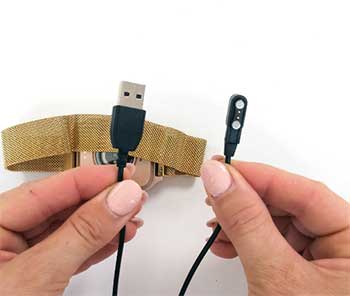
- Clean the Charging Pins: One of the most common failures with budget smartwatches is charging connectivity. Sweat and dead skin cells accumulate on the gold contact points on the back of the watch. Over time, this creates a barrier that prevents the charger from working. Once a week, take a Q-tip dipped in rubbing alcohol and gently clean the contacts on the back of the watch and the pins on the charging cable. This simple habit will ensure your watch charges every time you dock it.
- Wash the Strap Regularily: The silicone strap is comfortable, but it traps sweat and bacteria against your skin. This can lead to skin irritation or a funky smell. After every workout, or at least every few days, remove the watch and rinse the strap under warm water with a mild hand soap. Dry it thoroughly before putting it back on. This not only keeps the watch looking new but prevents the dreaded “watch tan rash” that occurs from trapped moisture.
- Don’t Let the Battery Drain Completely: Lithium-ion batteries, like the one in the E26, degrade faster if they are constantly drained to 0%. Try to charge the watch when it hits around 20%. Conversely, do not leave it plugged in for days at a time. Keeping the electrons moving is the key to battery longevity. If you plan to store the watch for a month without using it, charge it to 50% and turn it off; do not store it with a dead battery.
- Keep Firmware Updated: The developers often release updates to fix bugs, improve Bluetooth stability, or adjust step-counting algorithms. Open the companion app regularly and check for firmware updates. Keep your phone near the watch during the update process and do not close the app. These updates can often fix the syncing issues mentioned in the “Cons” section and breathe new life into the device.
- Use a Screen Protector: Given that the screen is prone to scratching, investing a few dollars in a pack of soft film screen protectors is a wise move. These are similar to the ones used on phones but sized for the E26. They will absorb the scratches from door frames and gym equipment. When the protector gets scuffed up, you simply peel it off and apply a new one, keeping the actual watch face pristine.
- Restart the Watch Weekly: Just like a computer or a smartphone, the E26 has a tiny processor and RAM that can get clogged up with temporary data processes. If you notice the interface getting laggy or the step count acting weird, restart the device. A simple reboot once a week clears the cache and keeps the operating system running smoothly, minimizing glitches and freezing.
Comparison with Other Brands
- Apple Watch SE:
- Ecosystem: Integration vs. Isolation: The Apple Watch SE is seamless. It unlocks your Mac, uses Apple Pay, and talks to Siri. The Letsfit E26 is an island; it mirrors notifications but doesn’t integrate into a larger ecosystem.
- Quality: Premium Materials: Apple uses aluminum and ion-X glass with a Retina OLED display. The Letsfit is plastic and LCD. The difference in build quality is palpable, but so is the $200+ price difference.
- Health: Medical Grade: Apple offers fall detection and FDA-cleared heart notifications. Letsfit offers basic fitness guidance. If you have a heart condition, buy the Apple. If you just want to count steps, the Letsfit is sufficient.
- Fitbit Inspire 3:
- Accuracy: Algorithm Superiority: Fitbit has been in the game for over a decade. Their step counting and sleep algorithms are generally considered more accurate and nuanced than Letsfit’s.
- App: Community and Polish: The Fitbit app is excellent, offering a social community, challenges, and a very polished interface. The Letsfit app is utilitarian and basic.
- Screen: Size Matters: The Inspire 3 is a narrow tracker band, whereas the E26 is a full watch shape. If you prefer a larger screen for reading text, the Letsfit actually wins here despite being cheaper.
- Wyze Watch:
- Smart Home: IoT Integration: The Wyze Watch is priced similarly to the Letsfit (under $50) but integrates with Wyze smart home products (bulbs, cameras). You can turn off your lights from your wrist. Letsfit does not offer this.
- Design: Boxy Twins: Both watches share a very similar aluminum/plastic rectangular design. They look nearly identical from a distance.
- Focus: Fitness vs. Utility: Letsfit focuses slightly more on the fitness data aspect, whereas Wyze focuses on being a controller for your smart home. If you don’t own Wyze bulbs, the Letsfit is likely the better standalone fitness tracker.
Also read: My Thoughts on Gevi Nugget Ice Maker
Frequently Asked Questions (FAQ)
Yes, the Letsfit E26 carries an IP68 rating. This means it is protected against dust ingress and can withstand immersion in water up to 1.5 meters (about 5 feet) for up to 30 minutes. You can wear it while swimming in a pool, showering, or washing your hands. However, it is not recommended for high-velocity water activities like jet skiing or deep diving, and you should avoid exposing it to hot water (like saunas) as steam can damage the seals.
Yes, the Letsfit E26 is compatible with both iOS (iPhone) and Android smartphones. You need to download the companion app (usually VeryFitPro or the Letsfit app) from the Apple App Store or Google Play Store to pair the device. The features are generally identical across both platforms, though Android sometimes offers slightly more customization for notification permissions.
No. The Letsfit E26 allows you to see incoming calls and reject them, and it allows you to read incoming text messages and app notifications. However, it does not have a microphone or speaker for taking calls, nor does it have a keyboard or voice-to-text feature for replying to messages. It is strictly a notification viewer.
The step counter is reasonably accurate for general activity tracking but may differ slightly from high-end devices like Garmin or Fitbit. Budget trackers often rely on arm movement sensors (accelerometers), so if you are pushing a stroller or a shopping cart, it might under-count. Conversely, vigorous arm movements while sitting might register as steps. For the average user looking to hit 10,000 steps, it is accurate enough to track trends and progress.
Conclusion
The Letsfit E26 Smartwatch proves that you do not need to spend a fortune to take control of your health. It strips away the vanity features of high-end wearables and doubles down on the essentials: battery life, durability, and basic tracking.
While it lacks the screen brightness and app polish of the big players, its incredible value makes it the perfect choice for budget-conscious buyers or first-time smartwatch users. You should buy this product directly from the official Letsfit store or Amazon to start tracking your fitness journey today without breaking the bank.