
If you are terrified of dropping your expensive smartphone into the ocean or smashing it against a rock while hiking, the Kodak Pixpro WPZ2 is a product you should buy. It is an unapologetically rugged, waterproof point-and-shoot camera designed for the exact moments where your phone fears to tread.
While it won’t compete with a DSLR for image quality, it offers something arguably more valuable: the freedom to capture memories in harsh environments without anxiety. Whether you are snorkeling, kayaking, or just want a “toddler-proof” camera for family vacations, this bright yellow brick is a durable companion that brings the fun back to photography. Let’s examine why this budget-friendly tough camera is making a comeback.
My Experience With The Kodak Pixpro WPZ2
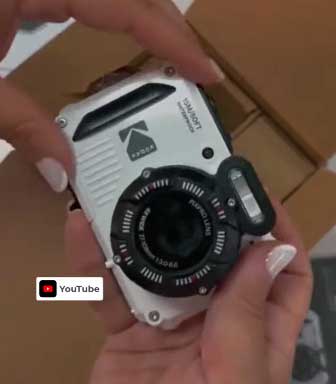
I bought the Kodak Pixpro WPZ2 specifically for a beach vacation where I knew I wanted underwater shots but wasn’t willing to risk my iPhone 15 or shell out $500 for a GoPro or an Olympus TG-7.
The first thing that struck me when I unboxed it was the build. It feels substantial—plasticky, yes, but a thick, dense plastic that screams “drop me.”
I chose the bright yellow version, which I highly recommend because if you drop it in murky water or sand, it is instantly visible.
My first test was a snorkeling trip. I was nervous submerging it for the first time—that instinct to keep electronics dry is hard to break.
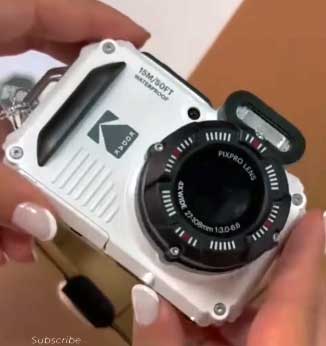
I double-checked the lock on the battery door (a crucial step) and jumped in. The camera is rated for 15 meters (about 49 feet), and while I only went down about 10 feet, it handled the pressure perfectly.
Using the “Underwater” mode, the colors popped surprisingly well. The water didn’t look grey or washed out; the blues were vibrant, and the fish looked sharp enough for social media. The buttons are stiff, which is actually a good thing; it means you won’t accidentally change settings when you are fumbling around with wet hands or gloves.
On land, the experience was a mix of nostalgia and utility. The 4x optical zoom is a nice feature that smartphones often lack (digital zoom just crops the image, while optical actually zooms). I was able to get decent shots of my kids playing in the surf from a distance without losing resolution. However, I did notice that the screen is not the brightest. In direct, midday tropical sun, it was sometimes a struggle to see exactly what I was framing on the 2.7-inch LCD. I found myself shading the screen with my hand often.
The video quality is 1080p, which is fine for home movies, but don’t expect cinematic 4K quality. It captures the moment, the sound of the waves, and the laughter, which is what matters. The digital image stabilization helps a little, but if you are walking and filming, it will be shaky.
The feature I used most, surprisingly, was the Wi-Fi connectivity. I expected it to be a gimmick, but being able to transfer the photos to my phone while we were still sitting at the beach bar was fantastic. The app isn’t the prettiest, but it worked reliably. I could edit the photos on my phone and post them to Instagram minutes after getting out of the water.
Overall, using the WPZ2 felt liberating. I tossed it in my sandy beach bag, let my 6-year-old take photos of seashells, and dunked it in the pool to rinse it off. It is not a professional tool, but it is a “fun” tool, and it captured memories I simply would have missed if I had been babying my phone.
Read more: Comparison Of GoPro Hero 10 And GoPro Hero 12
Pros Of The Kodak Pixpro WPZ2
- Genuine Waterproof Durability:The standout feature is its IPX8 rating. Being waterproof down to 15 meters is no small feat for a camera in this price range. You can take this fully underwater for snorkeling, swimming, or just playing in the pool. Unlike “water-resistant” phones that might survive a splash, this camera is built to live underwater. It opens up a whole new world of photography—split shots (half in, half out of water), underwater selfies, and reef photography—without the need for an expensive, bulky housing case.
- Shockproof and Dustproof Build:Beyond water, this camera is built to take a beating. It is shockproof from up to 2 meters (6.5 feet) and dustproof (IP6X). This makes it the ultimate “worry-free” camera. You can hand it to a clumsy child, drop it on a hiking trail, or bury it in the sand, and it will keep working. For parents, this durability is invaluable. You aren’t hovering over your kids telling them to “be careful”; you are letting them explore and document their own perspective.
- Affordable Price Point:When you compare the WPZ2 to the market leaders in the rugged camera space (like the Olympus Tough series), the Kodak is significantly cheaper—often half the price or less. It offers the core functionality of a tough camera (waterproof, zoom, ruggedness) without the premium price tag. For casual users who only need a rugged camera for one or two trips a year, this value proposition is unbeatable. You aren’t paying for features you won’t use, like RAW shooting or microscope modes.
- Optical Zoom Capability:Smartphone cameras have improved efficiently, but most still rely on digital zoom, which degrades image quality. The WPZ2 features a 4x optical zoom. This means the lens physically moves to get you closer to the action, preserving the full 16-megapixel resolution. This is great for capturing wildlife, boats in the distance, or your kids surfing, giving you framing flexibility that a fixed-lens action cam (like a GoPro) cannot offer.
- Convenient Wi-Fi Transfer:The built-in Wi-Fi allows you to connect the camera to your iOS or Android device via the PIXPRO Remote Viewer app. This bridges the gap between a standalone camera and your social media. You don’t have to wait until you get home to a computer to see your photos. You can transfer the best shots to your phone immediately, edit them with your favorite apps, and share them while the memory is still fresh.
Cons Of The Kodak Pixpro WPZ2
- Poor Low-Light Performance:The camera utilizes a small 1/2.3″ BSI CMOS sensor, which struggles significantly once the sun goes down. In bright daylight, photos are crisp and colorful. However, indoors or at dusk, you will notice significant “noise” (grain) and a loss of detail. The flash helps for close-up portraits, but it cannot compensate for the small sensor in landscape shots. This is definitely a “sunshine camera,” not a tool for night photography.
- Battery Life Anxiety:The rechargeable Li-ion battery is rated for approximately 200 shots (CIPA standards), which in the real world goes by very fast, especially if you are recording video or using the Wi-Fi transfer feature. There is nothing worse than the battery dying halfway through a snorkeling trip. Unlike some older cameras that used AA batteries you could buy anywhere, this uses a specific battery pack. You almost certainly need to buy a spare battery to get through a full day of adventure.
- Screen Visibility Issues:The rear LCD screen is 2.7 inches with a relatively low resolution (230k dots). While it is functional, it can be very difficult to see in bright, direct sunlight—which is exactly where you will likely be using this camera. The viewing angles aren’t amazing, and underwater, the screen can sometimes look dark, making it hard to judge if your subject is in focus. You often end up “point and praying” rather than composing carefully.
- Sluggish Focus Speed:Compared to the lightning-fast autofocus of a modern iPhone, the WPZ2 feels slow. It uses contrast-detection autofocus, which can hunt for a second or two before locking on, especially in lower contrast scenes (like underwater). If you are trying to photograph a fast-moving fish or a child jumping into a pool, you will likely miss a few shots due to shutter lag. It requires a bit of patience and anticipation.
- Video Limited to 1080p:In a world where even entry-level phones shoot 4K, the WPZ2’s 1080p video limitation feels dated. While the footage is clear enough for memories, it lacks the sharpness and detail of 4K. Additionally, the audio quality is somewhat tinny, especially when the camera is wet, as water can muffle the microphone. If your primary goal is high-end video blogging, this isn’t the right tool.
Also read: Comparison Of Ring Spotlight Cam And Stick Up Cam
Maintenance Tips For Kodak Pixpro WPZ2
- The “Golden Rule” of Freshwater Rinsing:Salt water is the arch-enemy of electronics, even waterproof ones. If you use the WPZ2 in the ocean, you must soak it in a bowl of fresh water for about 10-20 minutes afterward. Do not just run it under the tap; soaking helps dissolve salt crystals that might form in the crevices and buttons. If salt crystallizes, it can compromise the seals or jam the buttons. Press the buttons while submerged in fresh water to work out any trapped salt.
- Inspect the Seals religiously:Before every submersion, open the battery/SD card door and inspect the rubber O-ring seal. A single strand of hair, a grain of sand, or a piece of lint on that seal can cause a leak that will destroy the camera. Wipe the seal gently with a lint-free cloth. If the seal looks cracked or dried out, do not put the camera in water until you have replaced it.
- Dry Completely Before Opening:This sounds obvious, but it is where most accidents happen. When you come out of the water, dry the entire exterior of the camera with a towel before you open the battery door. Water droplets sitting near the hinge can easily drip inside the delicate electronics compartment the moment you pop the latch. Be paranoid about this step.
- Use a Floater Strap:The camera is waterproof, but it does not float. If you drop it in deep water, it will sink to the bottom like a stone. Invest in a cheap “floating wrist strap” (usually bright orange or yellow foam). This ensures that if the camera slips out of your hand while you are swimming, it will bob to the surface rather than disappearing into the abyss.
- Screen Protector Application:The screen is plastic, not Gorilla Glass, and it scratches relatively easily, especially if you are tossing it in a beach bag with sand and keys. Apply a generic universal screen protector cut to size. It’s a cheap insurance policy that keeps your view clear and protects the resale value of the camera.
Comparison With Other Brands

- Kodak WPZ2 vs. Olympus (OM System) Tough TG-6/TG-7:The Olympus Tough series is the gold standard for rugged cameras. It has a brighter f/2.0 lens, shoots in RAW, has incredible microscope macro modes, and supports 4K video. However, it costs roughly three times as much as the Kodak. If you are a serious diver or photography enthusiast, the Olympus is worth the money. If you just want holiday snaps and fun underwater photos without breaking the bank, the Kodak is the better value buy.
- Kodak WPZ2 vs. Panasonic Lumix TS30 (FT30):These two are very close competitors in the budget rugged space. The Panasonic is slimmer and looks a bit more stylish, but the Kodak generally has a slight edge in ruggedness (15m depth vs. Panasonic’s 8m) and sensor technology (BSI CMOS vs. Panasonic’s older CCD sensor). The Kodak tends to handle low light marginally better (though both struggle) and is often easier to find in stock. I prefer the grip and “holdability” of the Kodak.
- Kodak WPZ2 vs. Ricoh WG-80:The Ricoh has a unique design with six LED ring lights around the lens, which is fantastic for macro photography (close-ups of flowers or bugs). It also looks more “tactical.” However, the Ricoh WG-80 still uses an older micro-USB port and lacks Wi-Fi in some regions/models (check specific specs). The Kodak WPZ2’s built-in Wi-Fi is a major advantage for modern users who want to share photos instantly.
- Kodak WPZ2 vs. GoPro Hero:A GoPro is an action camera, designed for video first and photos second. It has a fixed wide-angle lens (fisheye look), whereas the Kodak has an optical zoom. If you want to zoom in on your kids, the Kodak is better. If you want to strap a camera to your chest while mountain biking and record smooth 4K video, the GoPro is vastly superior. They serve different purposes.
- Kodak WPZ2 vs. Your Smartphone:Your iPhone or Samsung likely takes better photos and videos than this camera. However, one drop on a rock or one seal failure in saltwater, and you are out $1,000+. The Kodak is an “insurance policy.” It takes the risk so your phone doesn’t have to. It also allows you to disconnect—leaving your phone in the hotel safe while still being able to take pictures.
Frequently Asked Questions (FAQ)
Yes, if you need a dedicated waterproof camera on a budget. It is excellent for family vacations, kids’ camps, or work sites where you need durability. It offers great value for the price, provided you accept that the image quality is good (comparable to a standard point-and-shoot) but not professional level.
It features Digital Image Stabilization (DIS). This is not as effective as Optical Image Stabilization (OIS) found in high-end cameras. It works by software processing to reduce shake, which helps, but you should still try to hold the camera steady, especially when zooming or shooting video.
The camera is rated IPX8 waterproof up to 15 meters (approximately 49 feet). This is sufficient for snorkeling, most recreational scuba diving, surfing, and swimming pools. Always ensure the battery door is securely locked before submerging.
No, the WPZ2 does not have a dedicated webcam mode. When plugged into a computer via USB, it typically functions as a mass storage device (to transfer photos). You would need a capture card to try to force a video feed, but it is not designed for that purpose.
Conclusion
To summarize, the Kodak Pixpro WPZ2 is the champion of “affordable adventure.” It doesn’t try to be a DSLR; it tries to be a reliable, fun, and tough camera that goes where others can’t. It is the perfect choice for parents, snorkelers, and outdoor lovers who want to document their life without risking their primary phone. The peace of mind alone is worth the investment. You should definitely pick one up before your next trip to the beach.