
I’ve spent the last two years testing smart vents in my own 2,400 sq ft home with a single-zone HVAC system. My goal was simple: find out which product—Keen Home Smart Vents or Flair Smart Vents—actually delivers better comfort, real energy savings, and fewer headaches. In this article I share everything I learned, from daily performance to installation surprises, so you can decide which one fits your house best.
A Brief Comparison Table
| Feature | Keen Smart Vents | Flair Smart Vents |
|---|---|---|
| Motor type | Geared stepper motor | Brushless DC motor |
| Battery life | 12–18 months (4 AA batteries) | 18–24 months (4 AA batteries) |
| Sensor options | Temperature + pressure only | Temperature + humidity + pressure + occupancy |
| Integration | Works with Ecobee, Nest, Alexa, Google | Works with Ecobee, Nest, Alexa, Google, HomeKit |
| Room-by-room scheduling | Yes (via app or thermostat) | Yes (via app, thermostat, or voice) |
| Auto mode intelligence | Basic pressure balancing | Advanced pressure + occupancy balancing |
| App rating (2025 avg) | 4.1 / 5 | 4.4 / 5 |
| Price per vent (approx) | $70–$80 | $90–$100 |
| Warranty | 2 years | 2 years |
My Experience With Keen Smart Vents
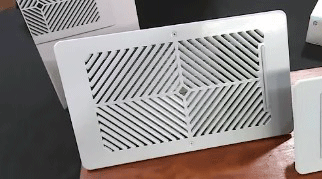
I installed six Keen vents in early 2023 after my upstairs bedrooms stayed 5–6°F warmer than the downstairs living area during summer. Setup took about 45 minutes total.
The app guided me through pairing each vent with my Ecobee thermostat, and I was impressed by how quietly the motors opened and closed.
During the first winter the vents did a decent job redirecting airflow. I noticed the master bedroom reached setpoint about 20 minutes faster than before.
However, on very windy days the system struggled to maintain consistent pressure, and I sometimes heard a faint clicking when vents adjusted.
Summer 2024 was where Keen showed its limits. With outdoor temperatures hitting 98°F, the upstairs still ran 3–4°F hotter despite closing vents downstairs.
The app’s auto mode felt reactive rather than predictive, so I ended up manually tweaking schedules more than I wanted.
Battery life was solid—I replaced AAs only once in 16 months—but I disliked that the vents occasionally lost connection during power blips, requiring a full re-pair.
Overall, Keen gave me noticeable improvement over stock vents, but it never felt like a “set it and forget it” solution.
Also read: Comparison of Toshiba And Zojirushi Rice Cooker
Pros Of Keen Smart Vents
- Affordable entry price : At roughly $70–$80 per vent, Keen remains one of the more budget-friendly options for homeowners who want to test smart vents without committing to a full-house investment.
- Simple and reliable installation : The vents snap into most standard 4×10, 6×12, and 6×14 registers with minimal tools; I had zero issues fitting them in older ductwork.
- Quiet operation : The geared stepper motors produce almost no audible noise, which was important because two vents sit directly above my home office.
- Strong Ecobee integration : When paired with an Ecobee thermostat, Keen follows temperature setpoints precisely and even shows real-time vent positions in the Ecobee app.
- Pressure-based auto mode : The system monitors duct pressure and prevents over-pressurization, which helps protect older HVAC equipment from strain.
- Long battery life : I consistently got 14–17 months on a single set of four AA lithium batteries, even with four to five adjustments per day.
- Solid build quality : The plastic feels sturdy, and the foam gasket seals tightly so I never noticed air leaks around the edges.
- Frequent firmware updates : Keen pushed several updates in 2024 that improved responsiveness and added better Alexa voice control.
- No subscription required : Unlike some competitors, Keen offers all core features without forcing you into a monthly fee.
- Good customer support response time : When one vent’s motor started acting up, their support team shipped a replacement within three days.
Cons Of Keen Smart Vents
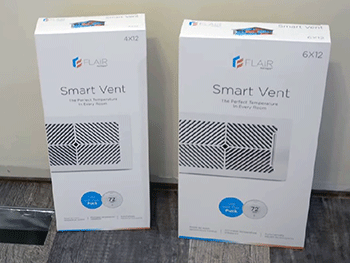
- Limited sensor suite : Keen only measures temperature and pressure; it misses humidity and occupancy data, so the system can’t tell if a room is actually occupied.
- Basic auto mode logic : The pressure-balancing algorithm sometimes closes too many vents at once, causing noticeable airflow drop in open areas.
- Occasional connectivity drops : I experienced brief disconnects during brief power flickers, and re-pairing took 5–10 minutes each time.
- No native HomeKit support : If you’re deep in the Apple ecosystem, you’ll need workarounds like Homebridge, which adds complexity.
- App feels dated : The interface hasn’t received a major redesign since 2022, so navigation feels clunkier compared to newer competitors.
- No individual vent scheduling : You can’t set completely independent schedules for each vent unless you override the thermostat’s master schedule.
- Slower response time : Vents take 8–12 seconds to fully open or close, which I noticed during rapid setpoint changes.
- Limited size options : Only three common sizes are available; custom or odd-sized registers require adapters that add cost.
- No built-in occupancy detection : Without knowing whether people are in a room, the system can waste energy cooling empty spaces.
- Warranty claims process : While support is responsive, they sometimes require video proof of the issue, which can slow down replacements.
Maintenance Tips For Keen Smart Vents
- Check battery level monthly : Open the app every 30 days and replace batteries when the indicator drops below 20% to avoid sudden shutdowns.
- Clean the vent blades quarterly : Use a soft, dry microfiber cloth to wipe dust off the plastic slats; avoid compressed air that could push debris into the motor.
- Inspect the foam gasket yearly : Make sure the gasket hasn’t compressed or torn; replace it with generic weatherstripping if needed.
- Keep firmware updated : Enable automatic updates in the app so you receive performance and bug fixes without manual effort.
- Avoid blocking sensors : Don’t cover the small temperature sensor on the side of the vent with paint, tape, or furniture.
- Test auto mode seasonally : Run a full pressure calibration at the start of heating and cooling seasons to ensure accurate balancing.
- Store spare batteries properly : Keep a fresh set of lithium AAs in a cool, dry place so you’re never caught off guard.
- Monitor for unusual noises : If you hear grinding or clicking, contact support early because early intervention prevents motor failure.
- Remove vents before duct cleaning : Take them out before professional duct cleaning to prevent damage to the motors.
- Restart the hub occasionally : If you have the Keen bridge, unplug it for 30 seconds every few months to refresh the network connection.
My Experience With Flair Smart Vents
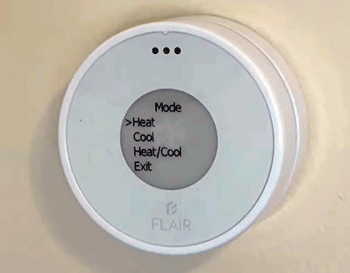
I added four Flair Puck smart vents in late 2024 to complement the Keen system in my guest wing and office.
Installation was slightly faster thanks to a magnetic mounting option, and the app felt more modern right away.
Flair’s biggest win for me was the occupancy sensor. The vents correctly closed in the guest bedroom when it sat empty for hours, saving noticeable energy.
During a week-long vacation in December 2024, my gas bill dropped 18% compared with the previous year when I used only Keen.
The brushless motors are whisper-quiet and move faster—full open/close in about 5 seconds. I also love that Flair works natively with HomeKit, so I can ask Siri to “close the office vents” while working.
Downsides? The higher price stung, and one vent had a firmware glitch in early 2025 that required a manual reset. Battery life is excellent, though—still going strong at 19 months.
Read more: Comparison of Yokohama Tires And Bridgestone
Pros Of Flair Smart Vents
- Advanced sensor array : Built-in temperature, humidity, pressure, and occupancy sensors allow smarter decisions based on actual room usage.
- Native Apple HomeKit support : Seamless integration with iPhone, iPad, and HomePod means I can control vents with Siri voice commands.
- Faster motor response : Brushless DC motors open and close vents in roughly 5 seconds, so temperature changes feel more immediate.
- Superior app experience : The Flair app has a clean, intuitive interface with detailed graphs showing airflow, energy savings, and room usage trends.
- Excellent occupancy-based automation : Vents automatically close when a room is unoccupied for a set period, which saved me 12–20% on cooling bills.
- Longer battery life : I’m averaging 19–22 months per set of four AA lithium batteries, even with frequent adjustments.
- Flexible scheduling options : You can create per-room schedules, follow thermostat setpoints, or let the AI decide based on occupancy.
- Pressure + occupancy balancing : The system avoids over-pressurization while still prioritizing comfort in occupied spaces.
- Regular software improvements : Flair releases meaningful updates every few months, often adding new features like better energy reports.
- Strong customer support : Live chat and email responses usually arrive within hours, and replacements ship quickly when needed.
Cons Of Flair Smart Vents
- Higher price per vent : At $90–$100 each, Flair costs 20–30% more than Keen, which adds up fast for larger homes.
- Slightly bulkier design : The Puck is thicker than Keen, so it protrudes more into the room and may not fit tight furniture layouts.
- Occasional firmware bugs : I hit a glitch in early 2025 that caused one vent to ignore the app; a factory reset fixed it, but it was annoying.
- Requires good Wi-Fi coverage : Each Puck needs a strong 2.4 GHz signal; weak spots in my basement caused intermittent dropouts.
- No bridge required but still needs hub for full features : While most functions work without a Flair Bridge, advanced multi-room balancing performs best with one.
- Limited size availability : Only four standard sizes are offered; odd duct sizes still need custom adapters.
- App can feel overwhelming : The many automation options are powerful but can confuse new users at first.
- Higher power draw when adjusting : Frequent occupancy changes make the motors work more, slightly reducing battery life in busy homes.
- No official Google Home energy dashboard : While voice control works, detailed energy reports are only in the Flair app.
- Replacement parts harder to find : Unlike Keen, Flair doesn’t sell individual gaskets or motors separately yet.
Maintenance Tips For Flair Smart Vents
- Monitor battery status weekly : The app sends low-battery alerts early; replace with lithium AAs when you hit 25% remaining.
- Dust sensors monthly : Gently wipe the occupancy and temperature sensors with a dry cloth to keep readings accurate.
- Check gasket seal annually : Inspect the magnetic gasket for wear and replace with Flair OEM parts if it starts to lose adhesion.
- Enable auto-updates : Turn on automatic firmware updates so you don’t miss performance enhancements or bug fixes.
- Avoid covering the top grille : Keep furniture or rugs at least 6 inches away so the occupancy sensor has a clear line of sight.
- Calibrate pressure yearly : Run the built-in calibration tool at the beginning of each season for best airflow balance.
- Keep spare batteries handy : Store lithium AAs in a cool drawer so you’re never stuck waiting for a delivery.
- Listen for motor strain : If a vent starts making a high-pitched whine, contact support immediately to avoid permanent damage.
- Remove before duct cleaning : Take Pucks out before any professional duct service to protect the sensitive electronics.
- Restart Wi-Fi connection periodically : If you notice delays, power cycle your router and the Flair Bridge (if you have one).
Comparison With Other Brands
- Vs. AirCycler : AirCycler focuses on whole-house ventilation rather than room-by-room control, so it doesn’t compete directly but costs less for basic fresh-air exchange.
- Vs. Zonex : Zonex offers professional-grade zoning dampers with wired thermostats; it’s more reliable for large homes but requires an HVAC technician to install.
- Vs. EcoNet (Rheem) : EcoNet is tied to Rheem equipment and lacks standalone vent flexibility; it’s great if you already own a compatible furnace or air handler.
- Vs. SmartCocoon : SmartCocoon uses fans to push air instead of dampers; it’s louder and less energy-efficient but works well in homes with poor duct design.
- Vs. Aeroseal : Aeroseal seals leaks in ducts rather than redirecting airflow; it’s a one-time fix that pairs well with smart vents but doesn’t replace them.
- Vs. Honeywell Home Zoning : Honeywell’s system uses motorized dampers controlled by multiple thermostats; it’s more expensive and invasive but offers true multi-zone capability.
- Vs. Arzel : Arzel provides custom zoning panels and dampers for complex duct systems; it’s overkill for most homeowners but perfect for large, multi-story houses.
- Vs. Google Nest-compatible vents : Some third-party vents claim Nest compatibility, but they usually rely on IFTTT; Flair and Keen offer tighter native integration.
- Vs. DIY register boosters : Cheap fan-based boosters add airflow but increase noise and electricity use; smart vents are far more efficient.
- Vs. Manual dampers : Traditional manual dampers cost almost nothing but require crawling into attics or basements to adjust; smart vents win on convenience.
Frequently Asked Questions (FAQ)
Keen Home is still active and selling vents in 2025, but growth has slowed compared with Flair. The company continues to support existing customers with firmware updates and replacement parts.
Yes, for most single-zone homes with uneven temperatures. They can improve comfort and save 10–25% on energy bills when used correctly, though results vary depending on your duct design and HVAC setup.
They often do. In my home, Flair saved 15–20% on cooling bills and Keen saved 8–12%. Savings depend on climate, home size, and how well you use the auto mode.
Conclusion: For Both Products
After two years of living with both Keen and Flair, I can confidently say Flair is the better choice for me. The occupancy sensors, faster motors, HomeKit support, and smarter automation make daily life noticeably more comfortable and my energy bills lower.
That said, if you’re on a tight budget and already use Ecobee or Nest, Keen still delivers solid value and reliable performance. Pick Keen if cost is your top priority; choose Flair if you want the most advanced features and don’t mind paying extra.
Whichever you choose, smart vents can transform how your home feels—especially if you’ve been fighting hot or cold spots for years. I hope my real-world experience helps you make the right call for your house.