
For years, wireless microphones have looked like black plastic bricks clipped to your collar. They were effective, but they ruined the aesthetic of a carefully planned outfit or a cinematic vlog. Enter the Hollyland Lark M2. This microphone is significantly smaller than its competitors—literally the size of a button or a coin—and weighs just 9 grams.
It promises to be the “invisible” audio solution for TikTokers, YouTubers, and vloggers who want high-quality sound without looking like they are reporting for the evening news. But does shrinking the size mean shrinking the audio quality? I clipped this tiny disc to my shirt (and my fridge) to find out if it’s a gimmick or a game-changer.
My Experience With Hollyland Lark M2
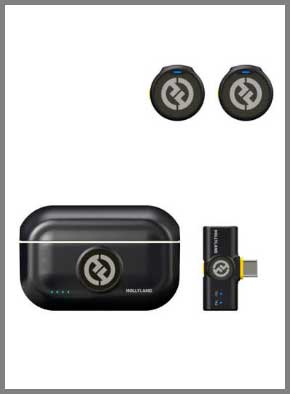
When I unboxed the Lark M2, I actually laughed. The transmitters (the microphones) are absurdly small.
They look more like air-hockey pucks for ants than audio equipment.
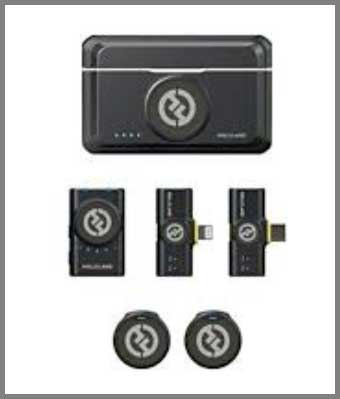
I was testing the “Combo” version, which comes with a camera receiver and plug-in receivers for iPhone (Lightning) and Android (USB-C).
My first test was a “walk-and-talk” vlog in a windy park. Usually, clipping a mic to a t-shirt drags the neckline down because of the weight. With the Lark M2, I used the included magnet back-clip.
I put the magnet inside my shirt and the mic on the outside. It snapped into place with a satisfying clack and didn’t budge.
More importantly, my shirt didn’t sag. It looked incredibly clean on camera—almost like a branded button rather than a piece of tech.
The audio quality shocked me. I expected “tinny” sound due to the small diaphragm, but the 48kHz/24-bit audio was rich and full. It captured the lower resonance of my voice surprisingly well. I toggled the Noise Cancellation (ENC) on by pressing the yellow button on the receiver. A landscaping crew was using a leaf blower about 50 feet away. With ENC on, the blower noise vanished completely. However, like most ENC algorithms, it did make my voice sound slightly “processed” and clipped the ends of my words if I spoke too quietly. I found it best to leave ENC off unless the environment was truly noisy.
The “Cool Factor” moment came when I realized I could stick the mic to anything metal. I was filming a cooking short and stuck the mic directly onto the range hood to capture the sizzling sound of a steak. It worked perfectly.
The only frustration I encountered was the lack of on-mic control. Because the transmitter is just a button, you can’t adjust gain (volume) on the mic itself. You have to use the receiver dial or the phone app. Also, the “dead cat” (windshield) is a little fuzzy sock that wraps around the button. It works, but it feels like it could slip off easily if you brush against something.
Also Read: Differences Between Jbl Charge 5 And Jbl Xtreme 3
Pros Of Hollyland Lark M2
- Incredible “Invisible” Form Factor: Weighing only 9g, this is the main selling point. It is unobtrusive and stylish. The magnetic attachment system is brilliant; you can hide the magnet under your clothes for a stealth look, use the magnetic necklace to wear it like jewelry, or clip it traditionally. It solves the “sagging collar” problem completely.
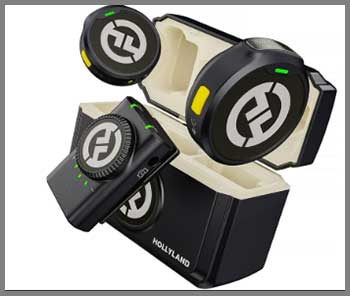
- Excellent Battery Life (40 Hours Total): The charging case is fantastic. The microphones themselves last about 10 hours on a single charge (which is impressive for the size), but the case can recharge the whole set multiple times, giving you up to 40 hours of runtime. You rarely have to worry about plugging it into a wall during a shoot day.
- High-Fidelity Sound (48kHz/24-bit): Despite its size, the audio specs are pro-grade. The Signal-to-Noise ratio is 70dB, which means the background hiss is very low. The sound is broadcast-ready straight out of the box without needing much EQ in post-production.
- Versatile “Combo” Options: If you buy the Combo version, you are future-proofed. You get a receiver for your mirrorless camera (3.5mm jack), a receiver for USB-C (Android/iPhone 15), and a Lightning receiver (older iPhones). The receivers for phones are plug-and-play and run off the phone’s battery, and they even allow you to play back video without unplugging the receiver (a huge quality-of-life feature).
Cons Of Hollyland Lark M2
- No Internal Backup Recording: This is the dealbreaker for professional filmmakers. Unlike the DJI Mic 2 or Rode Wireless PRO, the Lark M2 cannot record audio internally to the transmitter. If wireless interference cuts your signal, that audio is gone forever. This makes it risky for “one-chance” moments like wedding vows or live events.
- Easy to Lose: The blessing is also the curse. Because the transmitters are the size of a coin, they are incredibly easy to misplace. If you drop one in tall grass or leave it on a magnetic surface, good luck finding it. You have to be diligent about putting them back in the case immediately.
- Limited On-Board Controls: The transmitter is so small that it has no screen and essentially one button (for pairing/noise canceling). You cannot see your battery levels or audio levels on the mic itself. You are reliant on the receiver or the HollyView app to monitor your status.
- Windshield Design: The mini wind muffs are effective, but they are essentially elastic “socks” that stretch over the mic. They are harder to put on than the twist-lock bayonet wind muffs found on larger mics, and they look a bit like fuzzy pompoms, which ruins the “sleek” look slightly.
Maintenance Tips For Hollyland Lark M2
- Clean the Magnets: Since the mounting system relies on strong magnets, they tend to pick up iron filings or metallic dust from tables or bags. Regularly wipe down the back of the mic and the magnet clip with a cloth to ensure a flush, secure connection and to prevent scratching your clothes.
- Watch the Charging Contacts: The mics sit in the charging case via small gold contact points. Because these mics are handled with fingers constantly (and often pinned near sweaty skin), oils can build up on the contacts. If a mic isn’t charging, wipe the gold dots with a little isopropyl alcohol on a cotton swab.
- Firmware Updates via App: To get the best performance, connect the receiver to your phone and open the Hollyland Lark Sound app. They frequently release updates that improve connection stability and tweak the noise cancellation algorithms.
- Sticker Management: The kit comes with stickers to cover the Hollyland logo on the mic (for a stealth look) or to add funny faces. If you use these, make sure they don’t cover the microphone mesh inlet on the side/top, or you will muffle the sound.
Comparison with Other Brands
- Hollyland Lark M2 vs. DJI Mic 2:The DJI Mic 2 is a “Pro” tool. It has 32-bit float internal recording (unclippable audio), a touchscreen receiver, and a safety track. However, the DJI transmitter is huge and boxy compared to the Lark M2. If you need safety redundancy for paid client work, buy the DJI. If you want a mic that looks good on camera for social media, buy the Lark M2.
- Hollyland Lark M2 vs. Rode Wireless GO II:The Rode is the industry standard, but it is starting to show its age. The Lark M2 has a better charging case implementation (Rode requires a separate purchase or the “Pro” version for a case) and is much smaller. However, Rode supports external lavalier mics (you can plug a wired mic into the Rode TX). The Lark M2 has no input jack; it is the mic. You cannot attach a separate lav wire to the Lark M2.
- Hollyland Lark M2 vs. AnkerWork M650:The AnkerWork M650 is the closest competitor in terms of “all-in-one” design. The Anker has a swappable colored cover system and internal recording. However, the Anker is still a “circle clip” shape that is larger and heavier than the Lark M2 button. The Lark M2 generally sounds a bit more natural in the high frequencies than the Anker.
Also Read: Differences Between Bose SoundLink Flex And JBL Flip 6
Frequently Asked Questions (FAQ)
Technically, no. You pair the transmitters to one receiver unit at a time (either the Camera receiver or the Phone plug). However, you can use the Camera receiver unit, plug the 3.5mm cable into a camera, and use the USB-C port on the receiver to output digital audio to a phone/laptop simultaneously (UAC support).
Yes. The USB-C version of the receiver works perfectly with the iPhone 15/16 series. It also works with Android phones, iPads with USB-C, and laptops.
Hollyland claims 300 meters (1000ft) Line-of-Sight (LOS). In my testing, it is rock solid up to about 100 meters. However, because it operates on the 2.4GHz spectrum (same as WiFi), if you turn your back to the receiver (blocking the signal with your body) in a crowded area, you might get a split-second dropout at long distances.
No. The Lark M2 transmitter does not have a 3.5mm input jack. You must use the built-in microphone on the button itself. If you need to hide a lav mic under a shirt, this is not the product for you.
Conclusion
The Hollyland Lark M2 is currently the king of “lifestyle” microphones. It has successfully miniaturized professional audio into a form factor that anyone can wear without feeling self-conscious. While it lacks the safety net of internal recording found in more expensive “Pro” units, the sheer convenience, battery life, and audio quality make it the best choice for 90% of content creators. If you are a vlogger, TikToker, or mobile journalist, this is the mic to beat in 2025.
My Recommendation: If you shoot weddings or paid commercial work, stick with the DJI Mic 2 for the backup recording. For everything else—vlogs, gym videos, cooking tutorials—get the Lark M2.