
For years, the promise of Ultra Short Throw (UST) projectors has been seductive: a 120-inch screen that sits on your TV stand, replacing that black void of a television with a magical cinema wall. But they usually come with a catch—terrible input lag that makes gaming impossible, or a dim picture that vanishes the second you open the curtains.
The Hisense PX3-Pro (sometimes just called the PX3) is trying to end that compromise. Released in 2024 as the successor to the popular PX2, it boasts the first-ever “Designed for Xbox” certification for a UST projector.
It promises 3,000 lumens of brightness, triple-laser color accuracy, and refresh rates that rival gaming monitors. I set it up in my living room—not a dedicated theater cave—to see if it could truly replace a high-end TV. For gamers and movie lovers looking for the biggest possible screen without sacrificing speed, this is currently the best all-around projector on the market.
My Experience With The Hisense PX3-Pro

Setup was surprisingly forgiving.
Unlike traditional projectors that need to be mounted on the ceiling or placed across the room, the PX3-Pro sits mere inches from the wall.
Its throw ratio is an aggressive 0.22:1, which means I could project a massive 120-inch image with the unit sitting just ~16 inches from the wall.
This allowed me to keep my existing media cabinet without pulling it into the middle of the room—a major “spousal approval factor” win.
The first thing that hits you is the color. Hisense uses “TriChroma” (triple laser) technology, and the saturation is intense. Watching Spider-Man: Across the Spider-Verse, the reds and cyans popped with a vibrancy that standard LED TVs struggle to match. It covers 110% of the BT.2020 color space, which effectively means it can display colors that don’t even exist in standard broadcast TV.
But the real test was plugging in my Xbox Series X. Usually, projectors feel “floaty” with a delay between pressing a button and the character moving. The PX3-Pro, however, felt snappy. I switched to the High Refresh Rate mode, which drops the resolution to 1080p but boosts the speed to 240Hz.
In Call of Duty, it felt indistinguishable from a gaming monitor. Switching back to 4K/60Hz for Cyberpunk 2077 looked stunning, with the Auto Low Latency Mode (ALLM) kicking in instantly.
The only hiccup? Laser speckle. On bright, solid colors (like a white sky), you can sometimes see a faint “shimmer” or glittery texture, which is a side effect of the pure laser light interacting with the screen surface. It wasn’t distracting during movies, but it was visible in static menus.
Also Read: My Thoughts on Donner Digital Piano
Pros Of Hisense PX3-Pro
The PX3-Pro is a maximalist machine. It tries to do everything, and for the most part, it succeeds.
- Incredible Gaming Performance: This is the headline feature. With support for 1080p at 240Hz and sub-6ms input lag, it is arguably the best gaming projector available. The “Designed for Xbox” badge isn’t just marketing; the integration works seamlessly, automatically optimizing the picture when you boot up a console.
- 0.22:1 Throw Ratio: This number matters. Most competitors are 0.25:1. The lower number on the Hisense means the projector can sit closer to the wall to get a bigger image. This saves you from having to buy deeper custom furniture or pull your TV stand awkwardly far into the room.
- Color Volume Is Unmatched: The Triple Laser engine produces colors that are incredibly pure. HDR content (Dolby Vision, HDR10+, and IMAX Enhanced are all supported) looks rich and deep. It makes standard LCD TVs look washed out by comparison.
- Google TV Built-In: Unlike many projectors that use terrible proprietary interfaces or omit Netflix, the US version of the PX3-Pro runs Google TV. It’s fast, supports all major streaming apps natively, and integrates with your smart home. (Note: European models may use the VIDAA interface, which is faster but has fewer apps).
- Flexible Focus (80-150 inches): Many USTs are “fixed focus” or struggle at the edges if you change screen sizes. The PX3-Pro has a digital lens focus that lets you dial in a sharp image anywhere from 80 up to a wall-devouring 150 inches.
Cons Of Hisense PX3-Pro
Despite the high price tag, there are still limitations inherent to the technology.
- Black Levels Are Good, Not Great: While the contrast is excellent for a projector (3,000:1 native), it cannot compete with an OLED TV. In a pitch-black room, you will notice that the “black” bars in movies are actually a very dark grey. The competing Formovie Theater still holds the crown for absolute black levels.
- Requires a Specific Screen: You cannot just project this onto a white wall and expect magic. To get the advertised contrast and brightness, you must budget for an ALR (Ambient Light Rejecting) CLR screen. Projecting on a textured wall will also make the “laser speckle” shimmering effect much worse.
- No Optical Lens Shift: The projector relies on physical placement and digital keystone correction to align the image. Using digital keystone reduces resolution. You need to be patient and physically align the unit perfectly to get the sharpest 4K picture.
- Fan Noise in Quiet Scenes: The unit is generally quiet, but in High Brightness modes, the cooling fans ramp up. It’s not a jet engine, but during a quiet dialogue scene in a small room, you might hear a low hum.
- Price: At an MSRP around $3,000 (plus another $500-$1000 for a screen), this is a significant investment compared to a 75-inch TV.
Read more: My Thoughts on Cen Tech Battery Charger
Comparison with Other Brands
The UST market is crowded. Here is where the PX3-Pro stands.
- Hisense PX3-Pro vs. Formovie Theater: The Formovie has been the darling of the audiophile community for years due to its superior contrast and darker blacks. Choose the Formovie if you only watch movies in a pitch-black cave. Choose the Hisense PX3-Pro if you game, watch sports with the lights on, or want a snappier operating system. The Hisense is brighter and faster; the Formovie is more “cinematic” but slower.
- Hisense PX3-Pro vs. Epson LS800: The Epson LS800 is the brightness king (4,000 lumens) and uses 3LCD tech, meaning zero rainbow effect and zero laser speckle. Get the Epson if you watch daytime sports in a bright living room. However, the Epson only accepts 1080p HDR (it downscales 4K HDR) and has worse contrast. The Hisense is sharper and has much better color fidelity.
- Hisense PX3-Pro vs. AWOL Vision LTV-3000: The AWOL is a tank—huge and 3D capable with similar brightness. However, it lacks the smart TV integration (usually requires a Fire Stick) and the specific high-refresh gaming modes of the Hisense. The PX3-Pro is the more polished “all-in-one” package.
Maintenance Tips For Hisense PX3-Pro
A laser projector is low maintenance, but not no maintenance.
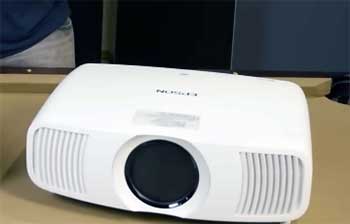
- Do Not Touch the Lens: The glass “trough” on top is a dust magnet. Do not wipe it with a standard cloth, as you can scratch the coating. Use a specialized photographic air blower (like a Rocket Blower) to remove dust. If you must wipe it, use a microfiber cloth designed for camera lenses and virtually zero pressure.
- Ventilation is Key: This unit pumps out 3,000 lumens, which creates heat. Ensure the vents on the sides have at least 8 inches of clearance. Do not enclose it in a cabinet drawer unless you have installed active cooling fans in the furniture.
- Pixel Refresh/Laser Protection: The unit has built-in safety features to dim the laser if an object (or a child/pet) gets too close. Keep the proximity sensors clean so they don’t trigger false positives and shut your movie off randomly.
Frequently Asked Questions (FAQ)
You strictly need a screen for the best performance. Ultra Short Throw projectors shine light from below at a steep angle. On a standard wall, this highlights every bump in the drywall (texture) and reflects much of the light onto the ceiling. An ALR/CLR (Ceiling Light Rejecting) screen is designed to catch that light and shoot it towards your eyes while blocking light from lamps/windows.
Yes. Unlike many modern TVs that have abandoned the format, the PX3-Pro supports active shutter 3D. You will need to buy compatible DLP-Link 3D glasses separately, but the depth and immersion on a 120-inch screen are fantastic.
Yes. It supports all major HDR formats: Dolby Vision, HDR10, HDR10+, and HLG. It is one of the few projectors that handles dynamic metadata (Dolby Vision) correctly, adjusting brightness scene-by-scene.
Yes, but it is designed primarily for tabletop placement (“console” mode). If you ceiling mount it, you need a specific UST mount and an “inverted” UST screen, or the light rejection physics will work backward and the image will look dark.
Conclusion
The Hisense PX3-Pro is the product that finally bridges the gap between “hardcore home theater projector” and “living room TV.” It removes the friction of traditional projectors with its smart interface and incredible throw distance, and it eliminates the lag that usually keeps gamers away.
While purists might still prefer the deeper blacks of the Formovie Theater, the PX3-Pro is the more versatile, fun, and family-friendly machine. I strongly recommend pairing it with a 120-inch Spectra Projection or Vividstorm ALR screen to truly unlock its potential—it’s the closest you will get to an IMAX in your living room.