
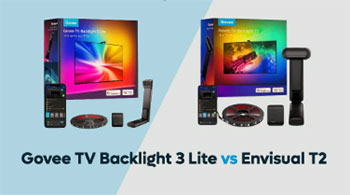
I remember the first time I attached a backlight to my TV; it wasn’t just about adding some cool lights, but about making the screen feel bigger and the movies more alive. If you are reading this, you are probably stuck in the same dilemma I was: do you save some cash and go for the newer, smarter Govee TV Backlight 3 Lite, or do you splurge on the powerhouse Govee Envisual T2 with its dual cameras and high-density LEDs? My goal here is to help you cut through the marketing noise and figure out which of these two immersion kits actually deserves a spot in your living room. I have tested both extensively, from action movies to console gaming, and the answer might surprise you because newer isn’t always better—but sometimes, it’s smarter.
A Brief Comparison Table
| Feature | Govee TV Backlight 3 Lite | Govee Envisual T2 |
| Camera Type | Single Camera (Fisheye Correction) | Dual Camera (Envisual Technology) |
| LED Density | 30 LEDs per meter | 60 LEDs per meter |
| Color Technology | RGBICW (4-in-1 with Dedicated White) | RGBIC (Standard Mixing) |
| Black Bar Detection | Yes (Automatic) | No (Requires Manual Zone Adjustment) |
| Mounting Mechanism | Gravity-Weighted Hanging Design | Top-Mount Adhesive |
| Chipset Speed | Upgraded MCU (Faster Processing) | Standard Dual-Core |
| Price Point | Budget-Friendly | Premium / Flagship |
| Best For | Movies, Accurate Whites, Value | Gaming, Brightness, Smooth Gradients |
My Experience With Govee TV Backlight 3 Lite
When I unboxed the Govee TV Backlight 3 Lite, the first thing I noticed was how much smaller the camera footprint felt compared to older models.
Installing it was a breeze because of the new gravity-weighted mount.
I didn’t have to worry about sticking a permanent adhesive pad to the top bezel of my expensive OLED TV; the camera just rests there securely, balancing itself.
It felt like a much more refined design choice that respects the hardware it is being attached to.
Using it daily, the “Lite” moniker feels misleading because the performance is surprisingly robust. The standout feature for me was the white balance. I watched scenes from Interstellar, and the whites were actually white, not that weird bluish-purple tint you get with cheaper RGB strips. The new chip that handles “fisheye correction” seemed to do a great job of grabbing colors from the far corners of the screen, which is usually a weak spot for single-camera systems. However, I did notice that because the strip has fewer LEDs per meter, the light spread on the wall was a bit softer and less defined, which actually worked well for slow-paced dramas but lacked a bit of punch for high-octane action.
Read More: Comparison Of Samsung Q80B And Q70A
Pros Of Govee TV Backlight 3 Lite
- RGBICW 4-in-1 LED Beads: This is arguably the biggest selling point of the 3 Lite over even some more expensive models. Most LED strips use RGB (Red, Green, Blue) to mix colors, and when they try to make white, they mix all three, often resulting in a cold, blue-tinted white. The 3 Lite includes a dedicated “W” (White) bead. In my testing, this made a massive difference during bright scenes, like explosions or snowy landscapes. The wall behind my TV lit up with a pure, neutral white that looked natural and expanded the screen’s perceived brightness significantly. It eliminates the color casting that can ruin the immersion of realistic content.
- Automatic Black Bar Detection: If you watch a lot of movies, you know the pain of letterboxing—those black bars at the top and bottom of the screen. Older backlights often get confused by these bars and just turn the top and bottom lights off or dim them to a muddy grey. The Govee 3 Lite has a specific algorithm that detects these black bars and ignores them, reading the colors below the bar instead. I found this to be a game-changer for movie nights. I didn’t have to go into the app and manually adjust the “scan zone” every time I switched from a 16:9 YouTube video to a 21:9 cinema film. It just works, keeping the lights synced to the actual content.
- Gravity-Suspension Camera Mount: The physical design of the camera mount on the 3 Lite is excellent. Instead of relying solely on strong 3M tape that leaves residue, it uses a counterweight system to hang off the top of your TV. This makes it incredibly easy to install on ultra-thin OLEDs where there is barely any bezel to stick things to. I found it much less stressful to adjust; if I didn’t get it perfectly centered the first time, I could just slide it over without peeling off adhesive. It sits flush and stable, and for anyone who is picky about the aesthetics of their TV setup, this less invasive mounting style is a huge plus.
- Improved Fisheye Correction Algorithm: Single-camera systems often struggle with the corners of the TV because the camera lens distorts the image (the fisheye effect). The 3 Lite uses an updated chipset that specifically corrects this distortion in real-time. In my usage, I noticed that the colors in the bottom corners of the TV were matched much more accurately than on previous Govee models like the T1. It feels like the system “knows” exactly where the screen ends, reducing the instances where a red object in the corner triggers a green light because the camera misread the pixel data.
- Matter Support and Smart Home Integration: Future-proofing is important, and the 3 Lite supports Matter (via a hub, usually). This allows for much smoother integration into smart home ecosystems like Apple HomeKit, Google Home, and Amazon Alexa. I set mine up to automatically turn on when my TV power state changed, and the response time was snappy. Being able to control the bias lighting through the same interface I use for my thermostat and door locks adds a layer of convenience that moves this from a “gadget” to a true part of the home infrastructure.
Cons Of Govee TV Backlight 3 Lite
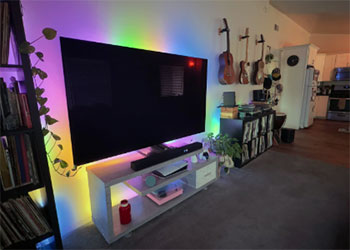
- Lower LED Density (30 LEDs/m): This is where the budget nature of the product shows. With only 30 LEDs per meter, the lights are spaced further apart on the strip. If your TV is positioned very close to the wall (less than 6 inches), you might see individual “hotspots” or dots of light rather than a smooth, continuous wash of color. I noticed this specifically on my wall-mounted setup; I had to pull the TV forward slightly to get the light to blend together. It lacks the “neon-like” smoothness that higher-density strips offer, which can make the effect look a bit cheaper if you inspect it closely.
- Single Camera Limitations: Despite the software improvements, a single camera looking down from the top still has blind spots, usually at the very top center of the screen directly below the camera unit. During my testing, I noticed that if there was a small, bright object right in the middle of the top edge of the screen, the backlight sometimes missed it or reacted sluggishly compared to the sides. It just physically cannot see that sharp angle as well as a dual-camera setup can. It is a limitation of physics that no amount of software correction can fully overcome.
- Build Quality Feels Lighter: Compared to the T2, the 3 Lite feels a bit more “plasticky.” The control box is smaller and lighter, and the camera housing, while functional, doesn’t scream premium. While this doesn’t affect performance once it is installed and hidden behind your TV, it is noticeable during the unboxing experience. The cables also felt slightly thinner. It is clear that cost-cutting measures were taken in the physical construction to allow for the upgraded internal tech at this lower price point.
- Saturation Can Be Overzealous: Out of the box, I found the 3 Lite to be extremely saturated—almost too much. Red colors would turn the wall a deep, blood-red even if the screen showed a lighter terracotta. I had to spend a good 15 minutes in the Govee Home app tweaking the saturation sliders down to about 15% to get a look that didn’t feel like a disco. While it is great that it can get that colorful, for users who want a subtle extension of their screen, the default settings are far too aggressive and require manual tuning.
- Camera Still Protrudes: Even with the better mounting system, you still have a camera hanging off the top of your TV. For me, this breaks the clean lines of the television. While the 3 Lite’s camera is smaller than the T1’s, it is still a visible bump. If you have a minimal setup, you might find yourself staring at the camera unit when the TV is off. It is the trade-off you make for camera-based syncing versus the much more expensive HDMI sync box options, but it is an aesthetic annoyance nonetheless.
My Experience With Govee Envisual T2
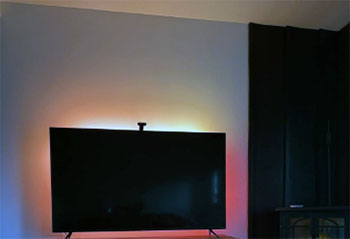
Switching over to the Govee Envisual T2 was like upgrading from a sedan to a sports car.
The box itself was heavier, and the dual-camera unit looked like a piece of serious tech, almost like a miniature Kinect sensor sitting atop my TV.
The installation was a bit more involved because the camera is heavier and uses a sticky adhesive pad that requires commitment—once it’s on, it is on.
The performance difference was immediately visible in terms of brightness and smoothness. Because the T2 has double the number of LEDs (60 per meter), the light output is incredibly fluid. When I played Cyberpunk 2077, the neon lights of Night City flowed off the screen and onto my wall with zero gaps or hotspots. The colors felt “thick” and rich. However, I did struggle a bit with the accuracy of blacks and greys. Without the dedicated white channel, dark scenes sometimes had a slight colored tint, and I found myself fiddling with the app’s white balance settings more often than I did with the 3 Lite. But for pure “wow” factor during gaming, the T2 was undeniably superior.
Pros Of Govee Envisual T2
- Superior LED Density (60 LEDs/m): This is the killer feature of the T2. Having 60 LEDs per meter means the light strip is practically a continuous bar of light. In my testing, this resulted in exceptionally smooth color gradients. If the screen transitions from blue to purple to red, the T2 replicates that gradient perfectly on the wall without any choppy “stepping” between colors. This high density also means the maximum brightness is significantly higher. In a room with some ambient light, the T2 can still punch through and make its presence known, whereas the 3 Lite might get washed out.
- Dual-Camera Precision: The T2 utilizes two lenses housed in a single unit on top of the TV. One lens captures the left side of the screen, and the other captures the right. This effectively doubles the amount of visual data the system processes. I found that this eliminated the “blind spots” often found in single-camera systems. The reaction to movement on the screen felt faster and more localized. If a car drove from left to right, the light tracked it with impressive accuracy, lighting up specific zones of the strip rather than just washing the whole side in a general color.
- Zone Control and Customization: Because of the higher LED density, the T2 offers more addressable zones. This allows for more intricate lighting effects. In the Govee app, you can paint the strip with different colors in much finer segments. While this is great for music mode or “scenic” lighting when the TV is off, it also translates to better syncing. Small details on the screen, like a torch in a dark cave, are represented by a small, focused cluster of LEDs on the wall, creating a much more realistic extension of the image.
- Premium Build and Stability: The T2 feels like a flagship product. The camera unit is weighty and substantial, and the light strip itself feels thicker and more durable, with a better coating to protect the LEDs. The control box is well-made, and the adhesive backing on the strips seemed stronger than what was provided with the budget models. For a piece of hardware that runs hot and stays on for hours at a time, this build quality gives me more confidence in its longevity. It feels like it can withstand the heat cycles of a TV running all day without peeling off.
- Exceptional Gaming Performance: If you are a gamer, the T2 is the better choice purely for its speed and vibrancy. Games often have HUD elements, fast camera pans, and saturated art styles that benefit from the T2’s high density and dual-camera tracking. I found that the lag (latency) between the action on screen and the lights reacting was imperceptible during gameplay. The intensity of the T2 matches the intensity of modern gaming visuals perfectly, creating an atmosphere that pulls you into the game world more effectively than the softer 3 Lite.
Cons Of Govee Envisual T2
- Lack of Dedicated White LEDs (RGBIC vs RGBICW): Surprisingly for a more expensive product, the T2 uses standard RGBIC strips (in most iterations) rather than the RGBICW found in the 3 Lite. This means it has to mix Red, Green, and Blue to create white. In my experience, this never results in a true, pure white. It always leans slightly blue or purple. While you can calibrate it in the app to get close, it lacks the piercing, clean brightness of a dedicated white diode. For movies with natural lighting or black-and-white films, this is a noticeable downgrade from the cheaper 3 Lite.
- No Automatic Black Bar Detection: This is a major annoyance for movie buffs. The T2 does not natively “ignore” black bars. If you watch a 21:9 movie on a 16:9 TV, the camera sees the black bars at the top and bottom and tells the lights to go dark or dim. To fix this, you have to open the app and manually adjust the camera calibration points to “zoom in” past the black bars. But then, if you switch back to a full-screen TV show, you have to change it back. It is a manual friction point that the 3 Lite solves automatically.
- Heavy Camera Requires Strong Adhesive: The dual-camera unit is significantly heavier than the single camera of the 3 Lite. It relies on a strong adhesive pad to stick to the top of your TV. I have read horror stories, and experienced some anxiety myself, about the adhesive failing over time due to the heat rising from the TV panel. If it falls, it can scratch the screen or damage the camera. Furthermore, if you ever want to move the kit to a new TV, that adhesive is a pain to remove and cannot be reused, forcing you to find replacement tape.
- Higher Price Tag: The T2 is often double the price of the 3 Lite. While you get more LEDs and a second camera lens, you have to ask yourself if those features are worth the premium. For many users, the difference in immersion is subtle. If you are on a budget, the T2 is a harder sell because the “bang for your buck” ratio is lower. You are paying for the cutting edge of their camera tech, but the law of diminishing returns definitely applies here.
- Complex Calibration: Because the T2 is more precise, it is also more finicky. Getting the calibration perfect took me several tries. You have to align the camera points very carefully in the app to match the screen corners. Because the camera angle is wider (to see the whole screen), it picks up reflections from the room more easily. I had to close my curtains and turn off all other lights to get a good calibration, whereas the 3 Lite seemed a bit more forgiving of imperfect setups.
Also Read: Comparison Of Roku And Tcl Tv
Frequently Asked Questions (FAQ)
It depends on your primary use. For general TV watching and movies, the Govee TV Backlight 3 Lite is best due to its accurate white reproduction and black bar detection. For gaming and maximum brightness, the Govee Envisual T2 is the best choice.
Absolutely. The “3 Lite” offers 90% of the premium experience for half the price. The addition of the dedicated white chip (RGBICW) and the improved chip for distortion correction makes it the best value-for-money backlight on the market right now.
The main difference lies in the Camera (Single vs. Dual), LED Density (30 LEDs/m vs. 60 LEDs/m), and Color Composition (RGBICW vs. RGBIC). The 3 Lite focuses on color accuracy and ease of use, while the T2 focuses on brightness, smoothness, and zone precision.
The Dual-Camera Envisual Technology is what sets the T2 apart. By using two lenses, it captures the screen content with much higher spatial accuracy than single-camera systems, allowing for faster and more precise lighting effects that match fast-paced content perfectly.
Conclusion
After living with both systems, my recommendation is straightforward. If you are a movie lover who wants accurate colors, pure whites, and a “set it and forget it” experience that handles letterbox bars automatically, save your money and get the Govee TV Backlight 3 Lite. It is a fantastic product that punches well above its weight class, and the gravity mount is a joy to use.
However, if you are a hardcore gamer or you have a setup where the TV is the centerpiece of a bright, dynamic entertainment space, the Govee Envisual T2 is the way to go. The extra brightness and the smoothness of the 60 LEDs per meter create a spectacle that the Lite just cannot match. It feels more “premium” and offers the kind of intense, fluid lighting that makes sci-fi games and action blockbusters feel explosive. Choose the tool that fits your content, and you won’t be disappointed.