
I have been a loyal Samsung audio user since the original Galaxy Buds, so when the Galaxy Buds 3 Pro dropped with a radically new “stem” design, I was both intrigued and skeptical. Did they just copy Apple, or is this an actual upgrade? I spent the last month daily driving both the trusted Galaxy Buds 2 Pro and the flashy new Galaxy Buds 3 Pro to find out. In this Galaxy Buds 2 Pro vs. Buds 3 Pro comparison, I am ditching the spec-sheet jargon to tell you how they actually feel in your ears, sound on the subway, and handle your daily zoom calls. If you are torn between grabbing the discounted older model or splurging on the new flagship, I will break down exactly which one deserves your money.
A Brief Comparison Table
| Feature | Samsung Galaxy Buds 2 Pro | Samsung Galaxy Buds 3 Pro |
| Design Style | Stemless “Bean” Shape | Stem “Blade” Design with Lights |
| Audio Drivers | 2-Way (Woofer + Tweeter) | 2-Way (10mm Dynamic + Planar) |
| Active Noise Cancellation | Standard Intelligent ANC | Adaptive ANC with AI |
| Microphone Quality | Good (3 Mics) | Excellent (3 Mics + VPU + Stem) |
| Battery Life (ANC On) | ~5 Hours (18 Hours Total) | ~6 Hours (26 Hours Total) |
| Water Resistance | IPX7 (Submersible) | IP57 (Dust & Water Resistant) |
| Controls | Tap Sensitivity | Pinch & Swipe Gestures |
| Best For | Discreet Look, Secure Fit | Call Quality, Audiophiles |
My Experience With Galaxy Buds 2 Pro
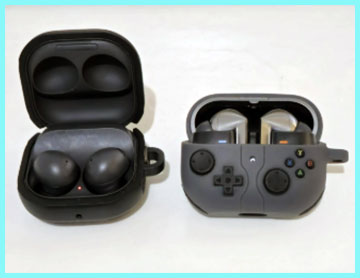
I remember unboxing the Galaxy Buds 2 Pro two years ago and falling in love with the matte, rubberized finish. They felt premium, distinct, and crucially, they didn’t look like AirPods. Putting them back in my ears for this review, I was reminded why they became a fan favorite. They nestle completely inside the ear concha, making them incredibly low-profile. I can lie down on a pillow without them digging into my ear canal, which is a massive plus for late-night podcast listeners.
The sound signature is punchy and fun.
It is the classic “Samsung Sound”—boosted bass that makes pop and hip-hop tracks feel energetic, with crisp highs that don’t get too piercing.
Walking through a busy downtown street, the Active Noise Cancellation (ANC) silenced the rumble of traffic effectively.
However, wind noise was always their Achilles’ heel.
Because of the bulbous shape, wind tends to whip around them, creating a buffeting sound that no software update ever fully fixed.
My main gripe has always been the touch controls. Adjusting the fit almost always results in an accidental pause or volume skip because the entire surface is a touch sensor. It is frustrating when you are just trying to secure them during a run and suddenly your music stops. Speaking of running, they stay put for me, but as soon as I get sweaty, that smooth matte finish gets slippery, and I find myself readjusting them every mile.
Despite their age, they hold up surprisingly well. The seamless switching between my Galaxy S23 and Tab S9 is instantaneous. If you are deep in the Samsung ecosystem, these still feel like a modern, cohesive part of the tech family, not an outdated relic.
Read More: My Thoughts On Pixel Buds Pro and Pixel Buds Pro 2
Pros Of Galaxy Buds 2 Pro
- Discreet And Comfortable “Invisible” Fit: The most immediate advantage of the Buds 2 Pro is their form factor. They are designed to sit flush within the ear, meaning there are no stems hanging down to catch on masks, hoodies, or long hair. For users who prefer a minimalist aesthetic, this “bean” shape is superior. I found them particularly excellent for gym use where I am toweling off frequently; there is nothing protruding to get snagged. Furthermore, the weight distribution is centered in the ear, which for many people (myself included) feels more secure during vigorous head movements compared to stem-style buds that can wobble.
- IPX7 Water Resistance Rating: The “7” in IPX7 is a significant deal. It means these earbuds can technically be submerged in up to 1 meter of fresh water for 30 minutes. While I wouldn’t recommend swimming with them, this rating gives you incredible peace of mind. I have dropped one in a sink full of water and fished it out with zero issues. If you are a heavy sweater or run in the rain often, the Buds 2 Pro offer a higher level of liquid protection than most competitors, including the newer model which trades some water resistance for dust resistance.
- Aggressive Passive Noise Isolation: Because the Buds 2 Pro fill up the ear canal so effectively, they block out a significant amount of noise physically, even before you turn on the ANC. This passive seal is excellent for blocking out high-frequency sounds like office chatter or keyboard clicking, which ANC algorithms often struggle with. When you combine this tight seal with the active cancellation, the “world-off” effect is profound. It creates a vacuum-like silence that is perfect for commuting or focusing in noisy environments.
- Excellent Value For Money: Now that the Buds 3 Pro are out, the Buds 2 Pro can often be found at a steep discount. You are getting flagship-level audio, 24-bit Hi-Fi sound (with Samsung phones), and 360 audio for nearly half the price of the new model. For the average listener who just wants great sound and decent noise cancelling, the price-to-performance ratio here is unbeatable. You aren’t paying the “early adopter tax” anymore.
Cons Of Galaxy Buds 2 Pro
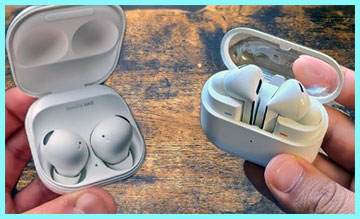
- Frustrating Touch Controls: As mentioned in my experience, the capacitive touch area covers almost the entire outer face of the earbud. This is a usability nightmare. If you have an itch, need to adjust the fit, or just brush your hair behind your ear, you will likely trigger a command. I eventually had to disable the “single tap” feature in the wearable app just to make them usable, which defeats the purpose of having convenient controls. It forces you to handle them gingerly by the edges, which is not intuitive when you are in a rush.
- Mediocre Microphone Quality: While acceptable for quick calls in a quiet room, the Buds 2 Pro struggle in the real world. Because they lack a stem to bring the microphone closer to your mouth, they rely heavily on beamforming algorithms to isolate your voice. In a noisy coffee shop or a windy street, my voice often sounded robotic or distant to the person on the other end. I frequently had to switch to my phone handset because the other person kept saying, “What? You’re breaking up.”
- Slippery Material Coating: The soft-touch matte finish looks gorgeous out of the box, but it has functional downsides. It offers very little friction against the skin. Once your ears get slightly oily or sweaty, the earbuds have a tendency to slowly slide out of the canal. This requires constant micro-adjustments to maintain that perfect seal and bass response. Additionally, the case coating is prone to scratching and scuffing very easily if you keep it in a pocket with keys.
- Wind Noise Issues: The aerodynamic shape ironically catches wind. Despite having a “wind shield” setting in the software, the physical protrusion of the bulb shape creates turbulence. If you cycle or run outdoors, you will hear a constant “whooshing” sound that the ANC tries, and fails, to cancel out. It can become fatigue-inducing on long outdoor sessions.
My Experience With Galaxy Buds 3 Pro
Switching to the Galaxy Buds 3 Pro was a shock to the system. The design is a complete departure, embracing a sharp, angular stem with a “Blade Light” strip running down the side. They look futuristic, almost like something out of a sci-fi movie. The case has a transparent lid, which is cool for seeing if your buds are charging, but it feels a bit more plasticky than the solid clamshell of the predecessor.
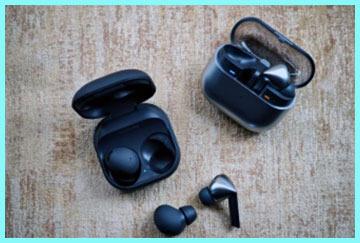
The fit is instantly polarizing. They sit more lightly in the ear compared to the plug-like feel of the Buds 2 Pro.
For me, this was a relief. I could wear them for four hours straight without that “stuffed ear” pressure fatigue.
The stem design also solves the adjustment issue—you grab the stem to move them, so no accidental touches.
Sound-wise, these are a beast. The dual-driver system (adding a planar tweeter) separates instruments in a way the old model didn’t.
Listening to complex rock tracks, I could hear the separation between the cymbal crash and the guitar riff distinctively. The bass is still there, but it feels tighter and less muddy.
The “killer feature” for me, however, was the call quality. I took a call while walking past a construction site, and my friend didn’t even know I was outside. The combination of the stem placing the mic closer to my mouth and the AI noise reduction is a massive leap forward. Also, the new pinch and swipe controls on the stem are fantastic. Swiping up and down for volume is so much more natural than tapping your ear drum.
Pros Of Galaxy Buds 3 Pro
- Superior Microphone And Call Clarity: This is the single biggest upgrade. The addition of the stem allows the microphone to be physically closer to the audio source (your mouth). Combined with Samsung’s “Super-Wideband” call technology and AI noise suppression, the voice clarity is arguably the best on any Android-compatible earbud right now. Background noise is aggressively filtered out, but your voice remains natural, not robotic. If you take work calls, Zoom meetings, or phone calls daily, this feature alone justifies the upgrade.
- Audiophile-Grade Sound Separation: Samsung introduced a dual-amp and dual-driver system here, utilizing a planar tweeter specifically for high frequencies. In plain English, this means the treble (high notes) is handled by a specialized speaker that is incredibly fast and precise. The result is a soundstage that feels wider and more detailed. You hear “air” around the vocals. It is less congested than the Buds 2 Pro. If you listen to classical, jazz, or metal where instrument separation is key, the fidelity improvement is noticeable.
- Intuitive Pinch And Swipe Controls: The new control scheme mimics the AirPods Pro, and frankly, it is better. You pinch the stem to play/pause and swipe up/down on the back of the stem for volume. This eliminates the “thud” sound of tapping on your ear. It is precise and requires intent, so you never accidentally skip a track while adjusting your hair. The volume swipe is particularly satisfying and responsive, giving you granular control without ever touching your phone.
- Adaptive ANC And AI Features: The noise cancellation is smarter. It features “Adaptive Noise Control” that automatically blends ANC and Transparency mode based on your environment. If it detects a siren or someone talking to you, it adjusts automatically. The “Voice Detect” is faster than on the previous model, lowering your music volume instantly when you start speaking. It feels like the earbuds are actively listening to the world for you, rather than just blocking it out blindly.
Cons Of Galaxy Buds 3 Pro
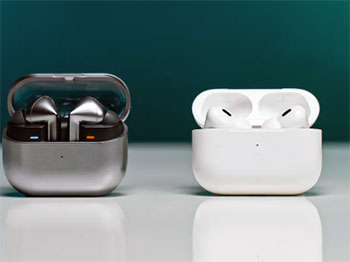
- Polarizing “Blade” Design: There is no getting around it—these look like “Cyberpunk AirPods.” The angular stem and the LED lights are a bold choice that won’t appeal to everyone. If you prefer your tech to be invisible or subtle, these are the opposite. They scream, “Look at me.” The lights can be turned off, but the physical shape remains distinct. Additionally, the triangular stem shape makes putting them back into the case a bit fiddly; you have to align them perfectly, unlike the drop-in simplicity of the older model.
- Reduced Water Resistance Rating: The Buds 3 Pro are rated IP57. While the “5” means they are now dust-protected (which the Buds 2 Pro weren’t), the water rating has technically dropped from IPX7. They can handle rain and sweat just fine, but they are not rated for submersion to the same degree as the predecessor. For most people, this is a non-issue, but if you are extremely clumsy around deep water, it is a downgrade on paper.
- Higher Price Point: At launch, these are significantly more expensive than the current street price of the Buds 2 Pro. You are paying a premium for the new form factor and the AI features. For many users, the difference in sound quality might not be worth the extra $80-$100. It places them in direct competition with high-end stalwarts like the Sony WF-1000XM5 and Bose QuietComfort Ultra, which is stiff competition.
- Less Secure Fit For Some Ear Shapes: While I found them comfortable, the move away from the deep-insert “bean” shape means they rely more on the ear tip and the stem balance to stay in. Some users with smaller ears report that the stem pushes against their tragus or that they feel less “locked in” during intense cardio compared to the Buds 2 Pro. Because they sit lighter, they can feel like they might fall out, even if they physically don’t.
Comparison With Other Brands
When you look outside the Samsung walled garden, the competition heats up.
- Against AirPods Pro 2: The Galaxy Buds 3 Pro are clearly Samsung’s answer to the AirPods Pro 2. Both use stems, both have pinch controls, and both have excellent transparency modes. The AirPods Pro 2 still have a slight edge in raw ANC strength and transparency naturalness. However, the Buds 3 Pro sound more exciting with their dual-driver setup. If you have an Android, the AirPods are useless; if you have an iPhone, the Galaxy Buds lose most features.
- Against Sony WF-1000XM5: The Sony buds are the kings of silence. Their foam tips and processor block out more noise than the Buds 3 Pro. However, the Sony buds are bulky, and many people find the foam tips uncomfortable for long periods. The Galaxy Buds 3 Pro offer much better call quality and a more comfortable, breathable fit for all-day wear.
- Against Pixel Buds Pro: Google’s offering is the “smartest” with Assistant integration, but in terms of raw audio fidelity, the Galaxy Buds 3 Pro smoke them. The Pixel Buds Pro sound good, but the dual-amp system in the Samsung buds puts them in a different league for music lovers.
Also Read: Comparison Of Pulse Explore and Inzone Buds
Frequently Asked Questions (FAQ)
Generally, no. The Buds 3 Pro have superior hardware with a dual-driver system (dynamic + planar) that offers better instrument separation and clearer highs. However, some users prefer the Buds 2 Pro because they have a warmer, bass-heavier sound signature out of the box, which can feel “punchier” for certain genres like hip-hop.
The main differences are the design (stemless vs. stem), drivers (single dual-way vs. dual-driver with planar), mic quality (improved significantly on the 3 Pro), and controls (tap vs. pinch/swipe). The Buds 3 Pro also adds LED “Blade Lights” and dust resistance (IP57), whereas the Buds 2 Pro has higher water resistance (IPX7).
If you make a lot of phone calls or want the absolute best audio clarity, yes. The mic quality upgrade is massive, and the pinch controls are much better. However, if you only use them for the gym or listening to podcasts and are happy with the fit of the 2 Pro, the upgrade might not be necessary as the noise cancelling and battery life are only incremental improvements.
The Buds 2 Pro (older model) are better if you want a discreet, invisible fit, higher water resistance, and a lower price tag. The Buds 3 Pro are better if you prioritize call quality, audiophile sound detail, and modern stem-style controls.
Conclusion
If you are a bargain hunter who loves a low-profile aesthetic, the Galaxy Buds 2 Pro are still a phenomenal choice. They remain one of the most comfortable earbuds for sleeping or working out because they don’t stick out of your ears. The IPX7 rating makes them nearly invincible against water, and the sound quality is still in the top 10% of the market. Stick with these if you hate the “stem” look and want flagship performance without the flagship price tag.
If you use your earbuds for work calls, meetings, or critical listening, the Galaxy Buds 3 Pro are the necessary evolution. Samsung didn’t just copy a design; they used the stem to solve the biggest complaints about call clarity and control usability. The dual-driver sound is crisp, detailed, and exciting. They are the best choice for the power user who wants their earbuds to be an all-in-one communication and media powerhouse, and who isn’t afraid of a little futuristic flair.