
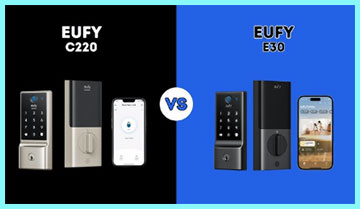
If you are standing in the aisle of a hardware store or staring at your Amazon cart wondering whether to splurge on the new Eufy E30 or stick with the wallet-friendly C220, you are not alone. I have been there, and frankly, the decision comes down to one major question: how deep are you into the Apple ecosystem? The intent of this article is to guide you through a hands-on comparison of these two heavy hitters in the smart lock world. I will break down why the E30 is a game-changer for iPhone users and why the C220 might still be the king of value for everyone else. By the end, you will know exactly which lock belongs on your front door.
A Brief Comparison Table
| Feature | Eufy Smart Lock E30 | Eufy Smart Lock C220 |
| Unlock Methods | Fingerprint, App, Keypad, Key, Apple Home Key | Fingerprint, App, Keypad, Key |
| Connectivity | Wi-Fi + Matter over Thread | Built-in Wi-Fi (Direct) |
| Apple Home Key | Yes (Tap to Unlock) | No |
| Smart Home | Apple Home, Alexa, Google, SmartThings (Matter) | Alexa, Google Assistant |
| Fingerprint Speed | < 0.3 Seconds (AI Learning) | < 0.3 Seconds (AI Learning) |
| Battery Life | Approx. 8 Months (depending on usage) | Approx. 8 Months (8x AA) |
| Waterproofing | IP53 | IP53 |
| Installation | Retrofit / Deadbolt replacement | Deadbolt replacement |
| Best For | Apple HomeKit Users & Matter Enthusiasts | Budget-conscious & Android Users |
My Experience With Eufy E30
When I finally got my hands on the Eufy E30, the first thing that struck me was how clearly it was designed to bridge the gap between “gadget” and “infrastructure.” I have used plenty of smart locks that feel like toys, but the E30 has a reassuring density to it. Setting it up was a breeze, but the real magic happened when I configured it with my iPhone.
If you have ever fumbled for keys with groceries in your hand, you know the struggle.
With the E30, I set up the Apple Home Key feature, and my life literally changed overnight.
I walk up to the door, tap my Apple Watch or iPhone near the lock face—even if my phone is dead, thanks to the power reserve feature—and click, the deadbolt slides open.
It feels seamless, almost like the door knows I’m there.
The fingerprint sensor is snappy, much like the C220, but the integration with the Apple Home app via Matter is what sets this apart. I didn’t have to open the Eufy app every time; everything lived right in my Control Center.
However, it wasn’t all perfect. I noticed that to get the most out of the “Matter over Thread” capabilities, I really needed a Thread Border Router (like a HomePod mini) close by. When I relied solely on the built-in Wi-Fi, the battery drain seemed slightly faster than I expected, though still manageable. The lock motor is smooth but audible—it has a mechanical whir that reminds you it’s working. For me, the E30 isn’t just a lock; it’s an entry ticket into a truly automated home where my lights turn on the moment the bolt retracts.
Read More: Comparison Of Wyze Lock And August Smart Lock
Pros Of Eufy E30
- Apple Home Key Support: This is, without a doubt, the single most significant advantage of the Eufy E30. If you are an iPhone user, the convenience of Apple Home Key cannot be overstated. Unlike other smart unlocking methods that require you to open an app, wait for a Bluetooth connection, or punch in a code, Home Key utilizes the NFC chip in your phone or watch. You simply tap your device against the lock, and it opens instantly. It functions exactly like tapping your phone to pay for coffee. I found this incredibly useful when my hands were full or when I was in a rush. Furthermore, Apple’s implementation includes a “power reserve” mode. This means that even if your iPhone battery dies, you can still unlock your door for up to five hours afterward. This removes the “battery anxiety” that often plagues smart lock owners. You are not just buying a lock; you are buying into the seamless Apple ecosystem where your digital wallet becomes your house key.
- Future-Proof Matter Compatibility: The E30 is built with Matter support, which is the new universal standard for smart home devices. While the C220 relies on older, proprietary connections or basic Wi-Fi, the E30’s Matter integration means it plays nicely with almost every major platform right out of the box—Apple Home, Amazon Alexa, Google Home, and Samsung SmartThings. This is a massive “Pro” for longevity. It means that if you switch from an Android phone to an iPhone, or swap your Echo dots for Nest Hubs, your lock will not become obsolete. You won’t have to throw it away and buy a new one. During my testing, the response time over Thread (a low-power mesh networking protocol used by Matter) was noticeably faster than standard Wi-Fi locks. The commands sent from my phone to lock the door happened almost instantaneously, eliminating that awkward three-second pause you often get with older Wi-Fi locks.
- AI-Enhanced Fingerprint Recognition: Just like its sibling, the E30 sports a top-tier fingerprint scanner, but the processing on board the E30 feels incredibly robust. The sensor is located ergonomically at the top of the unit, where your thumb naturally rests when you grab the door. Eufy claims it unlocks in under 0.3 seconds, and in my usage, this held true. It rarely failed, even when my hands were slightly damp from rain or sweat after a run. The “Self-learning” AI is a brilliant touch; it supposedly gets faster and more accurate the more you use it by mapping different angles of your print. I noticed that after the first week, I didn’t have to be as precise with my finger placement. It just worked. This reliability is crucial for a device that stands between you and the safety of your home.
Cons Of Eufy E30
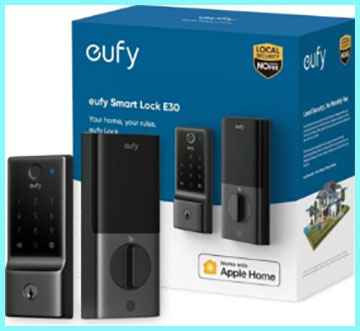
- Higher Price Point For Specific Users: While the E30 is feature-packed, it comes at a premium compared to the C220. If you are an Android user or someone who does not use a smart home hub, you are essentially paying extra for features you cannot use. The Apple Home Key functionality—the lock’s biggest selling point—is completely useless if you have a Samsung Galaxy or Google Pixel. You are paying for the NFC hardware and the licensing that Eufy pays to Apple, but receiving none of the benefit. For a user strictly looking for a keypad and fingerprint scanner, the price jump from the C220 to the E30 might feel unjustified. You have to ask yourself if tapping your phone is worth the extra $50 to $80 premium over just using your fingerprint, which is already free and fast on cheaper models.
- Dependency on Thread Border Router for Best Performance: While the E30 has Wi-Fi capabilities, its true potential is unlocked via Matter over Thread. To get that lightning-fast response time and superior battery life, you really need a Thread Border Router, such as an Apple HomePod mini, a newer Apple TV 4K, or a compatible Nest Hub. If you do not own one of these devices, you are forced to fall back on the Wi-Fi connection. In my testing, using pure Wi-Fi on the E30 drained the battery faster than using Thread. It creates a hidden cost: to get the “Pro” experience of the E30, you might need to buy an additional smart speaker or hub if you don’t already own one. This adds friction to the setup process for beginners who just want a lock that works out of the box without worrying about network protocols.
- Bulky Interior Assembly: Aesthetically, the exterior of the E30 is sleek and modern, but the interior assembly (the part that sits inside your house) is quite large. It houses the batteries and the motor, and it can look a bit like a plastic brick on your door. If you have a particularly stylish entryway or a door with window panes close to the frame, the bulk of the E30 might interfere with the trim or just look out of place. It is not the most discreet lock on the market. While this is a common issue with smart locks that use AA batteries, it is worth noting that the E30 does not try to hide its size. You will definitely notice it every time you walk past your front door from the inside, and the plastic cover can feel a bit less premium than the metal exterior suggests.
My Experience With Eufy C220
I swapped out the E30 for the C220 to see how the “budget” option compared, and I was honestly surprised. The C220 doesn’t try to be fancy; it tries to be effective. The installation was identical—very simple, requiring just a screwdriver. What I loved immediately was the “no-nonsense” approach. I didn’t have to mess with Matter codes or Border Routers. I connected it to my Wi-Fi, added my fingerprint, and I was done.
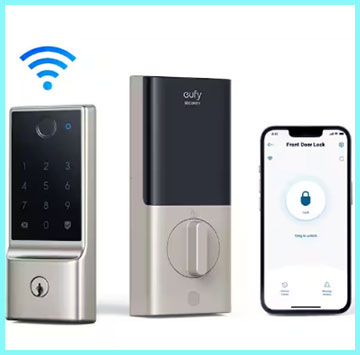
The C220 is a workhorse. The fingerprint sensor felt just as fast as the E30’s.
We have a busy household with kids running in and out, and the C220 kept up perfectly.
I set up temporary codes for a pet sitter easily through the app.
The lack of Home Key was noticeable to me because I had gotten used to it, but for my partner, who uses an Android phone, the C220 was actually better because it felt just as premium without the “Apple tax.”
One thing I noticed, however, was the battery life.
Because it uses direct Wi-Fi to stay connected to the internet (so you can lock it remotely), it wakes up frequently. It runs on 8 AA batteries, which adds some weight and cost when it’s time to replace them. But for the price, the value proposition is undeniable. It feels like 90% of the lock for 60% of the price.
Pros Of Eufy C220
- Unbeatable Value and Affordability: The absolute standout feature of the C220 is its price-to-performance ratio. In the world of smart locks, you often have to spend upwards of $200 to get a reliable biometric (fingerprint) sensor and Wi-Fi connectivity. The C220 shatters that barrier. It provides a robust, fully functioning smart lock experience often for significantly less than its competitors. You get the fingerprint scanner, the keypad, the app control, and the mechanical key backup all in one package. For homeowners who want to outfit multiple doors—say, the front door, the garage entry, and the back door—the C220 makes it financially feasible. You are not sacrificing core security features to save money; you are simply foregoing the “luxury” integrations like Home Key. It is the practical choice for the pragmatic buyer.
- Built-In Wi-Fi (No Bridge Needed): One of the biggest headaches with older smart locks was the need for a separate “bridge” or “gateway”—a little plastic dongle you had to plug into a wall outlet near the door to connect the lock to the internet. The C220 eliminates this clutter completely. The Wi-Fi chip is integrated directly into the lock itself. This simplifies the installation process immensely. You do not have to worry about pairing a bridge or finding an open outlet in your foyer. You just install the lock, connect it to your home’s 2.4GHz Wi-Fi network via the app, and you are good to go. This “hub-free” design makes it an excellent gift for parents or non-tech-savvy friends because there are fewer points of failure. If the Wi-Fi is on, the lock is online.
- Fast and Accurate Fingerprint Sensor: Despite being the lower-cost model, Eufy did not skimp on the biometric sensor. The C220 uses a 3D fingerprint scanner that is remarkably fast. In my daily use, it recognized my thumbprint in a fraction of a second, unlocking the door before I could even fully grasp the handle. This speed is a massive convenience factor. It transforms the act of entering your home from a fumble for keys into a fluid motion. The sensor is also coated to be resistant to wear and tear, and because it uses the same “AI self-learning” technology as the more expensive models, it adapts to slight changes in your fingerprint over time (like a small cut or dry skin). For a family with kids who might lose keys or forget codes, the fingerprint access is a lifesaver.
Cons Of Eufy C220
- Lack of Advanced Smart Home Integration (No Home Key): The glaring omission on the C220 is the lack of Apple Home Key support. If you are deep in the Apple ecosystem, this omission changes the experience from “magical” to “utilitarian.” You cannot tap your iPhone to unlock; you must use your finger or type a code. Furthermore, the C220 generally lacks the Matter support found in the E30. This means it is less “future-proof.” While it works fine with Alexa and Google Assistant today, it might not integrate as smoothly into the advanced smart home automations of the future that rely on the Matter standard. You are locked into the Eufy ecosystem and the basic voice assistant integrations. If you want your lock to trigger a complex scene involving devices from three different brands via Apple Home, the C220 is not the tool for the job.
- Battery Consumption via Wi-Fi: Because the C220 relies on direct Wi-Fi connectivity rather than a low-energy protocol like Zigbee or Thread, it consumes more power. Wi-Fi is a power-hungry standard. Every time you check the status of the lock from the app, or every time the lock “checks in” with the server, it uses a burst of energy. While Eufy mitigates this by using 8 AA batteries to provide a large power reservoir, you will still likely find yourself replacing batteries more often than you would with a non-Wi-Fi lock or a Thread-based lock like the E30 (when used with a hub). It is a trade-off: you get the convenience of no hub, but you pay for it in battery efficiency. In colder climates, this battery drain can be accelerated further, potentially leaving you to rely on the physical key backup in the dead of winter.
- Plastic Build Quality Feel: While the internal mechanics of the C220 are secure and certified, the exterior touchpoints can feel a bit “plasticky” compared to premium locks that use glass or heavy zinc alloys. The keypad face is sleek, but the surrounding housing has a lightweight feel that reminds you this is a budget-friendly device. Over time, scratches on the glossy black panel are more visible than they would be on a matte metal finish. It does not feel “cheap,” but it certainly does not feel “luxury.” For some homeowners, the tactile feel of the hardware is important—it is the first thing guests touch when they enter your home. The C220 prioritizes function over form, and while it looks good from the street, a close-up inspection reveals its budget nature.
Also Read: Comparison Of Yale Assure And Kwikset Halo
Frequently Asked Questions (FAQ)
No. The Eufy Smart Lock E30 is strictly a door lock. It does not have a camera lens and cannot record video. If you need recording capabilities, you should look at the Eufy Video Smart Lock S330.
No. The Eufy C220 operates locally. You do not need to pay any monthly fees to use the app, the fingerprint scanner, or the remote unlocking features via Wi-Fi.
If you are looking for a lock with a camera, the Video Smart Lock S330 is the top choice. If you mean standalone cameras, the EufyCam S3 Pro is currently their flagship for outdoor use, while the Indoor Cam S350 is excellent for indoor monitoring.
Yes. The Eufy Smart Lock E30 fully supports Apple Home Key, allowing you to unlock your door by simply tapping your compatible iPhone or Apple Watch against the lock.
Conclusion
Choosing between the Eufy E30 and the C220 ultimately comes down to the phone in your pocket.
If you are an iPhone user, the Eufy E30 is the clear winner. The ability to use Apple Home Key is a transformative feature that justifies the higher price tag. The addition of Matter support ensures that your lock will remain compatible with smart home standards for years to come. It feels like a premium, modern piece of technology that integrates seamlessly into your digital life.
However, if you use Android, or if you simply want a secure, reliable smart lock without spending a fortune, the Eufy C220 is the better buy. You get the same lightning-fast fingerprint unlocking and easy Wi-Fi access without paying for Apple features you can’t use. It is the definition of “bang for your buck.”