
I have been using security cameras around my home for years now, and when it came time to pick between the eufy E210 and E220, I wanted something reliable, wire-friendly for outdoor use, and without those annoying subscription fees. Both are wired outdoor cams from eufy with spotlight features, color night vision, and solid motion detection, but they differ mainly in resolution and some practical recording habits. In this article, I share my hands-on take to help you decide which one suits your needs better—whether you prioritize sharper details or smoother continuous recording.
A Brief Comparison Table
| Feature | eufy E210 | eufy E220 |
| Resolution | 1080p | 2K |
| Night Vision | Color with spotlight | Color with spotlight |
| Power Supply | Wired (5V/1A, 20ft cable) | Wired (similar extended cable) |
| Weather Resistance | IP67 (outdoor & indoor) | IP67 (outdoor & indoor) |
| Storage | Local microSD, no monthly fees | Local microSD, no monthly fees |
| Motion Detection | AI-enhanced, spotlight trigger | AI-enhanced, spotlight trigger |
| Field of View | Wide angle | Wide angle |
| 24/7 Recording Support | Full 1080p continuous | Limited to 1080p for continuous |
| Price Positioning | More budget-friendly | Slightly higher for 2K |
I have spent months testing both models in real conditions—rainy nights in my backyard, sunny days watching the driveway, and everything in between. The eufy E210 came first as my go-to for reliable basics without overcomplicating things. It delivers clear 1080p footage that captures license plates from a decent distance and handles motion alerts quickly. The spotlight kicks in bright enough to light up faces clearly at night, and color night vision means no more grainy black-and-white surprises.
The eufy E220 stepped up when I wanted more detail. That 2K resolution makes a noticeable difference in sharpness—think reading text on packages or distinguishing finer features like clothing patterns. Both share the same wired setup with a long cable for flexible placement, IP67 weatherproofing that shrugs off heavy rain, and no-fuss local storage via microSD card. They trigger spotlights on motion, support two-way audio for shooing away intruders, and integrate smoothly with the eufy app for live views and notifications.
My Experience With Eufy E210
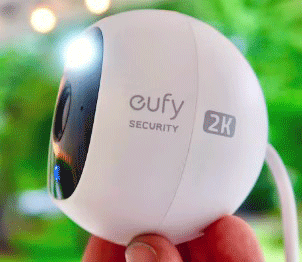
I started with the E210 because I needed straightforward outdoor coverage without fuss.
Installation took under 15 minutes—plug in the long cable, mount magnetically, and connect via app.
Footage came through clear, and the spotlight lit up my porch perfectly at night.
Motion alerts arrived fast, rarely false, and continuous recording ran smoothly at 1080p without overwhelming storage.
It survived heavy rain and heat waves without skipping a beat. I loved the peace of mind from local storage—no cloud worries. Drawbacks? Detail softened when zooming far, but for general monitoring, it exceeded expectations. Overall, it became my reliable daily driver for driveway and side yard watch.
Pros Of Eufy E210
- Affordable entry point: I paid noticeably less for the E210, which left budget for extra cameras or accessories without sacrificing core security functions.
- Excellent for 24/7 recording: Since continuous mode sticks to 1080p, it uses less bandwidth and storage space, letting me record non-stop without filling up the card too fast or straining my Wi-Fi.
- Reliable performance in mixed weather: The IP67 rating held up through storms, and the wired power meant zero battery worries even during long cloudy stretches.
- Bright spotlight for deterrence: When motion hits, the light floods the area, scaring off potential issues while giving clear color footage instead of IR-only darkness.
- Quick setup and stable connection: Magnetic mount plus the 20-foot cable made positioning easy around eaves or fences, and it stayed connected without random drops.
- Solid motion detection with fewer false alerts: AI filters out things like swaying branches, focusing notifications on real people or vehicles.
- Great value for basic outdoor needs: If your priority is dependable coverage over ultra-high detail, this model punches above its price.
- Color night vision shines in low light: Even without the spotlight active, colors pop better than many competitors in dim conditions.
- No subscription pressure: Everything stays local, so I control my footage without ongoing costs.
- Compact and discreet design: It blends into the house exterior without looking bulky.
Also read: Comparison of Select Eufy S230 And S331
Cons Of Eufy E210
- Lower resolution limits detail: In 2K comparisons, finer elements like distant faces or small text get softer, which matters if you zoom in often.
- No native 2K for events: While snapshots and clips stay 1080p, you miss the extra clarity the E220 provides during key moments.
- Spotlight range feels average: It illuminates well close-up but fades quicker at longer distances compared to some higher-end options.
- Limited zoom capability: Digital zoom crops in but loses quality faster due to the base resolution.
- App features feel basic at times: While functional, advanced AI tweaks are not as refined as in newer premium models.
- Cable management required: The 20ft cord is great for reach but needs careful routing to avoid tampering or aesthetic issues.
- No pan-tilt functionality: Fixed view means strategic placement is key; you cannot adjust remotely like indoor pan models.
- Occasional notification delay: In busy networks, alerts arrive a second or two later than ideal.
- Storage fills quicker with continuous mode: Even at 1080p, long recordings eat space unless you set short loops or overwrite.
- Less future-proof: As resolutions trend higher, 1080p might feel dated in a few years.
Maintenance Tips For Eufy E210
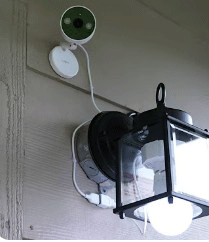
- Clean lens regularly: Wipe with a soft microfiber cloth monthly to remove dust or rain spots that blur footage.
- Check cable connections: Inspect the power cord every season for wear, especially where it meets the camera or adapter.
- Update firmware often: Open the eufy app every few weeks to grab improvements in detection or stability.
- Manage storage proactively: Set overwrite on the microSD card and download important clips to avoid overwriting key events.
- Test spotlight monthly: Trigger motion at night to ensure the light activates brightly without dimming.
- Secure mounting: Re-tighten screws or magnetic hold periodically against wind or vibrations.
- Monitor Wi-Fi signal: Place closer to router if notifications delay; use extenders if needed.
- Avoid direct sun glare: Angle away from intense light sources to prevent lens flare.
- Backup footage selectively: Export events to phone or computer for long-term keeps.
- Reset if glitches occur: Power cycle the camera and re-pair if app connectivity falters.
My Experience With Eufy E220

Switching to the E220 felt like an upgrade in clarity. Setup mirrored the E210—quick and intuitive.
The 2K made a huge difference: distant faces looked identifiable, and night clips with spotlight popped in color.
Alerts stayed accurate, and two-way talk helped scare off a prowler once.
Continuous mode reverted to 1080p, which was fine since events captured full res. It handled weather just as tough, and the compact size tucked away neatly.
Minor annoyances included faster card fill with high-res clips and occasional bandwidth hiccups, but nothing deal-breaking.
The sharper view made reviewing footage enjoyable rather than frustrating. It earned its spot for areas needing extra detail.
Pros Of Eufy E220
- Sharper 2K resolution: Details stand out—license plates, facial features, and package labels appear crisp even when zoomed.
- Better for identification: When reviewing footage, the extra pixels make a real difference in recognizing people or vehicles from farther away.
- Strong color night vision with spotlight: The combo delivers vivid, well-lit scenes at night, turning dark areas into clear, colorful views.
- Solid build for outdoor extremes: IP67 keeps it safe in dust, rain, or heat without issues.
- Easy wired installation: Long cable and magnetic base allow creative mounting spots like under eaves or on poles.
- AI motion detection works well: Distinguishes humans from animals or cars, reducing useless alerts.
- No monthly fees ever: Local storage keeps privacy intact and costs down.
- Two-way audio for interaction: Speak through the app to warn visitors or greet deliveries.
- Compact size hides easily: Small footprint makes it less obvious to passersby.
- Reliable app integration: Live view, playback, and notifications come through consistently.
Cons Of Eufy E220
- 24/7 recording drops to 1080p: Continuous mode limits to lower res to save resources, so you lose 2K benefits during always-on periods.
- Higher cost than E210: The jump in price might not justify it if you rarely zoom or scrutinize details.
- Storage demands increase with 2K clips: Event recordings fill cards faster, requiring more frequent management or larger cards.
- Spotlight could reach farther: Effective close-range but not stadium-level illumination.
- Fixed angle view: No pan-tilt means coverage depends heavily on initial positioning.
- Potential Wi-Fi strain in high-res mode: 2K streams use more bandwidth, which showed in weaker signal areas.
- Firmware quirks reported by some: Occasional connectivity hiccups in early units, though updates help.
- Overkill for simple setups: If 1080p suffices, the extra res adds unnecessary data load.
- No built-in battery backup: Pure wired, so power outages kill live view.
- App occasional lag on high-res feeds: Smoother on lower settings.
Maintenance Tips For Eufy E220
- Regular lens cleaning: Use gentle cloth to clear pollen, dirt, or smudges for peak 2K sharpness.
- Firmware checks routine: Stay current via app for better AI accuracy and bug fixes.
- Card formatting yearly: Reformat microSD in-app to maintain performance and prevent corruption.
- Cable inspection: Look for fraying on the long power line and protect from rodents.
- Spotlight functionality test: Verify color night vision triggers properly in dark tests.
- Position optimization: Adjust angle seasonally for best coverage as sun paths change.
- Bandwidth monitoring: If streams stutter, lower settings temporarily or boost network.
- Overheating watch: Ensure ventilation in hot climates to avoid shutdowns.
- Event clip organization: Tag and save critical 2K footage to external drives.
- App permission refresh: Re-grant storage and notification access if alerts stop.
Read more: Comparison of Eufy S340 And E30
Comparison With Other Brands
- Vs Ring outdoor cams: Eufy models win on no-subscription local storage, while Ring pushes cloud plans heavily.
- Vs Arlo essential wired: Arlo offers similar resolution options but often requires subscriptions for full features; Eufy stays free.
- Vs Wyze cam outdoor: Wyze is cheaper but less reliable in weather; eufy provides better build and AI consistency.
- Vs Blink outdoor wired: Blink leans budget but lacks spotlight color night vision strength found in eufy.
- Vs Nest cam: Google Nest excels in smart integration but demands subscriptions; eufy keeps everything local and cheaper long-term.
- Vs Reolink wired models: Reolink matches on resolution and no fees but setup feels more technical than eufy’s plug-and-play.
- Vs TP-Link Tapo: Tapo offers good value but detection accuracy trails eufy’s AI in reducing false positives.
- Vs Lorex wired systems: Lorex provides pro-level detail but at higher cost and complexity; eufy suits everyday home use better.
- Vs Swann security cams: Swann focuses on DVR setups; eufy simplifies with app-only control.
- Vs EZVIZ outdoor: EZVIZ has strong features but app reliability varies more than eufy’s consistent experience.
Frequently Asked Questions (FAQ)
Yes, if you value sharper 2K details for identification; otherwise, the E210 offers similar core features at a lower cost.
The E220 edges out for resolution and clarity, but the E210 is better for 24/7 recording efficiency and budget.
No, it is a wired camera with a power cable, though some eufy models offer battery options.
Conclusion: For Both Products
I have weighed these two closely, and here is the bottom line for you. If you want maximum detail in clips and do not mind managing storage a bit more, go for the E220—it delivers that extra sharpness that makes a difference when it counts. But if you prioritize non-stop recording without resolution compromises or prefer saving some cash for other home upgrades, the E210 performs admirably and might even suit you better long-term. Either way, you get solid, subscription-free security that I trust daily. Pick based on what matters most in your setup, and you will not regret it.