
If you have been browsing Walmart or Amazon for a dash cam, you have likely stumbled upon Enesy. The price tag is almost suspiciously low—often under $50 for a setup that promises 4K resolution, three-channel recording (front, rear, and cabin), and WiFi connectivity.
In a market where premium brands like Garmin and Nextbase charge $200+ for similar specs, Enesy seems like the ultimate bargain. But as a tech reviewer who has tested dozens of these budget cameras, I know that specs on a box rarely tell the full story.
For those looking to purchase an Enesy dash cam, it is crucial to understand that “Enesy” is likely a white-label brand. This means the hardware is mass-produced by a generic manufacturer and then branded with different names (you might see identical cameras sold under names like “Rimoody,”
“SkyAuks,” or “ACDANC”). Because of this, buying from a marketplace with a solid return policy like Walmart or Amazon is non-negotiable. Do not buy this from a final-sale site. In this review, I will walk you through the reality of owning an Enesy dash cam—from the “interpolated” 4K video to the frustrations of the mobile app—to help you decide if it is a smart budget hack or a headache waiting to happen.
My Experience With The Enesy Dash Cam
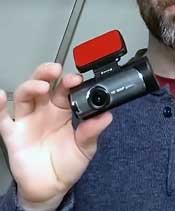
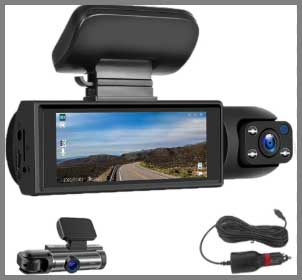
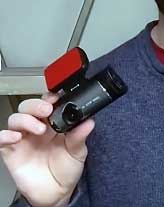
I picked up the popular 3-Channel Enesy Dash Cam (often listed as the “Front + Inside + Rear” model) to see if it could serve as a cheap security solution for my daily commuter. Out of the box, the build quality feels lightweight and plasticky. It lacks the dense, premium feel of a VIOFO or BlackVue unit, which was expected for the price. The screen is small (usually around 2 to 3 inches) but bright enough to see what is being recorded.
Installation was standard for a wired system. You have to run a cable to the cigarette lighter and another long cable to the rear window. The “inside” cabin camera is built directly into the main unit, which is convenient because it saves you from wiring a third camera, but it limits where you can place the unit. It needs to be low enough to see into the cabin but high enough to clear the hood for the front view.
The “4K” claim is where the reality check hit. When I pulled the footage off the SD card, it became clear that the resolution is likely interpolated. This means the camera captures in a lower resolution (like 1080p or 2K) and uses software to stretch it to 4K size. The result? The video looks decent on a phone screen, but when you zoom in on license plates, things get pixelated quickly. It is serviceable for proving who hit whom in an accident, but do not expect cinematic clarity.
The mobile app experience was the biggest hurdle. The manual directed me to download a generic app (often “Viidure” or “Roadcam”). Connecting to the camera’s WiFi was finicky; my phone kept trying to disconnect because the camera’s network has no internet. Once connected, downloading clips was slow. I found it much faster to just pop the SD card out and plug it into my laptop.
On the positive side, the 3-channel coverage is a legitimate feature for rideshare drivers or anxious parents. Having a camera pointed at the driver/passengers offers peace of mind that single-channel cams don’t. The night vision on the interior cam uses infrared (IR) LEDs, which worked surprisingly well. It turns the cabin footage black and white but captures faces clearly even in pitch darkness.
Read more: My Thoughts On Defend Cellular Security Camera
Pros Of Enesy Dash Cam
- Incredible Value for 3-Channel Coverage: The strongest selling point is simply the price-to-feature ratio. Getting a front, rear, and interior camera setup for under $60 is almost unheard of in the name-brand world. For Uber, Lyft, or DoorDash drivers who need to record unruly passengers on a shoestring budget, this is one of the cheapest entry points into full-cabin surveillance.
- Decent Infrared (IR) Interior Night Vision: The cabin camera typically utilizes dedicated IR lights that activate automatically in low light. In my testing, this was the most reliable feature. Even on unlit backroads, the interior camera clearly illuminated the driver and passengers. If your primary goal is documenting interactions inside the car rather than license plates outside, this feature punches above its weight.
- Loop Recording and G-Sensor Standard: Despite the low cost, it doesn’t skimp on the essentials. The loop recording works seamlessly, overwriting old footage so you never have to manually clear the card. The G-Sensor (which locks files if it detects a crash) is present, though you may need to adjust the sensitivity to “Low” to stop it from locking every time you hit a pothole.
- Easy “Plug-and-Play” Power: The camera runs off a standard cigarette lighter adapter (12V). You don’t have to hardwire it into your fuse box unless you want 24/7 parking monitoring. For most users, you can just stick it to the windshield, plug it in, and drive. It starts recording the moment the car turns on, making it very beginner-friendly.
- Compact Form Factor: Since the front and interior lenses are housed in one body, the footprint on your windshield is relatively small compared to systems that require separate units for everything. It tucks reasonably well behind the rearview mirror (though the interior lens needs a line of sight), keeping your dashboard relatively clutter-free.
Cons Of Enesy Dash Cam
- Misleading “4K” Resolution Claims: As mentioned, many of these budget sensors use interpolation. While the file properties might say “4K,” the actual image detail is often closer to 1080p or 2K. You will struggle to read license plates of moving cars more than a car length away. It is “evidence grade” video, not “YouTube travel vlog” grade.
- Frustrating App Connectivity (Viidure/Roadcam): The reliance on generic third-party apps is a major weak point. These apps are often buggy, riddled with translation errors, and struggle to maintain a stable WiFi connection with the camera. If you rely on the app to instantly show a police officer footage, you might be left fumbling with “Connection Failed” errors on the side of the road.
- Reliability Concerns (Heat and Battery): Cheaper dash cams often use lithium-ion batteries instead of heat-resistant supercapacitors. If you live in a hot climate (like Arizona or Texas), leaving this camera in a parked car under the sun can cause the battery to swell or fail, causing the camera to reset its date/time or stop recording entirely.
- SD Card Pickiness: These cameras are notoriously fussy about MicroSD cards. If you use a generic or slow card, you will likely get “Card Error” messages or corrupted files. You almost must buy a high-endurance card (like a SanDisk High Endurance or Samsung PRO Endurance), which adds another $15-$20 to the actual cost.
- Limited Customer Support: Because “Enesy” is likely a white-label brand, there is no dedicated customer support hotline or US-based service center. If the camera dies in six months, your only recourse is often the Amazon/Walmart return window (which may have closed) or emailing a generic support address that may not reply.
Maintenance Tips For Enesy Dash Cam
- Format the SD Card Monthly: This is the golden rule for all dash cams, but especially budget ones. Over time, “locked” files (from potholes triggering the G-sensor) fill up the card, leaving no room for new footage. Go into the camera’s menu (not the app) once a month and select “Format SD Card” to wipe it clean and keep it running smoothly.
- Use a “High Endurance” MicroSD Card: Do not use the cheap card that might have come in the box or an old card from a phone. Dash cams constantly write data, which burns out standard cards. Invest in a Class 10, U3 High Endurance card. This single step solves 90% of “camera stopped recording” issues.
- Adjust G-Sensor Sensitivity to “Low”: Out of the box, the crash sensor is often too sensitive. It will lock a file every time you close your car door too hard or drive over a speed bump. If your card fills up too fast, check this setting immediately and lower it.
- Check the Power Connection Frequently: The 12V cigarette lighter plugs on budget cameras can sometimes wiggle loose due to vibration. Make it a habit to glance at the camera when you start the car to ensure the little red recording light is actually blinking. There is nothing worse than realizing after an accident that your plug was loose for three weeks.
- Keep the Lens Clean: The interior camera lens is constantly exposed to dust, fingerprints, and even vape/smoke residue inside the cabin. Wipe both the front and interior lenses with a microfiber cloth every few weeks to ensure your night vision doesn’t look like a blurry, foggy mess.
Read more: My Thoughts On Lierhyt 4K Ultra HD Camera
Comparison With Other Brands
Comparison with VIOFO (e.g., A119 V3 or A129)
VIOFO is the “king” of mid-range dash cams. VIOFO uses genuine Sony Starvis sensors and supercapacitors, meaning the video quality is vastly superior (readable plates!) and they survive summer heat without dying. However, a 3-channel VIOFO setup costs nearly $250. Enesy is a fraction of the price. If you need absolute reliability and video evidence that will hold up in court with zero doubt, save up for the VIOFO. If you just need a basic witness for a low price, Enesy is the sacrificial lamb.
Comparison with 70mai
70mai is a reputable budget brand (part of the Xiaomi ecosystem). Their cameras, like the 70mai A800S, have much better software and a more reliable app than the generic “Viidure” app Enesy uses. 70mai offers better voice control and firmware support. If you can live with just a front/rear setup (no interior cam), a 70mai unit for around $80-$100 is a much safer, more polished investment than the Enesy.
Comparison with Rimoody / SkyAuks / Orskey
These are effectively Enesy’s siblings. You will often find that Rimoody, Orskey, and Enesy cameras look identical because they come from the same factories. Compare them solely on price and included accessories. If the Rimoody version is $5 cheaper or comes with a free SD card and the Enesy doesn’t, buy the Rimoody. There is virtually no difference in performance or software between these white-label clones.
Comparison with Garmin Dash Cam Mini 2
Garmin is the premium, reliable choice. The Mini 2 is tiny, has a flawless app, and syncs to the cloud. However, it is expensive and screens-less. A single Garmin Mini 2 (front only) costs more than the entire 3-channel Enesy system. Garmin is for the user who wants “set it and forget it” quality and doesn’t care about interior recording. Enesy is for the user who needs maximum coverage for minimum dollars.
Frequently Asked Questions (FAQ)
You should use a Class 10, U3 speed MicroSD card, specifically a “High Endurance” model from SanDisk or Samsung. Avoid generic “no-name” cards, as they often fail under the heat and constant writing stress of a dash cam.
Out of the box, no. It turns off when the engine stops. To get 24-hour parking monitoring, you must purchase a separate Hardwire Kit (usually Type-C or Mini-USB depending on your model) and connect it to your car’s fuse box. This provides constant power to the camera without draining your battery dead.
This is likely the “Screen Saver” feature, which is enabled by default to prevent the screen from distracting you at night. The camera is still recording (look for a blinking red or blue light). You can disable this in the settings menu if you prefer the screen to stay on.
Likely not “native” 4K. Most cameras in this price range use a 2K or 1080p sensor and use software to “upscale” the image to 4K dimensions. While the file size is large, the detail is not true 4K. Treat it as a decent 1080p camera.
Conclusion
The Enesy Dash Cam occupies a very specific niche: it is a disposable security system. It offers impressive 3-channel coverage that is genuinely useful for rideshare drivers or families on a tight budget. The interior night vision is solid, and it records reliable loops once set up.
However, you are sacrificing video fidelity, app usability, and long-term durability to hit that sub-$60 price point. If you treat it as an entry-level tool and swap out the SD card regularly, it will do the job. But if you want to read license plates clearly at 40mph or want a camera that will last for 5 years, you should double your budget and look at a VIOFO or 70mai instead.