
As a dedicated DIY enthusiast who’s spent countless hours in my workshop crafting everything from custom furniture to intricate carvings, I’ve come to rely on reliable rotary tools. In this article, I compare the Dremel 8250 and Dremel 8260 head-to-head, sharing my real-world experiences, key features, pros and cons, and which one ultimately earns a permanent spot in my toolkit.
A Brief Comparison Table Dremel 8250 Vs Dremel 8260
| Feature | Dremel 8250 | Dremel 8260 |
| — | ——————————- | ——————————- |
| Motor Type | Brushless | Brushless |
| Battery | 12V 3Ah Lithium-Ion | 12V 3Ah Lithium-Ion |
| Variable Speed | 5,000 – 30,000 RPM | 5,000 – 30,000 RPM |
| Power Output | 20% more than corded 4300 | 20% more than corded 4300 |
| Runtime Claim | 100% more than 8220 | 100% more than 8220 |
| Bluetooth Connectivity | No | Yes (Dremel App) |
| Digital Display | Yes (speed, battery, warnings) | Yes (enhanced with LED indicators) |
| Weight (with battery) | Approx. 1.3 lbs | Approx. 1.4 lbs |
| Additional Features | Overload/temperature protection | App for speed control, alerts, guidance |
| Typical Kit Price Range | Around $150 | Around $170-200 |
My Experience With Dremel 8250
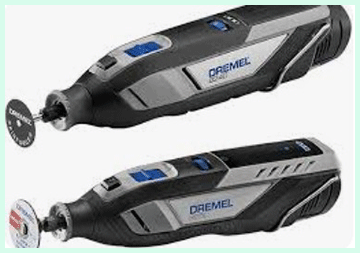
I picked up the Dremel 8250 a couple of years ago when I needed a cordless rotary tool that could handle serious work without fading halfway through a project.
Right out of the box, I appreciated how solid it felt in my hand.
The ergonomic grip with textured rubber made long sessions comfortable, even when I was carving detailed patterns in hardwood.
One weekend, I used it to restore an old metal garden gate. Grinding off rust, cutting through stubborn bolts, and then polishing the surface—it powered through without overheating or losing speed.
The brushless motor is noticeably quieter and smoother than my older brushed Dremels, and the battery lasted way longer than I expected, easily giving me over an hour of mixed use on a single charge.
I also love the digital display. It shows exact speed, remaining battery, and even warns if I’m pushing too hard or if it gets too warm.
That feature saved me from burning out accessories a few times. For everyday tasks like sharpening lawn mower blades or engraving glass, it feels precise and reliable. Overall, it’s become my go-to for heavy-duty jobs where I need raw power and endurance without cords getting in the way.
Also read: Comparison of Comcast Cable And Verizon Fios
Pros Of Dremel 8250
- Powerful Brushless Motor: Delivers exceptional torque for tough materials like metal and dense wood, outperforming older corded models I’ve owned.
- Extended Battery Life: The 3Ah battery consistently gives me long runtime, perfect for all-day projects without constant recharging.
- Digital Display Feedback: Shows precise speed settings, battery level, and overload warnings, helping me avoid mistakes and extend tool life.
- Ergonomic Comfort: Textured grip zones reduce hand fatigue during extended use, making it ideal for detailed or repetitive tasks.
- Quiet and Low Vibration: Runs smoother and quieter than brushed motors, allowing me to work longer without ear protection in lighter jobs.
- Overload Protection: Automatically alerts and protects against excessive heat or strain, adding durability for heavy-duty applications.
- Versatile Accessory Compatibility: Works seamlessly with all Dremel attachments, expanding options for cutting, grinding, polishing, and more.
- Reliable Performance Consistency: Maintains speed under load better than previous models, ensuring clean cuts and finishes every time.
- Compact and Portable: Easy to maneuver in tight spaces, great for hobbyists working on models or repairs.
- Value for Performance: Offers premium features without extra costs for connectivity I don’t always need.
Cons Of Dremel 8250
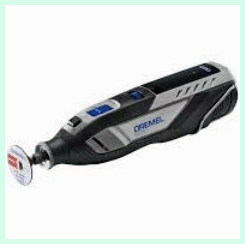
- No Bluetooth Connectivity: Lacks app integration for remote control or material guidance, which can be useful for beginners.
- Slightly Heavier Feel: The robust build adds a bit of weight compared to lighter models, noticeable in very prolonged overhead work.
- Charging Time: Full charge takes around 95 minutes, longer if using the standard charger without fast options.
- Limited Smart Alerts: No phone notifications for tool status, relying only on the onboard display.
- Higher Price Than Basic Models: More expensive than entry-level cordless options, though justified by power.
- No Illuminated Logo: Misses the aesthetic LED features found on newer variants.
- Potential Overkill for Light Tasks: Full power isn’t always needed for simple jobs, where a smaller tool might suffice.
- Battery Not Backward Compatible: Doesn’t work with older Dremel 12V packs, requiring new investments if upgrading.
- Occasional Warm-Up: Gets warm during intense continuous use, though warnings help manage it.
- Accessory Changes Require Care: While EZ Twist is convenient, heavy buildup can make swaps trickier without cleaning.
My Experience With Dremel 8260
When the Dremel 8260 came out, I couldn’t resist trying it, especially with all the talk about its smart features. I borrowed one from a friend first, then ended up buying my own because the Bluetooth connectivity intrigued me. Pairing it with the Dremel app was simple, and suddenly I had tips on the best speed for different materials right on my phone.
I took it on a woodworking project building a custom jewelry box. The app suggested accessories and speeds for carving intricate designs in walnut, and I could adjust RPM remotely without stopping. It made fine detail work feel easier, especially for someone like me who sometimes second-guesses settings.
The performance felt identical to the 8250 in terms of power and runtime—plenty for cutting, sanding, and drilling without bogging down. The LED indicators and glowing logo add a modern touch, and the soft grip reduces vibration even more. I used it outdoors for trimming pet nails on my nervous dog; the quiet operation and cordless freedom helped a lot. While the app isn’t something I use every time, it’s handy for planning projects or when I’m trying new techniques.
Pros Of Dremel 8260
- Bluetooth App Integration: Connects to phone for speed adjustments, project tips, and performance monitoring—game-changer for planning.
- Enhanced LED Indicators: Glowing logo and displays provide quick visual feedback on battery, speed, and connectivity.
- Same Robust Power: Matches the brushless efficiency for demanding cuts and grinds with consistent torque.
- Smart Alerts and Guidance: App offers material-specific recommendations, reducing trial-and-error for new users.
- Reduced Vibration Grip: Optimized soft grip makes precise control easier during intricate engraving or polishing.
- Long Runtime with Feedback: Monitors usage via app, helping optimize battery for longer sessions.
- Modern Design Touches: Sleek black finish and illuminated elements feel premium and motivating to use.
- Remote Speed Control: Adjust RPM from phone without touching the tool, handy in awkward positions.
- Tool Management Features: Tracks maintenance needs and performance history through the app.
- Versatile for All Levels: Extra guidance makes it welcoming for hobbyists while powerful for pros.
Cons Of Dremel 8260
- App Dependency for Full Features: Some users find the connectivity gimmicky if not used regularly.
- Slightly Higher Cost: Premium for Bluetooth adds to the price without major power differences.
- Potential Connectivity Issues: Bluetooth can occasionally lag or disconnect in certain environments.
- Battery Drain from Features: Constant app link might slightly reduce runtime if always connected.
- Overly Complex for Simple Jobs: Extra tech can feel unnecessary for quick tasks.
- Heavier Marketing on Smart Aspects: Core performance same as non-smart version.
- App Updates Required: Needs phone compatibility and occasional updates for best function.
- Glowing Elements Distracting: LED logo can be bright in low-light workshops.
- Similar Weight Issues: Still hefty for ultra-precision prolonged work.
- Limited App Depth: Guidance is basic; experienced users might not need it.
- Maintenance Tips For Dremel 8250
- Regular Cleaning: Wipe down the body and vents after each use to prevent dust buildup that can affect cooling.
- Battery Care: Store in cool, dry places and avoid full discharges for longer life.
- Collet Maintenance: Clean the collet and nut regularly to ensure secure accessory hold.
- Ventilation Check: Ensure air vents are clear for proper motor cooling during heavy use.
- Accessory Inspection: Check bits for wear and replace to avoid strain on the motor.
- Storage Position: Hang or store upright to prevent internal shifts.
- Overload Awareness: Heed display warnings to prevent long-term damage.
- Charger Compatibility: Use official chargers to maintain battery health.
- Periodic Run-Through: Run at varying speeds occasionally to keep motor smooth.
- Protective Case Use: Always store in the provided bag for protection.
Read more: Comparison of Kiierr Laser Cap And Irestore
Maintenance Tips For Dremel 8260
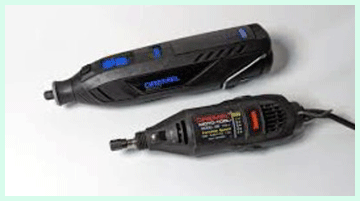
- App-Based Monitoring: Use the app to track temperature and usage for proactive care.
- Bluetooth Hygiene: Disconnect when not needed to save minor battery.
- Same Cleaning Routine: Dust removal crucial for vents and sensors.
- Battery Management via App: Alerts help optimize charging habits.
- LED Cleaning: Wipe indicators to keep them visible.
- Firmware Checks: Update app for any tool improvements.
- Accessory Quick Changes: Leverage EZ systems but clean mandrels often.
- Storage with Connectivity Off: Prevents unnecessary drain.
- Vibration Checks: Ensure grip is secure for reduced wear.
- Professional Servicing: For brushless, minimal but app can flag issues.
Comparison With Other Brands
Vs Milwaukee M12 Rotary Tool: Dremel models maintain better speed under load, while Milwaukee integrates seamlessly if you’re in their ecosystem.
Vs Ryobi Cordless Options: Dremels offer superior accessory variety and precision for detailed work.
Vs Bosch (Sister Brand): Similar battery compatibility, but Dremel focuses more on hobby versatility.
Vs Wen Brushless: Dremel provides better build quality and runtime, though Wen is more budget-friendly.
Vs Proxxon: Proxxon excels in ultra-precision, but lacks cordless power of Dremels.
Vs Harbor Freight Variants: Dremel far superior in durability and performance consistency.
Vs Makita Cordless: Makita stronger in some trades, but Dremel wins for rotary-specific tasks.
Vs DeWalt: DeWalt ecosystem strong, but Dremel quieter and more accessory-focused.
Vs Black+Decker: Dremel outperforms in power and longevity.
Vs Generic Brands: Dremel reliability and support justify the premium.
Frequently Asked Questions (FAQ)
Yes, it’s excellent for powerful, reliable cordless performance.
Cutting, grinding, sanding, carving, polishing, and more DIY tasks.
Up to 30,000 RPM with variable control.
The 8250 has a brushless motor for more power and runtime; the 8240 is brushed with a 2Ah battery.
Conclusion: For Dremel 8250 And Dremel 8260
If you’re like me and value straightforward power without extras, go for the 8250—it’s a workhorse that won’t let you down. But if you enjoy tech aids to make projects smoother and more informed, you’ll love the 8260. Both are fantastic; choose based on whether you want pure performance or smart enhancements to elevate your crafting game.