
If you’ve been managing diabetes and are tired of constant finger pricks, constant worry about highs and lows, or devices that feel bulky and unreliable, you need to consider the Dexcom G7 sensor right now. This CGM has transformed how I track my glucose levels every single day, giving me real-time readings straight to my phone with impressive accuracy and minimal hassle. It’s smaller, faster to start, and packed with features that actually make life easier. Trust me, once you try it, you’ll wonder how you ever managed without it—it’s genuinely worth every penny for the peace of mind and better control it delivers.
My Experience With Dexcom G7 Sensor
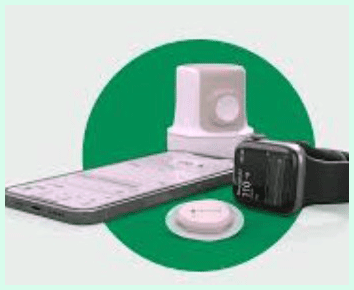
I still remember the day my first Dexcom G7 sensor arrived.
I had been using fingersticks for years, and the idea of a continuous monitor sounded great, but I was skeptical after hearing mixed things about previous models.
The box felt compact, and the all-in-one applicator looked straightforward—no separate transmitter to fiddle with like before.
Applying it was surprisingly simple. I chose my upper arm, cleaned the spot thoroughly, and pressed the applicator down.
The insertion was quick and almost painless—most of the time I barely felt a thing, maybe a tiny pinch on rare occasions.
The sensor sits flat against my skin, much smaller than anything I’d used previously, and it doesn’t stick out or catch on clothes.
Within about 30 minutes, my phone buzzed with the first reading, and I was hooked from that moment.
Over the past couple of years, I’ve worn dozens of these sensors, and the consistency has been a game-changer.
I get readings every five minutes without needing to scan anything, which means I can glance at my watch or phone during a meeting, workout, or even while sleeping and know exactly where I stand.
The alerts are customizable—I set mine to notify me for lows around 70 mg/dL and highs above 180, and they’ve caught issues early more times than I can count.
One night, I was trending low in my sleep, and the urgent alert woke me up just in time to grab some juice before things got scary.
The smaller size really shines in daily life. It doesn’t interfere with tight sleeves, sports bras, or even when I’m swimming (it’s waterproof, which is huge for me since I love the pool).
I rarely get compression lows now because the filament is shorter and inserts straight in, so sleeping on that side doesn’t throw off readings as much.
Pairing it with my phone app is seamless, and I love how the trends graph shows arrows for rising or falling levels—it’s helped me fine-tune my insulin doses way better than sporadic checks ever could.
Of course, it’s not flawless. Early on, I had a couple of sensors that failed before the full 10 days (or now with the newer 15-day version, it’s even longer for some).
One time the adhesive started lifting after a sweaty gym session, but I used an overpatch and it held fine. Accuracy has been solid overall—my readings usually match my fingerstick meter within 10-15 points, especially after the first day.
The 12-hour grace period is a lifesaver; I can swap sensors without losing data continuity.
What stands out most is the freedom it gives me. I travel more confidently, exercise without constant worry, and my A1C has dropped noticeably since switching.
It’s not just a device—it’s like having a reliable co-pilot for diabetes management. If you’re on the fence, my honest take is that the Dexcom G7 has made my daily routine smoother and less stressful in ways I didn’t expect. The peace of mind alone makes it feel indispensable.
Pros Of Dexcom G7 Sensor
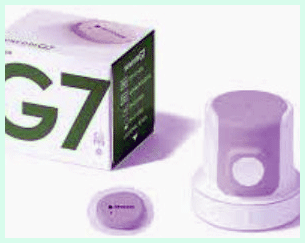
- Superior Accuracy : The Dexcom G7 delivers some of the best readings out there, with a MARD often around 8.2% for adults, meaning the numbers are close to lab values most of the time. You can trust them for making insulin decisions without second-guessing every alert.
- Compact And Discreet Design : This sensor is about 60% smaller than older models and lies flat on your skin, so it stays hidden under clothes and feels barely noticeable during everyday activities.
- Quick Warm-Up Time : You only wait about 30 minutes before getting readings, a massive improvement that lets you start using it almost right away without long delays.
- All-In-One Sensor And Transmitter : No more attaching a separate piece—the transmitter is built in, simplifying setup and reducing the chance of losing parts.
- Extended Grace Period : After the main wear time ends, you get up to 12 extra hours of readings, giving you flexibility to change sensors on your schedule without gaps in data.
- Customizable Alerts And Sharing : You can fine-tune low and high alarms, add predictive alerts, and share your data with family or doctors easily through the app.
- Waterproof And Durable : It handles swimming, showering, and sweating without issues, so you don’t have to remove it for normal life.
- Seamless App Integration : The app is intuitive, works with smartwatches for quick glances, and shows clear trends and graphs that help spot patterns fast.
- Proven Impact On Control : Many users, including me, see better time in range and lower A1C because the constant feedback guides smarter choices throughout the day.
- These strengths combine to make the G7 feel like a reliable tool rather than another chore in diabetes management. You get consistent performance that adapts to your lifestyle.
Cons Of Dexcom G7 Sensor
- Adhesive Issues For Some Users : The patch can lift or peel early, especially with heavy sweating or certain skin types, requiring overpatches or extra tape to keep it secure.
- Occasional Early Failures : A few sensors stop working before the full wear time, which can be frustrating and means contacting support for replacements.
- Higher Cost Without Insurance : Without good coverage, the price adds up quickly compared to some alternatives, making it less accessible for everyone.
- Signal Loss In Certain Situations : Distance from your phone or interference can cause brief gaps in readings, though it usually reconnects quickly.
- Pressure Sensitivity : Lying on the sensor site can cause temporary compression lows, even if less than older models.
- Warm-Up For Newer Versions : The 15-day sensor might require a longer 60-minute warm-up due to updated tech, slightly delaying startup.
- App Dependency : You need a compatible smartphone for full features, and occasional app glitches can disrupt alerts or viewing.
- Insertion Variability : While mostly painless, some insertions sting more or lead to minor irritation at the site.
- These drawbacks exist, but many are manageable with simple adjustments, and the overall benefits often outweigh them for dedicated users.
Maintenance Tips For Dexcom G7 Sensor
- Choose The Right Insertion Site Carefully : Pick spots like the back of your upper arm or abdomen that avoid waistbands, bra straps, or areas that get a lot of pressure during sleep. Rotating sites every time prevents skin irritation and helps maintain consistent accuracy over months.
- Prep Your Skin Thoroughly : Always clean the area with alcohol and let it dry completely before applying. Avoid lotions or oils that could weaken the adhesive—clean, dry skin makes the sensor stick much longer.
- Use An Overpatch Proactively : If you know you’ll sweat a lot, exercise, or swim, apply a breathable overpatch right after insertion. It reinforces the edges and extends wear without much extra bulk.
- Stack Sensors For Zero Downtime : Insert your new sensor about 30 minutes before the old one expires. This lets the new one warm up while you still get readings from the current one, eliminating any gap in monitoring.
- Monitor For Early Signs Of Issues : Check your site daily for redness or lifting. If you notice erratic readings, compare with a fingerstick and consider calibrating if needed, though most times it settles on its own.
- Keep Your Phone Nearby : Stay within Bluetooth range to avoid signal drops. If you lose connection, restarting the app or phone usually fixes it fast.
- Handle The Applicator Gently : After insertion, press around the edges to secure the adhesive without pushing on the center too hard, which can affect the filament.
- Store Sensors Properly : Keep unopened boxes at room temperature, away from extreme heat or cold, to ensure they perform as expected when you need them.
- Contact Support Promptly : If a sensor fails early, report it right away—Dexcom often replaces them quickly, which minimizes frustration and cost.
- Following these steps has helped me get the most reliable performance possible. Small habits like site rotation and preemptive overpatches make a huge difference in longevity and comfort.
Comparison With Other Brands
When I weigh the Dexcom G7 against competitors like the FreeStyle Libre 3, the differences become clear in real-world use.
Accuracy And Reliability : The G7 often edges out with strong performance across ranges, especially for quick changes, though some studies show the Libre 3 slightly tighter in certain metrics. You get dependable readings that support confident decisions either way.
Wear Time And Convenience : The G7’s standard 10-day wear (plus grace) or the newer 15-day option means fewer changes overall compared to some, but the Libre 3’s 14 days offers solid stretch without frequent swaps.
Warm-Up And Startup Speed : With only 30 minutes for most G7 versions, you start seeing data much faster than the Libre 3’s hour-long wait, letting you react sooner after application.
Size And Comfort : Both are small and discreet, but the G7’s flat, integrated design feels less obtrusive on the arm during movement or sleep for many users.
Alerts And Features : The G7 provides predictive and customizable alarms that notify you proactively, while some alternatives rely more on manual checks or basic thresholds.
Cost And Accessibility : Depending on insurance, the G7 can feel more affordable for covered users, though out-of-pocket prices vary widely between brands.
Integration With Devices : Smartwatch compatibility shines brighter with the G7, giving you glanceable readings without pulling out your phone as often.
Each brand has its strengths, but the G7 stands out when you prioritize speed, alerts, and seamless integration into an active routine.
Frequently Asked Questions (FAQ)
Yes, it works exceptionally well for most people. It provides continuous, real-time glucose readings with high accuracy, customizable alerts, and reliable trends that help manage diabetes effectively every day.
Some users face adhesive lifting, occasional early sensor failures, or higher costs without coverage. Signal issues or pressure sensitivity can occur, but these are often fixable with overpatches or site changes.
It depends on your priorities. The G7 wins for faster warm-up, proactive alerts, and smartwatch integration, while the Libre 3 offers longer standard wear and potentially competitive accuracy in some scenarios. Try both if possible to see what fits your lifestyle best.
Conclusion
After using the Dexcom G7 sensor for so long, I can say without hesitation that it’s worth it for anyone serious about better diabetes control. The accuracy, convenience, and freedom it provides far outweigh any minor hassles. If you’re ready to ditch constant finger pricks and gain real insight into your glucose patterns, go for the Dexcom G7—you’ll likely feel the same relief and confidence I do every single day.