
I’ve been using portable SSDs for years to handle everything from backing up photos and videos to transferring large project files between my laptop and desktop. When it came time to pick between the Crucial X9 and the Samsung T7, I spent weeks testing both in real scenarios—copying 4K footage, running everyday backups, and even tossing them around in my bag. My main goal here is to share an honest, first-person breakdown of how these two stack up, so you can decide which one fits your needs better without wasting money on hype.
A Brief Comparison Table Crucial X9 Vs Samsung T7
| Feature | Crucial X9 | Samsung T7 |
| Max Read Speed | Up to 1050 MB/s | Up to 1050 MB/s |
| Max Write Speed | Up to 1050 MB/s | Up to 1000 MB/s |
| Interface | USB 3.2 Gen 2 (10 Gbps) | USB 3.2 Gen 2 (10 Gbps) |
| Durability Rating | IP55 dust and water resistant, 7.5 ft drop protection | IP65 dust and water resistant (T7 Shield variant), higher drop resistance |
| Build Material | Aluminum with compact design | Aluminum body, rubberized in Shield version |
| Warranty | 5 years | 3 years |
| Encryption | 256-bit AES hardware encryption | 256-bit AES hardware encryption |
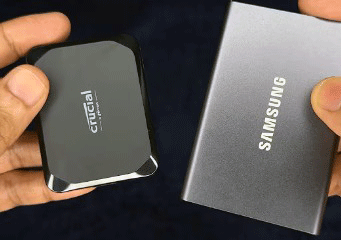
| Weight & Size | Very lightweight and smaller footprint | Slightly heavier and larger |
| Real-World Sustained Performance | Often sustains closer to peak | Slight throttling in long transfers |
| Price for 1TB (approx.) | Lower, better value | Higher, brand premium |
My Experience With Crucial X9
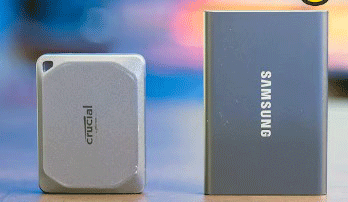
I first grabbed the Crucial X9 because it looked like a no-nonsense option at a solid price.
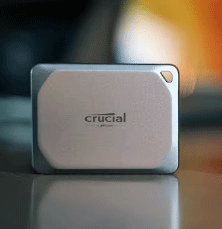
The moment I unboxed it, I noticed how tiny and light it felt in my hand—almost like holding a credit card with some thickness.
Plugging it into my laptop via USB-C was seamless, and the included cable worked perfectly with both my Mac and Windows machines.
In daily use, transferring large video files felt snappy. I copied over 50GB of raw footage, and the speeds stayed consistent around 900-1000 MB/s for most of the job.
I didn’t see the kind of drop-off that sometimes happens with other drives after a few minutes. For photo editing workflows, where I pull hundreds of high-res images at once, it handled everything without making me wait around.
Heat was never an issue. Even after extended copying sessions, the aluminum body stayed cool enough to touch comfortably.
I appreciate the IP55 rating because I work in varied environments—sometimes dusty workshops or light rain outdoors—and I never worried about a splash or drop from my desk.
Security features are straightforward. The hardware encryption is there if I need it, though I mostly rely on my OS-level passwords. The drive mounts quickly, and I never had connection drops or weird disconnects during long sessions.
Overall, the Crucial X9 became my go-to for quick backups and on-the-go work because it just performs reliably without drama. I ended up using it more than my older drives simply because it’s so portable and consistent.
Also read: Comparison of Solidigm P44 Pro And 990 Pro
Pros Of Crucial X9
- Exceptional portability: The super-compact size and low weight make it easy to slip into any pocket or bag without adding bulk.
- Strong sustained performance: It holds close to advertised speeds longer during large file transfers, which saves time on big jobs.
- Better value pricing: Often costs less for the same capacity, giving more storage per dollar spent.
- Longer warranty period: Five years of coverage provides extra reassurance for long-term use.
- Efficient heat dissipation: The aluminum design keeps temperatures low, reducing any risk of performance drops from overheating.
- Consistent real-world speeds: In mixed file transfers like videos and photos, it delivers reliable throughput without sudden slowdowns.
- Broad compatibility: Works flawlessly with PCs, Macs, gaming consoles, and even some phones via USB-C.
- Quiet and vibration-free: No moving parts mean silent operation, perfect for quiet workspaces or video calls.
- Simple plug-and-play setup: No extra drivers needed, and it mounts instantly on most devices.
- Durable enough for everyday knocks: The IP55 rating handles dust and splashes well for typical mobile use.
Cons Of Crucial X9
- Lower IP rating than some rivals: IP55 is good but not as robust as IP65 or higher for extreme water exposure.
- No included rubberized protection: Lacks the extra grip layer that some competitors offer for rough handling.
- Encryption software less polished: While hardware encryption exists, the companion app isn’t as user-friendly as Samsung’s.
- Slightly less drop resistance: Rated for 7.5 feet, which is solid but trails some models claiming higher.
- Limited color options: Comes in fewer finishes compared to brands with more variety.
- No Thunderbolt support: Sticks to USB 3.2 Gen 2, so it won’t hit higher speeds on compatible ports.
- Basic packaging: The box and accessories feel minimal, without extras like multiple cables in some cases.
- Potential for minor firmware updates needed: Early units sometimes benefit from updates for optimal compatibility.
- Less brand recognition in some circles: Samsung’s name carries more weight for buyers who prioritize familiarity.
- No built-in keychain loop in base model: Some variants add this, but it’s not standard across all.
Maintenance Tips For Crucial X9
- Keep ports clean: Wipe the USB-C connector regularly with a soft cloth to avoid connection issues from dust.
- Avoid extreme temperatures: Store it between 0-70°C to maintain performance and longevity.
- Safely eject always: Use the eject function before unplugging to prevent data corruption.
- Update firmware when available: Check Crucial’s site periodically for improvements in compatibility.
- Use protective case if needed: Add a sleeve for extra scratch resistance during travel.
- Run occasional disk checks: Use built-in tools like CHKDSK or Disk Utility to verify integrity.
- Encrypt if handling sensitive data: Enable hardware encryption for added security layers.
- Don’t overload sustained writes constantly: Give short breaks in very large transfers to manage heat.
- Clean exterior gently: Use a microfiber cloth for fingerprints without harsh chemicals.
- Backup important files elsewhere: Treat it as primary storage but keep duplicates safe.
My Experience With Samsung T7
The Samsung T7 has been around longer, and I picked one up to compare directly.
The build feels premium right away—the aluminum shell has a nice matte finish, and the Shield version adds that rubber grip which makes it feel tougher for rough handling.
Speeds on paper match the Crucial, but in practice, I noticed slight differences. Short transfers flew at near-peak rates, but when moving bigger folders—like 100GB+—it tended to slow a bit more noticeably after sustained writes. Real-world numbers hovered around 800-950 MB/s depending on the file types.
I like the Samsung software suite. The portable app lets me set up password protection easily, and it works across devices. For someone who travels a lot and needs that extra layer of security without thinking too hard, it’s convenient.
Durability stands out, especially with the Shield model. I dropped it once from about waist height onto concrete, and it survived without a scratch or data issue. The IP65 rating gives peace of mind in wetter conditions compared to the X9.
Heat management is decent, but during heavy use, it warms up more than the Crucial. Not enough to throttle badly, but I could feel it getting warmer after 20-30 minutes of continuous transfers.
In the end, the T7 feels like a trusted name I can count on, but it didn’t wow me as much in speed consistency or size. I still reach for it when I want that rubberized protection.
Pros Of Samsung T7
- Premium build quality: The aluminum construction feels solid and looks sleek right out of the box.
- Excellent software integration: Samsung’s app makes password setup and management simple across platforms.
- Higher durability in Shield version: IP65 rating and better drop protection suit rugged lifestyles.
- Proven reliability over time: Many users report years of heavy use without failures.
- Good compatibility with older devices: Includes options for USB-A in some bundles.
- Consistent short-burst performance: Excels at quick file copies and everyday tasks.
- Strong security features: Easy-to-use encryption that works well for sensitive data.
- Wide availability: Easy to find in stores and online with good support.
- Rubberized grip on Shield: Adds extra protection against slips and minor impacts.
- Trusted brand ecosystem: Pairs well if you already use other Samsung products.
Cons Of Samsung T7
- Higher price for similar specs: You often pay more for the name and extras.
- More noticeable throttling on long transfers: Sustained writes can dip compared to competitors.
- Shorter warranty: Only three years, which feels limiting next to five-year options.
- Larger and heavier: Less pocket-friendly than ultra-compact rivals.
- Warmer during extended use: Heat buildup is more apparent in heavy workloads.
- Slightly lower peak consistency: Real-world tests show minor variations in speed holding.
- Rubber coating attracts dust: The Shield’s grip can pick up lint over time.
- No major speed edge: Matches but doesn’t exceed newer USB 3.2 Gen 2 drives.
- Fewer capacity jumps in some lines: Options top out similarly but at higher cost.
- Software can be overkill: The app adds features not everyone needs.
Read more: Comparison of Samsung 980 And 970 EVO Plus SSDs
Maintenance Tips For Samsung T7
- Eject properly every time: Always use the safe removal option to protect file system.
- Monitor temperature during heavy use: Pause if it feels excessively warm to avoid long-term wear.
- Clean rubber grip carefully: Use mild soap if dirty, but avoid submerging the drive.
- Update Samsung software: Keep the portable app current for best encryption and features.
- Store in cool, dry place: Avoid humidity to prevent any moisture-related issues.
- Perform regular backups: Don’t rely solely on one drive for irreplaceable data.
- Check for firmware updates: Samsung occasionally releases tweaks for performance.
- Use included cables: Stick to originals or quality replacements for stable connections.
- Avoid magnets or strong fields: Keep away from items that could interfere with electronics.
- Test periodically: Copy test files to confirm ongoing health.
Comparison With Other Brands
- Vs SanDisk Extreme series: SanDisk offers similar speeds but often at higher prices; Crucial X9 edges out on value and compactness.
- Vs WD My Passport SSD: WD provides good reliability, but Samsung T7 has better software; Crucial wins on sustained performance.
- Vs Seagate Fast SSD: Seagate focuses on ruggedness, similar to T7 Shield, but Crucial offers longer warranty and better pricing.
- Vs Lexar SL series: Lexar can be cheaper, but build quality lags; both X9 and T7 feel more premium.
- Vs ADATA SE series: ADATA competes on price, but Crucial and Samsung deliver more consistent real-world speeds.
- Vs OWC Envoy Pro: OWC targets pros with higher durability, but costs more; X9 provides similar everyday use at lower cost.
- Vs Transcend ESD series: Transcend is solid for budget, but lacks the polish of Samsung software or Crucial compactness.
- Vs LaCie Rugged SSD: LaCie excels in extreme conditions, but overkill and pricier for most users compared to these two.
- Vs Sabrent Rocket Nano: Sabrent offers tiny size like X9, but Samsung has stronger brand support ecosystem.
- Overall market position: Crucial X9 stands out for balanced value in 2025-2026, while Samsung T7 holds strong on trust and extras.
Frequently Asked Questions (FAQ)
The Crucial X9 often edges out with better sustained speeds during large transfers, staying closer to peak rates longer.
The Samsung T7 (especially Shield) has a higher IP65 rating and better drop protection; Crucial X9 offers solid IP55 but feels more compact and lightweight.
The Crucial X9 typically provides better value with lower prices for comparable capacities and a longer warranty.
Yes, the Crucial X9 runs cooler and throttles less during extended use; the T7 can warm up more noticeably.
Conclusion: For Both Products
I have put both the Crucial X9 and Samsung T7 through real daily tasks, and honestly, you can’t go wrong with either one—they’re both reliable portable SSDs that get the job done fast. If you’re looking for the best overall mix of speed consistency, compact size, lower cost, and longer warranty, I would go with the Crucial X9 every time—it’s become my personal favorite for most situations. But if you prioritize rugged protection, easy encryption software, and that familiar brand feel, the Samsung T7 is still a fantastic choice that won’t let you down. Think about your specific needs—like how rough you are with gear or how much you value portability—and pick the one that matches. Either way, you’ll end up with a drive that makes file handling way easier than older options. What matters most to you in a portable SSD?