
If you love creating custom stickers, labels, cards, or small iron-on projects without taking up half your kitchen table, the Cricut Joy Xtra deserves a spot in your craft room. It’s compact, easy to use, and gives you professional-looking results even if you’re just starting out. After months of daily use, I can confidently say it’s one of the best purchases I’ve made for quick, everyday crafting. Keep reading to see why I think you should grab one too.
My Experience With The Cricut Joy Xtra
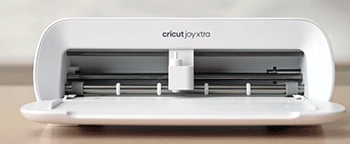
I bought my Cricut Joy Xtra about eight months ago, mostly because I was tired of my bigger machine hogging counter space for simple jobs like address labels or gift tags.
The first time I unboxed it, I was honestly shocked at how small and light it is—barely bigger than a loaf of bread. Setup took less than ten minutes: plug it in, download the Design Space app on my phone, and pair it via Bluetooth. No complicated drivers, no fuss.
My very first project was a set of waterproof vinyl labels for my spice jars. I cut them in under five minutes, weeded them easily, and they’ve survived months of dishwashing without peeling.
That moment alone made me fall in love with the machine. Since then, I’ve used it almost every week for everything from birthday cards to custom tote bags.
One thing that surprised me is how quiet it runs. My old machine sounded like a lawnmower; the Joy Xtra is whisper-quiet, so I can craft late at night without waking the house.
I also love that it handles Smart Materials perfectly. You don’t have to load a mat every time—just feed the roll in and let it go. For a mom who crafts while the kids nap, that speed is a game-changer.
I’ve also made a ton of iron-on transfers for the kids’ sports teams. The heat-transfer vinyl cuts cleanly and weeds without tearing.
I’ve even experimented with foil iron-on and glitter materials, and the results look store-bought. The only time I ran into trouble was when I tried to cut a thicker cardstock that wasn’t officially supported. The blade struggled, but once I switched to the recommended 80-lb cardstock, it was flawless.
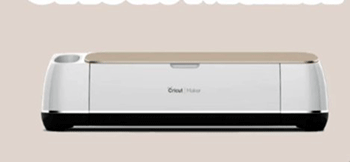
Overall, this little machine has become my go-to for small, fast projects. It’s not replacing my larger Cricut Maker for big vinyl banners or 3D paper crafts, but for 80% of what I actually make, it’s perfect. If you want something you can pull out, use, and put away in under 30 minutes, this is it.
Also read: My Thoughts on Knead Cat Bed
Pros Of The Cricut Joy Xtra
- Super Compact Size : At roughly 8.5 inches wide, it fits on any desk or shelf. I can store it in a drawer when I’m not using it, which is a huge win in my tiny craft corner.
- Fast And Quiet Operation : Projects that used to take 15 minutes now finish in 4-5. Plus, it’s so quiet I can run it while my toddler naps.
- Smart Materials Compatibility : You can cut without a mat using Cricut’s Smart Vinyl and Smart Iron-On. No sticky mats to clean, no curling edges—just feed and cut.
- Easy Mobile App Control : The Design Space app works great on my phone or tablet. I design and cut from the couch while watching TV.
- Affordable Price Point : It costs significantly less than the bigger Cricut models, making it easier to justify if you’re not ready to invest in a full-size machine.
- Great For Small Projects : Perfect for labels, cards, stickers, and small apparel. It handles up to 8.5 inches wide and 4 feet long, which covers most everyday needs.
- Reliable Bluetooth Connection : I’ve never had a disconnect mid-cut, even when my phone is across the room.
- Wide Range Of Supported Materials : It cuts over 50 materials, including cardstock, vinyl, iron-on, and some thin fabrics.
Cons Of The Cricut Joy Xtra
- Limited Cutting Width : Maximum 8.5 inches wide means you can’t make large banners or full-sheet stickers in one pass.
- No Built-In Scoring Wheel : Unlike the Maker series, it doesn’t have a scoring tool, so score lines on cards have to be done manually or with a separate tool.
- Fewer Advanced Features : No engraving, debossing, or perforating tools. If you want those, you’ll need a bigger machine.
- Requires Design Space Subscription For Some Features : Free version is limited; the full catalog and cloud saving need a paid subscription.
- Blade Replacement Can Add Up : While the fine-point blade lasts a long time, you’ll eventually need replacements, and they aren’t cheap.
- Not Ideal For Thick Materials : It struggles with heavy chipboard or thick leather—stick to the recommended materials.
- No Automatic Material Detection : You have to manually select the material type, unlike some newer models.
Maintenance Tips For The Cricut Joy Xtra
- Clean The Cutting Mat Regularly : Even though you can use Smart Materials without a mat, when you do use one, wipe it gently with a damp cloth after every few projects. Sticky residue builds up fast and can ruin cuts.
- Change The Blade Promptly : When the app tells you the blade is dull, replace it immediately. A worn blade tears vinyl instead of cutting it cleanly.
- Keep The Machine Dust-Free : Dust and pet hair can get inside the rollers. Use a soft brush or compressed air every month to clean the feed area.
- Store Smart Materials Properly : Roll them loosely and keep them away from direct sunlight so they don’t warp or lose adhesive.
- Update The Firmware Often : Every few months, check for updates in the app. New firmware often improves cut quality and fixes bugs.
- Use The Right Pressure Settings : If a material isn’t cutting cleanly, don’t just crank up the pressure. Test different settings first to avoid damaging the blade or mat.
- Lubricate The Rollers Occasionally : Every six months, run a cleaning strip (available from Cricut) or a piece of plain paper through the machine to keep the rollers smooth.
- Avoid Overloading The Machine : Don’t force thick materials through. If it feels like it’s struggling, stop and change your settings.
Read more: My Thoughts on Instaseal Vacuum Sealer
Comparison With Other Brands
Silhouette Cameo 4
The Silhouette Cameo 4 is a direct competitor and has a few advantages. It cuts up to 12 inches wide, so you can handle larger projects in one go. The software, Silhouette Studio, offers more precise control over cut paths and doesn’t require a subscription for basic features. However, it’s louder, heavier, and the Bluetooth connection can be finicky compared to the Joy Xtra’s rock-solid pairing.
Brother ScanNCut SDX125
Brother’s ScanNCut SDX125 stands out because it has a built-in scanner. You can place a hand-drawn sketch on the mat, scan it, and cut it automatically. It also cuts thicker materials better than the Joy Xtra. On the downside, it’s much bulkier, more expensive, and the software feels dated compared to Design Space.
Cricut Explore 3
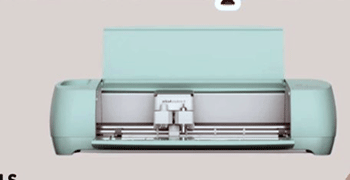
The Explore 3 is a step up in the Cricut family. It cuts faster and wider (up to 12 inches) and has a stronger motor for tougher materials. If you already own a lot of Cricut accessories, it’s an easy upgrade. But it’s larger, more expensive, and doesn’t offer the same grab-and-go simplicity that makes the Joy Xtra so appealing.
Sizzix eclips2
The Sizzix eclips2 is a budget-friendly option that works with free software. It’s compact like the Joy Xtra and doesn’t require a subscription. However, it lacks Smart Material support and the cut quality isn’t as consistent on vinyl. For basic cardstock cutting, it’s fine, but it can’t match the Joy Xtra’s ease of use.
Frequently Asked Questions (FAQ)
It excels at small to medium projects like custom labels, stickers, greeting cards, iron-on designs for T-shirts, tote bags, and short banners. It’s ideal for quick, everyday crafting.
Yes, it’s excellent for casual crafters who want professional results without a bulky machine. The ease of use, quiet operation, and reliable cuts make it a favorite.
Its main limits are the 8.5-inch cutting width, no scoring wheel, and inability to handle very thick materials. It’s not meant for large commercial projects.
Absolutely. The app is intuitive, the setup is fast, and you don’t need advanced skills to get great results right away.
Conclusion
After using the Cricut Joy Xtra almost daily for months, I can say it’s worth every penny if you want fast, fuss-free crafting. It won’t replace a full-size machine for huge projects, but for labels, cards, gifts, and apparel, it’s hard to beat. If you’re tired of bulky cutters and just want something simple that works beautifully, go ahead and buy the Joy Xtra—you’ll wonder why you waited so long.