
I’ve spent countless hours sweating it out on indoor bikes, chasing that perfect mix of motivation, performance, and value. In this article, I share my honest take on the Bowflex C6 versus the Peloton Bike, two popular choices for anyone serious about home cycling. My main intent here is to help you decide which one suits your lifestyle better by breaking down real features, costs, and experiences without the hype.
A Brief Comparison Table
| Feature | Bowflex C6 | Peloton Bike |
| Price (Approximate) | $899 – $999 | $1,695 |
| Built-in Screen | No (tablet holder) | Yes, 21.5″ HD touchscreen |
| Resistance Levels | 100 magnetic | 100 magnetic |
| Flywheel Weight | 40 lbs | ~38-40 lbs |
| Pedals | Dual-sided (toe cages + SPD clips) | SPD clips only |
| Included Accessories | 3-lb dumbbells | None |
| App Compatibility | Peloton, Zwift, JRNY, others | Peloton only (full features) |
| Monthly Subscription | Optional (~$13 for Peloton app) | $44-$49 All-Access |
| Warranty | Frame 10 years, parts 3 years | Frame 5 years, parts 1 year |
| Weight Capacity | 305 lbs | 297 lbs |
| Quiet Operation | Yes, belt-driven | Yes, belt-driven |
My Experience With Bowflex C6
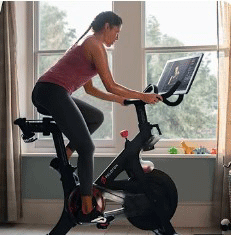
I have been using the Bowflex C6 for a solid stretch now, and it quickly became my go-to for daily rides.
The setup felt straightforward, with a sturdy steel frame that inspires confidence right away.
The 40-pound flywheel delivers a smooth, road-like feel, even during tough intervals.
Magnetic resistance adjusts precisely across those 100 levels, letting me fine-tune every session without any jerky changes.
What stands out most is the flexibility. I mount my tablet on the holder, sync to the Peloton app, and get live classes with metrics like cadence showing up perfectly.
The Bluetooth speakers pump audio clearly, so I never miss instructor cues. Those included 3-pound dumbbells come in handy for arm segments in bootcamp rides.
I appreciate the dual-sided pedals too—regular sneakers on one side for casual days, SPD clips on the other for serious efforts.
The bike stays whisper-quiet, which matters in my small apartment. Adjustments for seat and handlebars are easy, accommodating my height without hassle.
Over months of consistent use, it has held up beautifully with no wobbles or noises. The console tracks basics like time, distance, and calories reliably.
If you enjoy variety in apps or want to avoid lock-in, this bike opens up options like Zwift for virtual routes or JRNY for scenic rides.
It feels like a smart, practical choice that prioritizes performance over flash. I often finish rides feeling accomplished, and the lower ongoing costs keep me motivated long-term.
Also read: Comparison of Ritfit And Major Fitness
Pros Of Bowflex C6
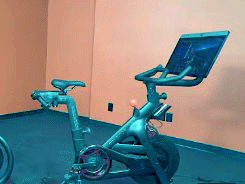
- Affordable Upfront Cost: You get a high-quality bike for under $1,000, making it accessible without breaking the bank.
- Versatile App Options: Connects seamlessly to Peloton, Zwift, JRNY, and more, so you choose what motivates you most.
- Included Dumbbells: Comes with 3-pound weights for added strength elements in classes, saving extra purchases.
- Dual-Sided Pedals: Use regular shoes or clip-ins without buying special footwear right away.
- Smooth And Quiet Ride: The 40-pound flywheel and belt drive provide realistic feel with minimal noise.
- Longer Warranty Coverage: Frame protected for 10 years and parts for 3, offering better peace of mind.
- Bluetooth Audio Integration: Speakers enhance sound from your device during workouts.
- Sturdy Build Quality: Heavy-duty frame supports intense sessions without flexing or instability.
- Easy Adjustments: Quick seat and handlebar tweaks fit various body types comfortably.
- No Subscription Required: Use it freely or add low-cost apps as needed.
- Portability Features: Transport wheels help move it when necessary.
- Value For Money: Delivers near-premium experience at a fraction of the cost of integrated-screen bikes.
Cons Of Bowflex C6
- No Built-in Screen: You need your own tablet or phone, which adds setup steps each time.
- Tablet Holder Limitations: Larger devices might not fit securely or align perfectly.
- Basic Console Display: Shows metrics but lacks advanced visuals or integrated programming.
- App Subscriptions Separate: You pay extra for premium classes, though cheaper than full Peloton access.
- No Auto-Adjust Features: Resistance changes manually, unlike some high-end models.
- Assembly Required: Takes time and effort, though instructions are clear.
- Less Immersive Without Screen: Misses the seamless, all-in-one feel of integrated displays.
- Potential For Device Dependency: Battery life or connectivity issues can interrupt rides.
- No Incline/Decline Simulation: Lacks dynamic terrain adjustments found in pricier bikes.
- Limited Built-in Workouts: Relies entirely on external apps for guided content.
Maintenance Tips For Bowflex C6
- Clean After Every Use: Wipe down the frame, seat, and handlebars with a damp cloth to remove sweat buildup.
- Check Pedals Regularly: Ensure clips and cages stay tight to prevent loosening during rides.
- Lubricate Chain If Needed: Though belt-driven, inspect for any unusual sounds and maintain as per manual.
- Adjust Tension Periodically: Keep resistance knob smooth by occasional checks.
- Keep Flywheel Area Dust-Free: Vacuum around the base to avoid debris affecting the mechanism.
- Store In Dry Place: Avoid humidity to prevent rust on metal parts.
- Inspect Bolts Monthly: Tighten any loose hardware from regular vibrations.
- Update App Connections: Ensure Bluetooth stays paired for accurate metrics.
- Use Protective Mat: Place under bike to protect floors and reduce noise further.
- Follow Warranty Guidelines: Document any issues promptly for support claims.
My Experience With Peloton
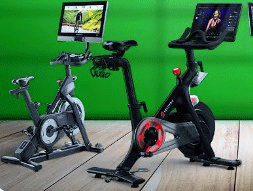
I’ve been using my Peloton Bike regularly for months now, and it’s become a real game-changer for my home workouts.
The moment I clip in, the large 21.5-inch touchscreen comes alive with bright, motivating classes that feel like I’m right in the studio.
The instructors are fantastic—some push me hard with high-energy music, others keep things fun and encouraging, which helps me stay consistent even on low-motivation days.
The ride itself is smooth and quiet, with precise magnetic resistance and accurate real-time metrics like cadence, output, and heart rate (when I pair my monitor).
I love the leaderboard for that extra competitive spark and the high-fives from other riders—it makes me feel connected even when I’m sweating alone in my room.
Classes range from quick 15-minute rides to longer endurance sessions, plus off-bike strength and yoga options that round out my routine perfectly.
What stands out most is how easy it is to show up. No commute, no excuses—just turn it on and go. I’ve built streaks I never thought possible, and I finish rides feeling stronger and more energized.
Yes, the subscription adds cost and I had to buy shoes separately, but the immersion and variety keep me coming back. For anyone who wants guided, community-driven workouts at home, Peloton delivers an experience that’s hard to beat.
Read more: Comparison of Planet Fitness And Crunch Gym
Pros Of Peloton
- Integrated Touchscreen: 21.5-inch HD display makes classes effortless and immersive.
- Huge Class Library: Thousands of live and on-demand sessions with top instructors.
- Community Features: Leaderboards and high-fives create engaging social motivation.
- Smooth Premium Ride: Excellent build and resistance for realistic cycling feel.
- Swivel Screen: Rotate for off-bike workouts like strength or yoga.
- Personalized Metrics: Tracks progress with detailed stats and programs.
- High-Quality Audio: Built-in speakers deliver clear instructor guidance.
- Regular Updates: Software improvements keep the experience fresh.
- Trial Period: 30-day home trial reduces risk.
- Brand Reputation: Strong community and reliable performance.
Cons Of Peloton
- High Initial Cost: Bike price significantly higher than alternatives.
- Expensive Subscription: Monthly fee adds up quickly for full access.
- Locked Ecosystem: Limited to Peloton content without full features.
- Shoes Required: Needs specific cleats, adding extra expense.
- Shorter Warranty: Parts coverage only one year in many cases.
- No Included Weights: Extra purchases needed for strength segments.
- Larger Footprint: Requires more dedicated space.
- Potential For Higher Maintenance: Complex electronics may need support.
Comparison With Other Brands
- Vs Peloton: Bowflex offers similar ride quality at half the price with more app freedom.
- Vs Echelon: Bowflex provides better warranty and included weights, though Echelon has some screen options.
- Vs NordicTrack: Bowflex stays more affordable while matching magnetic resistance smoothness.
- Vs Schwinn IC4: Essentially similar bike, but Bowflex branding often includes extras like JRNY trial.
- Vs SoulCycle: Bowflex emphasizes versatility over music-focused rhythm classes.
- Vs ProForm: Bowflex avoids heavy subscription lock-in common with iFit.
Frequently Asked Questions (FAQ)
The Bowflex C6 matches Peloton in ride quality and resistance but costs less upfront, offers more app choices, and includes extras like dumbbells.
Yes, it provides a sturdy, quiet, and versatile ride that performs well for daily use and app-based classes.
Many prefer Bowflex C6 for value, or NordicTrack models for added features like incline.
Brands like Bowflex, Echelon, and NordicTrack lead as strong alternatives.
Conclusion: For Both Products
I have weighed both options carefully, and the choice comes down to your priorities. If you want an immersive, all-in-one experience with a vibrant community, go for the Peloton—you will love the convenience and energy. But if you prefer saving money, gaining flexibility with apps, and still getting a fantastic ride, the Bowflex C6 wins for me every time. You know your budget and workout style best. Whichever you pick, consistent rides will transform your fitness. What do you think fits you? Share your thoughts!