
If you’ve been searching for a large-format E Ink tablet that truly feels like paper while giving you the power to handle massive PDFs, take endless notes, and stay productive without eye strain, you should seriously consider buying the Boox Note Max. This 13.3-inch beast stands out in a crowded market because it combines a razor-sharp 300 PPI display, Android flexibility, and a premium writing experience that makes it worth every penny for anyone serious about digital reading and annotation. Trust me—once you go big with this device, smaller screens feel cramped and limiting.
My Experience With Boox Note Max
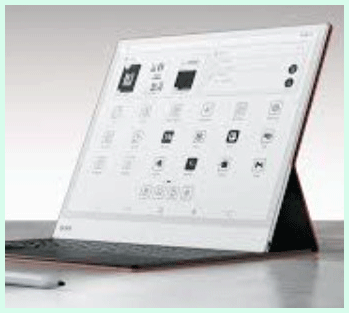
I picked up the Boox Note Max a few months ago, mainly because I was tired of squinting at A4-sized PDFs on my old 10-inch tablet.
The moment I unboxed it, the size hit me—it’s genuinely A4-like, measuring about 11.3 by 9.6 inches, and at just 4.6mm thick and 615 grams, it feels surprisingly manageable despite the footprint.
I remember holding it up next to a standard sheet of paper, and the match was almost perfect.
No more constant zooming or scrolling sideways; everything fits naturally.
Right away, I loaded some dense research papers and textbooks. The 13.3-inch Carta 1300 screen with 3200 x 2400 resolution at 300 PPI delivers incredible clarity—text looks crisp, lines are sharp, and diagrams pop without any pixelation.
I spent hours annotating a 200-page PDF for a project, underlining key sections, circling figures, and adding margin notes. The included Boox Pen Plus stylus responds beautifully with 4096 levels of pressure sensitivity.
Writing feels natural, almost like putting pen to paper, with just the right amount of friction. I could vary my line thickness effortlessly for headings versus fine details.
What surprised me most was how the Android 13 base opens everything up. I installed NeoReader for advanced PDF handling, OneNote for syncing notes across devices, and even Google Drive for seamless backups.
Split-screen mode lets me keep a reference document open on one side while jotting ideas on the other—no interruptions. I took it to meetings (yes, it’s big, but I prop it on the table), dictated quick voice notes using the built-in microphone, and played soft ambient music through the dual speakers during long reading sessions.
Battery life held up well; with Wi-Fi mostly off and moderate use, I easily got 4-5 days before needing a charge. The 3700mAh battery isn’t massive, but the E Ink efficiency makes it last.
There were a couple of adjustments. At first, I noticed occasional faint ghosting after fast page turns, but tweaking the refresh modes in settings (like using Super Refresh for smoother motion) mostly fixed that.
No front light means it’s best in well-lit areas, which suits my daytime desk setup perfectly—direct sunlight actually makes the screen look even better, with zero glare.
I carried it in a backpack without issue, though it’s not something I’d toss in a small purse. Overall, this device transformed how I work with documents.
I no longer print stacks of paper or strain on smaller screens. It’s become my go-to for deep focus sessions, and I catch myself reaching for it over my laptop more often than not.
If you deal with large files or crave that paper-like feel on a grand scale, you’ll understand why I can’t go back.
Also read: My Thoughts on Klipsch The One Plus
Pros Of Boox Note Max
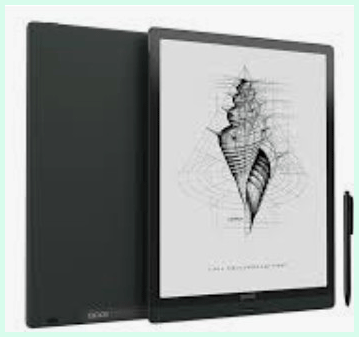
- Large And Crisp Display : The 13.3-inch screen at 300 PPI gives you true A4 viewing without compromises, making PDFs and textbooks feel effortless and readable.
- Exceptional Writing Feel : You get smooth, pressure-sensitive stylus input that mimics real pen-on-paper, perfect for long note-taking without fatigue.
- Powerful Performance : With a 2.8GHz octa-core processor and 6GB RAM, the device handles multitasking, large files, and app switching quickly for an E Ink tablet.
- Android Versatility : Full Android 13 access to Google Play means you install any app you need, from productivity tools to cloud services, expanding far beyond basic note-taking.
- Solid Build And Portability : It’s remarkably thin at 4.6mm and sturdy, so you can hold it comfortably despite the size, and it travels well in a bag.
- Audio Features : Built-in speakers and microphone let you listen to podcasts or dictate notes hands-free, adding real utility.
- Long Battery In Practice : Expect several days of mixed use thanks to E Ink efficiency, even with occasional app activity.
- Customizable Refresh Modes : Options like Super Refresh keep things snappy for scrolling or annotations without excessive ghosting.
- Ample Storage : 128GB gives plenty of room for documents, books, and apps, with expansion possible via cloud.
- Distraction-Free Yet Capable : The E Ink reduces eye strain compared to LCD screens, while Android adds just enough flexibility without overwhelming notifications.
Cons Of Boox Note Max
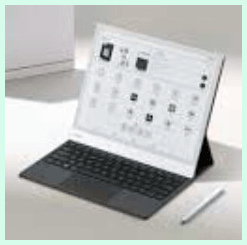
- No Front Light : Without adjustable lighting, it’s less ideal for low-light or bedtime reading, limiting versatility in dim environments.
- Higher Price Point : At around $630-$700, it costs more than smaller E Ink devices, so you pay a premium for the large size and power.
- Size And Weight Trade-Off : The big footprint makes it less pocketable or one-handed friendly; you need a table or lap for extended sessions.
- Occasional Ghosting : Fast movements can leave faint remnants, though refresh tweaks minimize this—it’s not perfect out of the box.
- Battery Not Endless : While good for E Ink, heavy app use or constant refreshing drains it faster than minimalist competitors.
- Android Tweaks Needed : The OS offers freedom, but optimizing settings for best performance takes some initial effort.
- Stylus Lacks Eraser Button : The included pen works great, but no quick eraser means relying on gestures or on-screen tools.
Maintenance Tips For Boox Note Max
- Keep The Screen Clean Regularly : Wipe the display gently with a microfiber cloth every few days to remove fingerprints or dust—you avoid buildup that could affect stylus glide or clarity.
- Protect With A Case Or Folio : Always use the official or compatible cover when transporting it; this prevents scratches on the glass and adds a layer against drops.
- Manage Battery Health : Charge to 80-90% most times instead of full, and avoid letting it drop below 20% often—this extends the 3700mAh battery’s lifespan over years.
- Update Firmware Promptly : Check for OTA updates monthly through settings; Boox releases improvements for refresh, ghosting, and app compatibility that enhance performance noticeably.
- Optimize Refresh Settings : Experiment with modes like Balanced or Super Refresh based on your task—use faster ones for active note-taking and standard for reading to balance smoothness and battery.
- Store Stylus Properly : Keep the pen in its slot or a safe spot to prevent loss or damage; clean the tip occasionally if it picks up debris for consistent writing.
- Backup Notes Frequently : Sync your notebooks to cloud services like Google Drive or OneDrive automatically—this ensures you never lose important annotations if something happens.
- Avoid Extreme Temperatures : Don’t leave it in hot cars or freezing conditions for long; E Ink panels and batteries perform best in moderate room temperatures.
- Calibrate Touch Occasionally : If stylus response feels off after heavy use, recalibrate in settings to maintain precision.
- Monitor Storage Usage : Clear cache from apps periodically and delete unused files; with 128GB, you stay organized and prevent slowdowns.
Comparison With Other Brands
Versus reMarkable Tablets : reMarkable focuses on minimalist, distraction-free note-taking with an incredibly paper-like feel and excellent organization tools. The Note Max counters with full app access, faster processing for PDFs, and audio features, while reMarkable wins on battery longevity and simplicity—no Android bloat. If you want pure focus without extras, reMarkable edges out, but for versatile document work, the Note Max pulls ahead.
Versus Kindle Scribe : Amazon’s Scribe offers a front light for any lighting and tight integration with Kindle books, plus a premium pen option. The Note Max blows it away in screen size for full-page PDFs, raw performance, and open ecosystem—you aren’t locked into Amazon’s store. Kindle feels more polished for casual reading, but the Note Max dominates productivity on large files.
Versus Supernote Devices : Supernote excels at intuitive notebook management, with linking, tagging, and a clean interface that feels thoughtful for writers. The Note Max provides a bigger canvas, stronger hardware for multitasking, and Android apps for broader use cases. Supernote might suit dedicated note-takers who prioritize organization, while the Note Max appeals if you need power and flexibility.
Versus Other Boox Models : Smaller Boox like the Note Air series trade size for portability and sometimes add front lights or color. The Note Max stands out for its expansive 13.3-inch workspace at high resolution, ideal when you refuse to compromise on viewing area. If desk-bound work is your priority, this model justifies choosing bigger over smaller siblings.
These comparisons highlight why the Note Max fits specific needs so well—you get scale and capability that others can’t match directly.
Read more: My Thoughts on Nikon FTZ Vs. FTZ II
Frequently Asked Questions (FAQ)
You get outstanding results across the board. Reading large PDFs feels natural with full-page views and crisp text. Note-taking shines thanks to the responsive stylus and spacious area for handwriting or sketching. Productivity benefits from split-screen, app support, and cloud syncing, making it a solid workstation for focused tasks.
The display offers top-tier 300 PPI sharpness for paper-like clarity, though no front light limits dim rooms. Battery lasts days with typical use, thanks to E Ink efficiency. Stylus input feels premium with pressure sensitivity and low latency, delivering a natural writing sensation.
Yes, especially if you value the massive screen, high performance, and Android freedom. It costs a premium, but delivers more versatility and better PDF handling than most rivals in its class, making the investment pay off for heavy users.
It manages apps smoothly with strong hardware and full Play Store access. Versatility stands out—you run productivity suites, browsers, or custom tools. Overall performance stays snappy for an E Ink device, with minimal lag even on demanding tasks.
Conclusion
In the end, the Boox Note Max earns its place as a top choice for anyone needing a large, capable E Ink companion. If massive screen real estate, strong note-taking, and flexible Android features matter to you, go ahead and get one—you won’t regret upgrading to this level of productivity and comfort. It’s not just a gadget; it’s a genuine paper replacement that enhances how you think and work every day.