
I recently found myself in a coffee shop, hunched over my laptop, frantically Alt-Tabbing between a spreadsheet and a video call. I felt cramped. I missed my dual-monitor setup at home. If you are a remote worker, a student, or a gamer with a Steam Deck, you have probably felt this pain. You want a second screen, but you don’t want to carry a heavy, fragile slab of glass in your backpack.
Enter the Arzopa Portable Monitor. If you have been browsing Amazon, you have likely seen this brand pop up with high ratings and surprisingly low prices—often dipping under $100. It sounds perfect, but can a screen that cheap actually be good? Or is it just electronic waste waiting to happen?
I bought the popular Arzopa S1 Table (and have tested the Z1FC gaming model) to see if these budget screens can survive the rigors of daily travel. In this review, I’ll break down the real-world experience of using an Arzopa monitor, the frustrations you might face, and whether it’s the right upgrade for your mobile setup.
My Experience With Arzopa Portable Monitors
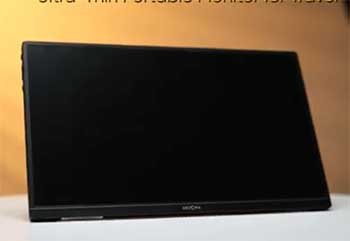
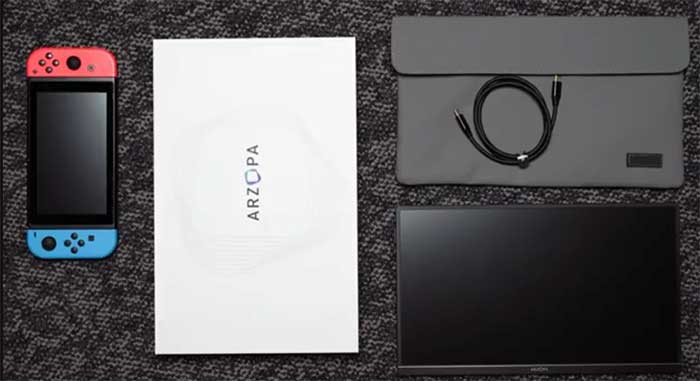
When the package arrived, I was surprised by how slim the box was.
The monitor itself is incredibly thin—about the thickness of a pencil at its widest point.
It felt less like a piece of hardware and more like a heavy tablet.
I opted for the 15.6-inch model, which is the standard laptop screen size.
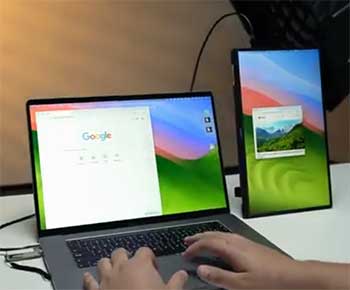
The setup was the definition of “plug and play,” which is a phrase tech companies love to abuse, but here it was actually true. I plugged the included USB-C cable into my MacBook Air and the other end into the monitor. Boom. The screen lit up instantly. No drivers, no power bricks, no searching for outlets. It drew power and video signal directly from my laptop. This single-cable solution is arguably the “magic” moment of this product.
I spent the next week working from various locations: my kitchen table, a library, and a hotel room. The 1080p IPS panel is surprisingly crisp. Text looks sharp, and while the colors aren’t “photographer grade” accurate, they are vibrant enough for YouTube, Excel, and coding.
I also tested it with my Nintendo Switch. This is where the Arzopa shines. I connected the Switch directly to the monitor via USB-C (and plugged a power bank into the monitor’s second port). It bypassed the need for the bulky Nintendo dock entirely. Playing Mario Kart on a 15-inch screen in the back of a car is a game-changer.
However, it wasn’t all perfect. The “Smart Cover” that doubles as a stand is… frustrating. It uses magnets to hold the monitor up, similar to an iPad case, but the magnets are weak. If you nudge the table too hard, the monitor has a tendency to flop over. I eventually bought a cheap tablet stand to hold it up securely, which I highly recommend you do too.
Also read: My Thoughts On Ting Electrical Monitor
Pros Of Arzopa Portable Monitors
- Insane Value For Money: This is the undeniable winner. You can often find the S1 or A1 models for around $80–$120 during sales. Compare that to the ASUS ZenScreen or ViewSonic equivalents that can cost $200+, and the Arzopa is a steal. You are getting 90% of the functionality for 50% of the price. For a secondary display that gets tossed in a bag, this low entry price makes it much less painful if it eventually gets dinged or damaged.
- True Single-Cable Connectivity: If your laptop has a Thunderbolt 3/4 or a fully-featured USB-C port, you only need one cable. The monitor pulls power and video from your laptop. This keeps your travel setup minimalist. You don’t need to hunt for a wall outlet at the airport just to use your second screen.
- Pass-Through Charging: The monitor usually has two USB-C ports on the side. If you plug your laptop charger into the monitor, the monitor will pass that power through to your laptop (while also displaying the video). This is incredibly useful for devices with limited ports, like the MacBook Air or the Steam Deck, allowing you to charge and play simultaneously.
- Surprisingly Good Screen Quality: For a budget panel, the IPS screen is solid. Viewing angles are good (you don’t have to look at it dead-on to see the image), and the 1080p resolution at 15.6 inches provides a pixel density that looks sharp. The gaming models (like the Z1FC) even offer a 144Hz refresh rate, which makes mouse movements and gaming feel incredibly smooth compared to standard 60Hz office monitors.
- Ultra-Lightweight: Weighing in at around 1.7 lbs (depending on the model), it adds barely any bulk to your backpack. It fits easily into the laptop sleeve alongside your computer. If you are used to carrying a heavy tablet or bulky gear, you will barely notice this is there.
Cons Of Arzopa Portable Monitors
- The “Smart” Cover Is A Letdown: As mentioned, the magnetic cover is the weakest link. It is finicky to fold correctly, and it isn’t very stable. It offers two angles, but neither feels confident. If you are typing heavily on the same table, the screen might wobble. Plan on propping it up against a book or buying a separate stand for $10.
- Brightness Struggles Outdoors: Most Arzopa panels top out around 300 nits of brightness. This is perfectly fine for a coffee shop or office, but if you try to work outside on a sunny patio, you will struggle to see the screen. It is not bright enough to combat direct sunlight or very harsh overhead lighting.
- Audio Is Tinny: It has built-in speakers, but they are not great. They sound like cheap cellphone speakers—flat and quiet. They are fine for a system beep or a quick voice memo, but for watching a movie or gaming, you will definitely want to use your laptop speakers or headphones.
- Build Quality Feels Plasticky: To hit that low price point, the chassis is made of plastic, not aluminum. It feels a bit hollow. While it doesn’t feel like it will fall apart in your hands, it certainly doesn’t have the premium “Apple-like” feel of more expensive competitors. You need to be careful not to sit on your bag when this is inside.
- Confusing Model Names: Arzopa releases many models that look nearly identical (S1, A1, Z1, G1). Some have better color gamuts (100% sRGB vs 72%), some have higher refresh rates, and some are slimmer. It can be hard to know exactly which specs you are getting without reading the fine print on the product listing carefully.
Maintenance Tips For Arzopa Portable Monitors
- Protect The Ports: The USB-C and Mini-HDMI ports on the side of the monitor are soldered directly to the mainboard. They are the most common failure point. Do not transport the monitor with cables plugged in. When you unplug a cable, pull it straight out; do not wiggle it up and down, or you will eventually loosen the port and lose connection.
- Get A Proper Sleeve: While the magnetic cover protects the screen glass, it leaves the sides and corners exposed. If you throw this in a backpack with keys or a charger, the plastic edges can get scratched or cracked. I recommend buying a padded laptop sleeve specifically for the monitor to provide 360-degree protection.
- Gentle Cleaning Only: The screen usually has a matte anti-glare coating. Do not use Windex or alcohol-based cleaners, as they can strip this coating. Use a dry microfiber cloth (like for glasses) to wipe away dust. If you have a stubborn smudge, use a tiny amount of distilled water on the cloth (not the screen) and wipe gently.
- Manage Your Cables: The cables included are usually decent quality, but they can fail if bent sharply. Avoid wrapping the cables tightly around the monitor or the power brick. Coil them loosely in a circle to prevent the internal wires from fraying, which causes that annoying “No Signal” flickering.
- Check Firmware/OSD Settings: If the colors look washed out or “weird” out of the box, use the scroll wheel on the side to enter the OSD (On-Screen Display) menu. Ensure “HDR” is turned off for normal Windows/Mac work (HDR on budget monitors often looks gray and washed out). Adjust the “Color Temp” to “User” or “6500K” for the most natural look.
Also read: My Thoughts On Moen Flo Smart Water Monitor
Comparison with Other Brands
- Arzopa vs. ASUS ZenScreen:ASUS is the premium choice. Their ZenScreens often have metal builds, built-in batteries (on some models), and tripod mounts. They feel sturdier and look more professional. However, they cost significantly more. Arzopa uses the same underlying panel technology (often similar IPS screens) for half the price. If you don’t need a built-in battery, Arzopa is the better value.
- Arzopa vs. Lepow:Lepow was the original king of budget portable monitors on Amazon. For years, they were the go-to. However, Arzopa has largely overtaken them recently by offering slimmer bezels, better color gamuts (on the “Gamut” models), and often lower prices. Lepow monitors are still solid, but they often look a bit dated compared to the newer Arzopa designs.
- Arzopa vs. iPad (Sidecar):If you already own an iPad, you can use it as a second screen for a Mac using “Sidecar” or for PC using “Duet Display.” The iPad screen is vastly superior—brighter, higher resolution, and better colors. However, an iPad is a $300+ device with a 10-inch screen. The Arzopa gives you a much larger 15.6-inch canvas for $100. For spreadsheets and coding, the extra size of the Arzopa wins; for color-critical art, the iPad wins.
- Arzopa vs. KYY / Cocopar:You will see brands like KYY and Cocopar right next to Arzopa. Honestly? They are often produced in similar factories. The differences are minor. Arzopa tends to have slightly better sales support and more frequent discounts. If you see a KYY monitor with identical specs for $20 less, it’s safe to buy it, but Arzopa generally has a slightly better track record for consistency.
Frequently Asked Questions (FAQ)
Yes. Because the iPhone 15 series switched to USB-C, you can plug the phone directly into the monitor using the included USB-C cable. It will mirror your screen immediately. For older iPhones (Lightning port), you will need a specific Lightning-to-Digital AV adapter and an HDMI cable, and you will need to power the monitor separately.
Most standard Arzopa models (like the S1, A1, Z1FC) do not have a built-in battery. They rely on your laptop or a wall outlet for power. This keeps them lightweight and travel-friendly. If you plug it into a phone or Switch without external power, it will drain your device’s battery quickly.
Absolutely. It has a Mini-HDMI port specifically for consoles. You can connect your PS5 or Xbox using the HDMI cable (included). Note that since the monitor doesn’t have a battery, you will need to plug the monitor into a wall outlet using a USB phone charger when using it with a console. The Z1FC model supports 144Hz, making it excellent for high-frame-rate gaming.
This is the most common issue. It usually means the device you plugged it into doesn’t output enough power to run the screen. Try plugging a USB charger into the monitor’s second USB-C port to give it dedicated power. Also, ensure you are using the USB-C cable that came with the monitor (or a high-quality video-rated cable), not a cheap charging cable from a gas station.
Conclusion
So, is the Arzopa portable monitor worth it? If you need more screen real estate but don’t want to spend a fortune, the answer is a resounding yes. It transforms a cramped laptop setup into a productivity powerhouse that fits in a backpack.
While the kickstand cover is annoying and the audio is forgettable, the core experience—the screen itself—is excellent for the price. It is the perfect companion for students, digital nomads, and gamers on the go. You can check the current deals on the Arzopa Official Store or find it on Amazon where it is frequently on sale.