
In the world of horology, few names carry the nostalgic weight of Armitron. For decades, they were the go-to brand for durable, affordable digital watches that could survive a childhood in the 90s or a rugged job site. But times change, and the trusty digital display has been replaced by the demand for heart rate monitors, notification pings, and step counters. Enter the Armitron Connect series—the heritage brand’s attempt to bridge the gap between their classic durability and modern smart technology.
You have likely seen these watches in department stores or populating Amazon search results with attractive price tags that undercut the Apples and Samsungs of the world by hundreds of dollars. The design often looks sleek, borrowing cues from high-end competitors, but the question remains: is this a legitimate smart wearable, or just a digital watch playing dress-up? In this comprehensive review, I am going to analyze the Armitron smart watch experience, breaking down its functionality, accuracy, and daily usability to help you decide if it is a bargain gem or a budget trap.
My Experience With The Armitron Connect Matrix
I decided to pick up the Armitron Connect Matrix model because I wanted to see if a sub-$100 watch could actually replace my daily driver for basic tasks. I wasn’t looking for something to track a triathlon; I just wanted to see my texts without pulling out my phone and maybe count my steps during the workday. The packaging was simple, devoid of the premium “unboxing experience” you get with high-end tech, but it felt honest. Inside was the watch, a magnetic charging cable, and a quick-start guide.
Setting it up was a mixed bag.
I had to download the proprietary “Armitron Connect” app, which had a user interface that felt a few years behind the curve.
Pairing took two tries, but once connected, the watch sprang to life.
The first thing I noticed was the screen quality. On the Matrix model, the display was surprisingly vibrant for the price point. It didn’t have the infinite blacks of an OLED Apple Watch, but the colors punched enough to be readable indoors.
For the first week, I wore it exclusively. On the wrist, it is incredibly lightweight—almost to a fault. It lacks the dense, premium heft of a stainless steel divers watch, feeling more like the resin sports watches Armitron is famous for. This was actually a plus for sleeping; I barely noticed it was there, which made sleep tracking much more comfortable than with bulky competitors.
The notification system worked, but it was rudimentary. I could see who was texting me and read the first few lines of an email, which is really all I needed. However, the vibration motor was loud and buzzy rather than a subtle haptic tap. It felt less like a gentle nudge and more like a tiny angry bee on my wrist. In quiet meetings, I actually turned it off because the “zzzt-zzzt” sound was audible to people sitting next to me.
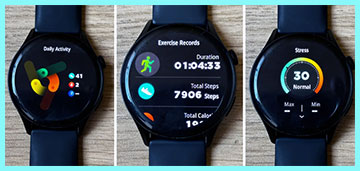
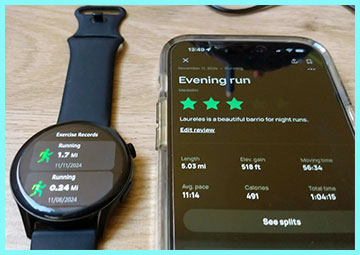
The fitness tracking is where I started to see the limitations. I took it on a verified 3-mile run alongside a GPS-enabled Garmin. The Armitron was generous with my steps, clocking me at nearly 4 miles. It seems to count arm movements as steps more aggressively than higher-end sensors. The heart rate monitor was decent for resting rates, but during high-intensity intervals, it struggled to keep up, often lagging behind my actual pulse by 10-15 seconds.
Battery life, however, was a standout win. I squeezed about four days of usage out of it before needing the charger, which included 24/7 heart rate monitoring and sleep tracking. For a budget device, not having to charge it every night was a massive relief. Ultimately, my experience was that of a “notification mirror” rather than a true smart computer. It kept me connected, but I wouldn’t trust it to train for a marathon.
Read More: My Thoughts On Tikland Smart Watch
Pros Of Armitron Smart Watch
When you look at the Armitron Connect line through the lens of value, it has some undeniable strengths. It is not trying to be a $400 computer; it is trying to be a functional accessory. Here are the specific areas where it succeeds.
- Exceptional Battery Life for the Price: One of the biggest pain points of modern wearables is the need for daily charging. The Armitron watches typically offer a multi-day battery life, often ranging from 3 to 5 days depending on usage. This is largely because the operating system is lighter and less power-hungry than WearOS or watchOS. You can go away for a weekend trip without needing to pack yet another proprietary charging cable. For users who often forget to charge their devices, this forgiveness is a major selling point.
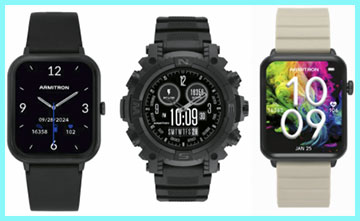
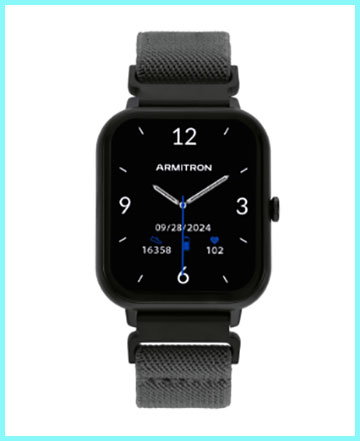
- Classic and Familiar Aesthetics: Unlike the generic black squares that flood the budget market, Armitron designs their smartwatches to look like watches. Many models feature round faces, textured bezels, or integrated lugs that mimic traditional sport watches. They don’t scream “I am wearing a piece of technology,” which allows them to blend in better with casual or business casual attire. The brand understands style better than many tech-first companies, offering colorways like rose gold, navy, and gunmetal that look surprisingly premium from a distance.
- Simple and Approachable Interface: If you are buying this for a child, a senior, or someone who is not tech-savvy, the simplicity is a pro. The menu system is not cluttered with app stores, complications, or complex settings. You swipe to see your steps, swipe again for heart rate, and press a button to go home. It removes the “paralysis by analysis” that can happen with complex devices. It does the basics—time, weather, messages, health—without forcing you to learn a new operating system.
- Accessible Price Point: The barrier to entry is incredibly low, often hovering between $50 and $90. This makes it a low-risk purchase. If you scratch it, lose it, or decide you hate wearing a smartwatch, you aren’t out a significant investment. It allows you to dip your toes into the world of wearables to see if you like the lifestyle before committing to a flagship device. For parents, it is a great “starter watch” for teenagers that provides connectivity without the cost of an Apple Watch SE.
Cons Of Armitron Smart Watch
Despite the attractive price, corners had to be cut to get there. The limitations of the hardware and software become apparent quickly if you are used to premium tech.
- Inaccurate Fitness Sensors: If you are a serious athlete or data nerd, this watch will frustrate you. The step counter is prone to “ghost steps,” registering movements like typing or driving as walking. The heart rate sensor lacks the sampling rate and precision needed for HIIT workouts or zone training. It provides a general ballpark estimate rather than medical-grade data. You cannot rely on the calorie burn estimates for strict weight loss tracking, as they are often inflated based on the generous step count.
- Limited App Ecosystem and Support: You are locked into the proprietary Armitron app, which is functional but buggy. There is no app store, so you cannot download Spotify, Strava, or Google Maps onto the watch. If the app decides to crash or fails to sync (which happens occasionally), you have no alternative way to get your data off the watch. The app updates are infrequent compared to major tech companies, meaning bugs can persist for months without a fix. Data export to platforms like Apple Health or Google Fit can be hit-or-miss depending on the current app version.
- Build Materials Feel Budget: While they look good, the tactile feel reveals the cost-cutting. The screens are typically covered in plastic or basic mineral glass rather than Gorilla Glass or sapphire, making them prone to scratches. The cases are often made of ABS plastic that can feel hollow or cheap compared to aluminum or steel. The included silicone straps can be stiff and less breathable than premium bands, leading to sweat buildup and skin irritation if worn too tight.
- Connectivity and Notification Issues: The Bluetooth connection is not as rock-solid as higher-end devices. You may find that the watch randomly disconnects from your phone, requiring you to open the app to force a re-sync. Notifications sometimes arrive with a delay, or they arrive in a batch all at once. The text on the screen is often static; you can read the message, but you usually cannot reply, tap to open, or interact with it in any meaningful way.
Maintenance Tips For Armitron Smart Watch
To keep a budget device running smoothly for the long haul, you need to treat it with a bit of care. The materials are not as resilient as flagship models, so preventative maintenance is key.
- Clean the Charging Contacts Regularly: The most common failure point for these watches is the charging mechanism. Sweat and skin oils build up on the metal contact points on the back of the watch. Over time, this corrosion prevents the magnetic charger from making a solid connection. Use a Q-tip dipped in rubbing alcohol to gently scrub the gold pins on the back of the watch once a week. This simple step can prevent the “it won’t charge anymore” issue that plagues many users after a few months.
- Wash the Strap and Wrist: The silicone bands used by Armitron are durable but they trap moisture. If you wear it while working out or doing dishes, water gets stuck between the band and your skin. Take the watch off daily to rinse the band with soap and water, and dry your wrist thoroughly. This prevents “watch rash” (contact dermatitis), which is common with non-breathable silicone bands. If the strap becomes sticky or degrades, replace it immediately; most use standard quick-release pins (20mm or 22mm).
- Manage Your Battery Cycle: Lithium-ion batteries in budget devices can degrade if mistreated. Try not to let the watch drop to 0% completely, as deep discharging can stress the battery chemistry. Aim to charge it when it hits around 20%. Conversely, do not leave it plugged in for days at a time. Once it hits 100%, take it off the charger to preserve the long-term health of the cell.
- Force Sync for Firmware Updates: Since the watch relies entirely on the phone app for brains, you need to keep the software current. Open the Armitron Connect app at least once a week to sync data and check for firmware updates. These updates often fix connectivity bugs or improve sensor algorithms. If you notice the watch acting glitchy, a “hard reset” (usually found in the settings menu) followed by a fresh pair with the app can often resolve software gremlins.
Comparison with Other Brands
The sub-$100 smartwatch market is a battlefield. Here is how Armitron compares to the other major players fighting for your wrist.
- iTouch Air 3 / Air SE: This is arguably Armitron’s biggest direct competitor in the department store aisle. Comparison: iTouch and Armitron share very similar DNA—both are fashion-forward budget trackers. iTouch often edges out Armitron in terms of screen quality, with some models featuring slightly sharper displays and better touch responsiveness. However, Armitron generally wins on rugged aesthetics and water resistance claims on their sportier models. The apps for both are similar in their limitations. If you want something that looks like an Apple Watch, iTouch is the better clone; if you want something that looks like a G-Shock, Armitron is the better choice.
- Amazfit Bip / GTS Mini: Amazfit is the “king” of the budget enthusiast sector. Comparison: Amazfit is fundamentally a tech company, while Armitron is a watch company. Amazfit watches (like the Bip series) blow Armitron out of the water regarding sensor accuracy, GPS (often built-in), and screen technology (often OLED). Amazfit’s battery life is also legendary, sometimes lasting weeks. However, Armitron feels more “American Classic” in design. If you care about data accuracy and features, buy the Amazfit every time. If you just want a simple accessory from a brand you recognize from the 90s, Armitron is the nostalgia pick.
- Fitbit Inspire 3: Fitbit is the entry-level premium option. Comparison: The Fitbit Inspire 3 is significantly more expensive than the average Armitron (often $99 vs $50), but the ecosystem is vastly superior. Fitbit’s app is polished, social, and incredibly detailed with sleep scores and health metrics. Fitbit sensors are among the most accurate in the industry. Armitron cannot compete on data; it competes on the fact that it looks like a traditional watch. The Fitbit Inspire looks like a fitness band; the Armitron Matrix looks like a timepiece. Choose Fitbit for health; choose Armitron for style on a budget.
Also Read: My Thoughts On Tozo S4 Smart Watch
Frequently Asked Questions (FAQ)
You must download the “Armitron Connect” app from the iOS App Store or Google Play Store. Do not try to pair the watch directly through your phone’s Bluetooth settings menu first. Open the app, create an account, and select “Add Device” or the watch icon to search for your model (e.g., Matrix, Sync). Follow the on-screen prompts to complete the pairing.
Most Armitron smart watches are rated IP68 or IP67. This means they are resistant to dust and can withstand immersion in water up to 1.5 meters for roughly 30 minutes. They are safe for hand washing, rain, and sweat. However, they are generally not recommended for swimming laps, diving, or hot showers (steam can damage the seals).
The specific app depends slightly on the generation, but the vast majority use the Armitron Connect app. Some older or specific models might use a generic third-party app like “Da Fit” or “VeryFitPro” if they are rebranded devices. Check the QR code in your specific manual to be sure, but “Armitron Connect” is the standard.
Conclusion
The Armitron smart watch is a testament to the fact that you don’t need to spend a mortgage payment to get notifications on your wrist. It is a capable, stylish, and remarkably affordable entry into the world of wearables. For the casual user who wants to track steps, check the time, and see who is calling without reaching for their phone, it gets the job done with a surprising amount of charm.
However, if you are expecting an Apple Watch killer, you will be disappointed. The lack of third-party apps, the mediocre sensor accuracy, and the budget build quality place it firmly in the “accessory” category rather than “tech essential.” It is the perfect watch for a teenager’s first smart device or for someone who values the classic watch aesthetic over raw computing power. If you manage your expectations, the Armitron Connect serves as a reliable, low-maintenance companion for the daily grind.