
I know exactly why you are here: your phone battery is dead by 2 PM, and you are tired of being tethered to a wall. You want a magnetic battery pack that just works, but you are stuck deciding between the slim Anker 622 and the chunkier Anker 633. My goal is simple.
I want to help you figure out if you need the portability of the 622 or the raw power of the 633. Below, I’ll break down my real-world testing of these devices to show you exactly which one belongs in your pocket.
A Brief Comparison Table
| Feature | Anker 622 (MagGo) | Anker 633 (MagGo) |
| Battery Capacity | 5,000mAh | 10,000mAh |
| Wireless Output | 7.5W | 7.5W |
| Wired Output (USB-C) | 12W Max | 20W Max (Power Delivery) |
| Kickstand Style | Foldable Magnetic Flap (Origami style) | Integrated Pop-out Leg |
| Weight | ~5 oz (142g) | ~7.7 oz (218g) |
| Thickness | 0.5 inches (12.8mm) | 0.72 inches (18.15mm) |
| Pass-Through Charging | Yes | Yes |
| Port Location | Side (Newer Models) / Bottom (Older Models) | Side |
My Experience With Anker 622
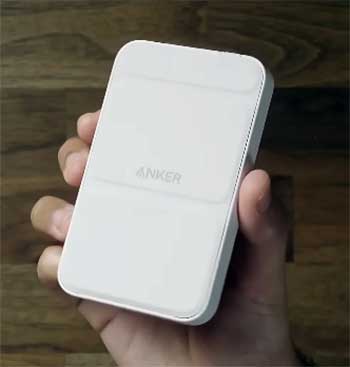
When I first unboxed the Anker 622, the immediate impression was just how incredibly sleek it felt in my hand.
It didn’t feel like a piece of tech utility; it felt like a premium accessory designed to match the aesthetic of my iPhone.
I grabbed the “Interstellar Gray” version, and the rubberized finish offered a satisfying grip that didn’t feel cheap or slippery.
Snapping it onto the back of my phone was seamless—the magnets aligned with a confident thud, and I didn’t have to wiggle it around to get the charging animation to pop up.
For the first week, I used it exclusively during my morning commute and coffee shop runs. I realized quickly that this isn’t a “powerhouse” meant to keep you off the grid for days. It is a lifeline. I remember one specific Tuesday when I forgot to charge my phone overnight. I snapped the 622 on at 8:00 AM with my phone at 18%. By the time I got to work, it was comfortably topping me up.
However, the most unique aspect of my experience was the foldable “origami” kickstand. I found myself using it constantly during lunch breaks to watch videos or keep an eye on notifications without having to prop my phone up against a water bottle. It wasn’t all perfect, though—I noticed some warmth accumulating in my pocket when charging while walking, which is something I’ll touch on in the cons. Overall, using the 622 felt like carrying a little bit of extra insurance that didn’t weigh down my pants pocket.
Pros Of Anker 622
- Exceptional Portability and Ergonomics: The biggest selling point for me was how the Anker 622 practically disappears when you aren’t using it. It is slim enough that I could slide it into the same pocket as my wallet without creating an unsightly bulge. When attached to the phone, it adds weight, sure, but it doesn’t make the device unwieldy. The rubberized texture is soft to the touch, which prevents it from scratching the back of your phone if you go caseless, and it provides enough friction that it won’t slide off a table easily. For anyone who wears fitted jeans or carries a small clutch, this form factor is superior because it respects your limited space.
- The Versatile Foldable Kickstand: The “origami” style flap on the back is not just a gimmick; it is surprisingly functional. You can fold it down to create a stand that holds the phone in either portrait or landscape mode. I found this incredibly useful for FaceTime calls where I needed to be hands-free or for keeping my phone visible on my nightstand as a makeshift clock. Unlike rigid plastic kickstands that can snap off, this magnetic flap feels durable because it relies on magnets to hold its shape rather than mechanical hinges that wear out. It turns the battery pack into a functional phone stand even when you aren’t actively charging.
- Strong Magnetic Adhesion: One fear I had was that the battery pack would slide off when I pulled the phone out of my pocket, but the magnets on the 622 are tuned perfectly. They are strong enough to hold the weight of the phone if you (carefully) hold it by the battery pack, though I don’t recommend swinging it around. In daily use, it stayed aligned perfectly with the MagSafe coils. This is crucial because if a wireless charger slides even a few millimeters off-center, the charging efficiency drops and heat builds up. The 622 stayed locked in place, ensuring that the 7.5W charge was actually reaching the battery.
- Pass-Through Charging Capability: I loved that I could plug the Anker 622 into a USB-C wall charger and it would charge my phone wirelessly at the same time as it recharged its own internal battery. This effectively turns the 622 into a standard wireless charging pad at night. You can plug it in on your bedside table, snap your phone on top, and wake up with both the phone and the battery pack at 100%. This reduces the number of cables you need to pack for a weekend trip—you just need one cable for the battery pack, and the pack handles the phone.
- Aesthetic and Color Options: Tech accessories are often boring black bricks, but Anker leaned into the lifestyle aspect here. The 622 comes in a variety of muted, pastel, and professional colors like Misty Blue, Lilac Purple, and Mint Green. While this doesn’t affect performance, it allows you to personalize your carry. I found that having a lighter-colored battery pack actually made it easier to find in the depths of a dark backpack compared to standard black accessories.
Cons Of Anker 622
- Limited Capacity for Power Users: You need to manage your expectations regarding power. The 5,000mAh rating is the internal capacity of the cells, but wireless charging is inherently inefficient due to energy loss through heat and magnetic induction. In my real-world testing, the Anker 622 could not fully charge my iPhone Pro Max from 0% to 100%. It usually got me from a dead battery to about 70-80% depending on whether I was using the phone while it charged. If you are a heavy user who needs to go a full 24 hours shooting 4K video or navigating with GPS, one Anker 622 won’t be enough to keep you topped up all day. It is strictly a “top-up” device, not a multi-charge power bank.
- Heat Generation During Use: This is a common physics problem with wireless charging, but it is noticeable here. Because the 622 is so compact, there is less surface area for heat to dissipate. I noticed that if I was using the phone for something intensive—like scrolling through image-heavy social media feeds or playing a game—while the pack was attached, both the phone and the battery got quite warm. On two occasions during a hot summer day, my iPhone actually paused charging with the “iPhone will resume charging when it cools down” notification. This isn’t a defect of the 622 specifically, but rather a limitation of the form factor and technology, yet it is frustrating when you are desperate for power.
- Charging Speed is Capped: The wireless output is limited to 7.5W for iPhones. While this is standard for third-party MagSafe-compatible chargers (only official Apple certified ones usually hit 15W), it feels slow if you are used to fast wired charging. If you plug your phone in via a Lightning or USB-C cable, you can get 50% battery in 30 minutes. With the Anker 622, a 30-minute charge might only give you 15-20%. It is designed for passive charging—sitting on your desk or in your pocket—rather than a rapid “emergency rescue” charge where you need 50% in ten minutes.
- The Stand’s Stability Issues: While I praised the kickstand earlier, it has limitations. If you have a larger phone like the “Max” or “Plus” models, the stand can feel a bit top-heavy in portrait mode. If you tap the top of the screen too hard while it is propped up, the magnetic flap can sometimes collapse or the phone can tip backward. It works best on a completely flat, stable surface. Using it on a tray table on a train or an airplane that is vibrating can sometimes cause the origami fold to undo itself, causing the phone to slide flat.
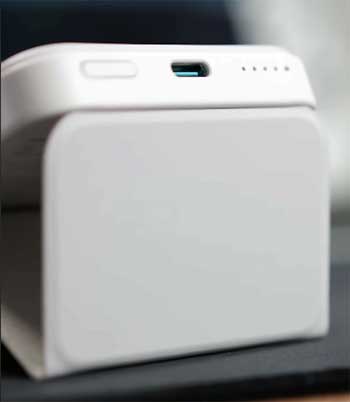
- Port Placement on Older Models: You have to be careful which version you buy. The earlier iterations of the Anker 622 had the USB-C charging port on the bottom edge. This was a massive design oversight because it meant you couldn’t use the kickstand mode while charging the battery pack itself (since the port would be blocked by the table). Anker fixed this in updated “PopSocket compatible” versions by moving the port to the side, but many retailers still sell the old stock. If you get the bottom-port version, you lose the ability to use it as a charging stand, which is a significant drawback.
Read More: My Thoughts on Green Bean Battery.
Maintenance Tips For Anker 622
- Port Hygiene is Essential: Even though this is a wireless charger, the USB-C input port is the device’s lifeline. Since this device spends a lot of time in pockets or the bottom of bags, that port is a magnet for lint, dust, and crumbs. I recommend inspecting the port once a month. If you see debris buildup, use a non-conductive tool like a wooden toothpick or a can of compressed air to gently clear it out. Do not use metal needles, as you could short the pins. A clogged port can lead to slow recharging of the bank or, worse, the cable not seating correctly and failing to charge entirely.
- Mind the Temperature Extremes: Lithium-ion batteries degrade faster when exposed to extreme temperatures. Do not leave your Anker 622 in a hot car during the summer or sitting in direct sunlight on a windowsill. The heat from the environment combined with the heat generated by wireless charging can swell the battery cells over time, ruining the device. Similarly, using it in freezing conditions can temporarily reduce its capacity. If you have been out in the cold, let the battery pack warm up to room temperature naturally before you plug it in to recharge.
- Cycle the Battery Regularly: If you buy the 622 strictly for travel and then leave it in a drawer for six months, you might damage the battery chemistry. Lithium-ion batteries prefer to be used. If you aren’t using it daily, try to take it out at least once every month or two, discharge it by charging your phone, and then recharge it back to about 80%. Storing a battery at 0% or 100% for extremely long periods can reduce its total lifespan. The “sweet spot” for long-term storage is usually around 50-60% charge.
- Clean the Magnetic Pad: The rubberized face that touches your phone can accumulate oils from your hands, dust, and grit. If grit gets trapped between the charger and your phone case, it can act like sandpaper and leave micro-scratches on your case or phone back. I suggest wiping the surface of the Anker 622 with a slightly damp microfiber cloth (no harsh chemicals or alcohol, which might degrade the rubber coating) once a week. This also ensures the surface remains “tacky,” helping the magnetic grip stay strong and preventing the phone from sliding off.
- Use Quality Cables and Bricks: Just because the Anker 622 charges at a modest speed doesn’t mean you should use a cheap gas-station charging brick to fill it up. Using a quality USB-C PD (Power Delivery) wall charger ensures that the power bank receives clean, stable voltage during its recharge cycle. Cheap chargers can fluctuate in voltage, causing unnecessary heat and stress on the battery’s power management integrated circuit (PMIC). Stick to Anker, Apple, or other reputable brands for the wall plug you use to juice up the 622.
My Experience With Anker 633

Moving on to the heavyweight contender, the Anker 633 is a completely different beast.
If the 622 is a sleek sports car, the 633 is an SUV. The moment I took it out of the box, the difference in heft was undeniable.
It is significantly thicker—roughly double the thickness of the 622—and you feel every gram of that extra battery density.
However, that extra bulk immediately translated into peace of mind.
I took the 633 on a weekend hiking trip where I knew I wouldn’t be near a wall outlet for at least 18 hours.
The experience was less about “style” and more about raw utility. I snapped it onto my phone, and while it definitely made the device feel like a brick in my hand, I didn’t care because my battery percentage actually went up while I was using GPS and taking photos. With the 622, heavy usage often just stalls the battery drain; with the 633, I felt like I had a portable generator attached to my phone. The kickstand on this model is different too—it uses a small pop-out arm made of metal rather than the folding origami flap.
While I initially worried it looked flimsy, it held the heavy battery pack up surprisingly well. The side-mounted USB-C port is also a blessing, allowing me to charge the bank while it was propping up my phone, something the original 622 struggled with. It is a tool for utility, not a fashion statement, and I found myself respecting it for that honesty.
Pros Of Anker 633
- True All-Day Battery Capacity: The absolute best feature of the Anker 633 is the 10,000mAh capacity. In my testing, this was the difference between “getting home safely” and “using my phone as much as I want.” While wireless charging inefficiencies mean you don’t get the full 10,000mAh delivered to your device, I consistently managed to get nearly two full charges on my iPhone Pro. This changes how you use your phone. I stopped closing apps or dimming my screen to save power. I knew I had a tank on the back of my phone. For travelers, this is the one to get. You can survive a long-haul flight or a full day of transit without ever looking for a wall plug. It transforms your phone from a fragile device that needs coddling into a workhorse that can go 36 hours straight.
- High-Speed Wired Charging Option: One distinct advantage the 633 has over its smaller sibling and many competitors is its ability to output 20W via the USB-C port. Sometimes, wireless charging is just too slow. If I was about to leave the house and realized I was at 5%, I could plug a USB-C to Lightning cable into the 633 and plug the other end into my phone. This bypasses the slow 7.5W wireless limit and fast-charges the phone. It essentially functions as a standard high-speed power bank that happens to have magnets. This dual-functionality (wireless for convenience, wired for speed) makes it incredibly versatile. You can even charge a second device via the cable while wirelessly charging your phone, effectively charging two devices at once.
- Strong Magnetic Grip for the Weight: You might think a heavier battery pack would fall off easier, but Anker seems to have reinforced the magnet strength here. Despite the added weight, the 633 clung to my phone tenaciously. I could slide the phone into a tight jean pocket, and the battery pack wouldn’t detach. The surface friction is excellent, preventing the “pendulum effect” where the battery swings around on the back of the phone. When holding the phone, the extra thickness actually gives you something substantial to grip, which can be comfortable for people with larger hands, acting almost like a camera grip when you are taking photos in landscape mode.
- Intelligent Pass-Through Charging: Like the 622, the 633 supports pass-through charging, but it feels more robust here. Because of the larger capacity, I often used it as my primary charging station on my desk. I would plug the 633 into the wall and leave it there. When I sat down to work, I’d snap my phone onto it. The device prioritizes charging the phone first, then fills up the battery pack. Because the battery is larger, if the power goes out or I need to run out the door, I am grabbing a fully charged 10,000mAh bank along with my full phone. It simplifies the “charging anxiety” routine by combining your home charger and your portable charger into one unit.
- Sturdy Build Quality: The Anker 633 feels dense and well-constructed. There is no creaking when you squeeze it, and the plastic housing feels resistant to drops and scuffs. I accidentally dropped it onto a hardwood floor from waist height (without the phone attached), and it survived without a scratch. The materials used feel premium and heat-resistant. Even when the device gets warm, the casing doesn’t feel like it is melting or softening. It feels like a piece of gear designed to be thrown into a backpack and tumbled around with keys and cables without failing.
Also read: My Thought on Arenti Video Baby Monitor.
Cons Of Anker 633
- Significant Bulk and Weight: You cannot ignore the size. The Anker 633 is thick—0.72 inches to be exact. When attached to an iPhone, it effectively triples the thickness of the device. This ruins the “pocketability” of your phone. Carrying it in the front pocket of skinny or slim-fit jeans is uncomfortable; it looks like you are carrying a brick. It weighs about 218g, which is heavier than the iPhone 13 or 14 itself. When you are lying in bed holding the phone above your face, your arms get tired significantly faster. It makes the phone feel top-heavy and unbalanced. If you care about the sleek aesthetics of your Apple device, the 633 destroys that profile completely. It is a utility block, not a design accessory.
- The Fragility of the Pop-Out Kickstand: While I liked the metal material of the kickstand, the mechanism itself worries me long-term. Unlike the 622’s magnetic flap which has no moving mechanical parts, the 633 uses a small, thin arm on a hinge. It feels somewhat spindly compared to the massive battery it is supporting. If you were to accidentally put too much pressure on the phone while it is standing up, or if you snapped the stand open too aggressively, I could see this hinge snapping. Furthermore, the stand is quite narrow. If you are tapping on the sides of your phone screen while it is propped up, it wobbles significantly more than the wide-base stance of the 622. It is functional for watching movies, but terrible for typing or interacting with the screen.
- Heat Accumulation is Still an Issue: Despite the larger size which should theoretically help with heat dissipation, the 633 still gets hot. In fact, because it charges for longer periods (since it has more capacity), it stays hot for longer. During a full discharge cycle where I drained the entire 10,000mAh into my phone, the connection point between the phone and the battery got uncomfortably warm. It wasn’t too hot to touch, but it was hot enough to make my palms sweat if I was holding it. As with the 622, this heat can cause the iPhone to throttle charging speeds or dim the screen brightness to protect its own internal components.
- Slow Recharging of the Bank Itself: Charging a 10,000mAh battery takes time. If you drain this thing completely, do not expect to plug it in for 30 minutes and be good to go. It can take hours to fully recharge the Anker 633 itself, even when using a fast PD charger. If you forget to plug it in overnight, you are out of luck for the next day. The LED indicators give you a rough idea of how much juice is left, but the last dot seems to last forever while charging, leaving you guessing when it is actually full. It requires a discipline of “always be charging” when you are near a wall, or you’ll find yourself with a dead brick.
- Wireless Charging Speed is Still Capped: It is disappointing that despite the “Pro” size and “Pro” vibes, the wireless output is identical to the smaller model: 7.5W. You are carrying double the weight, but you aren’t getting a faster wireless charge. It is purely a capacity upgrade, not a speed upgrade (wirelessly). Watching the battery percentage crawl up at the same slow rate as the smaller battery feels mismatched with the bulky, powerful appearance of the device. You have to remember to use the cable if you want speed, which defeats the purpose of buying a MagSafe battery in the first place.
Maintenance Tips For Anker 633
- Protect the Kickstand Hinge: The little metal leg on the back is the weak point of the 633’s structural integrity. When you are not using the stand, ensure it is snapped flush against the body of the charger. Do not play with it or flick it open and closed as a fidget toy, as this will wear out the tension in the hinge over time. If you notice the hinge becoming loose (where the leg dangles instead of snapping shut), you might need to carefully tighten it if accessible, or accept that its standing days are over. Be extremely gentle when deploying it; pull it out slowly rather than yanking it.
- Monitor the Surface for Debris: Because the 633 is heavy, the magnetic connection needs to be flush to be secure. If there is sand, crumb, or lint trapped between the magnetic pad and your phone, the bond is weaker. Given the weight of this brick, a weak bond could result in the battery pack falling off and hitting the ground (or your foot). Wipe the contact surface with a clean cloth every time you attach it. This also prevents the hard plastic edges of the battery pack from grinding dirt into your phone’s glass back.
- Storage Charge Levels: Similar to the 622, the 633 uses Lithium-Polymer cells. However, because it has double the cells, the risk of swelling if mistreated is slightly higher. If you are putting this away in a drawer for a few months, discharge it to two LED lights (roughly 50%). Do not store it fully charged. Storing a 10,000mAh battery at 100% capacity in a warm drawer is a recipe for battery degradation. Check on it every 3 months to ensure it hasn’t self-discharged to zero.
- Cable Management: Since the 633 supports 20W wired input/output, you will likely be using the cable port more often than with the 622. This puts more wear and tear on the USB-C port. When you have a cable plugged in, avoid bending the connector at sharp angles, especially if you have the battery pack in your bag. The leverage from a bent cable can damage the internal solder points of the port. Use a cable with a reinforced neck or a right-angle connector to reduce strain on the port if you plan to charge it while it’s inside a bag.
- Heat Management During Pass-Through: If you are using pass-through charging (charging the bank while it charges the phone), try to keep the devices in a well-ventilated area. Do not do this under a pillow or buried under a pile of papers. Pass-through charging generates the most heat because two power conversions are happening simultaneously. Doing this in a hot environment can trigger thermal shutdowns. I recommend placing it on a cool surface, like a stone countertop or a glass table, rather than a fabric surface like a sofa, to help dissipate that heat.
Comparison with other brands
- Anker 633 vs. Anker 622 (Internal Rivalry): The comparison really boils down to your daily routine. The 622 is for the office worker who has a commute and sits at a desk; it’s a safety net. The 633 is for the field worker, the traveler, or the student who is on campus from 8 AM to 10 PM. If you wear tight clothing, the 633 is intrusive. If you carry a backpack or purse, the 633’s weight is negligible. The 622’s stand is better for stability, but the 633’s stand is easier to deploy. Ultimately, the 622 feels like a part of the phone, while the 633 feels like an attachment. You buy the 622 to maintain your battery; you buy the 633 to recharge it.
- Anker 633 vs. 10,000mAh Power Banks (Wired): You can buy a standard 10,000mAh Anker PowerCore for half the price of the 633. Why pay more? You are paying for the magnets. If you don’t mind carrying a cable, a standard wired power bank is much more efficient, charges your phone faster, and generates less heat. The 633 is strictly for people who hate cables. If you are okay with a wire connecting your pocket to your hand, a standard PowerCore Slim 10K is objectively a better performer. But the convenience of “snap and go” is what the 633 sells, and for many, that wireless freedom is worth the extra cost and heat.
- Anker 633 vs. Mophie Snap+ Juice Pack: Mophie is another big player here. The Mophie Snap+ often comes with a ring adapter for non-MagSafe phones, which is a nice bonus. However, in my experience, the Mophie units often have a slightly larger footprint (wider and taller) which can interfere with the camera bump on newer iPhone models. The Anker 633 is compact in height/width, making it fit better on the Mini and Pro models without touching the camera lenses. Anker’s magnet strength also tends to be slightly more aggressive than Mophie’s, which I prefer for a battery of this weight. Mophie sometimes wins on fabric finishes that look stylish, but Anker wins on raw utility and compactness relative to capacity.
Frequently Asked Questions (FAQ)
The main difference is capacity and size. The Anker 633 has a 10,000mAh battery and is thicker (0.72 in), while the 622 has a 5,000mAh battery and is slimmer (0.5 in). Additionally, the 633 has a pop-out kickstand, whereas the 622 uses a foldable magnetic flap.
Yes, if you prioritize battery life over portability. It is worth it for travelers and heavy users who need nearly two full phone charges and want the option of 20W fast wired charging. It is not worth it if you want a slim profile.
Yes, it gets noticeably warm. Wireless charging creates heat, and the 633 generates significant warmth during extended charging sessions or pass-through charging. It is normal but can be uncomfortable in a pocket.
Like most lithium-ion batteries, the Anker 633 is rated for approximately 300 to 500 complete charge cycles before the capacity degrades to about 80%. With daily use, this translates to roughly 1.5 to 2 years of peak performance.
Conclusion
Choosing between the Anker 622 and the Anker 633 isn’t actually about choosing a battery; it is about choosing a lifestyle.
If you are a minimalist who hates bulky pockets and just needs a little boost to get through a night out or a workday, the Anker 622 is your winner. It is elegant, functional with its origami stand, and respectful of your space. It feels like a natural extension of your iPhone.
However, if you are a power user, a frequent flyer, or someone who gets anxiety when the battery icon turns red, the Anker 633 is the only logical choice. The bulk is a trade-off I am willing to make for the sheer utility of having a 10,000mAh tank on the back of my phone. It isn’t pretty, but it is powerful. Personally, I keep the 622 for dinner dates and the 633 for travel days. Assess your daily routine—do you need insurance (622) or a generator (633)? The choice is yours.