
If you have spent any amount of time looking for a gaming chair recently, you know the market is absolutely flooded with options that look identical. They all have that racing-style bucket seat, the bright colors, and the promise of fixing your back pain forever.
I was in the same boat, scrolling through endless pages of “ergonomic” chairs that cost anywhere from $100 to $1000. I wanted something that felt premium without costing as much as a used car, which is how I landed on the Andaseat Phantom 3.
It positions itself as the “Goldilocks” option—better quality than the cheap knock-offs, but significantly more affordable than the heavy hitters like Secretlab. But does it actually deliver on that promise, or is it just another pretty seat that hurts your back after an hour?
The short answer is yes, it is worth it, specifically if you enjoy a firmer seating experience and want a chair that feels built like a tank. For the best warranty coverage and to ensure you get the latest version with the magnetic assembly features, you should buy this product directly through the Andaseat website or their official store on Amazon. Buying from authorized retailers is crucial because customer support for heavy furniture items can be a nightmare if you go through a third-party reseller.
My Experience With The Andaseat Phantom 3
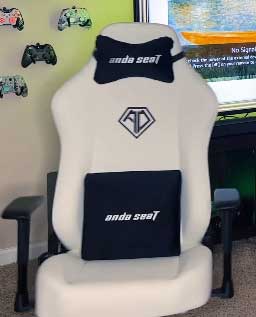
I ordered the Phantom 3 in the “Elegant Black” PVC leather finish because I wanted something that would blend into my home office without screaming “gamer” to everyone on my Zoom calls.
The delivery was heavy—the box weighed nearly 50 pounds—which was my first clue that this wasn’t made of cheap plastic.
Dragging it up the stairs was a workout, so I recommend having a helper if you live in a walk-up apartment.
Opening the box, I was immediately struck by the lack of chemical smell. Usually, these PU leather chairs off-gas for days, filling the room with a factory plastic scent, but the Phantom 3 was surprisingly neutral.
The packaging was meticulous, with every component wrapped in heavy plastic or foam.
The assembly process is where Andaseat really tries to sell you on their “MagClap” technology. Essentially, the backrest slides into the seat base and is supposed to just “clap” together without needing a struggle. In practice, it was about 90% as easy as they claimed. I did have to wiggle the backrest a bit to get the brackets to line up perfectly, but once they were seated, it felt incredibly secure. The magnetic side covers are a brilliant touch. On my old chair, I had to screw in these cheap plastic covers that always fell off. On the Phantom 3, they just snap on magnetically, hiding the ugly bolts instantly.
The first time I sat in it, I was surprised by the firmness. Do not expect to sink into this chair like a plush living room recliner. The foam is dense, rated at 60kg/m³, which is on the harder side. At first, I was worried I had made a mistake. It felt stiff. However, after about three days of working eight-hour shifts, my opinion flipped completely. The firmness is actually supportive. Unlike soft chairs that let your spine collapse into a slouch, the Phantom 3 forces you to sit correctly.
I also appreciated the “flat” seat base. Many gaming chairs have high, aggressive “wings” on the seat cushion that squeeze your thighs together. As someone who likes to occasionally sit cross-legged or just spread out, the Phantom 3’s flatter side wings were a blessing. I didn’t feel confined.
The lumbar pillow, however, was a bit of a mixed bag for me. It is a loose pillow, meaning there are no straps to hold it in place. Every time I stood up to grab a coffee, the pillow would fall forward or slide sideways. I eventually found a sweet spot for it, but I found myself adjusting it constantly. The head pillow, on the other hand, is excellent—soft, plush, and strapped securely to the top.
After six months of daily use, the chair looks brand new. The PVC leather hasn’t peeled or cracked, and the foam hasn’t developed that dreaded “butt print” sag. It is a workhorse of a chair that prioritizes posture over initial plushness.
Also Read: My Thoughts On Gus Modern Furniture
Pros Of The Andaseat Phantom 3
- Exceptional Build Quality and Materials: When you touch the PVC leather on the Phantom 3, it doesn’t feel like thin, stretchy plastic. Andaseat uses what they call “DuraXtra” leatherette, and it feels thick, bonded, and resistant to scratches. I have a cat that occasionally uses my furniture as a launchpad, and so far, her claws haven’t left a single mark on the material. The stitching is uniform and tight, with no loose threads that you often find on budget chairs. The steel frame underneath gives the chair a substantial weight, making it feel grounded and stable even when you lean all the way back. It feels like a product designed to last five years, not just one.
- MagClap Assembly System: If you have ever assembled a gaming chair before, you know the nightmare of trying to align the screw holes on the backrest with the metal brackets on the seat while holding the heavy backrest up in the air. It usually results in crossed threads and sore fingers. The Phantom 3 solves this with a slide-in bracket system. You slide the backrest onto the seat rails, and it holds itself in place while you insert the safety screws. It turns a two-person wrestling match into a simple one-person job. The magnetic covers that hide the screws are the cherry on top, eliminating the need for tiny, easy-to-lose screws just for aesthetics.
- Generous Recline Functionality: One of my favorite features is the 160-degree recline. Most office chairs stop at around 110 or 120 degrees. The Phantom 3 goes back so far it is almost flat. I have actually taken power naps in this chair between meetings. The balance mechanism is well-tuned, so even when you are fully reclined, you don’t feel like the chair is going to tip over backward. It locks securely into place at multiple angles, allowing you to find the perfect position for watching a movie or playing a controller-based game where you want to lean back and relax.
- Spacious Seat Design: The design philosophy of the Phantom 3 leans towards “comfort for all” rather than “racing cockpit for the skinny.” The seat base is wider than average, and critically, the side bolsters (the raised edges) are much flatter than competitors like DXRacer. This means your thighs aren’t being pressed together. If you have a wider frame or if you just enjoy sitting with your legs apart or crossed, this design is significantly more comfortable. It accommodates a wider variety of body shapes without needing to upgrade to an “XL” specific model, provided you are under the 200lbs recommended weight limit for optimal foam longevity.
Cons Of The Andaseat Phantom 3
- Lumbar Support Lacks Straps: This is arguably the biggest design oversight of the chair. The lumbar pillow is just a free-floating cushion. While the foam inside the pillow is high quality and supportive, the fact that it doesn’t attach to the chair means it moves every time you move. If you shift your weight forward, the pillow falls flat. If you stand up, it tips over. You have to manually reposition it against your lower back every single time you sit down. For a chair in this price range, adding a simple elastic strap or a magnetic attachment (like in their higher-end Kaiser series) would have made a world of difference.
- Armrests Are Basic (2D Only): In the world of premium gaming chairs, “4D” armrests (which move up/down, left/right, forward/back, and swivel) are becoming the standard. The Phantom 3 only comes with “2D” armrests, meaning they only go up and down. You cannot slide them forward to support your wrists while typing, nor can you angle them inward for mobile gaming. The armrest caps are also somewhat hard plastic with very little padding. If you lean on your elbows for hours at a time, you might find them a bit fatiguing compared to the softer, more adjustable armrests found on the Secretlab Titan or the Andaseat Kaiser.
- Firmness Isn’t For Everyone: I mentioned this in my experience, but it bears repeating as a potential “con.” If you are expecting a cloud-like, sink-in sensation, you will be disappointed. The high-density foam is designed for posture and durability, not plush comfort. It can feel quite hard on your tailbone for the first week until your body adjusts. If you prefer a softer, sofa-like seat, or if you are very lightweight (under 130lbs), you might find the foam too resistant and unyielding, leading to discomfort after long sessions because you don’t weigh enough to compress the foam.
- Height Limitations For Taller Users: While the chair is spacious width-wise, it isn’t the tallest chair on the market. The backrest height is ideal for people between 5’5″ and 5’11”. If you are over 6 feet tall, you might find that the magnetic head pillow sits on your shoulders rather than your neck, even at its highest adjustment. Since the pillow straps go through the “eyes” of the chair, there is a hard limit on how high you can move it. Taller users would be better off looking at the Kaiser 3 XL, as the Phantom 3 might force them into a hunched position to make use of the headrest.
Maintenance Tips For The Andaseat Phantom 3
- Cleaning The PVC Leather: The beauty of the PVC leather version is how easy it is to clean, but you must use the right agents. Do not use bleach, acetone, or harsh multi-purpose cleaners, as these can strip the protective top layer and cause the leather to crack or peel over time. Instead, simply use a microfiber cloth dampened with warm water for regular dusting. For tougher stains or sweat buildup, use a mild mixture of dish soap and water. Wipe the area gently, and then—this is crucial—wipe it again with a dry cloth. Leaving moisture to sit on the seams can degrade the stitching over time.
- Lubricating Moving Parts: Over time, any chair with moving parts can develop a squeak. On the Phantom 3, the most common squeak points are the reclining mechanism and the wheel casters. I recommend using a silicone-based lubricant (like WD-40 Specialist Silicone, not regular WD-40) once every six months. Spray a tiny amount into the hinge where the backrest meets the seat and onto the axles of the wheels. This keeps the recline action smooth and silent. Avoid oil-based lubricants as they can attract dust and grime, creating a gummy paste that is hard to clean.
- Tightening The Bolts Regularly: Even with the spring washers included in the assembly kit, the screws can loosen over time due to the vibrations of sitting and moving. Every six months, pop off the magnetic side covers and give the main backrest bolts a quarter-turn to tighten them. Also, flip the chair over and check the four bolts holding the tilt mechanism to the bottom of the seat. A wobbly chair is usually just a loose screw away from being solid again. Keeping everything tight prevents the frame from warping and ensures the chair doesn’t make clicking noises when you shift your weight.
- Protecting From Direct Sunlight: If your gaming setup is near a window, be careful about direct sunlight hitting the chair for hours every day. UV rays are the enemy of PVC leather. Prolonged exposure will dry out the material, causing it to become brittle and eventually crack. It can also cause the black color to fade into a charcoal grey. If you can’t move your desk, consider throwing a blanket over the chair during the hottest parts of the day or investing in blackout curtains. This small step can double the lifespan of the upholstery.
- Fabric Care (If You Choose Linen): If you opted for the linen fabric version instead of the leather, your maintenance routine is different. Fabric absorbs sweat and spills instantly. You should vacuum the chair with an upholstery attachment weekly to remove dust and skin flakes that get trapped in the weave. If you spill a drink, blot it immediately—do not rub, as rubbing pushes the liquid deeper into the foam. I highly recommend applying a fabric protector spray (like Scotchgard) when you first get the chair to create a hydrophobic barrier that repels liquids.
Also Read: My Thoughts On Helio Air Broom
Comparison with Other Brands
- Andaseat Phantom 3 vs. Secretlab Titan Evo: This is the comparison everyone wants to see. The Secretlab Titan Evo is widely considered the gold standard, but it costs nearly twice as much as the Phantom 3. What do you get for that extra money? The Titan has a built-in, fully adjustable lumbar support knob (no loose pillow), 4D armrests, and a magnetic head pillow that doesn’t need straps. The materials on the Secretlab are slightly more premium, and the magnetic ecosystem is more developed. However, in terms of raw comfort and posture support, the Phantom 3 is remarkably close. If you can live without the adjustable lumbar knob and 4D armrests, the Phantom 3 offers 80% of the Secretlab experience for 50% of the price.
- Andaseat Phantom 3 vs. Andaseat Kaiser 3: The Kaiser 3 is the “big brother” to the Phantom. The main difference is size and features. The Kaiser is physically larger, designed for taller and heavier users (up to 395lbs vs the Phantom’s ~200lbs comfort limit). The Kaiser also adopts the magnetic headrest and the integrated lumbar support found in the Secretlab Titan. If you are a larger individual (over 6ft or 220lbs), the Phantom 3 will feel too small, and you should upgrade to the Kaiser. But if you are average height and build, the Phantom 3 fits better and saves you money on features you might not need, like the extra-wide seat base of the Kaiser.
- Andaseat Phantom 3 vs. Corsair TC100 Relaxed: The Corsair TC100 is another strong contender in the budget-friendly space. The Corsair chair is generally softer and has a more “plush” feel immediately out of the box, which appeals to people who dislike the firmness of the Andaseat. However, the build quality of the Corsair feels a step down; the plastics are scratchier, and the base is often nylon rather than the heavy-duty metal found on the Phantom 3. The Corsair is a better “lounge” chair, while the Phantom 3 is a better “posture/work” chair. If durability is your main concern, the Phantom 3 wins. If immediate softness is your priority, the Corsair has the edge.
- Andaseat Phantom 3 vs. Generic Amazon Brands (GTPlayer, etc.): You will see chairs that look exactly like the Phantom 3 for $100 on Amazon. Do not be fooled. The difference is entirely in the foam and the frame. Cheap generic chairs use thin plywood in the seat base (which breaks) and low-density sponge foam (which goes flat in a month). The Phantom 3 uses a steel framework and cold-cured molded foam, similar to a car seat. A generic chair is a disposable item that will last a year; the Phantom 3 is a piece of furniture meant to last five. The price difference is absolutely worth it for the structural integrity alone.
Frequently Asked Questions (FAQ)
The Andaseat Phantom 3 generally holds a rating of 4.5 to 4.8 stars out of 5 across major retailer sites and tech review publications. Users consistently praise the easy assembly and material quality. The negative reviews almost exclusively focus on the firmness of the seat cushion being unexpected or the lumbar pillow not having straps.
If you sit at a desk for more than 4 hours a day, a quality gaming chair like the Phantom 3 is worth it. Unlike cheap office chairs, they offer a high backrest that supports your shoulders and neck, which is crucial for preventing slouching. While “gaming” aesthetics aren’t for everyone, the ergonomic benefits of the firm foam, adjustable recline, and lumbar support provide a tangible health benefit for your spine compared to a standard, non-adjustable kitchen or task chair.
Conclusion
The Andaseat Phantom 3 sits in a sweet spot in the market. It sheds the “cheap” feel of budget chairs without demanding the “luxury” price tag of top-tier brands. It is sturdy, supportive, and incredibly easy to assemble. While the loose lumbar pillow is a minor annoyance and the firm seat takes some getting used to, it is an excellent investment for anyone looking to upgrade their home office or gaming setup on a mid-range budget. If you are ready to stop slouching, I highly recommend checking out the Andaseat Phantom 3 to see if it fits your setup.